

What your training calendar is actually for
Stop using your training calendar as a to-do list. Use it as a feedback loop between your plan and your reality.
Inside Kinoku
The app surfaces behind this story
 Open full-size image ↗
A calendar with training meaning
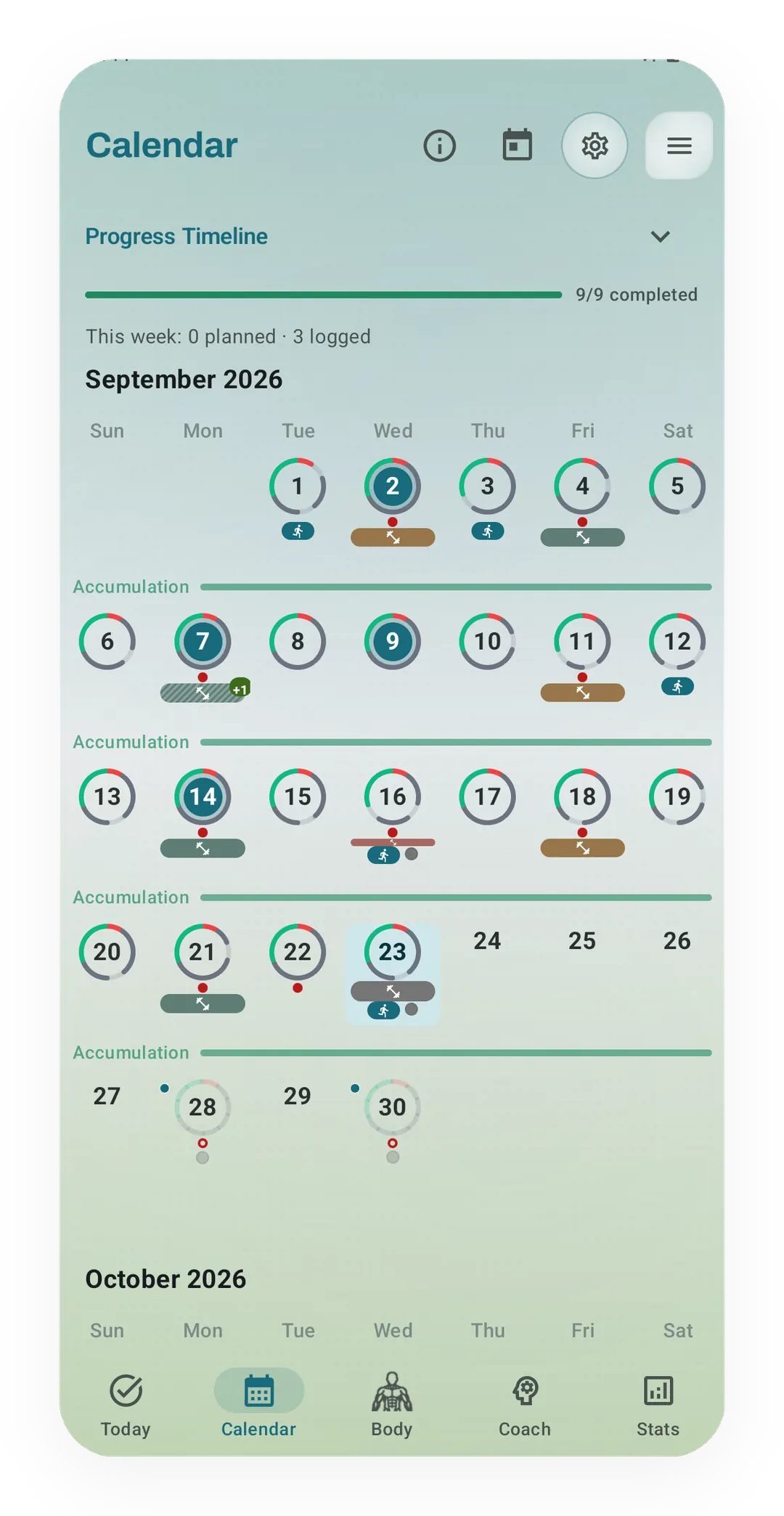
Kinoku's calendar keeps plan and record on one month. September shows each logged session on its day, the program's Accumulation weeks, and a Progress Timeline at 9/9 completed.
A training calendar is a record of intent next to reality. The sessions you planned sit on one side and the sessions you did on the other, kept where you can compare them. Used that way it is one of the more useful parts of a training log, and used as a to-do list it becomes a guilt machine. Here is one way to read the gap without turning every moved session into a failure.
The wrong way: calendar as to-do list
Here is what most people do with a calendar, whether it is a paper planner, an app, or a Google Calendar:
Monday = push day Tuesday = pull day Wednesday = rest Thursday = legs Friday = upper Saturday = long run Sunday = rest
They set it up once and plan to do it forever, and then real life starts chipping away. Monday’s push day slides to Tuesday because they slept badly, and Tuesday’s pull slides to Wednesday. By Thursday they are trying to catch up on three missed sessions, or they quietly give up on the week and start fresh next Monday. The calendar turns into a grid of what they should have done, staring back every time they open the app.
In the to-do-list way the calendar becomes a list of promises, and every box left unticked feels like a failure. Over time, most people stop looking at the calendar, because it makes them feel bad. The problem is not their willpower but the model they are using.
The right way: calendar as feedback loop
The better way treats the calendar as a feedback loop between two things:
- What you planned to do (your intent)
- What you actually did (your reality)
The gap between the two can be one of the most useful facts in a training log, and the to-do-list approach often hides it.
Take an example, which this post carries through to the end. You plan four sessions a week, but over three months you complete 2.8 on average. A harsh reading says you failed 30% of the plan and only have to try harder.
In the feedback-loop reading, that 2.8 is data. The number suggests the current schedule supports something closer to three sessions, though it does not explain why. Planning three for the next block and reviewing what happens is a change you can test rather than a guarantee of success. The calendar is not telling you to try harder; it is telling you who you are as an athlete right now, and the useful move is to listen.
Two things a useful calendar can reveal
A training calendar can help make at least two things visible.
1. The plan-versus-actual gap. Every planned session you skipped and every surprise session you added both matter, and red marks on skipped days miss the point. What you want is a clear side-by-side of what you meant to do and what you actually did. When you look back at last month and see you planned “heavy legs” five times but did it twice, you have learned something real. Maybe heavy legs does not fit your life the way you thought, maybe you are avoiding it, or maybe the timing never worked. The gap is the lesson.
2. The when. Even without a dedicated time-of-day dashboard, dates and timestamps can help you look for scheduling patterns. You might notice that Monday morning plans often happen while Friday evening plans often move. Such a pattern is a clue to test a different schedule, not proof that one time slot can never work.
A skipped workout is not a failure
One calendar pattern is worth pushing back on: showing a missed plan as a red mark of shame. Some calendars mark a missed day with red labels or nagging language, which feeds the to-do-list mindset and pushes people to erase a plan just to clear the warning. Once the plan is gone, it is harder to compare intent with reality.
One useful response is to leave the uncompleted plan in the calendar and move on. Over time those untouched plans preserve what you hoped to do and let you compare that intent with what actually happened. In the four-sessions-a-week example, the missed sessions are only visible because the plans stayed on the grid.
Kinoku keeps planned workouts and completed sessions visible on the calendar and shows a monthly completion summary when planned workouts exist. Kinoku does not claim a time-of-day performance dashboard, so the useful part is the kept record and a simple completion count, not a verdict about why a session moved. Planning on any day is free, with no cap on how many plans you keep. The shortcuts that move plans around (repeating schedules, drag-to-move, bring-to-today, repeat-day, and whole-day move) are part of Pro, while copying a day to today is free, and Kinoku is Android only.
Two illustrative scenarios
These are made-up examples, not measured Kinoku user outcomes.
Scenario 1: The Monday leg-day plan. A person notices that Monday leg sessions are often skipped around late meetings, while Wednesday sessions get done more often. Moving the plan to Wednesday is a fair experiment. The calendar cannot promise a personal record (PR) or a body-composition outcome; it simply exposes a scheduling pattern worth testing.
Scenario 2: The four-day identity. A person thinks of themselves as training four days a week, but their recent calendar shows closer to two or three completed sessions. Seen from the inside, that is the 2.8 average from above. They rebuild the next block around three realistic slots and check whether they train more steadily before changing anything else.
In both scenarios, the calendar supports a better question, and it does not prove the cause or guarantee the result.
The quiet superpower
Reading your own calendar is an unglamorous training skill, and while it cannot explain every missed session, it can make repeated schedule clashes easier to see. The loop has four steps:
- A plan based on what you can really do, not what you wish you could do
- The plan-versus-actual gap left to build up, without judging it
- A look at the gap every month or so, which changes what gets planned next
- The same loop again, for the rest of your training life
That is the basic loop, and it is plain and unglamorous, but it can make the next plan more realistic. Kinoku’s Periodization feature and training calendar are built for it: you plan the sessions, the completion data builds up, and that data feeds a better month. The calendar is not there to make you feel guilty; its job is to help you stay honest about what is possible, which turns out to be the base for real progress.
What is fixed in this post is the model, a calendar read as a mirror rather than a to-do list. What can still change is what your own gap says. The 2.8 in the example is made up and your number will be yours, and it may move each block for reasons the calendar cannot see. If that fits how you train, Kinoku is on Google Play.
Related features
Plan workouts on one calendar, with no limit on how many plans you keep or how far ahead you plan. Pro adds repeating schedules (weekly, custom days, or every few weeks), drag-to-move, bring-to-today, repeat-day, and day copy.
A Today card shows the workout you are due for, the muscles it trains and a Start button. Free automatically spots your A/B/C rotation, follows the Rotation Groups you build, and lists routines that are due. Pro shades that body by how fresh each muscle is, and adds an easy-day pick when your sleep or HRV is low.
Unlimited routines, Smart Sync, Starter Packs, and follow-along links are free, and so are Rotation Groups that cycle through several routines for you.
Try Kinoku
Core tracking works offline. No mandatory account. No Kinoku-hosted training-history cloud.
Get on Google Play →