

Privacy and data architecture
Your data,
on your terms.
Offline-first means something exact in Kinoku: core training works on your device, there is no Kinoku account, and no Kinoku server holds your training history. Android backup and each network exception are named below, including billing, map tiles, promo checks, opt-in weather, opt-in diagnostics, and the currently disabled Social Bets feature.
What stays on device
Every field of your training record is stored on the device, in a SQLite database inside Kinoku's app-private storage, and the record covers:
- All workouts, sets, reps, perceived effort (RPE), notes, and timestamps
- All routines, programs, planned workouts, and periodization state
- All exercises (the 1,300+ that ship with the app, plus every custom one you create)
- All progress photos, in the app's private photos folder
- All GPS run tracks, route points, elevation profiles, and heart-rate traces
- Dedicated Cycle Tracking records and configuration: period dates, phase state, symptoms, predictions, and your tracking setup
- All Kinoku Score history, wellness logs, and custom metric values
- Health Connect data imported into the main database (eligible for Android system backup; see below)
- All settings, themes, scenes, preferences, and achievement unlock state
- Earned reward tier time and activation history
- Readable Change History for committed changes to user-owned records
Kinoku does not upload this core record to its own servers, though eligible main-database and app-file data may be copied by Android Auto Backup when system backup is enabled. Manual backup, export, sharing, Health Connect permissions, and the network edges below are separate paths that you or the platform control.
Reproductive health is in its own database
kinoku_dbWorkouts, routines, runs, metrics, plans, and the Change History that goes with themkinoku_cycle_dbPeriods, symptoms, pregnancy, settings, and the private Change History that goes with themWhat stays separated
Period dates, calculated phase, symptoms, predictions, basal body temperature, mucus, luteinizing hormone surges, pregnancy state, and Cycle Tracking configuration live in kinoku_cycle_db, while the main training database, kinoku_db, remains a separate file.
Other app preferences and user-created custom metrics remain in the main database and may enter Android system backup. The split lets Kinoku leave the dedicated reproductive record file out of Google Auto Backup.
How the boundary is enforced
Two XML rule files declare the exclusion: res/xml/data_extraction_rules.xml for Android 12+ and res/xml/backup_rules.xml for older versions. A regression test checks the rule when the Android test suite runs. Android's user-initiated device-to-device transfer may still carry the cycle database to a new phone, by design.
The boundary continues inside the app, where dedicated period, pregnancy, generated cycle-insight, interaction, private-prompt, and private cycle-settings data access objects are exposed only by CycleDatabase, never the main AppDatabase. Routing tests check that cycle-derived generated insights and cycle settings enter the excluded store.
Why the split matters
Reproductive health data carries a different risk than training data. A leaked personal record (PR) for back squat is a bit awkward, while a leaked period record can be a legal risk in some places. The split creates a tested automatic-backup boundary instead of treating every local record the same way.
Want to keep your cycle data? A manual backup you explicitly create includes the cycle database, and you choose where that ZIP goes, including a cloud provider if you want one. Want it gone? Delete the data in Kinoku or remove the app, because Kinoku servers never receive the cycle database and Android's automatic cloud-backup path excludes it.
Change History follows the same boundary
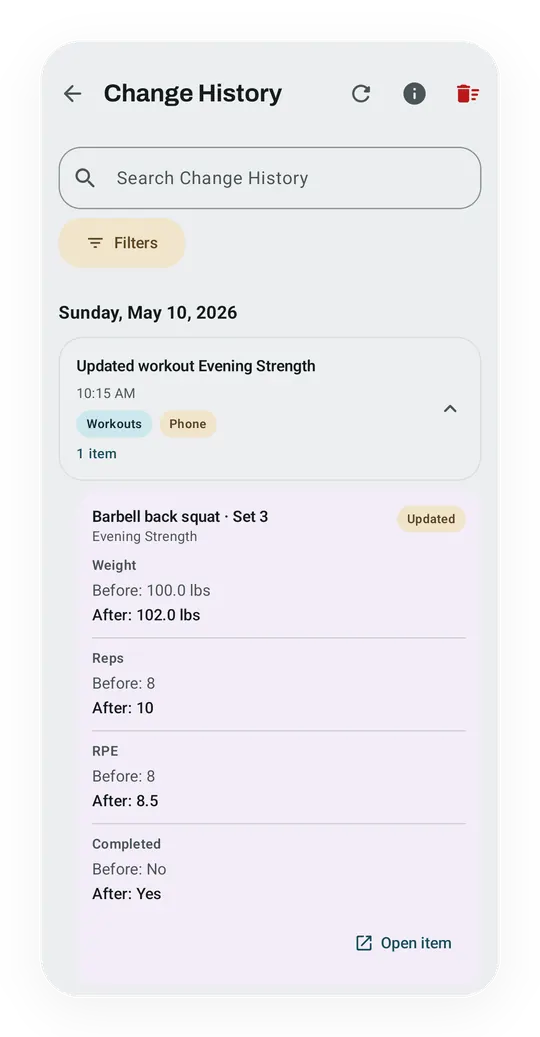
Change History records committed changes to user-owned data as readable actions and before-and-after values. It begins with a start marker after the feature upgrade. Kinoku does not invent a history for edits made by older versions, and it leaves out background analytics, sensor samples, Health Connect readings, caches, and other maintenance.
Main training changes stay in kinoku_db, while cycle, symptom, pregnancy, and private cycle-setting changes stay in kinoku_cycle_db. The app reads from both stores when it builds the screen, but never copies the private values into the main database. A deleted training target can keep its old name and differences even when there is no item left to open.
Main Change History is eligible for Android Auto Backup and appears in the normal Kinoku backup and CSV export. Private Change History is excluded from Android automatic cloud backup and the normal export. It can travel in an Android device-to-device transfer you start, a manual Kinoku backup, or the separate cycle-data export. Turning Cycle Tracking off keeps private history; Delete all cycle data removes it.
You can clear both histories from Settings → Data & Storage → Change History. Clearing removes the explanations, not the current workouts, routines, settings, or other records they described. The screen is read-only and does not act as a second undo system.
What leaves, and when
Core logging does not need the network, and these are the current exceptions and disabled paths, none of which turns Kinoku into a training-history cloud.
1. Social Bets (opt-in, PRO)
Turned off in the current release. Kinoku will only re-enable Social Bets after the shared path completes release testing. Social Bets makes no Firebase Auth or Firestore call today, and what follows describes the built design, not a promised release date.
Create or join a Social Bet and Kinoku connects to Firebase (anonymous auth + Firestore) to sync bet state between you and your opponent. The cloud payload is limited to bet data: bet type, progress numbers, timestamps, and opponent ID. Your wider training record is not sent.
Anonymous auth means there is no Kinoku account, no email, and no password. Firebase assigns an anonymous user ID and credential to that app install. Never join a bet, and Kinoku makes zero Firestore calls.
Security: deployed Firestore rules block cross-bet access (you can read only the bets you are in), and App Check is enforced on client requests. The app source is not public; email the privacy contact if you need a technical summary of these controls.
2. Promo and gift checks
On a cold start, Firebase Remote Config may fetch a friends-and-family promo allowlist and cache it for 12 hours. Firebase can receive normal request metadata such as your internet protocol (IP) address and an app-install ID. Kinoku compares the allowlist locally with the Android device ID shown in Settings; that raw ID is sent to Kinoku only if you choose to share it with support. Gift-code redemption is disabled in the current release.
Everything else
Diagnostics are opt-in, and with them on Firebase may get app interaction events, crash stack traces, performance traces, and a little extra info such as tier, theme, billing product IDs, and rough workout interaction counts. It does not get exercise names, set logs, notes, route coordinates, Health Connect values, cycle data, photos, or contact details.
The website does not track visits with analytics, cookies, pixels, or fingerprinting. Hosting logs may exist for a short time, to handle abuse and run the service, but they are not read for product analytics and do not link to the app.
Google Play handles subscription billing, so Kinoku asks Play's billing library to check your tier, and the billing tokens never reach a Kinoku server.
Map screens request tiles from OpenFreeMap or OpenTopoMap, and so does a run print while its Water or Buildings switch is on, to draw the water and the building outlines around the route. The print keeps those maps on the phone to reuse them. Those providers receive the tile coordinates needed for the visible area, the map fonts and icons those tiles draw with, and your IP address. Opt-in weather sends rounded run-start coordinates to Open-Meteo. Android speech recognition may use its platform fallback when you choose voice logging.
The Passport look for a run share image prints a place name, and the Suggest button on a run print offers one. Kinoku asks your phone's built-in Android place-name service for that name only when you pick the look or tap Suggest, and Google provides that service on most phones. The request carries one point of the route, rounded to about 1 km, and while the route's start and finish are hidden it asks for the city only. Kinoku 1.4.1 and earlier asked each time a run share opened, with the route's exact first point.
Google Play's data safety label sums up these edges in Google's own categories, and the privacy-focused apps roundup sets Kinoku's label next to those of ten other fitness apps.
Backup format and integrity
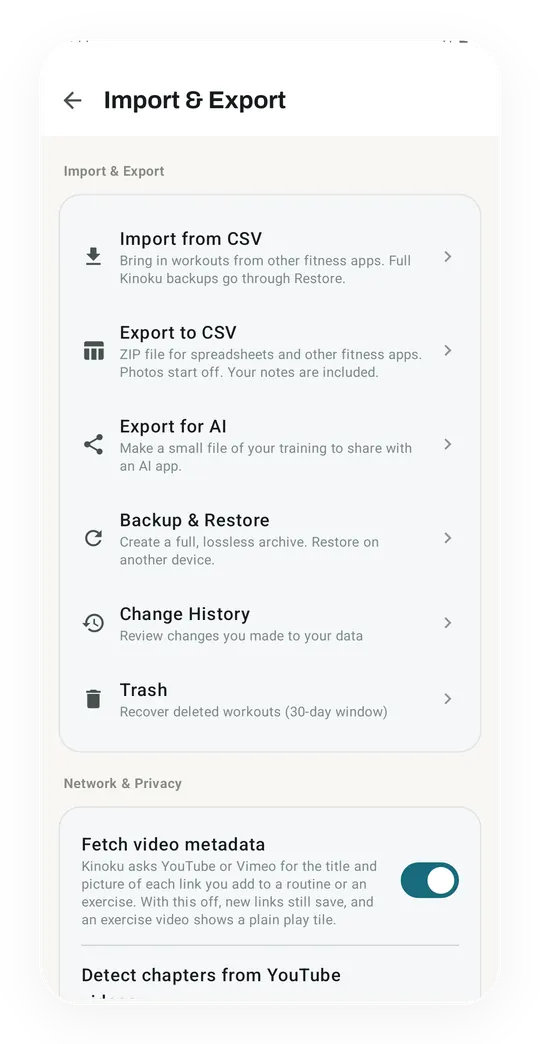
The Backup & Restore feature makes a single ZIP file, which holds:
- The full SQLite database (every row of every entity)
- All progress photos
- All run GPX data
- All your preferences and settings
- Main and private Change History, each kept in its original database
- Backup metadata and a SHA-256 checksum for the main database snapshot
- A SQLite header check during restore
Restore checks the metadata it has, the main-database checksum, and the SQLite header before it swaps in the restored database. Backup and restore hardening is still an active quality package; this page does not claim that every ZIP member has its own checksum.
The ZIP is designed to restore across supported Kinoku versions, devices, and reinstalls; the app applies its current database migrations during restore. Email it to yourself, drop it in a cloud drive you pick, or carry it on a USB stick, because the file is yours.
Health Connect model
Health Connect is Android's health-data platform, and Kinoku reads supported heart rate variability (HRV), sleep, heart-rate, step, weight, and body-composition records on-device. With permission, it writes completed exercise-session summaries and steps, not full set, rep, or weight logs.
Kinoku talks to the local Health Connect API rather than passing those values through a Kinoku server. The app that first wrote a value, and Android's own backup or transfer behavior, have their own policies. You pick which data types Kinoku can reach on the Health Connect screen in Android settings.
When Kinoku writes a workout to Health Connect, that workout becomes visible to any other app you have given read access. You control that too, so the visibility chain is plain.
Menstruation is the one Health Connect data type Kinoku treats one-way. The manifest declares the READ_MENSTRUATION permission and never the write permission, so Kinoku can import periods you logged elsewhere but cannot write a single row back to Health Connect. One regression test (ManifestHealthPermissionCoherenceTest) keeps the manifest this way. A second test (CycleImportPrivacyTest) checks that imported periods land in the cycle database that is backed up separately, never in the main training database.
Why no accounts
An account system would force Kinoku to do all this:
- Store login credentials (or lean on OAuth providers who do)
- Run a server that signs users in
- Defend that server against a breach
- Answer data-subject rights requests under Europe's General Data Protection Regulation (GDPR) Article 15 and California's Consumer Privacy Act (CCPA) §1798.100
- Decide what to log, where, and for how long
Kinoku avoids an identity and training-history server, though optional Firebase-backed features still have a narrow network boundary, documented above and in the privacy policy.
The trade-off: no automatic cross-device sync, no social feed, no server-side tuning. If those matter to you, Kinoku is the wrong tool. If they do not, you get a simpler, faster, more private app.
How Kinoku makes money
Kinoku sells Pro through Google Play, monthly, yearly, or lifetime. Google Play handles billing, refunds, and regional pricing, so Kinoku runs no separate billing setup.
Kinoku does not sell personal information or share it for cross-context behavioral advertising, and there are no ads or affiliate links. Revenue comes from Google Play purchases, while the free tier remains usable without paying for the deeper layer.
Privacy contact
Questions about how Kinoku handles your data can go to privacy@kinoku.app, and the full Privacy Policy is at /legal/privacy.
Kinoku is run by DREAM SOFT DISTRIBUTED EOOD, a Bulgarian EOOD (limited liability company) based in Plovdiv, Bulgaria. The GDPR applies, and California residents may have CCPA rights plus rights under the later California Privacy Rights Act (CPRA). Most training data is controlled locally; the privacy policy explains the narrower third-party service records and how to make an access or deletion request.