

Reference simulator
Banister Form Band Simulator
Three lines come out of your daily training load, and each one moves at a different speed. Chronic training load (CTL) is the slow average, which reads as fitness, while acute training load (ATL) is the fast one, which reads as fatigue. Training stress balance (TSB) is fitness minus fatigue, so it reads as form, or how fresh you are. Paste 14 or more days of daily load to see the curve, and 42 or more gives a CTL worth reading.
The formula
Each line is an exponentially weighted moving average of your daily load, which means recent days count more than old ones. The two lines use different time spans, so one moves slow and one moves fast.
α_CTL = 1 − e^(−1/42)   ≈ 0.0235
α_ATL = 1 − e^(−1/7)    ≈ 0.1331

CTL[t] = CTL[t-1] × (1 − α_CTL) + load[t] × α_CTL
ATL[t] = ATL[t-1] × (1 − α_ATL) + load[t] × α_ATL
TSB[t] = CTL[t] − ATL[t]
The 1 − e^(−1/τ) form is the one that matches what "time constant" means. Two shortcuts get used instead, and both are wrong here: 1/τ is off by about 1% on CTL and 7% on ATL. 2/(N+1), the moving-average span, roughly halves both.
Reading the zones
The direction surprises people, because negative TSB is where productive training happens, not where trouble starts. Joe Friel's published zones put the best band at −10 to −30, and he calls −10 to +5 the low-yield grey zone. The bands below are the ones Kinoku ships, which narrow Friel's a little.
| TSB | Zone | Meaning |
|---|---|---|
| Over +10 | Peaked / very fresh | Rested. Fitness drifts down if it lasts |
| +5 to +10 | Tapering | Shedding fatigue before a race |
| −5 to +5 | Maintaining | Holding steady, so not much fitness is being built |
| −15 to −5 | Productive training | The band where the most useful training tends to sit, week after week |
| −25 to −15 | High strain | Deliberate overreach, sustainable for a few weeks |
| Under −25 | Overreaching | Fatigue is running well ahead of fitness |
About this simulator
Both lines start at the average of your first week, not at zero. Starting at zero looks harmless, but it is not. Fatigue settles about six times faster than fitness, so a zero start makes up a deep negative TSB. The dip bottoms out around day 15 and lingers past day 60. Six identical training weeks, whose true form is flat, used to read −22.2 here and get called overreached.
Paste at least 14 days, because CTL reaches only 63% of its settled value at 42 days, and 88% at 90. A short series is provisional, and the result tells you how far along yours is.
Kinoku's Form Band is built from the published Banister impulse-response family. The app starts from your real training history instead of this page's seed and reads TSB from the previous day's values, while this simulator uses today's values. At a sharp change in load those can sit several points apart. Kinoku does not claim exact parity with TrainingPeaks or any other product.
Common questions
What do chronic training load (CTL), acute training load (ATL), and training stress balance (TSB) mean?
CTL is chronic training load, a slow 42-day average that stands in for fitness. ATL is acute training load, a fast 7-day average that stands in for fatigue. TSB is CTL minus ATL, and it reads as how fresh you are right now.
What is a good TSB for race day?
Most people race well between +5 and +15. Above +10 usually means fitness has been sliding. The productive training band is negative, roughly minus 5 to minus 15, which surprises people. These are common landmarks rather than rules, and the right number varies by person and event.
How much training history does this need?
At least 14, and 42 or more for a CTL worth reading, because 42 days is the time constant. Even at 42 days CTL has only reached 63% of steady state, and 88% at 90 days. The result tells you how far along yours is.
Is this affiliated with TrainingPeaks?
No. Kinoku is not affiliated with TrainingPeaks, though both draw from the published Banister impulse-response family, which TrainingPeaks helped popularize. Implementation details, inputs, initialization, zones, and product behavior can still differ between them.
Privacy
This simulator runs in your browser, so the load series you paste in is never sent anywhere, and nothing is saved between visits. Because it never reaches the network, there is nothing in transit to intercept and no log to keep.
Full story
The Banister article in the Learn section goes deeper, covering why the model works, how to read five common curve shapes, and how it differs from newer models. If you also track an acute to chronic workload ratio, then ACWR vs the fitness-fatigue model explains which one reacts first.
Track this in Kinoku
The Training form curve draws the same three lines from your own training, and the base chart is free. Pro adds the forecast tails that show where the curve is heading, plus a written read of what the shape means.
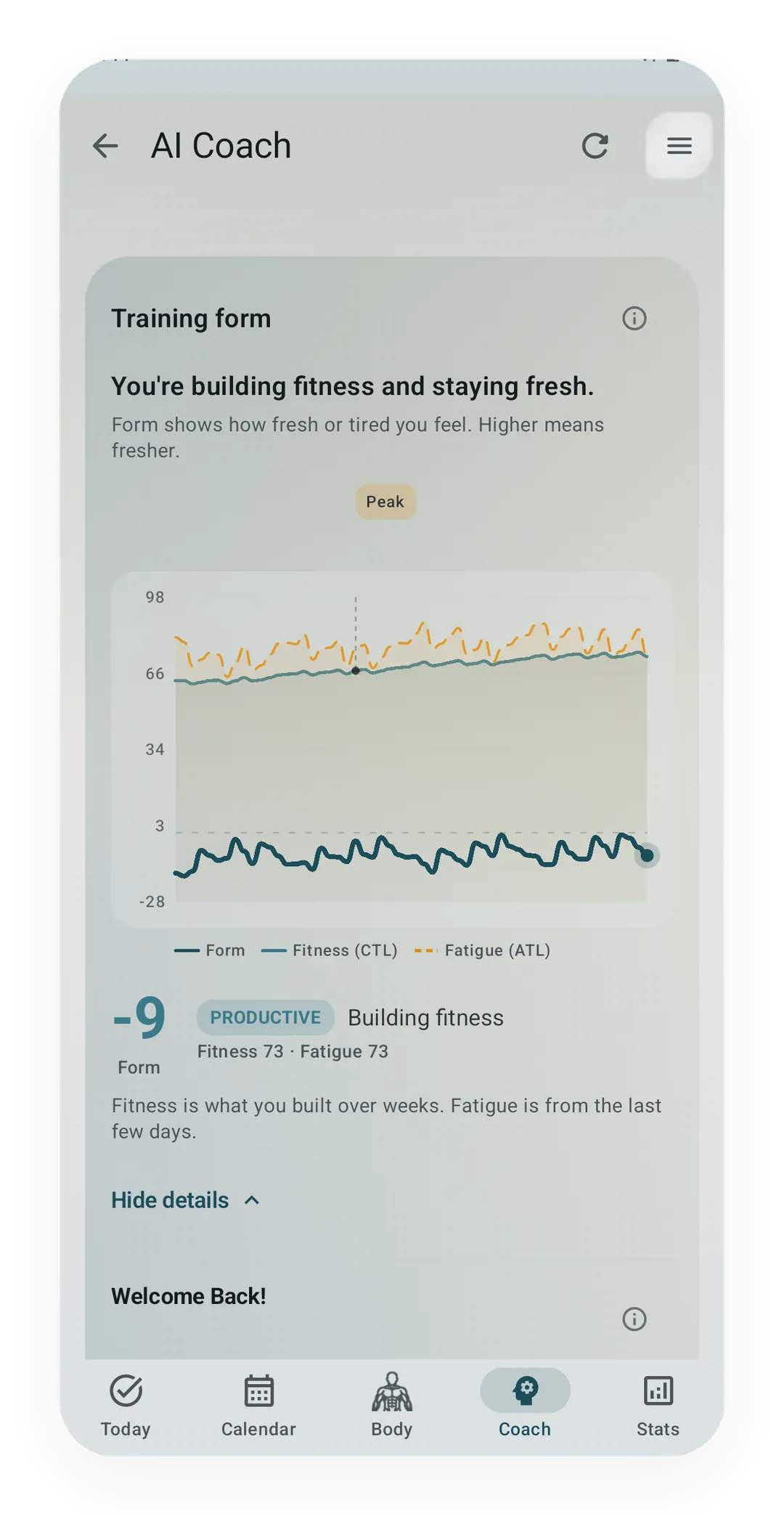
Coach → Training form
This page needs a load series typed in by hand, while the app builds one from the sessions you already logged and redraws it after each one.
FreeFree forever, with no mandatory Kinoku account or Kinoku-hosted history cloud.
Track this in the app
Training Form curve (Coach screen)
The lead card on the Coach screen shows how fresh or tired you are right now. One Form line sits over three soft bands: Fresh, OK, and Tired, with a state pill beside it. Tap Show fitness details for the fitness and fatigue lines behind it. The base chart is free for all. Pro adds forecast lines and a note in plain words.