
CTL, ATL, and TSB: the fitness-fatigue model
What CTL, ATL, and TSB really mean in the Banister fitness-fatigue model, how to read the curve day to day, and how to time a peak or a deload.
Worked example
Thirteen weeks through the model
Gym days, runs, a weekly class and brisk walks, run through the same math the app uses.
- Fitness (CTL)
- Fatigue (ATL)
- Form (TSB)
- Gym
- Runs
- Classes
- Brisk walks

Kinoku draws this curve free on its Coach screen, with your lifts, runs, classes and walks in one line. Try the math on your own numbers.
Quickstart
The Banister fitness-fatigue model turns your logged training load into three estimates. They are useful context, not direct measures of fitness, fatigue, or medical readiness.
- CTL (chronic training load): a slow-moving chronic-load signal, often labelled fitness.
- ATL (acute training load): a faster recent-load signal, often labelled fatigue.
- TSB (training stress balance): CTL minus ATL, often labelled form. Positive means recent load sits below chronic load; negative means it sits above it.
Kinoku names the form value with six bands: Peaked above +10, Tapering from +5 to +10, Maintaining from −5 to +5, Productive from −15 to below −5, High strain from −25 to below −15, and Overreaching below −25. When form sits above +5 while fitness fell more than 5% over the last week, the label reads Detraining instead. The free Coach screen draws the same line over three softer bands: Fresh, OK and Tired.
Those cut-offs describe the chart; they are not universal rules or injury thresholds. Read the curve beside performance, sleep, soreness, illness, and your own judgment. The rest of this page explains the math and its limits.
The impulse-response idea
In 1975, Eric Banister had a simple idea: training is a jolt to your body, and your body answers on two clocks. One is a fast bad answer, which is fatigue, and the other is a slow good answer, which is fitness. What you can do on any day is the gap between the two.
This view did two things: it split the slow payoff of training from the fast cost, and it let scientists model both with simple decay curves. The math is older than the sport science. It is the same first-order curve engineers use for a charging battery, a thermostat finding its setpoint, or a pot of water cooling to room temperature.
The jolt is your daily training load, which Banister called TRIMP (training impulse) and TrainingPeaks calls TSS (training stress score). You can just call it “load,” one number for how hard a session was.
The answer comes out as two smoothed averages:
- A slow one set to 42 days, for CTL. This is fitness.
- A fast one set to 7 days, for ATL. This is fatigue.
A hard week spikes ATL fast and nudges CTL up slowly, while a taper week drops ATL fast and lets CTL drift down slowly. The gap between them, CTL minus ATL, is TSB.
The math
Here is the smoothed-average formula for daily load L(t) with a time setting τ:
X(t) = X(t-1) × e^(-1/τ) + L(t) × (1 − e^(-1/τ))Set τ to 42 days for CTL and 7 days for ATL. Each day you take yesterday’s value, let it fade a little, and add a slice of today’s load.
The curves come out smooth, so one hard session won’t whip CTL around, though it does move ATL. With no new load, a seven-day rest leaves about 37% of the starting ATL because the ATL time constant is seven days; CTL falls much more slowly.
TSB is CTL minus ATL each day, an absolute difference rather than a value scaled to CTL. So a TSB of −15 does not mean the same relative load state at CTL 200 as it does at CTL 60.
Reading your own curve
The shape of your curve over 90 days tells a story. Here are five common shapes:
1. The classic peaking taper
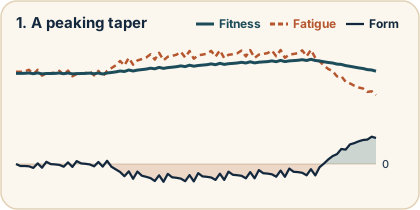
You ran a hard block, so CTL climbed and ATL stayed high. Then load dropped, ATL fell faster than CTL, and TSB rose. Some athletes use that shape when timing an event, but the best target is your own rather than a single TSB number.
2. The slow grind (overreaching)
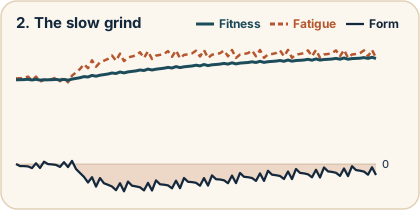
You have entered steady high load, so ATL stays close to or above CTL and TSB stays negative. The equations keep moving CTL toward the daily load you enter; they do not know whether your body is adapting well. Read the pattern as a nudge to check your performance and recovery signals, not as a verdict on whether the overreaching is helping or hurting.
3. Detraining
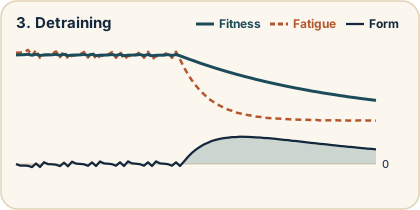
You stopped training, so ATL fell off in a week while CTL drifts down over months. TSB went positive, but you are not fit, just rested. This is one of the model’s big lessons: a TSB above zero does not mean you are strong, it means you are fresh for your current CTL. If CTL is low, a high TSB is not a peak but detraining. Kinoku labels this state Detraining when form sits above +5 while fitness fell more than 5% over the last week.
4. Maintenance
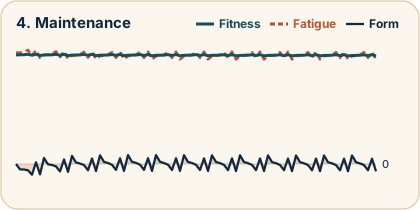
Steady load keeps CTL fairly flat while ATL moves with the week, so TSB hovers around zero. The chart calls this stable, though whether the plan is right still depends on your goal and how you feel.
5. Return from injury
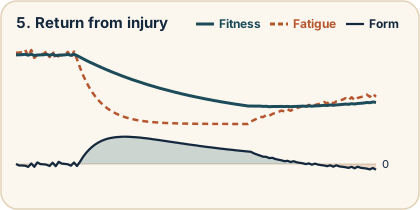
You took two months off, so CTL fell off a cliff. You came back with care, so ATL is rising slowly, and TSB is deep positive since there is no fatigue yet. Over weeks, CTL climbs and TSB settles just below zero, because new load lifts fatigue faster than fitness.
These are chart patterns rather than diagnoses, and a sustained negative pattern is worth reviewing alongside performance, sleep, soreness, illness, and planned workload. The curve alone cannot tell whether overload is productive or harmful.
What counts as load?
This is where the model meets real training. Banister’s first version used heart rate (TRIMP), and TrainingPeaks and Intervals.icu made it watts-based (TSS) for cycling, while most fitness apps stick to one sport.
Kinoku turns every session into one load number on the same scale as TSS, so a squat day, a run and a walk can add up to one day. Each formula is set so a moderate session lands near where TSS would put it, and TSS puts an hour at threshold effort at about 100. Gym sets and timed sessions also use RPE (rate of perceived exertion), the 1 to 10 effort rating you log.
Kinoku’s combined load formula
| Session | Load formula | Example | Load |
|---|---|---|---|
| Gym set | weight × reps × effort factor × 0.012 | 10 sets of 5 at 80 kg, RPE 8 | 64 |
| Run with power | the run’s own TSS | a run with a power meter | its TSS |
| Run with heart rate | TRIMP × 0.66 | 60 minutes at 75% of heart-rate reserve, 123 TRIMP | 81 |
| Timed session | minutes × RPE × 0.20 | 45-minute class at RPE 6 | 54 |
| Brisk walking | brisk minutes × 0.35 | 60 brisk minutes | 21 |
A few rules sit behind the table:
- Effort factor: RPE 7, or no RPE at all, counts as 1.0. Each point above 7 adds a third, so RPE 8 counts 1.33 and RPE 10 counts 2.0. Each point below 7 takes off 0.05, down to 0.85.
- Which sets count: working, rest-pause and failure sets count, while warm-ups and drop sets add nothing. For pull-ups, dips and push-ups, the weight includes the share of your body weight the move lifts.
- Runs: a run uses the richest signal it has. Power comes first, then heart rate, then an estimate from your pace zones.
- Timed sessions: swims, classes, rowing and mobility take the RPE you logged for the set, then the workout’s own RPE, then an estimate from the type of activity.
- Walking: only time above your brisk pace counts, so a slow stroll adds nothing.
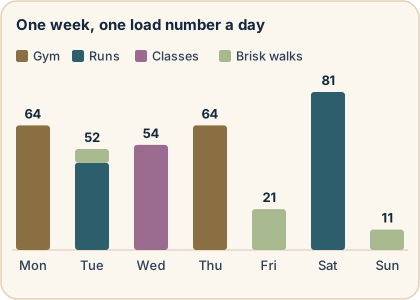
Add the days of that example week and they total 347, or about 50 a day, which is where the thirteen weeks at the top of this page start. The constants are our calibration, chosen so the session types stay consistent for one person’s trend. They are not a lab measure, and another app can score the same run a little differently.
One curve then sums up the mixed training record, and that breadth is useful, though it also makes input quality and the assumptions behind each activity important. The TRIMP vs TSS page shows how a run is scored with no power meter.
Using the curve as context
A weekly review is often enough, and these questions help:
- After last week: did the load match the plan, and did performance and recovery move in the same direction as the curve?
- Mid-block: is sustained negative form intentional, and are sleep, soreness, mood, and performance still acceptable?
- Before an event: does reduced load make form rise without sacrificing too much chronic load? Your own successful tapers are a better target than a universal number.
- After an event: is ATL falling as expected, and does your actual recovery agree with the model?
If you also watch a workload ratio, the page on the acute to chronic workload ratio versus the fitness-fatigue model covers which of the two moves first on a hard week.
Why the model works
The decay math is not a body measurement. You do not have one fitness clock or one fatigue clock. The model is best read as a short summary of the load you logged, and its direction can support your training judgment, never replace it.
Other impulse-response models can use different time settings, some fitted to the person. Kinoku keeps the familiar fixed 42-day and 7-day settings so the chart stays clear and comparable, while making its assumptions visible.
The model’s weak spots are known. Skip logging a session and your load drops, so CTL acts as if you rested, and bad inputs give bad outputs. Log a hard session as easy (or the other way around) and the TRIMP or TSS is wrong, so everything below it is wrong too. Honest logging is the price of using the model well.
Track this in Kinoku
The Training Form curve on Kinoku’s Coach screen draws your form for free, from your gym, run, class and brisk-walk load together. It appears once you have 14 days of history and 14 finished workouts, and Show fitness details opens the fitness and fatigue lines behind it. Pro adds two seven-day forecast lines, one for full rest and one for your usual load, plus a short note in plain words.
The Form Band in Pro Analytics opens the Training Load screen, which draws all three lines over 30 days, 90 days, 180 days, a year or your whole history. Drag across the chart to read the fitness, fatigue and form of any past day. The clips below show both screens.
Every calculation runs on your device, and no Kinoku server receives your training history. The curve comes from the published impulse-response family made popular by tools such as TrainingPeaks, and Kinoku is not affiliated with TrainingPeaks and does not claim exact product parity.
The curve in the app
The Coach card is free on every plan, and the Training Load screen is part of Pro.
Try it free on Android, with no account to make.
References
Common questions
What do CTL, ATL and TSB mean in training?
CTL, ATL and TSB are three numbers the Banister fitness-fatigue model works out from the training load you log. CTL (chronic training load) is a slow average set to 42 days, often called fitness. ATL (acute training load) is a fast one set to 7 days, often called fatigue. TSB (training stress balance) is CTL minus ATL, often called form.
How are CTL and ATL calculated?
CTL (chronic training load) and ATL (acute training load) come from one formula, set to 42 days for CTL and 7 days for ATL. Each day the formula takes yesterday's value, lets it fade a little, and adds a slice of today's load. With no new load, a seven-day rest leaves about 37% of the starting ATL, while CTL falls much more slowly.
What is a good TSB?
The best TSB (training stress balance) target is your own. The tapers that worked for you make a better guide than one number for everyone. A TSB above zero means you are fresh for your current CTL (chronic training load), which is different from being strong. When CTL is low, a high TSB points to detraining more than to a peak.
What does a negative TSB mean?
A negative TSB (training stress balance) means your recent load sits above your chronic load, and a stretch of steady high load keeps it there. The curve alone cannot tell whether that overload is helping or hurting you. A long negative stretch is worth checking against your performance, sleep, soreness and illness.
Where does the fitness-fatigue model break down?
The fitness-fatigue model's weak spot is what you feed it. A session you skip logging drops your load, so CTL (chronic training load) acts as if you rested. A hard session logged as easy gives a wrong load score, and everything built on it is wrong too. The decay math is a short summary of the load you logged, and it measures nothing in your body.
Does Kinoku track CTL, ATL and TSB?
Kinoku runs the fitness-fatigue model on your device across your gym, run, class and brisk-walk load, with the fixed 42-day and 7-day settings. The Coach screen draws your form curve for free. The Pro Training Load screen draws all three lines over 30 days to a full year, and you can drag across it to read any past day. Kinoku names form with six bands, from Overreaching below −25 to Peaked above +10. No Kinoku server receives your training history.
Track this in the app
Training Form curve (Coach screen)
The lead card on the Coach screen shows how fresh or tired you are right now. One Form line sits over three soft bands: Fresh, OK, and Tired, with a state pill beside it. Tap Show fitness details for the fitness and fatigue lines behind it. The base chart is free for all. Pro adds forecast lines and a note in plain words.
Core tracking works offline, with no mandatory account.
Related features
A fitness-and-fatigue curve built from the same published family of impulse-response models made popular by TrainingPeaks, and it works across gym, run, and brisk-step load.
A Pro hub with five core tabs, plus a Cycle tab when cycle tracking is on. Its 20+ features include strength scores like DOTS, IPF GL, Wilks, and FFMI, the Banister Form Band, plateau alerts, ACWR, muscle balance, and cycle links.
A 4-phase planning stack. The builder, all 25 templates, named programs with auto-progression, the custom model, and unlimited active programs are free. Pro adds volume targets, readiness tuning, and auto set changes.