

The Supplemental AI Philosophy
Most fitness apps let AI run your training. Kinoku flips that. The AI shows you patterns you might miss, then you make the call.
Kinoku in practice
Where this shows up in the app
 Open full-size image ↗
Observations with their evidence
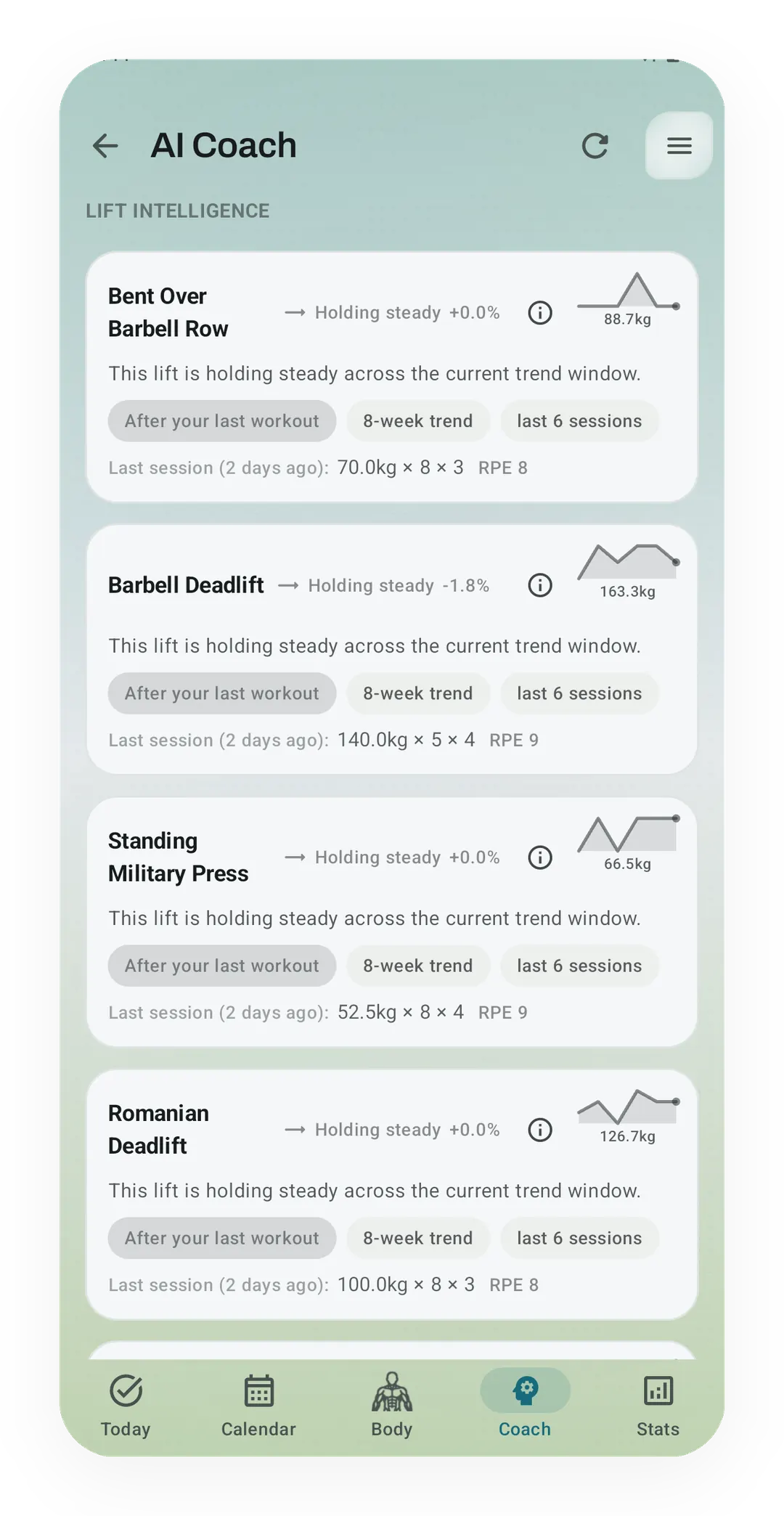
Lift Intelligence on the Pro Coach screen describes each lift, such as Barbell Deadlift holding steady at -1.8%. Each card shows what its read rests on, from the 8-week trend to the last workout's sets, and none of them tells you what to lift next.
Quickstart
Fitness apps use “AI” for very different things. Kinoku’s default is explainable decision support: deterministic rules and statistical pattern detectors show patterns such as, “Your bench top sets have gotten harder at the same weight for four weeks.” A few separately enabled tools can apply bounded adjustments, and this article names them rather than pretending every surface is passive.
Kinoku treats this as a design choice about uncertainty and control. Training data is incomplete, so Kinoku favors visible evidence, bounded actions, and a manual override over a black-box prescription.
Two kinds of AI in fitness
The two are worth keeping apart, because the word AI hides the difference.
Replacement AI
The app runs the decision loop, so it may pick the next workout, change sets and reps, or swap exercises with little explanation. A fully managed plan can be useful when someone wants one, but it also raises the stakes on the hidden assumptions.
Supplemental AI
The app shows patterns you would miss. One card might read, “Your chest volume is 40% below your weekly target this week.” Another notes that your Kinoku Score is low because your recovery dipped sharply yesterday, or that your effort on top-set bench has crept up for four weeks at the same weight. Most Kinoku surfaces stop there, and optional Readiness Adaptation and Autoregulation are the bounded exceptions described below.
Both have a place, but they are not the same, and for people who train themselves, supplemental decision support is Kinoku’s default.
Why replacement AI struggles with strength training
Replacement AI works well for endurance sports like cycling or running with a power meter. Those sports suit it because the effort is measured cleanly by hardware, the body’s response is well studied, and the goal is usually a race time the model can aim for. Tools like TrainerRoad’s adaptive plans and Garmin’s daily suggested workouts do a decent job because the problem fits.
Strength training has none of these traits, and that changes what a model can do.
The data is a guess
Effort scores are self-reported, and “Two reps left in the tank” means whatever you judged it to mean today. Your judgment shifts with sleep, the lift, the time of day, even your coffee. A model trained on those numbers learns noise with a faint signal inside.
People differ too much
Lifters respond to the same training in wildly different ways, and a program that works for one person stalls another at the same level. AI tries to learn your own response curve, but the data it would need is usually more than your whole training history holds.
Context is invisible
Maybe you had a fight with your partner, traveled yesterday, ate badly, or feel a cold coming on. The app only sees “3 sets of 5 at 180 kg, hard effort,” so the real story of that session does not fit in a data field, and that story is often what matters most for tomorrow.
The goal keeps moving
A runner has a race, while a lifter might want a meet, a personal record (PR), a look, or all three at once, and that mix shifts every few months. An AI aiming for “strength gains” may be chasing a goal you will not even want in six weeks.
Add these up and replacement AI has a poor fit, because it can give an answer that looks fine but has no idea when it is wrong.
What supplemental AI does well
Here is the key idea: AI is great at the hard part for humans, spotting patterns across long stretches of messy data, and weak at the human part, judging that pattern against your real life.
A lifter usually cannot catch these on their own:
- A muscle group’s weekly volume has drifted 30% below target over the last month
- Top-set bench effort has crept up at the same weight for 4 weeks
- Short-term fatigue has stayed high for 21 days with no drop
- The bench-to-squat ratio has been out of range for 8 weeks
- Run pace has flatlined while distance kept rising
These hide in thousands of data points, so an AI that shows them each morning is a real help. An AI that acts on them is not, because cutting your weight, swapping a lift, or canceling your session on its own is often wrong. The app cannot tell if you just got back from vacation, or whether that effort climb is real fatigue or just a shift in how you score it.
The rule is simple: the app detects and shows, and you decide. The detection runs on its own, and the choice stays yours.
How Kinoku builds this
Every coaching surface should show its evidence, stay within a named boundary, and preserve a manual way out.
Kinoku Score
A single score from 0 to 100 blends your training, wellness, and health signals. Pulse shows your state for the day, and it does not tell you what to do. On PRO it shows five insights per day, including exclusive pattern types, and you read each one and decide.
Pulse also handles missing data well. If you skip wellness logging, it shifts the weight to what you do have, and it does not fake confidence when the data is thin.
Coach screen
Today’s Focus and Weekly Recap come free, while Active Alerts, Exercise Intel, and the Patterns engine all come with PRO. Every card has a Why? panel that shows the inputs, the source, and how sure the app is. You can disagree, and the app does not mind.
Forecast insights
These look 1 to 3 days ahead for things like overreach, rest debt, and cycle-phase shifts. They read like this: “Your form trend points to an overreach in about 2 days if your load holds,” rather than a flat “rest tomorrow.”
Readiness Adaptation (PRO, optional)
Readiness is the closest Kinoku comes to replacement AI, and you have to turn it on yourself. Once enabled, Readiness can automatically apply a bounded load or volume reduction to the next planned session after it recomputes your recovery state. The adjustment and reasoning remain visible, and a manual override takes precedence. There is no separate approval step before the automatic write.
One hard limit holds: Readiness can shrink a session by up to 15%, but it can never cancel it for you. You decide whether to rest, and the app only flags that it might be a good day for it.
Autoregulation
After each set, Kinoku can tweak the next set based on how many reps you had left. This is the most active of these features, and it works set by set, so you stay in the loop the whole time. You log the effort, the app suggests the next load, and you can ignore it while the app still works.
The pitch, in plain terms
The usual fitness pitch is: “An AI coach. Plans that adapt to you on their own.” Kinoku’s pitch is: “The AI shows you what you can’t see. You still call the shots.”
It is a less dramatic pitch that promises no magic, and it is designed for someone who has views on their own program and wants a tool that sharpens what they notice without hiding the assumptions.
Every automatic adaptation still takes a stand on what you should do next. Because the available information is incomplete, Kinoku keeps those actions opt-in, capped, explainable, and subordinate to a manual choice.
What this means for the app
A few concrete results follow from this design choice.
- Fewer push alerts. Kinoku does not ping you to rest. It shows you in the app when you open it.
- No “Daily Suggested Workout” on the home screen. Smart Today shows what you can do, based on your rotation and recovery. It does not push.
- Everything gets a reason. Every AI-driven card has a Why? panel. If you can’t see the inputs, you can’t really agree or disagree.
- You can turn any AI part off. Hide Coach. Keep Pulse minimal. Ignore Forecast. If you just want to log workouts, Kinoku works as a plain log.
Here is the quiet part most apps won’t say: the best fitness AI right now stays out of your way most of the time. It speaks up only when it spots something you would have missed, and Kinoku tries to be that.
Track this in Kinoku
Most of what’s here is free: base Kinoku Score, Coach Today’s Focus and Weekly Recap, and a Why? panel on every insight. The deeper layers live in Pro Analytics and the Patterns tier of AI Coach. The stance stays the same across every tier.
References
Explore Kinoku
Core tracking works offline. No mandatory account. No Kinoku-hosted training-history cloud.
Get on Google PlayRelated features
Coaching screens that run on your phone and explain what changed in your training and why it matters.
Once Kinoku has enough data, the Kinoku Score sums up your recent training, recovery, and health signals. Until then, it shows a learning state instead of a made-up number.
A Pro hub with five core tabs, plus a Cycle tab when cycle tracking is on. Its 20+ features include strength scores like DOTS, IPF GL, Wilks, and FFMI, the Banister Form Band, plateau alerts, ACWR, muscle balance, and cycle links.