

Offline-First Fitness Tracking
Local fitness tracking without a Kinoku account or Kinoku-hosted history cloud, with eligible Android backup and the dedicated-cycle exception.
Kinoku in practice
Where this shows up in the app
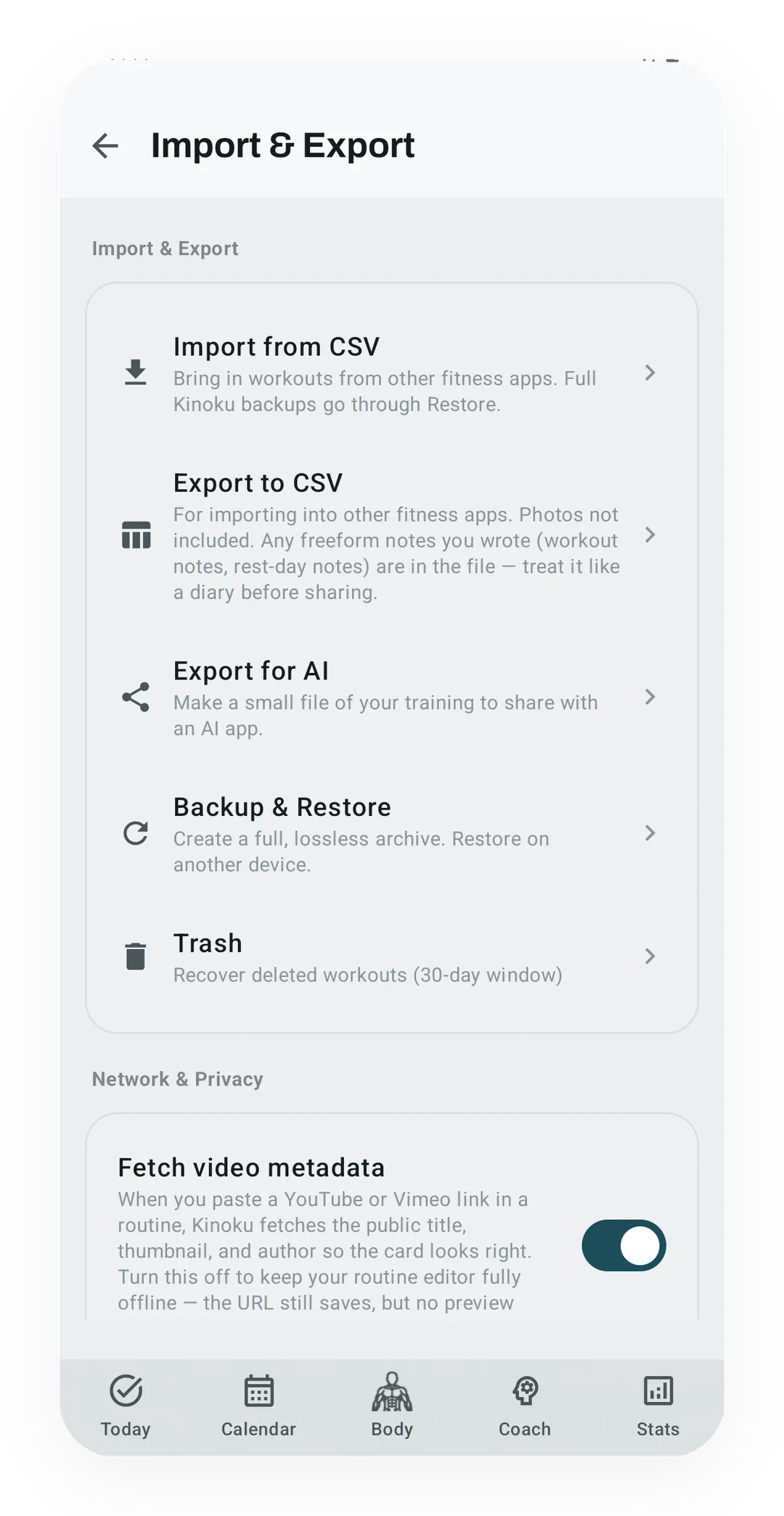 Open full-size image ↗
Your data controls are visible
Backup, restore, import, export, and deletion remain user-initiated controls on the device.
Quickstart
Offline-first, the Kinoku way, means your primary training record and core calculations live on your phone, with no mandatory Kinoku account or Kinoku-hosted history cloud. The app remains useful without a network. Android system backup may copy eligible main app data to your Google account; the dedicated reproductive-health database is excluded from automatic cloud backup.
What you get: faster launches, no account to recover, no Kinoku-hosted record, and no cloud lock-in on your plan. What you give up: no Kinoku sync between devices and no social feed, and new exercises arrive only with app updates.
For some people, none of these tradeoffs matter, while for others they are the whole reason to switch.
Four claims people collapse into one
The word “offline” carries four separate promises, and an app can keep one of them and drop the other three.
| The claim | What it means | What it does not prove |
|---|---|---|
| It works without a network | The core tasks still run with Wi-Fi and mobile data switched off | That you can skip the account, or that nothing reaches a cloud |
| It needs no account | You can keep using the app without signing up for anything | That every screen still works once the network is gone |
| The main log lives on the phone | The copy on your phone drives the log and the calculations | That the operating system never copies that data anywhere |
| It has cloud backup | Android or a file host holds a spare copy for you | That the maker runs a live sync service across your devices |
The sections below answer all four rows for Kinoku, naming where the record lives and every network edge it has today.
Where fitness apps put your data
Here is a short map of where these apps keep your training record.
| App | Where your data lives | Account required |
|---|---|---|
| FitNotes | Device | No |
| Strong | Cloud, in the United States and other countries | Yes |
| Strava | Cloud, in the United States | Free sign-up |
| Kinoku | Device-primary; eligible Android system backup | No |
Each row above is quoted from that app’s own pages, and the sources sit on the compare pages for FitNotes, Strong, and Strava. The offline trackers roundup sets five apps side by side on the same question.
“Cloud” means the main copy of your training lives on someone else’s server, so your phone just holds a cache. If the service goes down or cuts off your access, your history is at their mercy.
“Device” means the reverse: the main copy lives on your phone, and the cloud, where it exists at all, is just a place to export to.
Kinoku sits in the device-first camp, which does not mean the app never makes a network or platform call. The current edges are narrow and named, and they stay apart from your main training record.
What offline-first by default means
Here are five things Kinoku does not do.
- No signup. No email, no password, no Google account, no phone number. You install the app and start logging.
- No Kinoku-hosted training record. Your primary record lives in the app. Eligible main-app data can enter Android system backup in your Google account. Dedicated raw cycle and pregnancy records, generated cycle state, and Cycle Tracking configuration are excluded from future automatic cloud backup; user-created metrics remain eligible. The dedicated database can still travel in a manual Kinoku ZIP backup or a device transfer you start.
- No tracking by default. Crash reports are off until you turn them on. The website uses no analytics, cookies, pixels, or fingerprinting.
- No model training on your history. Kinoku does not upload your main training record to train a Kinoku model. Opt-in crash reports and bounded service records are described in the privacy policy.
- No Kinoku billing account. Google Play handles the paid plan. If Play cannot be reached, Kinoku holds a seven-day grace window on your last known tier. Your local training record is not locked behind a billing server.
And here are five things the app does do.
- Full ZIP backup. Export the database, photos, routes, and settings to a file you own. Restore it in a compatible Kinoku install on Android.
- CSV import from FitNotes, Strong, Hevy, Jefit, RepCount, Liftin, Fitbod, and Strava. One time, on your device.
- Health Connect support. Kinoku reads supported signals. It writes exercise summaries and steps through Android’s local Health Connect API. Android, and the apps that first supplied those records, have their own backup and transfer rules.
- Wear OS watch app. Your phone and watch sync straight to each other, not through a Kinoku server.
- Trash, so you can undo. Deleted workouts and progress photos wait in Trash for 30 days. You can still delete for good, or delete one kind of record, when you mean it.
Current network and platform edges
Offline-first describes where your record lives and what still works with no network, and it is not a promise that the app never opens a socket.
Promo settings
Firebase Remote Config checks for a small friends-and-family promo allowlist on cold start, and release fetches are cached for at least 12 hours. Firebase can receive your internet protocol (IP) address and an app-install ID, while the check against the derived support code happens on your device. No workout, health, route, cycle, or photo record is attached.
Optional and user-triggered calls
Crash reports are off until you opt in, and weather context is off until you enable it. Viewing maps requests tiles, and pasting a YouTube or Vimeo routine link can request the video’s title and thumbnail. Voice logging can use Android’s speech service, while Google Play handles billing and review prompts. Each service gets only what the request needs, and the privacy policy lists the exact payloads.
Social Bets is off
The built Social Bets design uses anonymous Firebase Auth and Firestore, and it syncs the aliases and progress numbers of the people in a bet. The feature is disabled in the current release and creates no new shared-bet record, though legacy records from an earlier enabled build still have deletion controls.
A chat coach that uses your own API key is an idea rather than a shipped feature, so it is not a network edge today, and not a promise. The full current list lives on the Data Sovereignty page and in the Privacy Policy.
Why it matters in practice
Most people who try Kinoku react to offline-first in one of three ways.
- “Oh, that’s neat.” They don’t really care. It doesn’t slow them down. It works like a normal app. This is most people.
- “Finally.” They’ve been burned by a service shutting off or changing terms. They want to own their data. This is the committed few.
- “Wait, how do I sync?” They expect auto sync across phones. Kinoku doesn’t do that. The honest answer: back up the file, then restore it. It works fine. It is not magic.
Offline-first is not free, and it has real limits. Put plainly: if you want sync across phones with zero thought, Kinoku will annoy you, and if you want data you own outright, that is the whole point.
What owning your data really means
“Data sovereignty” gets thrown around until it means nothing, so here is what it means in Kinoku.
- Your training record is a file. A database plus a photos folder. Both sit in the app’s private storage on your phone.
- Backup is a ZIP. Email it to yourself, drop it in Drive, put it on a USB stick. You own the file.
- Restore goes anywhere. The same ZIP restores on a new phone. It also works after a factory wipe, or on a newer Kinoku version.
- Export is CSV. Dozens of CSV files cover every part of your data. You can leave Kinoku and take your data. You can also import it back.
- No locked format. The ZIP holds a standard SQLite database. Anyone with a free SQLite tool can read it.
The General Data Protection Regulation (GDPR) calls this “data portability,” and its Article 20 says a service must let you export your data. Kinoku builds that in from the start, not as a bolt-on to tick a legal box.
Safety by not holding the data
A fitness service holding 50 million people’s training data is a target, and every quarter one of them gets breached. Sometimes it is password hashes, and sometimes it is worse: run routes, recovery histories, body stats, progress photos. The 2018 Strava heatmap leak is the famous one, because it traced out military bases from run routes, while the quieter cases involve real people being stalked or found.
The surest way to stay out of those breaches is simple: do not hold the data at all. Call it safety by absence, because data can’t leak from a server that doesn’t exist.
Kinoku has no required account for that reason, and with no identity server and no training-history server, that breach surface is gone. Removing it does not erase the narrower third-party edges named above.
What you give up, in plain terms
Let’s name the costs that come with all of this.
- No sync across phones. Want your workouts on two phones? Move a backup by hand. Not terrible. Not magic.
- No social feed. No feed of what friends did. No global leaderboards. You share on purpose, with a card, a link, or a quick-response (QR) code, or not at all.
- No server-pushed exercise updates. New exercises arrive in an app update. You can’t add one and have it spread to other users.
- Few crash reports by default. With them off, bug reports come by email. If you opt in, Firebase can aggregate the bounded crash, interaction, and performance data listed in the privacy policy.
- No managed cloud coach. The coaching and pattern features that ship run on your phone. A bring-your-own-key chat coach is only an explored future option, not a current feature.
If any of these feel like deal breakers, Kinoku is not your tool, and if they don’t, welcome.
Track this in Kinoku
The Backup & Import feature shows the backup and restore steps. The Strava Import page covers the CSV path for runners moving off Strava. The Trash & Undo feature explains the 30-day undo on deletes. The Data Sovereignty page maps out what stays on your device and what doesn’t.
References
Explore Kinoku
Core tracking works offline. No mandatory account. No Kinoku-hosted training-history cloud.
Get on Google PlayRelated features
Lossless backup, open CSV and JSON import, Strava import, and a scoped Export for AI handoff.
Bring your Strava history with no login token. Choose the Strava archive ZIP once; Kinoku reads activities.csv and supported route files from it on your phone. Kinoku never touches Strava's servers.
Kinoku reads and writes Android Health Connect data without passing it to a cloud. Period flow import is a Pro feature and read-only. Kinoku never writes cycle data back to Health Connect.
Deleted workouts and progress photos go to Trash for 30 days. A restored workout rewinds your program max, resyncs Health Connect, and updates bet progress.