

Relative Strength + Bodyweight Exercise Load
Why 10 pull-ups at 70 kg is not the same set as 10 pull-ups at 85 kg, and how Kinoku estimates bodyweight training load across sets.
Kinoku in practice
Where this shows up in the app
 Open full-size image ↗
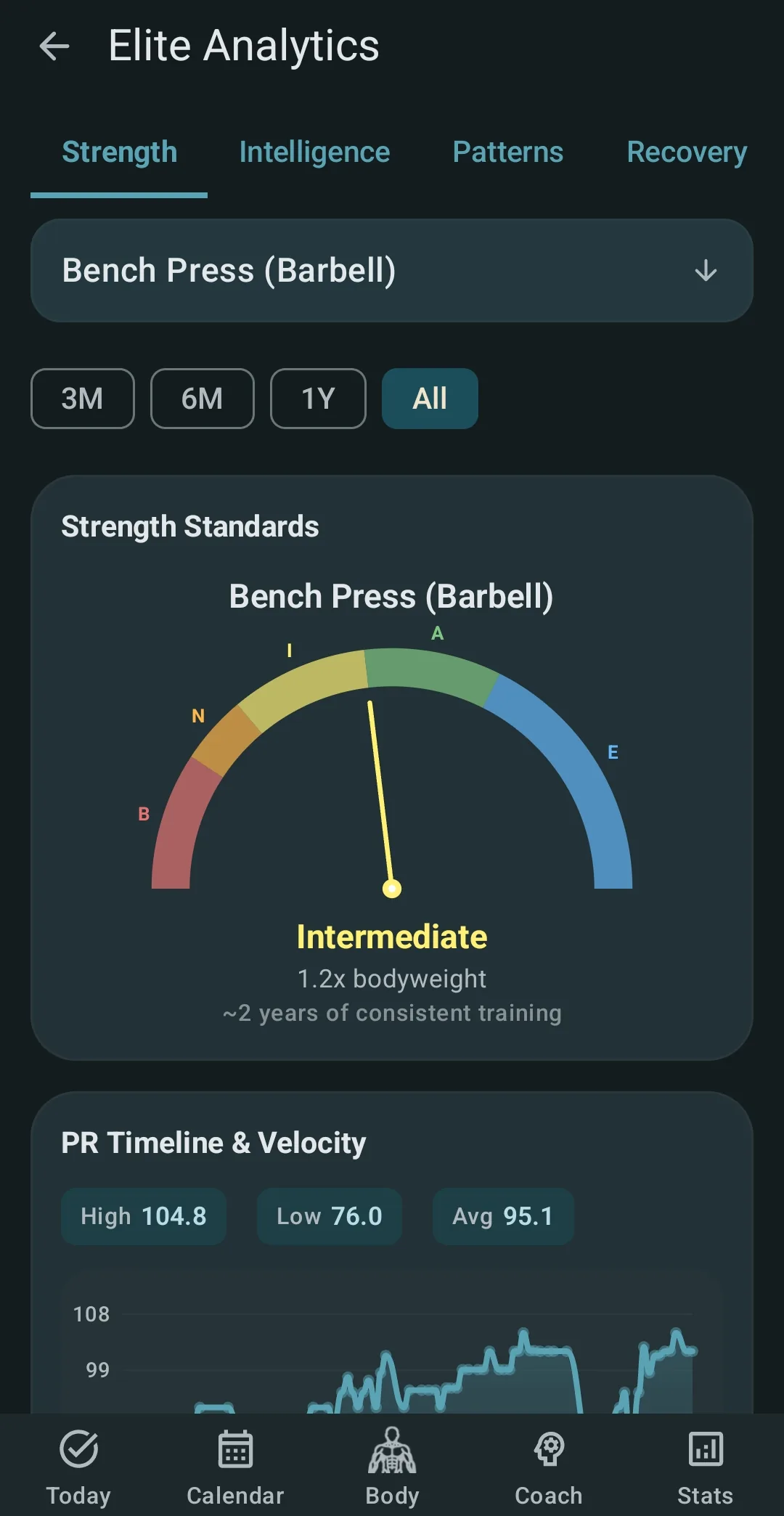
Relative strength on screen
Strength Standards makes bodyweight-relative comparison visible beside the selected lift and result.
Quickstart
Most fitness apps log a pull-up as “1 rep” and stop there. That works for counting, but it falls apart when you track progress over a cut or a bulk.
The real load of one pull-up is about your full bodyweight. Your hands on the bar are the pivot, so your whole mass below the bar is what you lift. For a push-up it is about 64% of your bodyweight, since two-thirds of your mass sits above the pivot at your toes.
Gain 5 kg on a bulk and your pull-up load went up, while losing 5 kg on a cut sends it down; same ten reps, but real different work.
Kinoku tracks the real load, not just the rep count. The rest of this page covers why the numbers matter, which studies they come from, and how to read the Total Load chart to track progress with clear eyes.
Want the number for your own weight? The bodyweight load calculator works it out for hundreds of exercises. The bodyweight load explainer covers where each load factor came from and which ones are measured.
What “relative strength” means
You can measure strength two ways:
- Absolute strength: how much weight you can move. A 200 kg deadlift is 200 kg, whatever you weigh.
- Relative strength: how much you can move for your own mass. A 200 kg deadlift at 80 kg bodyweight is a 2.5x pull. At 100 kg bodyweight it is 2.0x.
Both kinds matter, and they matter to different athletes. Powerlifters care about the absolute total at a weight class, while gymnasts and calisthenics athletes care about relative strength, since their sport is moving their own body. Most serious lifters care about both at different times.
For bodyweight moves like pull-ups, push-ups, dips, and pistols, relative strength is the whole game. A pull-up at bodyweight is 1.0x, and a pull-up with a 20 kg vest is (bodyweight + 20) ÷ bodyweight. Progress is not only more reps: it can be more load at the same reps, cleaner reps at the same load, or a better ratio as your body changes.
Why “reps × 1” is wrong
A typical app logs a pull-up set as exercise=pullup, reps=10, reads the session as “10 pull-ups,” and stops. This breaks in two ways:
-
Volume charts go flat for bodyweight work. Your Monday pull-ups at 75 kg and the same Monday session six months later at 90 kg both log as “10 pull-ups.” So the volume chart shows a flat line. But the heavier session is real more work. The chart lies.
-
Personal-record (PR) detection misfires. A “best” on a bodyweight move is just “more reps than last time.” It ignores that you might do those reps at a 5 kg lighter body, which makes them easier, not harder.
Both bugs come from the same root: the app counts reps instead of tracking load.
The load numbers
When you hang from a pull-up bar, your shoulder is the joint that turns to bring your chin up. The mass below that joint, which is most of your body minus your arms and head above the bar, is the real load. Studies on pull-up form put this at about 1.0 x bodyweight for most builds.
For a push-up, the pivot is at your toes. The mass above it, which is most of you, is the load. Ebben and colleagues (2011) measured 0.64 x bodyweight for a flat-plank push-up, on a force plate with 23 subjects. That is the one measured number the table below rests on.
Kinoku ships load numbers for the most common bodyweight moves:
| Exercise | Load factor | Notes |
|---|---|---|
| Pull-up | 1.00 | Full bodyweight |
| Chin-up | 1.00 | Same factor. Grip shifts muscle use, not load |
| Dip (parallel bar) | 0.98 | A touch under bodyweight. Feet hang below the pivot |
| Push-up (standard) | 0.64 | Two-thirds of mass sits above the pivot |
| Pike push-up | 0.80 | More mass shifts onto the upper body |
| Decline push-up | 0.70 | Rough. Depends on the decline angle |
| Inverted row | 0.55 | Varies with body angle and foot spot |
| Pistol squat | 0.95 | The free leg balances you, so it is not pure load |
564 moves ship with their own factor, from levers and the planche to dragon flags, and a move with no entry falls back to a 0.70 estimate. Only 11 of those rows repeat a measured value; the rest are Kinoku’s own estimates, and the full table labels every row so you can tell which is which.
Adding extra weight
Wear a 10 kg vest on your pull-ups and your real load per rep is bodyweight + 10 kg. The load factor stays the same, and you just add weight on top of your own mass.
Hang 30 kg from a belt and it is the same math: bodyweight + 30 kg. The factor still applies to the bodyweight part only, since that is the part it describes.
A push-up with a 10 kg plate on your upper back gets a bit odd. The plate sits above the pivot, so it is mostly all load. But part of it sits closer to your hands than your torso would. Kinoku counts the plate as 1.0x (straight added load) rather than splitting it by physics, because the error is too small to matter.
Saving your bodyweight at the set
For the math to hold across a cut or a bulk, Kinoku needs your bodyweight at the time of the set, not today. There are four ways to feed it:
- Profile setting: the current bodyweight you type in
- Health Connect: an on-device sync from any weight app
- Pulse metric opt-in: log weight on the morning Pulse screen
- Manual backfill: add a weight reading to a set after the fact
The app saves that weight with the set. The Total Load chart excludes legacy sets that have no saved bodyweight snapshot; it does not silently substitute today’s weight or a 1.0× stand-in. Those sets still remain in your history and ordinary rep-based views. Only sets with a saved weight can enter the load calculation.
Reading the Total Load chart
For a bodyweight rep exercise, the detail screen adds a free Total Load metric alongside the normal history. Each point is the best single set from that session:
((bodyweight × load factor) + added weight) × reps
That answers, “How much total work did my strongest set contain?” Rep records and the ordinary history still answer, “Am I getting better at moving my body?”
There is no relative-strength toggle on this exercise-detail chart. Pro instead adds bodyweight-relative volume normalization to the general Stats Analysis tab, where it helps compare broader workload across a cut, bulk, or maintenance phase.
The “Gravity Defier” achievement
Kinoku marks relative-strength milestones with a three-tier achievement:
- Bronze: 1.0x bodyweight on any bodyweight move (a clean bodyweight pull-up)
- Silver: 1.5x bodyweight (your body plus 50% added load)
- Gold: 2.0x bodyweight
These sit in the STRENGTH category, and they do not care about rep count. One clean rep at the target ratio earns the tier.
Why this approach
There were a few options:
- Ignore bodyweight, like most apps: simpler, but the volume chart lies
- Fixed load numbers with no saved weight: less exact across a cut or a bulk
- Per-person numbers from muscle or motion sensors: more exact, but it needs gear most people will never set up
Kinoku uses published load numbers plus a saved bodyweight, which is the sensible middle. Most people get far better tracking than before, and anyone who wants exact-to-the-percent numbers for their own build can read the source studies.
The idea is plain: track the work you actually did, not the work the app guessed because guessing was easier.
Track this in Kinoku
The Bodyweight Total Load feature applies these contribution estimates across your training history, so free exercise-detail charts include more realistic absolute load for pull-ups, push-ups, dips, inverted rows, and hundreds of other moves. A move with no entry falls back to a 0.70 default. Pro can additionally normalize overall volume by your saved bodyweight from the Stats Analysis tab.
References
Track this in the app
Bodyweight Total Load
Pull-ups, push-ups, and dips get real per-rep load from body-movement math, not just reps times one. The load math, snapshots, and Total Load chart are free; Pro scales the volume charts in Stats Analysis to your body weight.
Core tracking works offline, with no mandatory account.
Related features
Pull-ups, push-ups, and dips get real per-rep load from body-movement math, not just reps times one. The load math, snapshots, and Total Load chart are free; Pro scales the volume charts in Stats Analysis to your body weight.
132 achievements across 13 groups. The whole ladder stays visible; 24 of them and the Achievement Timeline require Pro.
Charts per exercise, PRs, your best one-rep estimate, volume trends, and date filters. Every exercise type gets a chart that fits it: Best, Total, and Avg Time for holds, Best and Total Reps for rep work, and Best and Total Distance for distance work, not just weight charts.