

Calisthenics & Bodyweight Load Tracker (Free)
Pull-ups, push-ups, and dips get a real per-rep weight, not just reps times one. Tracks strength as your body weight changes.
Real app capture
What this feature looks like with data
 Open full-size image ↗
How bodyweight work is counted
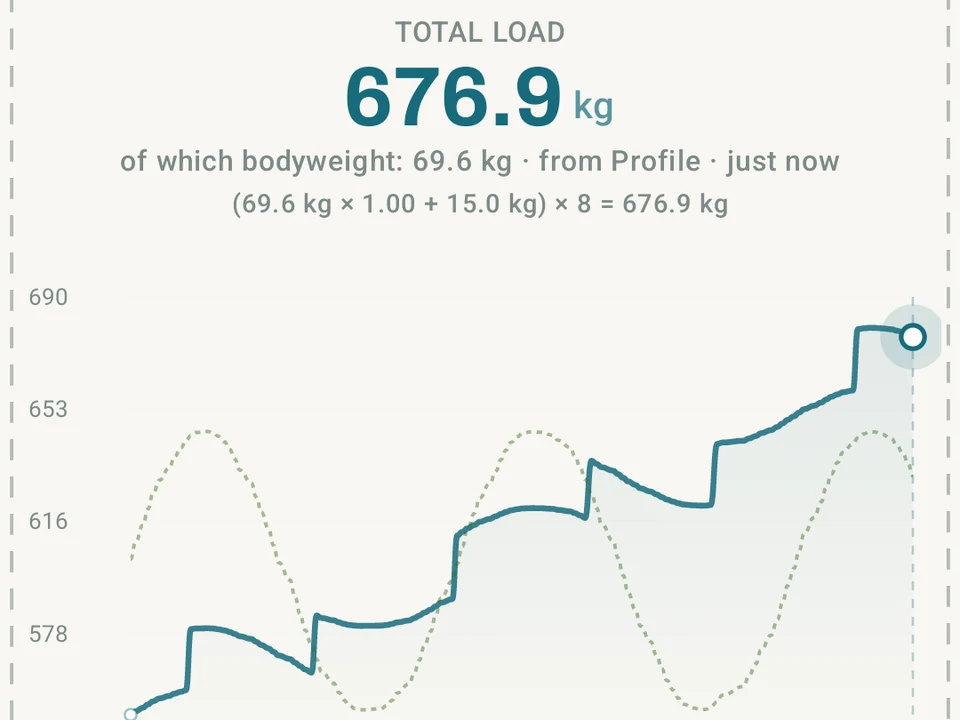
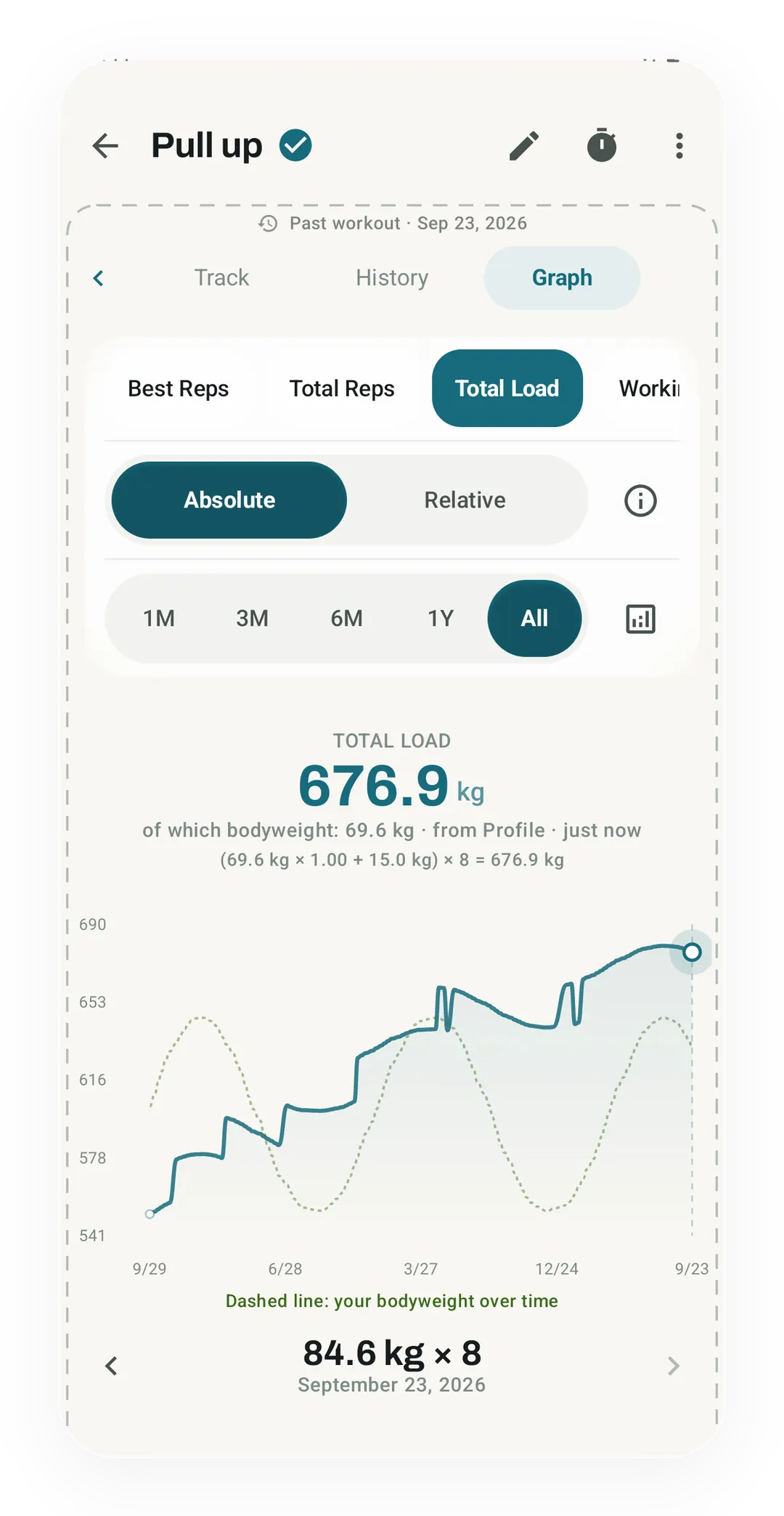
The Pull up Total Load counts 69.6 kg of bodyweight plus 15.0 kg added on each rep, so 8 reps come to 676.9 kg. A dashed line on the chart tracks your bodyweight over time.
Tier shape
How access changes by tier
Per-rep load math, editable exercise coefficients, body-weight snapshots on sets, and the Total Load chart.
Scale the Stats Analysis volume charts to your body weight, so you can compare a cut, a bulk, and a steady phase.
What it is
Bodyweight Total Load gives a pull-up, a push-up, or a dip a real per-rep weight instead of counting it as one rep and stopping there. Ten pull-ups at 70 kg is not the same set as ten at 85 kg, and the tracking should know the difference.
How the load is figured out
A bodyweight move does not lift all of you, since a push-up keeps your feet on the floor and so moves less than a pull-up does. Kinoku ships a load factor for 538 distinct moves, and a few of them read like this:
- Pull-up: 1.0 of your body weight
- Chin-up: 1.0 of your body weight
- Dip: about 0.98
- Push-up: about 0.64
- Inverted row: about 0.55
- Pistol squat and other one-leg moves: about 0.95
11 of those rows repeat a measured value from a 2011 force-plate study of push-ups, while the other 527 are our own estimates. The bodyweight load calculator lists every row and labels which is which.
Extra weight from a belt, vest, or chains gets added on top. Take a lifter at 80 kg body weight: a pull-up counts 1.0 of that, so every rep is 80 kg of load, and clipping on a 20 kg vest makes each rep 100 kg.
Every bodyweight move shows its own percentage in the app and you can change it. A move that falls back to the 70% default says so on screen. Your value applies to new sets, while sets you already logged keep the number they were saved with.
Saving your body weight with each set
For the math to stay true through a cut or a bulk, Kinoku needs your body weight on the day of the set rather than today’s, and there are four ways it gets that:
- Profile setting. The body weight you typed in.
- Health Connect. A sync from a weight app on your device.
- Pulse opt-in. Log your weight on the Pulse screen as part of your morning numbers.
- Manual backfill. Add a weight to a set you already logged.
Kinoku saves that weight alongside the set. Old sets from before the feature keep a 1.0 value and are left alone, so a later update can never rewrite your history.
Total Load chart and relative-volume analysis
Open the detail screen for any bodyweight move and you get a Total Load chart, which plots the weight per rep over time using both the move’s factor and your real body weight. Pro adds a bodyweight-relative volume option in the general Stats Analysis tab. It divides volume by body weight, so a week during a cut compares more fairly with a week during a bulk. The per-exercise Total Load chart stays free.
Gravity Defier achievement
A three-tier achievement in the Strength group tracks your best load-to-body-weight ratio on any saved set:
- Bronze: 1.0 times body weight on any bodyweight move
- Silver: 1.5 times (for example, body weight plus 50% added)
- Gold: 2.0 times body weight
Because the move’s own load is built in, the 80 kg lifter above clears Bronze with a clean pull-up, and that vested rep at 100 kg sits at 1.25 times body weight on the way to Silver.
Where the numbers stop
One limit belongs next to every factor here: 527 of the 538 rows are our estimates rather than lab measurements, so each is a working figure and not a measured truth. Every percentage is editable for that reason, and the calculator marks which rows carry a study behind them.
What this fixes
On a barbell curl, 5 kg more reads clearly as progress. Bodyweight progress is fuzzier, and it can mean three more reps, 3 kg lost at the same reps, or a 10 kg belt added. All three are real gains and all three belong on one chart, so if your goal is to move your own body well, the line should rise whichever of them changed.
For the science behind the numbers, see the Relative Strength article and the Bodyweight Load explainer in /learn. To try a number without installing anything, use the bodyweight load calculator.
Free, forever
The per-rep load math, the body-weight snapshot on each set, editable coefficients, and the Total Load chart are free, while Pro adds bodyweight-relative volume normalization inside Stats Analysis. The free math stays free, and any single factor can still be corrected when better measurements turn up.
Questions people ask
How does Kinoku calculate weight for pull-ups, push-ups, and dips?
Kinoku multiplies your body weight on the day of the set by each move's load factor. It uses 1.00 for a pull-up, 0.98 for a dip, and 0.64 for a push-up, then adds any belt or vest weight on top.
Can I edit the bodyweight percentage for an exercise?
Yes. Every bodyweight move shows its percentage in the app, and you can change it whenever you want. Your custom percentage applies to new sets, while sets you already logged keep the figure they were saved with.
What happens to my calisthenics charts when my body weight changes?
Kinoku saves your body weight alongside each set from your profile, Health Connect, or Pulse, so your historical sets stay accurate through a cut or a bulk. The per-exercise Total Load chart is free on every plan.
Try it for yourself.
Available on Google Play. The core here is free. Pro adds optional extras.
Get on Google PlayRelated surfaces
Every set, one tap. Track how hard each set felt, your rest timers, set types, and notes.
Charts per exercise, PRs, your best one-rep estimate, volume trends, and date filters. Every exercise type gets a chart that fits it: Best, Total, and Avg Time for holds, Best and Total Reps for rep work, and Best and Total Distance for distance work, not just weight charts.
132 achievements across 13 groups. The whole ladder stays visible; 24 of them and the Achievement Timeline require Pro.