

Reproductive Health Privacy Architecture
How Kinoku excludes dedicated reproductive records and Cycle Tracking configuration from Android automatic cloud backup; user-created metrics remain eligible.
Kinoku in practice
Where this shows up in the app
 Open full-size image ↗
The private surface itself
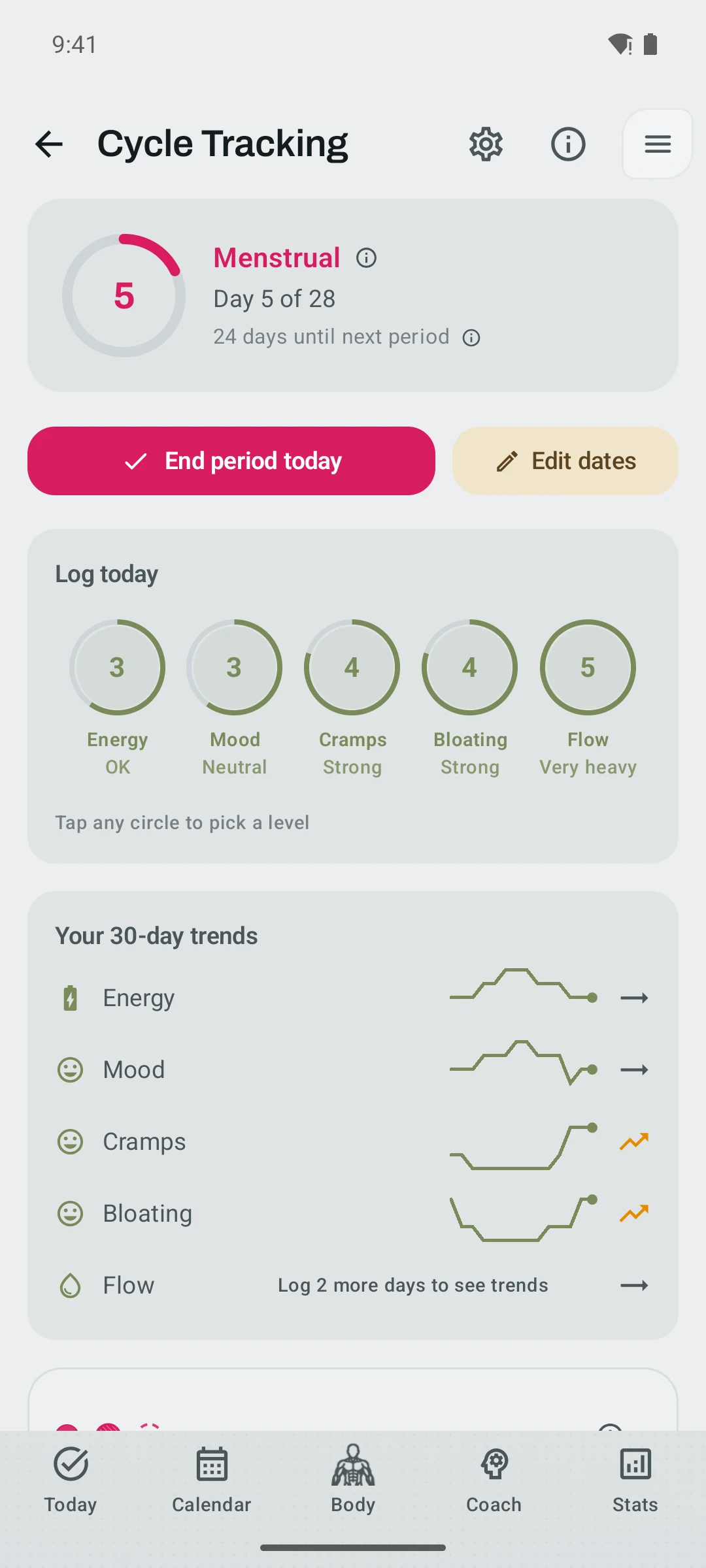
Cycle Tracking shows phase and symptom context while its dedicated records stay in the excluded local database described in this article.
Quickstart
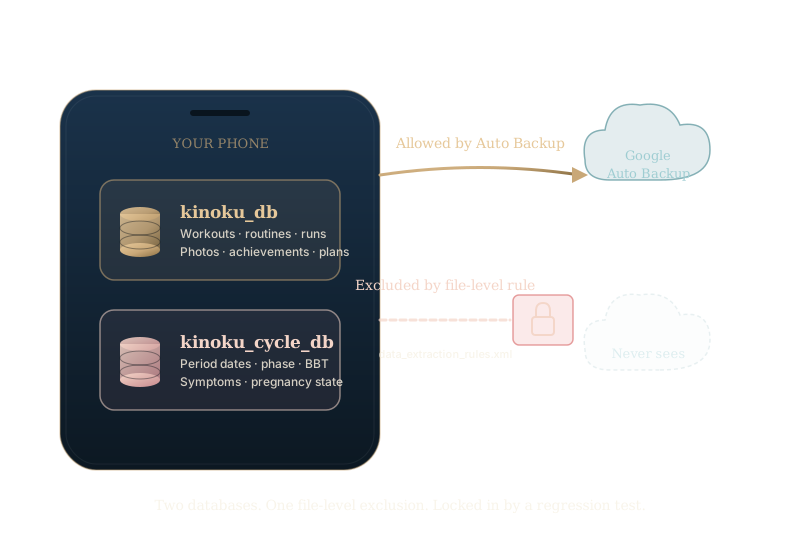
Dedicated reproductive records and provably cycle-derived generated state in Kinoku live in their own database file, kinoku_cycle_db, along with your Cycle Tracking settings. It is kept apart from the main training database, kinoku_db. The cycle file is left out of Google Auto Backup at the file level, set by XML rules. Tests lock the storage and routing rule in place.
A backup you start yourself does include the cycle file, because your backup is your call. Google Auto Backup leaves it out, while a user-initiated device-to-device transfer may include it. A manual ZIP can go wherever you choose to save it. Kinoku cannot rewrite an older Android backup Google already holds. The design makes the automatic cloud line clear without pretending user-controlled transfers do not exist.
Why a separate database
Most fitness apps that track reproductive health keep it next to everything else, in the same database, tables, and backup. The easy path for Kinoku was the same. Kinoku does not ship it that way, because of one limit in how Android backs up apps.
Android Auto Backup works at the file level, not the row level. When the system backs up an app, it copies the app’s private files in full. There is no way to say “back up this app, but skip the period rows.” The rules in data_extraction_rules.xml take file paths and folders, not row-level rules.
That leaves one direct way to keep reproductive health data out of Android’s automatic cloud-backup path. Put it in its own file, then exclude that file. A user can still save a manual backup to a cloud service by hand; the difference is automatic system backup versus a backup the user makes and places.
Kinoku uses a second database for that reason, and only that reason.
What lives in the cycle database
Everything tied to reproductive health:
- Period start and end dates.
- Inputs used to calculate cycle phase, such as follicular, ovulation, luteal, or menstrual; cycle phase is never persisted on main Pulse or Readiness rows and is joined transiently when needed.
- Symptom logs: cramps, mood, flow, and anything else you tag.
- Basal body temperature. A detector reads the temperature shift to estimate ovulation.
- Mucus notes and luteinising hormone (LH) surge results.
- Pregnancy state: test results, due date, and week-by-week progress.
- Generated insights whose type or explainability inputs prove they are cycle-derived.
- Private one-time prompt state and cycle-sensitive insight interaction records.
- Cycle Tracking settings: whether tracking is on, Health Connect import choices, typical cycle and period lengths, and the rest of your cycle preferences.
User-owned training history stays in the main database. Workouts, sets, reps, effort, routines, programs, photos, runs, heart-rate data, Pulse history, and achievements live in kinoku_db. Generated training insights are routed by their privacy label. Provably cycle-derived rows go to the excluded cycle store, while unrelated insights remain in main.
How the exclusion is set
Two XML rule files sit in the Android resources folder.
res/xml/data_extraction_rules.xml   (Android 12+, "device-to-device transfer + cloud backup" model)
res/xml/backup_rules.xml             (Android 11 and earlier, the legacy backup model)
Both files contain clear <exclude> clauses naming the cycle database file:
<data-extraction-rules>
  <cloud-backup>
    <exclude domain="database" path="kinoku_cycle_db" />
    <exclude domain="database" path="kinoku_cycle_db-shm" />
    <exclude domain="database" path="kinoku_cycle_db-wal" />
  </cloud-backup>
</data-extraction-rules>
The -shm and -wal files are helper files that SQLite uses. SQLite spreads one database across these three files when a faster write mode is on, which Room turns on by default. Leaving out only kinoku_cycle_db would still back up the -wal file, which holds recent writes. So all three files have to be left out together.
One detail matters here: the rule applies to cloud-backup only. The device-transfer block, used to move to a new phone, does not leave the cycle file out. So if you start a phone-to-phone transfer yourself, your cycle data can come with you. Google Drive cloud backup never sees it, but a transfer you control does, and that split is on purpose.
How the exclusion stays in place
XML rules are easy to write and just as easy to delete by mistake. A later edit to the backup rules, or a quick “let me clean these up” pass, could drop the rule. Nobody might notice until a user reports their period data showing up on a fresh-install phone.
A test prevents that: CycleCloudBackupExclusionTest reads the real XML files at build time and checks three things:
cloud-backupexcludes each ofkinoku_cycle_db,kinoku_cycle_db-shm, andkinoku_cycle_db-waldevice-transferdoes not over-exclude, so a transfer you start still carries the cycle file- The same three exclusions exist in the older
backup_rules.xmlfor Android 11 phones
If anyone deletes a line, renames a file, or breaks the rules, this test fails when the Android test suite runs. It is a guardrail for release checks, not a claim that every local compile executes every test automatically.
Keeping the data apart in code
The XML rules cover the files, and the same stance covers the app’s code.
The dedicated period, pregnancy, cycle-training-insight, interaction, private-state, and cycle-settings tools are not exposed on the main AppDatabase class. They live on a separate CycleDatabase class, with their own providers and a shared mutation fence. Delete-all invalidates stale producers so a calculation begun before deletion cannot recreate private generated state afterward.
The wiring that supplies these tools is easy to miss. A future feature, say a period note on the lock screen, could add the cycle tool to its setup. It might then read cycle data into a notice that gets tracked or logged by accident. Keeping the tool off the main database forces every read through the cycle-only path. A test, CycleImportPrivacyTest, checks that these tools stay off AppDatabase, so later code can’t add them back by mistake.
Put together: the XML rules keep cycle data from leaking through system backup. The code split keeps it from leaking inside the app.
Health Connect: read-only for periods
Health Connect is Android’s own health data store. Kinoku can read supported recovery, sleep, heart-rate, step, weight, and body-composition signals. Its write surface is narrower: completed exercise-session summaries and steps. It does not write full set, rep, weight, or cycle records to Health Connect.
Periods are the one exception. The AndroidManifest.xml asks for read access to menstruation and never asks for write access. So even if some future code tried to write a period to Health Connect, the system would block the call. A test, ManifestHealthPermissionCoherenceTest, checks that the manifest stays this way.
Kinoku keeps this read-only for a reason. Health Connect is shared with other health apps you authorize, so Kinoku deliberately requests read access for menstruation and no write access. That lets a compatible Android app supply period entries without Kinoku publishing them back into the shared store.
Periods brought in from Health Connect go straight into kinoku_cycle_db, never into the main training database. Restored legacy inbox rows are reconciled into the excluded store on every launch, verified, and then cleared from main. A second test, CycleImportPrivacyTest, checks this line end to end.
What this looks like in practice
You install Kinoku, log a few periods, and log some workouts, then turn on Google Auto Backup in your system settings. Later you buy a new phone, set it up, and restore from Google Drive.
Your training data comes back: workouts, routines, achievements, all of it.
Your cycle data does not come back, and neither does your Cycle Tracking setup. Nothing is lost: both are still on the old phone if you haven’t wiped it, and in any backup you made yourself. The cloud restore simply did not carry them over, so Cycle Tracking starts fresh. You can set it up again, restore a backup you made, or import from Health Connect.
If your reaction is “good, that’s what I want,” the design is doing its job. If your reaction is “wait, I want my cycle history,” there is a path. A backup you make yourself does include the cycle store. Kinoku offers it in the normal backup and restore flow on first launch. You choose where that file goes: email, a USB stick, or a cloud drive of your choice. Google Drive’s automatic backup never enters the picture.
Why this matters
Reproductive health data carries a different risk than training data. A leaked PR for back squat is mildly awkward. A leaked period record can be a legal risk in some places. That includes parts of the United States after the 2022 Dobbs decision. The Electronic Frontier Foundation, Mozilla’s Privacy Not Included, and several state attorneys general have flagged cloud-stored period data. They call it a type that needs a built-in safeguard, not a promise.
Kinoku is a small, solo app. A user’s legal risk is not Kinoku’s to solve. But one design choice is Kinoku’s to make. Kinoku controls whether the data sits where a court order or a breach can reach it. Kinoku is the only one who can decide to put that data in a separate file in the first place.
That choice was made, and the tests guard it. Android’s automatic cloud backup excludes the cycle database, while explicit transfer and manual-backup choices remain yours.
Where to verify
These source and test files cover it. Kinoku is not currently published as an open-source repository, so this list documents the internal checks rather than offering a public source checkout:
app/src/main/res/xml/data_extraction_rules.xmlapp/src/main/res/xml/backup_rules.xmlapp/src/main/java/app/kinoku/data/CycleDatabase.ktapp/src/main/java/app/kinoku/data/AppDatabase.kt. Note that it has no cycle data getters.app/src/test/java/app/kinoku/privacy/CycleCloudBackupExclusionTest.ktapp/src/test/java/app/kinoku/privacy/ManifestHealthPermissionCoherenceTest.ktapp/src/test/java/app/kinoku/data/repository/CycleImportPrivacyTest.ktapp/src/test/java/app/kinoku/privacy/CyclePrivacyStorageBoundaryTest.ktAndroidManifest.xml. Search it for the menstruation read permission.
If one of those lines changes, the matching test is designed to fail when the test suite runs, so the change can be reviewed before release.
Want the bigger picture of how Kinoku handles all your training data, not just cycle data? See the Data Sovereignty page or the Offline-First Fitness Tracking article.
Track this in the app
Cycle Tracking & Fertility
Full cycle, fertility, and pregnancy tracking, with phase context and training links. Dedicated raw records and generated cycle state are excluded from future Android automatic cloud backup, standard exports, share cards, and Kinoku servers. Your Cycle Tracking configuration lives in that same excluded database, while user-created metrics remain eligible for Android system backup in your Google account. A manual ZIP or user-initiated device transfer can carry the dedicated database.
Core tracking works offline, with no mandatory account.
Related features
Full cycle, fertility, and pregnancy tracking, with phase context and training links. Dedicated raw records and generated cycle state are excluded from future Android automatic cloud backup, standard exports, share cards, and Kinoku servers. Your Cycle Tracking configuration lives in that same excluded database, while user-created metrics remain eligible for Android system backup in your Google account. A manual ZIP or user-initiated device transfer can carry the dedicated database.
Lossless backup, open CSV and JSON import, Strava import, and a scoped Export for AI handoff.
Kinoku reads and writes Android Health Connect data without passing it to a cloud. Period flow import is a Pro feature and read-only. Kinoku never writes cycle data back to Health Connect.