

What's new in Kinoku 1.1
Kinoku now watches each lift on its own, adds a home-screen widget, and lets you scrub through your Score day by day.
Inside Kinoku
The app surfaces behind this story
 Open full-size image ↗
Progress across disciplines
The 1.1 progress work brought lift and running history into clearer, data-rich views.
Kinoku 1.1 is about one idea: your training leaves a trail, and the app should read it back to you in plain words.
Here is what landed, section by section.
Lift Progress
Kinoku now watches each lift on its own. Open a lift in Stats and a small label tells you if it is climbing, holding steady, or slipping. You also see how long it has been since your last best, and a shaded band shows the usual range of your recent sessions. A lift climbing out of the top of that band reads at a glance.
When a lift has been stuck, a card lists a few things lifters try, like one extra set, a lighter week, or a close swap. Each idea says why it might fit, and they are options rather than orders, so nothing changes unless you change it.
Some moves are not ones you chase, like warm-ups, stretches, and rehab work. Open the exercise info sheet and flip one switch so that move never gets a stuck flag.
The per-lift label is free, while the all-lifts dashboard and the ideas are Pro.
A home-screen widget
Add a small Kinoku tile to your home screen for a quick look at your Score, today’s plan, and your streak. Start a workout and it switches to your live set with a rest timer that counts down. Tap it to open the right screen, and it comes in two sizes, free for everyone.
Score story
Tap the score history card on your Pulse screen to open Score story, then drag across the chart to land on any day. Each day shows one plain line, like “A bit below your usual. Mostly recovery,” plus what pushed it up or down next to your own normal. A gold star marks record days, and rest days and big changes get their own marks.
Score story is free for everyone, and the 1-year and all-time views come with Pro.
Running Progress
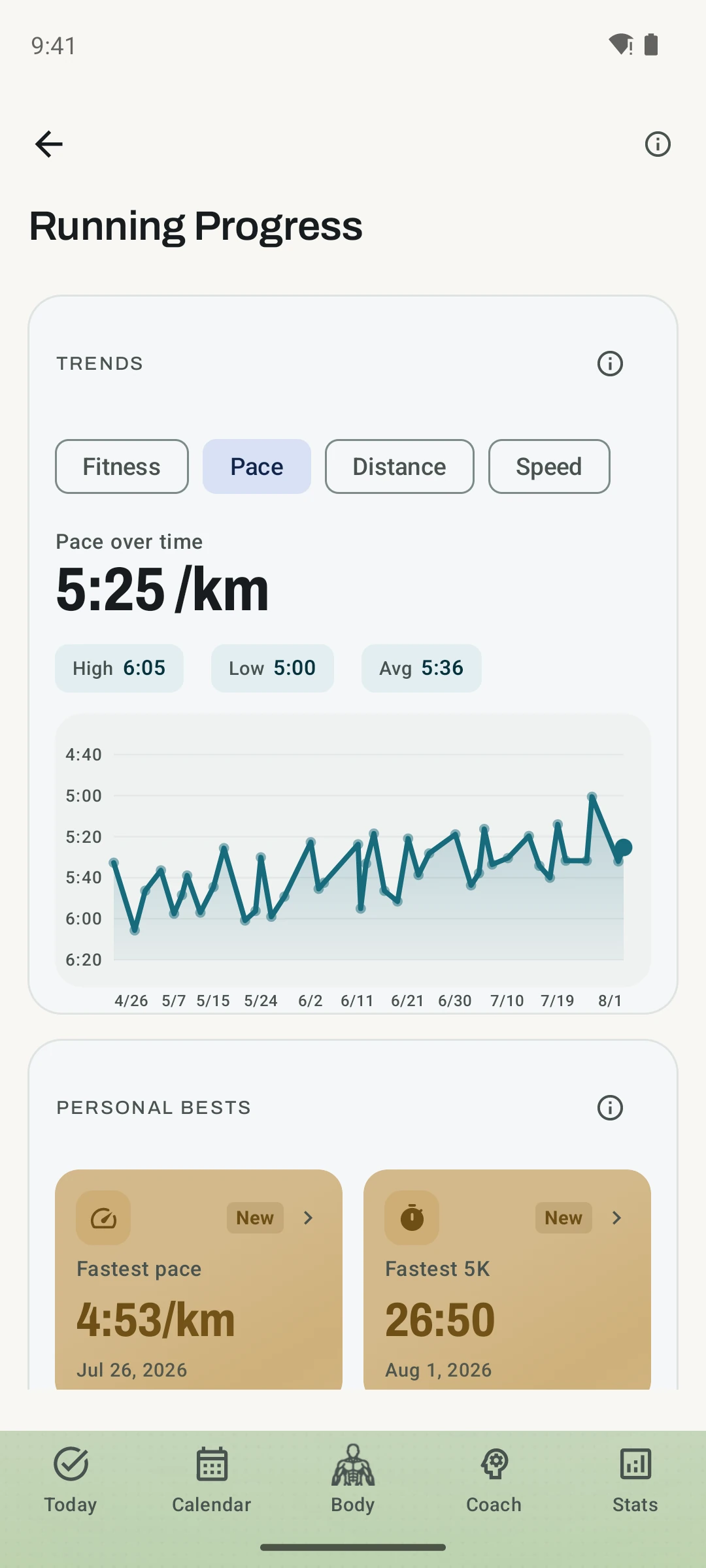
A new screen shows your personal bests, like your fastest pace, fastest 5K, top speed, longest run, and biggest climb, each with the day you set it. It tells you plainly when you are getting faster, and only when there are enough runs to be sure. Simple charts show your pace, fitness, weekly distance, and top speed over time, and all of it is free for everyone.
Routines that hold a plan
When you build a routine, you can now add a rep range, a target effort, and a rest time to any set. A set can hold a percent of your training max instead of a fixed weight, so change your training max later and every routine that uses it keeps up. Warm-up sets can build themselves, and you can set a tempo for each exercise too.
Start a workout from that routine and each set shows its target as a light hint. The hint is only a guide, so what you type always wins, and all of it is free.
Open a routine’s stats and you can also see how the whole thing is trending, not just one lift.
A lower price to start
At Kinoku 1.1 launch, eligible new customers could receive introductory prices on monthly Pro and the then-existing Elite plan, and Elite has since merged into Pro. Today, Google Play shows whether you are eligible for a Pro introductory price and the exact price and renewal schedule before purchase.
There is no countdown and no deadline, and you always see both numbers before you buy.
And the rest
Four new starter packs landed, your year-end Story is fully free, and Pro has a lifetime option now. Your workout recap is saved, so you can open any past workout and read it again.
The full list is in the changelog.
Related features
Open a lift in Stats and a plain label says if it is progressing, holding steady, or slipping, with a flat-zone band on the chart. The label is free. Pro adds ideas for a stuck lift (options, never orders), an all-lifts dashboard, and a Coach card. It stays quiet when the data is thin.
Five Android widgets for the home screen: today's next move, one progress signal, quick actions, your score and goals as three rings, and the muscles you trained in the last 7 days. The core is free; Pro adds the deeper views and Quick Log.
Scrub back through your Kinoku Score day by day. Each day says in one plain line what moved it, next to what is normal for you.
Try Kinoku
Core tracking works offline. No mandatory account. No Kinoku-hosted training-history cloud.
Get on Google Play →