

Progressive Overload Tracker: A Free Read on Each Lift
Kinoku tracks progressive overload for free: each lift gets a strength chart, the weeks since your last best, and a label that says if it is still climbing.
The Momentum page puts this next to the other ways Kinoku shows your training adding up.
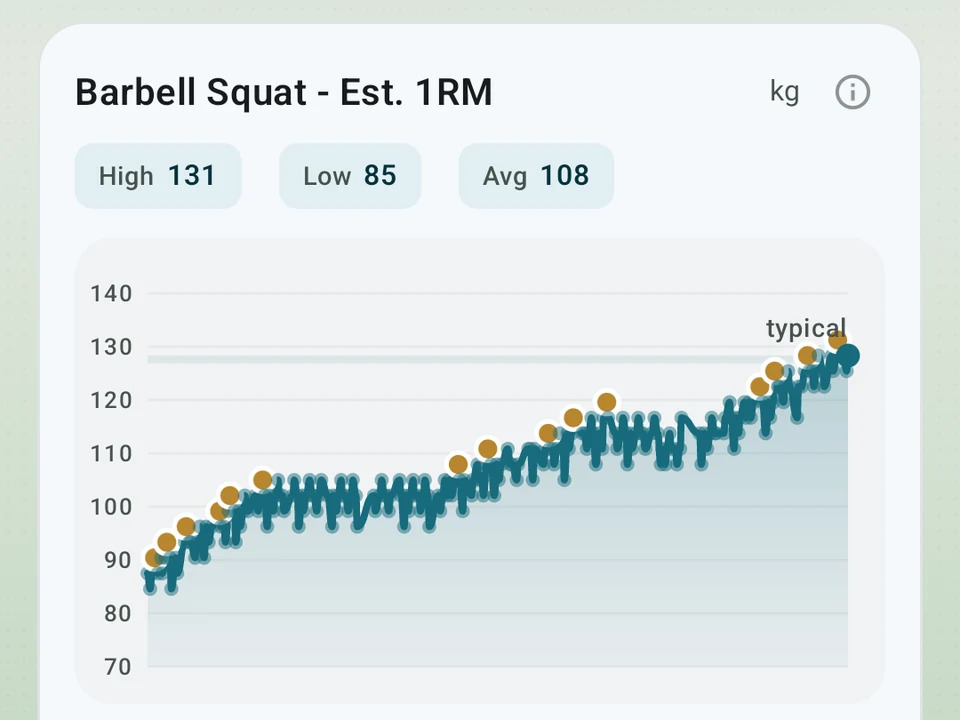
Real app capture
What this feature looks like with data
 Open full-size image ↗
Every lift at a glance
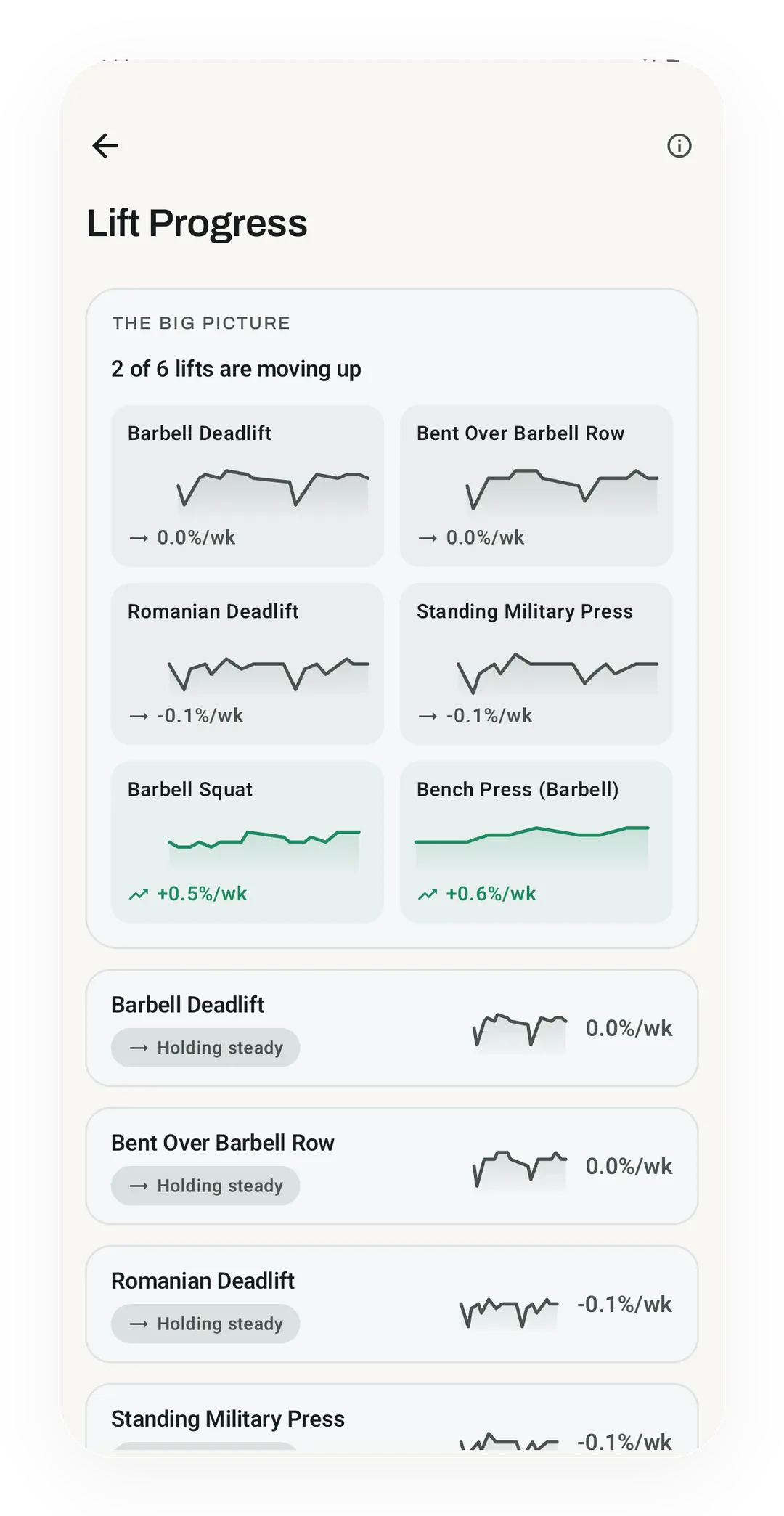
The Pro dashboard opens on a summary, 2 of 6 lifts moving up, then a trend line for each lift. Barbell Squat gains 0.5% a week and Bench Press 0.6%.
Tier shape
How access changes by tier
A progressing / holding / slipping label, weeks since your last best, a flat-zone band, and a switch to skip a move.
Ideas for a stuck lift, an all-lifts dashboard, a Coach card, and an opt-in weekly recap line.
What it is
Kinoku tracks progressive overload on every lift you log, free and with no account. Open a lift in Stats and a small label says whether it is progressing, holding steady, or slipping, beside a strength chart and the weeks since your last best. Pro adds a dashboard for every lift and ideas for a stuck one.
The label is drawn only from the sets you logged. The strength line behind it uses the Epley one-rep estimate on sets of ten reps or fewer, and the Epley vs Brzycki page explains the choice of formula and cap. The free gym apps with progressive overload tracking roundup quotes what nine other apps put on their free plans.
What you get free
- A label on each lift: progressing, holding steady, or slipping.
- A count of the weeks since your last best on that lift.
- A quiet band on the chart, marking the flat zone while a lift holds.
- A switch that takes a move out of tracking, for warm-ups, rehab work, and anything else you never meant to push.
Why a label and not only a chart
A year of one lift is a noisy line, and reading a trend off it takes longer than most people spend in Stats. A label folds that line down to the one word you were squinting for.
Plateaus are measured in time rather than shape. Weeks since your last best is the number that says a lift has stalled, and no chart hands it to you without arithmetic you do yourself.
Some lifts should never be flagged at all. A warm-up or a rehab movement sitting flat is the plan working, so the switch that skips a move keeps those out of every stuck count on this page.
Ideas for a stuck lift (Pro)
When a lift has been holding or slipping for a while, a card lists a few things lifters try, such as another set, a lighter week, or a close variation. Each idea says why it might fit your case, and none of them change your training until you do.
The Lift Progress dashboard (Pro)
One screen ranks every lift you train, with the ones worth a look on top and each row carrying a small trend line beside its label. The summary line at the top works as the example. A line reading “5 of 8 lifts are moving up” means three sit lower in the list. Tapping any of those three opens its full chart with the flat band already drawn.
On the Coach screen (Pro)
A card can name up to three lifts that have stalled, with one plain line about why each one qualified. Tap “fewer like this” and the card goes quiet for you. You can also add a one-line lift note to your Weekly Recap, which stays off until you switch it on.
Quiet when it is not sure
Kinoku needs a run of sessions before it will label a lift, so thin data reads as “not enough yet” rather than a guess. The waiting is the real limit here. A lift you train once a month can go without a label for a long stretch, because three points cannot tell a plateau from one bad night.
Tier matrix
The per-lift label and the skip switch are free, while Pro adds the ideas card, the dashboard, and the Coach card.
| Feature | FREE | PRO |
|---|---|---|
| Per-lift state label | ✓ | ✓ |
| Weeks since your last best | ✓ | ✓ |
| Flat-zone band on the chart | ✓ | ✓ |
| Skip a move from tracking | ✓ | ✓ |
| Ideas for a stuck lift | - | ✓ |
| Lift Progress dashboard | - | ✓ |
| Coach card for stalled lifts | - | ✓ |
| Weekly recap line (opt-in) | - | ✓ |
The free layer
Every lift you log gets its label, its weeks-since-best count, its flat-zone band, and the switch that takes it out of tracking, at no cost. Pro adds the ideas for a stuck lift, the all-lifts dashboard, and the Coach card. The label describes what your own history already shows, which is the reason it belongs on the free side of the line.
Questions people ask
Is progressive overload tracking free in Kinoku?
Yes, the core of it is free with no account. Every lift gets its strength chart, its label, the weeks since your last best and a flat-zone band. Pro adds the all-lifts dashboard, ideas for a stuck lift, a Coach card, and weight suggestions while you train.
How does Kinoku decide a lift is stuck?
It measures time, not the shape of the line. The label reads from your own logged sets, and the number to watch is the weeks since your last best on that lift. A lift with only a few sessions gets no label until there is enough data to tell a stall from one bad night.
Does Kinoku raise the weight for me?
Only where you ask it to. A named program such as GZCLP or 5/3/1 sets its own weights on the free plan, by the program's rules. In a free-form workout, the next-weight suggestion is part of Pro, and every suggestion waits for you to accept it.
Can I leave warm-ups out of the progress read?
Yes. A switch on each exercise takes it out of tracking, so a warm-up, a rehab movement or an accessory you never meant to push stays out of every stuck count. The switch is free and leaves your records and muscle volume untouched.
Try it for yourself.
Available on Google Play. The core here is free. Pro adds optional extras.
Get on Google PlayRelated surfaces
Charts per exercise, PRs, your best one-rep estimate, volume trends, and date filters. Every exercise type gets a chart that fits it: Best, Total, and Avg Time for holds, Best and Total Reps for rep work, and Best and Total Distance for distance work, not just weight charts.
Open a routine's stats and see the whole routine trend across every time you have done it: a work-done chart and a strength trend where each lift is measured against its own start, so a light move and a heavy move count the same. Plus a look-back on the recap after a big session.
A Pro hub with five core tabs, plus a Cycle tab when cycle tracking is on. Its 20+ features include strength scores like DOTS, IPF GL, Wilks, and FFMI, the Banister Form Band, plateau alerts, ACWR, muscle balance, and cycle links.