

Epley vs Brzycki: Which One-Rep Max Formula to Trust
Two formulas turn a set of reps into a one-rep max. They agree up to ten reps and drift after. Here is the choice, and the one Kinoku uses.
Kinoku in practice
Where this shows up in the app
 Open full-size image ↗
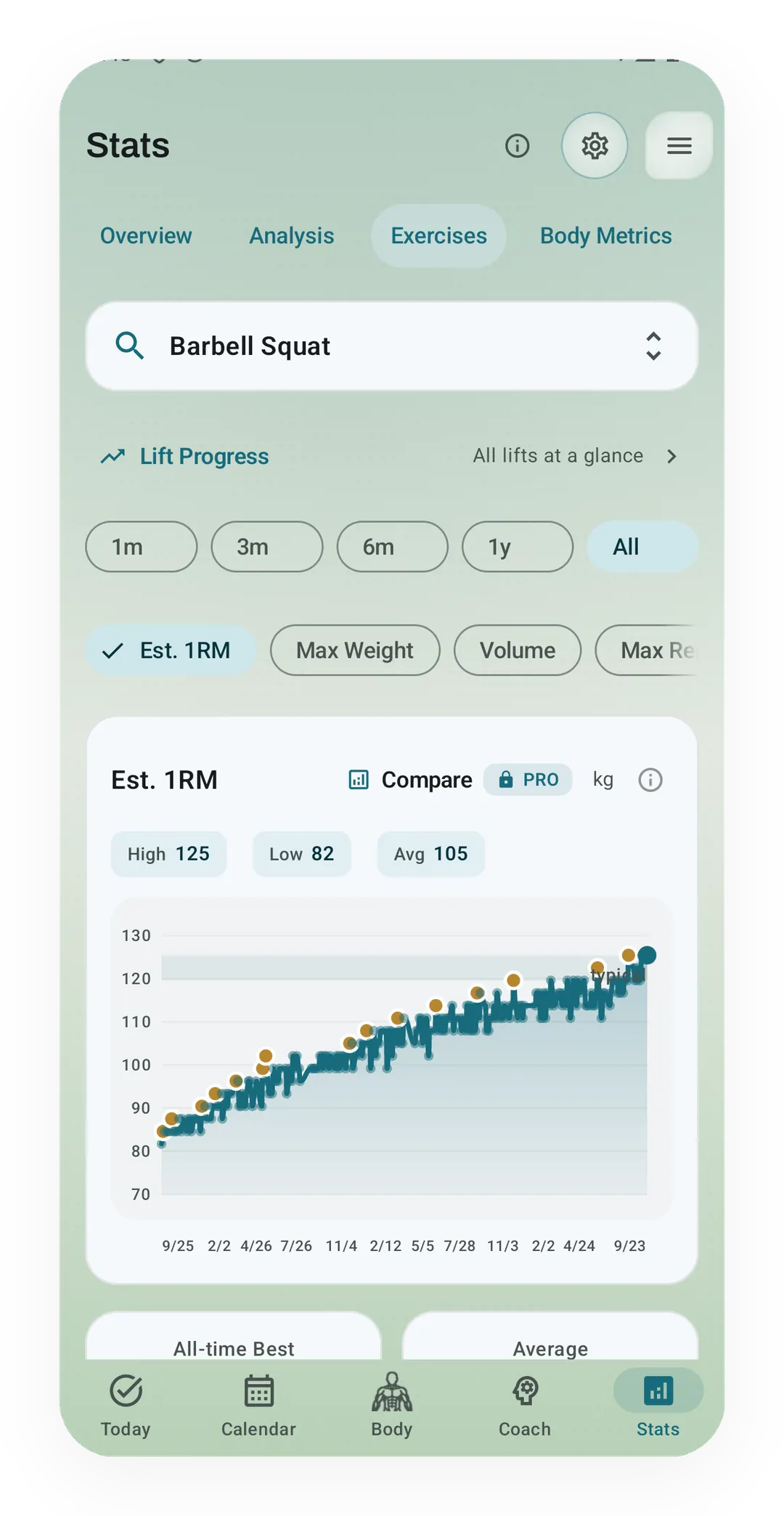
Your estimated max across sessions
Free Stats charts the Barbell Squat Epley estimate, with a high of 125 kg, a low of 82 kg and an average of 105 kg. The locked Compare button is a separate Pro feature; all figures shown are fictional sample data.
What is an estimated one-rep max?
Epley and Brzycki turn a set’s weight and reps into a one-rep max (1RM) estimate, which guesses what you could lift once. Below ten reps their answers stay close, while higher rep counts make them drift apart. The gap shows formula disagreement, not a personal confidence interval, and either estimate can miss your tested max.
The one-rep max calculator shows both answers and prints a percentage chart plus estimated rep-max loads. Each table keeps the formulas in separate columns, so you can see how their gap carries through to the loads.
What each formula measures
Both answer the same question: you lifted this weight for this many reps, so what could you lift once? Both formulas estimate a lift from a rule, without measuring the max itself or how hard your set felt. A set below your rep limit can therefore read low, while fatigue and technique can change the result too.
Epley is the older one, printed by Boyd Epley in 1985 as a poundage chart for the Nebraska football program. It is a straight line, where each rep adds one thirtieth of the weight, so ten reps add a third.
Brzycki came in 1993, published by Matt Brzycki in a physical education journal. It is a curve rather than a line, and the curve bends upward as reps climb, so a high-rep set reads heavier than Epley says.
Epley:    1RM = weight x (1 + reps / 30)
Brzycki:  1RM = weight x 36 / (37 - reps)
At ten reps the two give the same number, and below ten Brzycki reads a little lower. Above ten it runs away, returning 36 times the weight at 36 reps and dividing by zero at 37.
A single is the odd case, because literal Epley reads a one-rep set one thirtieth above the weight you lifted. The calculator keeps that rule to match the Stats chart, so a 100 kg single reads 103.3 kg with Epley and 100 kg with Brzycki.
Brzycki’s original paper prints weight divided by 1.0278 minus 0.0278 times reps, using rounded constants. This page and the calculator use the rational form above, matching Kinoku’s unused Brzycki helper, so small differences from the printed equation are possible.
Side by side
The same lift through both formulas, from the year each one was written to the point where each one fails.
| Epley | Brzycki | |
|---|---|---|
| Year | 1985 | 1993 |
| Shape | Straight line | Curve |
| Ten reps | Same answer | Same answer |
| Under ten reps | Reads slightly higher | Reads slightly lower |
| Over ten reps | Keeps climbing in a line | Climbs faster and faster |
| Breaks at | Never, but drifts | 37 reps |
| Common in | Most apps and spreadsheets | Many gym calculators |
Here is 100 kg through both formulas at four rep counts, which is arithmetic rather than a measurement, since nobody lifted these sets.
| Set | Epley | Brzycki | Gap |
|---|---|---|---|
| 100 kg x 5 | 116.7 kg | 112.5 kg | 4.2 kg |
| 100 kg x 8 | 126.7 kg | 124.1 kg | 2.5 kg |
| 100 kg x 10 | 133.3 kg | 133.3 kg | 0 kg |
| 100 kg x 15 | 150.0 kg | 163.6 kg | 13.6 kg |
Up to ten reps the gap stays under 5 kg on a 100 kg lift, and at fifteen reps it is more than a plate. The gap alone cannot tell you which answer is closer to your own max. LeSuer and colleagues’ 1997 study tested seven formulas in 67 untrained college students, finding that strong links with real maxes could still leave errors for each lift.
Which one Kinoku shows you, and where
Kinoku displays Epley estimates, and a Brzycki helper in the code has no callers or formula switch in the app. The free Stats screen and the Pro Lift Progress dashboard read the same sets in different ways, as checked in October 2026.
- The formula is weight times one plus reps over thirty, and it lives in one function that every record check runs through. A repeat of an old best therefore never reads as a new one. A Brzycki helper sits in the code base, and nothing calls it.
- The personal record (PR) banner uses completed effective working sets. When a workout ends, the app takes the best Epley number per exercise and checks it against your history. There is no rep cap here, so a set of twenty can set the record.
- Lift Progress caps at ten reps. The per-lift state label, the Lift Progress dashboard, Routine Progress, the post-workout exercise standing, and the Progress widget’s strength line all read one best set per session. Only sets of ten reps or fewer can be that best set, and sets above ten still count toward the session’s volume.
- The Stats chart has no cap. The e1RM line on an exercise’s Stats page runs Epley on completed effective working sets, and so do the Pro Analytics five-lift strength view and the Pulse strength trend.
- Bodyweight lifts count your body. For a pull-up or a dip, the weight in the formula is the added load plus your body weight times a per-move factor. The app captures your body weight when the set is done.
- One rep reads two ways. The live set panel in a workout shows a single as the weight itself, while the Stats chart and record check use literal Epley, about 3.3 percent higher. Both are in the code today.
The ten-rep cap is our choice for trend surfaces rather than a hard boundary that makes every lower-rep estimate exact. Brzycki’s original paper describes weaker estimates above about ten reps, and Mayhew and colleagues’ 2008 study found better bench press predictions below ten reps in young women.
What do the printable charts show?
The percentage chart takes each estimate and multiplies it by 50 through 100 percent, in five-percent steps. For the 100 kg, five-rep example, 75 percent is 87.5 kg with Epley and 84.4 kg with Brzycki. Those loads are arithmetic from an estimate, rather than a training plan or a test of what you can lift.
The rep-max table uses the estimated max itself for the one-rep row, then reverses each formula for two through ten reps. Epley’s inverse divides the max by one plus reps over thirty; Brzycki’s inverse multiplies it by 37 minus reps, divided by 36. The row-one rule is stated on the printable chart tool, because blindly reversing Epley at one rep would shrink its max again.
Both tables use kilograms for the maths and convert the display to pounds if you choose that unit. Values are rounded once for display, with no rounding to the plates in your gym, and invalid inputs clear the tables. A4 and US Letter printing includes the input set and both estimates, so the paper keeps the context behind its numbers.
How much does agreement tell you?
Two formulas can agree and still miss your tested max, because both rely on the same limited input. At ten reps they give the same answer by construction, so a zero gap is no sign of certainty. A steady formula makes comparisons easier, but changes in effort, fatigue and technique can still move the trend without a change in strength.
Track this in Kinoku
The Stats charts draw the estimated one-rep max (e1RM) for each weight-tracked lift using Epley, free. Open Stats, choose Exercises, select your exercise, then choose Est. 1RM to see the graph and personal record dots. Lift Progress reads the same sets with the ten-rep cap and puts a state label on each lift. That label is free, while the dashboard and the idea cards are part of Pro. The Pro Analytics strength tab reads your five main lifts without the cap.
The locked Compare button is a separate Pro feature in the free Stats chart’s header, while Brzycki stays a comparison on the web calculator. The screenshot shows fictional squat history, with different inputs from the worked example in this article. To see which other apps chart a one-rep max on a free plan, the progressive overload roundup quotes each app’s own pages.
References
Common questions
Which one rep max formula is most accurate?
Neither Epley nor Brzycki is exactly right, and a 1997 test by LeSuer and colleagues found that all seven one-rep max (1RM) formulas it checked tracked real maxes well. Most still missed the bench or the squat by a set amount, and every one read the deadlift low. A close match across a study group still leaves room for a large error in one person's lift.
What is the Epley formula?
The Epley formula estimates a one-rep max (1RM) as the weight times one plus reps over thirty. Boyd Epley printed it in 1985 as a poundage chart for the Nebraska football program. Each rep adds one thirtieth of the weight, so 100 kg for 5 reps reads as 116.7 kg, and a true single reads 3 percent above what you lifted.
What is the Brzycki formula?
The Brzycki formula estimates a one-rep max (1RM) as the weight times 36, divided by 37 minus the reps. Matt Brzycki published it in 1993 for reps-to-fatigue tests of ten reps or fewer. The formula is a curve that bends upward as reps climb, so it returns 36 times the weight at 36 reps and divides by zero at 37.
Do Epley and Brzycki give the same 1RM?
Epley and Brzycki give the same number at ten reps, and below ten Brzycki reads a little lower. Above ten reps Brzycki climbs faster and faster, so 100 kg for 15 reps reads 150.0 kg in Epley and 163.6 kg in Brzycki. A gap of 9 percent comes from the formula alone, so two apps can read the same set differently.
Are one rep max estimates reliable for high-rep sets?
One-rep max (1RM) estimates get less reliable above ten reps, where Epley and Brzycki drift apart and most of the test studies stop. Sets close to your rep limit give a more useful input than easy sets with many reps left. The trend can still change with effort, technique and fatigue, even when you keep the formula fixed.
Which formula does Kinoku use?
Kinoku uses Epley and nothing else, and it does not let you switch formulas. The personal record (PR) banner counts every completed working set, while Lift Progress reads only sets of ten reps or fewer. The free Stats charts draw the Epley estimate for every lift. The Lift Progress state label is also free, while its dashboard and idea cards are part of Pro.
Track this in the app
Stats & Progress
Charts per exercise, PRs, your best one-rep estimate, volume trends, and date filters. Every exercise type gets a chart that fits it: Best, Total, and Avg Time for holds, Best and Total Reps for rep work, and Best and Total Distance for distance work, not just weight charts.
Core tracking works offline, with no mandatory account.
Related features
Charts per exercise, PRs, your best one-rep estimate, volume trends, and date filters. Every exercise type gets a chart that fits it: Best, Total, and Avg Time for holds, Best and Total Reps for rep work, and Best and Total Distance for distance work, not just weight charts.
Open a lift in Stats and a plain label says if it is progressing, holding steady, or slipping, with a flat-zone band on the chart. The label is free. Pro adds ideas for a stuck lift (options, never orders), an all-lifts dashboard, and a Coach card. It stays quiet when the data is thin.
A Pro hub with five core tabs, plus a Cycle tab when cycle tracking is on. Its 20+ features include strength scores like DOTS, IPF GL, Wilks, and FFMI, the Banister Form Band, plateau alerts, ACWR, muscle balance, and cycle links.