

Widgets & Shortcuts
Five Android widgets for today, progress, quick actions, three rings, and the muscles you trained. The core is free; Pro adds analytical lenses and Quick Log.
Real app capture
What this feature looks like with data
 Open full-size image ↗
Three widgets on the home screen
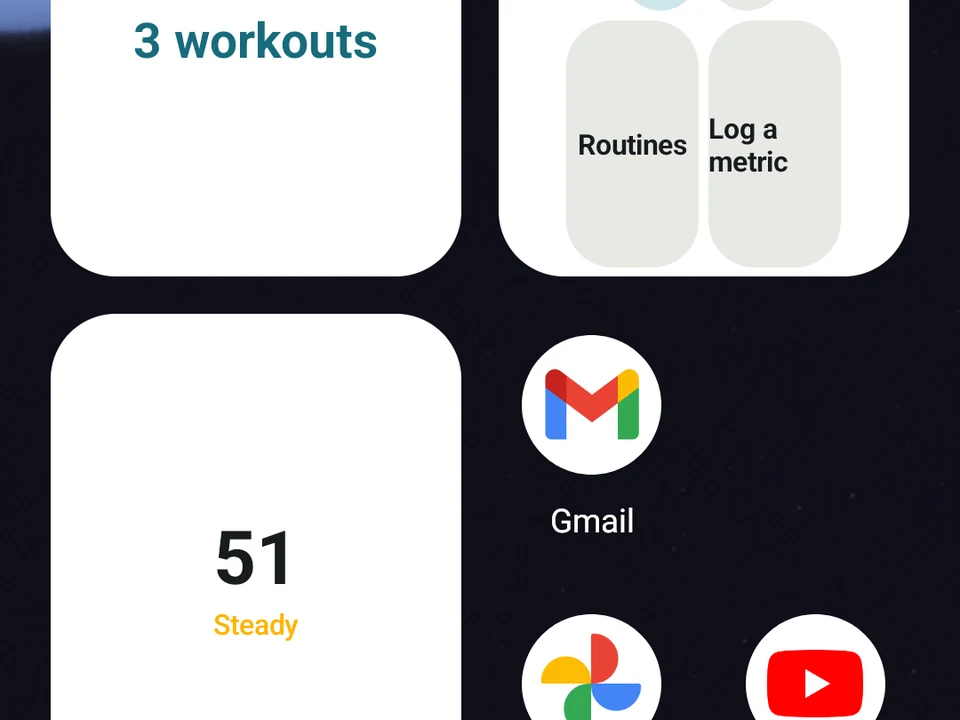
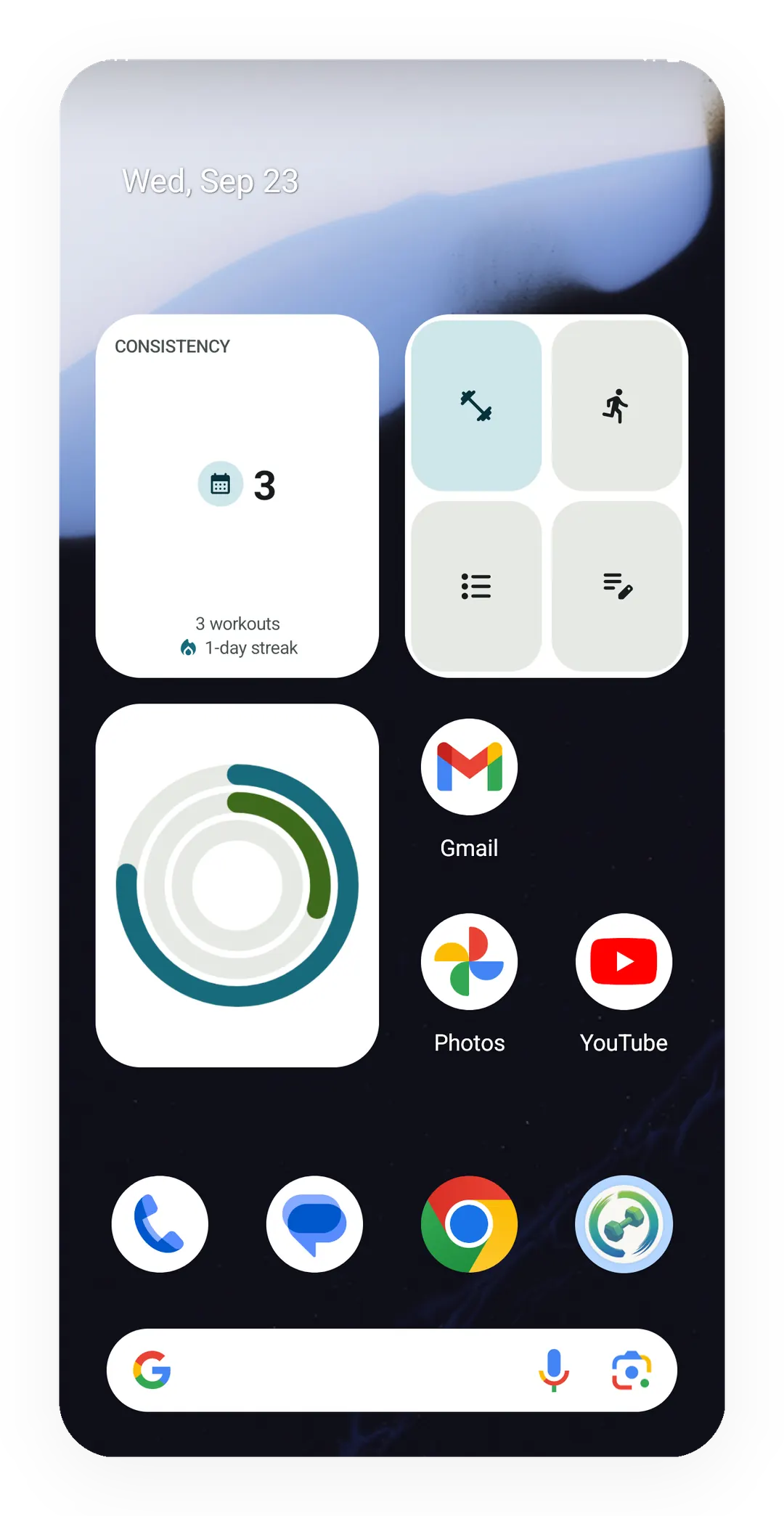
The Progress widget on its Consistency view counts 3 workouts and a 1-day streak, next to Quick Start's four buttons and the Kinoku Rings.
It changes while you train
Mid-workout the tile swaps to your set count and a rest timer that counts down on your home screen, with the app closed.
Tier shape
How access changes by tier
Today, Kinoku Rings, the Muscle Map body, the core Progress lenses and the standard Quick Start actions, with their sizing, look and privacy controls.
Recovery colors on the Muscle Map, the Strength Trend and Volume Landmarks lenses, training-load context on Run Progress, and the Quick Log action.
What it is
A widget is a Kinoku tile you place on your Android home screen. There are five of them, with a job each, and you set up every tile on its own. The app’s Widgets & shortcuts screen previews them all before Android adds them.
- Today helps you decide what comes next. It can show an active session, today’s plan, a Smart Today pick, a recent finish, your Kinoku Score, or your consistency.
- Progress keeps one signal in view: Steps, Consistency, Muscle Coverage, Training form, Strength Trend, Volume Landmarks, Run Progress, or the road you are walking in Journeys.
- Quick Start holds up to four actions you choose, from Workout, Run, Routines, Log, Quick Log, or one named routine.
- Kinoku Rings draws three rings you can read at a glance: your Kinoku Score, today’s steps, and this week’s workouts.
- Muscle Map draws a body and colors the muscles you have been working.
Useful while you train
During a strength workout the Today tile can show the current exercise and the sets you have finished. It can run a rest countdown on the home screen with the app closed. During a run it shows the session and the time so far. Tapping it takes you back into the app, and the tile itself never starts, resumes, or finishes a workout.
Tiles refresh when something changes, whether that is a set, a plan, your score, your steps, your theme, or the widget setup. One safety refresh an hour covers what an event can miss, such as Android stopping the app or the day rolling over at midnight.
Consider filling the four Quick Start slots with the week you actually train: a run, the routine you repeat most, the Log screen, and Routines. Each tile opens the right screen and stops there. The routine tile still waits for your normal Start gesture rather than beginning the session for you.
Progress without opening the app
The Progress tile holds the lens you picked instead of cycling through them:
- Steps, Consistency, Muscle Coverage, and Training form are free.
- Run Progress is free as well, with your seven-day run count, distance, time, and next planned run.
- The road lens is free too. It draws your marker against the length of the road you are walking, and a tap opens your roads.
- Strength Trend and Volume Landmarks are Pro.
- Pro also adds recent training-load context to Run Progress, as TSS (training stress score) or TRIMP (training impulse), where that data exists.
- On the wider tile sizes, the Training form and Strength Trend lenses add a row of dots, one per day for the last eight days, with the highest day drawn larger.
If Pro access ends while a Pro lens is showing, Kinoku falls back to the free Consistency lens for the time being. Your choice is kept and comes back on its own if Pro returns.
Your day as three rings
Kinoku Rings carries three numbers at once, from the outside in: your Kinoku Score out of 100, today’s steps against your daily goal, and this week’s workouts against your weekly goal. There is no lens to pick and nothing to set up beyond how it looks and what it shows on the lock screen.
A ring you have set no goal for still shows your number and simply draws no arc, so the day before you pick a step goal reads as no goal rather than as a goal you missed. A number Kinoku could not read at all shows a dash instead, never a zero.
The muscles you have been working
The Muscle Map tile draws a body and colors the muscles on it. What the colors mean depends on whether you have Pro, and either way you get a tile that works rather than one behind a lock.
Without Pro the body is colored by how many sessions in the last seven days hit each muscle, in three shades, and the tile counts the muscles you trained. With Pro the same body is colored by how rested each muscle is, and the count becomes the muscles that are ready to train. The free tile names what Pro adds on one quiet line and leaves it there.
The two are not asking the same thing, so they can disagree. The free reading counts every session, runs included, while the Pro one leaves cardio out. Seven days of running will color your legs on the free body and leave them plain on the Pro one.
One more honest edge sits on the Pro colors. The tile uses Kinoku’s standard 72-hour window and does not stretch it with your readiness, the way the Muscle Map inside the app does. On a day when your readiness runs high or low, the tile and the app can put a muscle one recovery state apart.
Quick actions that stay safe
Quick Start only opens screens, so a routine tile opens that routine and then waits for the normal Start gesture. If the routine was deleted, the widget asks you to pick another rather than quietly swapping in a different one.
Quick Log stays a Pro action. Without Pro it lands on the standard free Log screen instead, so the tile never turns into a dead end.
Appearance and the lock screen
Each tile can follow Kinoku’s theme or the device theme. The layouts fit the compact square, wide compact, wide, and tall spaces a launcher offers.
Widgets can also sit on the Android lock screen. Summary mode is the default there, and it hides your totals, your history, routine names, and detailed suggestions. Full Details takes a separate choice on each widget, and tapping through still meets Android’s normal screen lock first.
What a widget will not do
A widget reads what Kinoku already holds and cannot log anything for you, so a tile is a window rather than a second app. Every change to your record happens inside Kinoku, and that is on purpose.
Free core, Pro depth
Today, Kinoku Rings, the Muscle Map body, the core Progress lenses, the standard Quick Start actions, the sizing, the appearance controls, and the privacy controls are all free. Pro adds recovery colors on the Muscle Map, plus Strength Trend, Volume Landmarks, the training-load context, and the Quick Log action. Every tile reads data already on your device, and none of them sends your training history to a Kinoku server.
Try it for yourself.
Available on Google Play. The core here is free. Pro adds optional extras.
Get on Google PlayRelated surfaces
Once Kinoku has enough data, the Kinoku Score sums up your recent training, recovery, and health signals. Until then, it shows a learning state instead of a made-up number.
A Today card shows the workout you are due for, the muscles it trains and a Start button. Free automatically spots your A/B/C rotation, follows the Rotation Groups you build, and lists routines that are due. Pro shades that body by how fresh each muscle is, and adds an easy-day pick when your sleep or HRV is low.
Daily steps, streaks, brisk minutes, and an hour-by-hour view of how you moved.
Frequency and training-volume maps are free. Pro adds recovery estimates, readiness context, and exercise picks.