

What's new in Kinoku 1.3
Skill Journeys, maps without the watermark, one answer on the Today tab, and a camera that reads a written program into a routine.
Inside Kinoku
The app surfaces behind this story
 Open full-size image ↗
Skill Journeys on one board
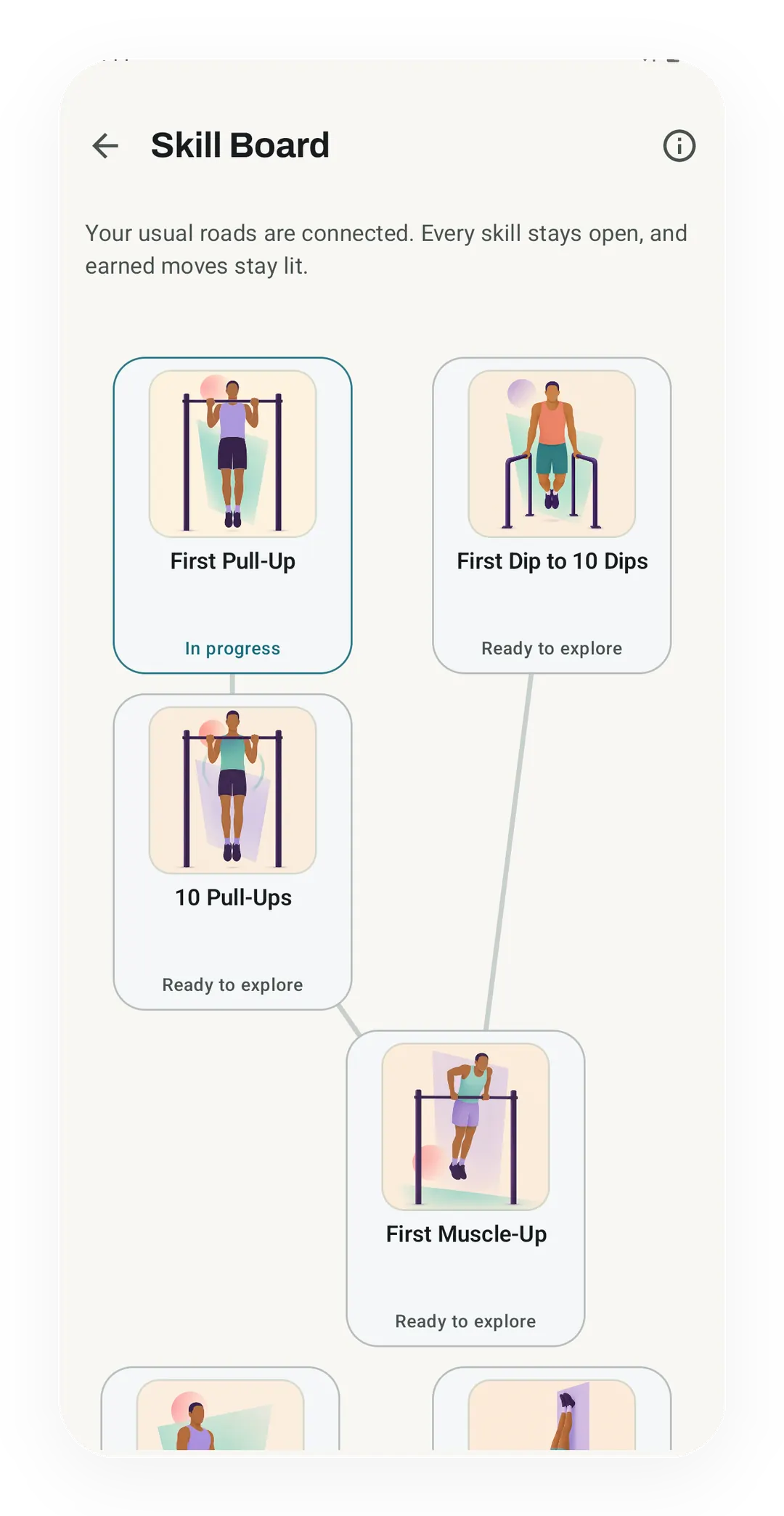
In Kinoku 1.4.0, the Skill Board shows First Pull-Up in progress next to First Dip to 10 Dips, 10 Pull-Ups and First Muscle-Up, which are ready to explore, and none of them carries a lock.
 Open full-size image ↗
One card, and the reason behind it
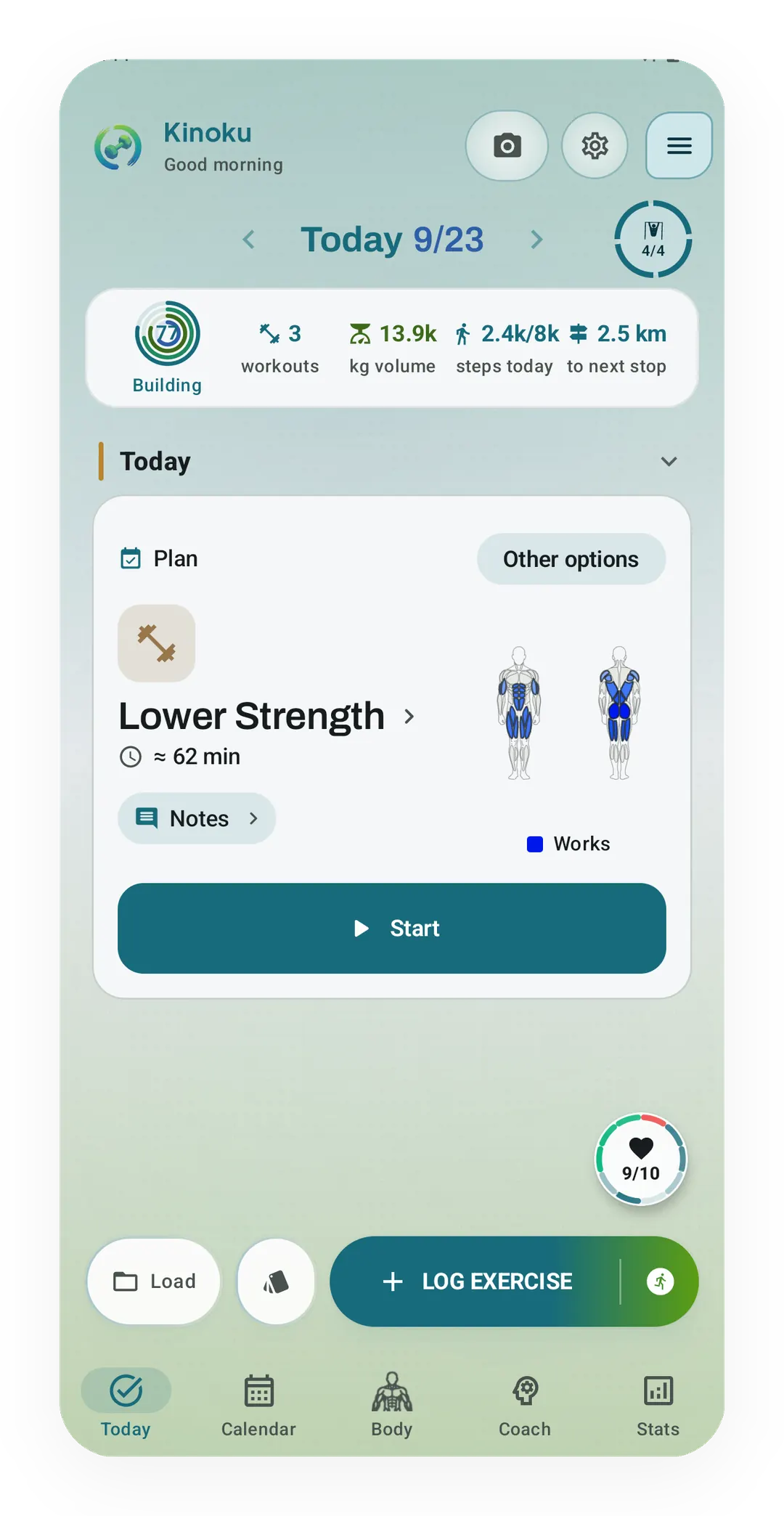
In Kinoku 1.4.0, the Today tab names one pick, Lower Strength at about 62 minutes, marks that it comes from your plan, and keeps the rest under Other options.
In 1.3 the app answers the question instead of listing the options. One card tells you what to train and why, and one colour scale means one pace on every map. A new kind of goal now sits beside the programs you already run.
Here is what landed.
Skill Journeys
Seven free journeys take a move you cannot do yet and lay out the rungs to it. The first pull-up path runs through hangs, rows, negatives and band work, and several journeys can run beside your normal training. Progress comes from the sets you logged rather than dates you ticked off, so a week where you trained on Tuesday instead of Monday still counts. The day you land the move, you get the real weeks behind it and the dated set you started from.
Your maps are clean again
Four of the five map styles used to carry API KEY REQUIRED across them, on screen and on every share card you sent out. Those four come from a new map source now, so they draw clean, and they are drawn on your phone rather than sent as fixed pictures. Roads and labels stay sharp however far you pinch in. Every run map shares one pace colour scale built from your last ninety days of running, so the same colour means the same pace wherever you see it.
Today gives one answer
Five cards used to compete for the top of the Today tab, and the one you wanted was rarely the one on top. Now a single card names the pick and the reason behind it, which is your plan, your usual day for that session, or the next slot in your rotation. Everything the card did not pick moves under Other options, rest included. The numbers along the top of the screen became buttons, and you choose their order.
Scan a program with your camera
Point the camera at a written program, or at a screenshot of one, and Kinoku reads it into a routine. The reading happens on your phone, and you get to check the lines it was unsure about before anything is saved. Some phones can also switch on a local model to help with messy layouts, and that switch stays off until you turn it on.
The reader only knows the Latin alphabet in this first version, so Bulgarian, Japanese and Korean get a notice pointing at the paste-text route instead. Other scripts are the obvious next step, and they are not in this release.
Three widgets and a tile
The home screen work split into three widgets with one job each. Today helps you decide what to train, Progress keeps one chosen signal in view, and Quick Start opens a routine or an action you picked. Every widget shows a plain summary on the lock screen, and full detail is a switch you flip one widget at a time. A Quick Settings tile and shortcuts on the app icon start or resume a session from anywhere.
Training form counts more of your week
The form curve used to score your lifting and your runs and skip the rest, so a hard swim or a long class read as a rest day. Swims, classes, rowing and mobility work now feed the curve. They score from how hard you rated the session, or from the activity itself when you rated nothing. The line is coloured by band, dates run underneath it, and dragging along the curve reads back any single day.
Every change you make, written down
Change History keeps a readable before and after for the edits you make to your own data, deleted things included. The screen sits in Settings under Import and Export, it costs nothing, and it is read only. So it records what happened without offering to undo it. Cycle entries are the exception worth naming, because those changes stay in the separate protected store the rest of your cycle data lives in.
And the rest
Quiet step tracking counts your steps with nothing in the notification shade. Meridian is a new free theme built from the colours in the app icon, and a Light, Dark and System switch now sits above the theme picker. Picking and reordering the tabs in the bottom bar works on the free tier, and Export for AI hands a small file of your training to whichever AI app you choose. The full list is in the changelog.
Related features
Seven free, offline-first paths to named bodyweight skills, with editable routines, evidence-based progress, graduation receipts, and no active-journey cap.
See saved edits as plain before-and-after changes, including imports and deleted targets. The history stays local, and private cycle changes stay in their own database.
Five Android widgets for the home screen: today's next move, one progress signal, quick actions, your score and goals as three rings, and the muscles you trained in the last 7 days. The core is free; Pro adds the deeper views and Quick Log.
Try Kinoku
Core tracking works offline. No mandatory account. No Kinoku-hosted training-history cloud.
Get on Google Play →