

Exercise Galaxy Explained: How Moves Are Grouped by Muscle
How the Exercise Galaxy places 1,300+ exercises: each move as a list of muscle percents, compared by angle, linked to its closest matches, then laid out in 3D.
Kinoku in practice
Where this shows up in the app
 Open full-size image ↗
The same figures inside the app
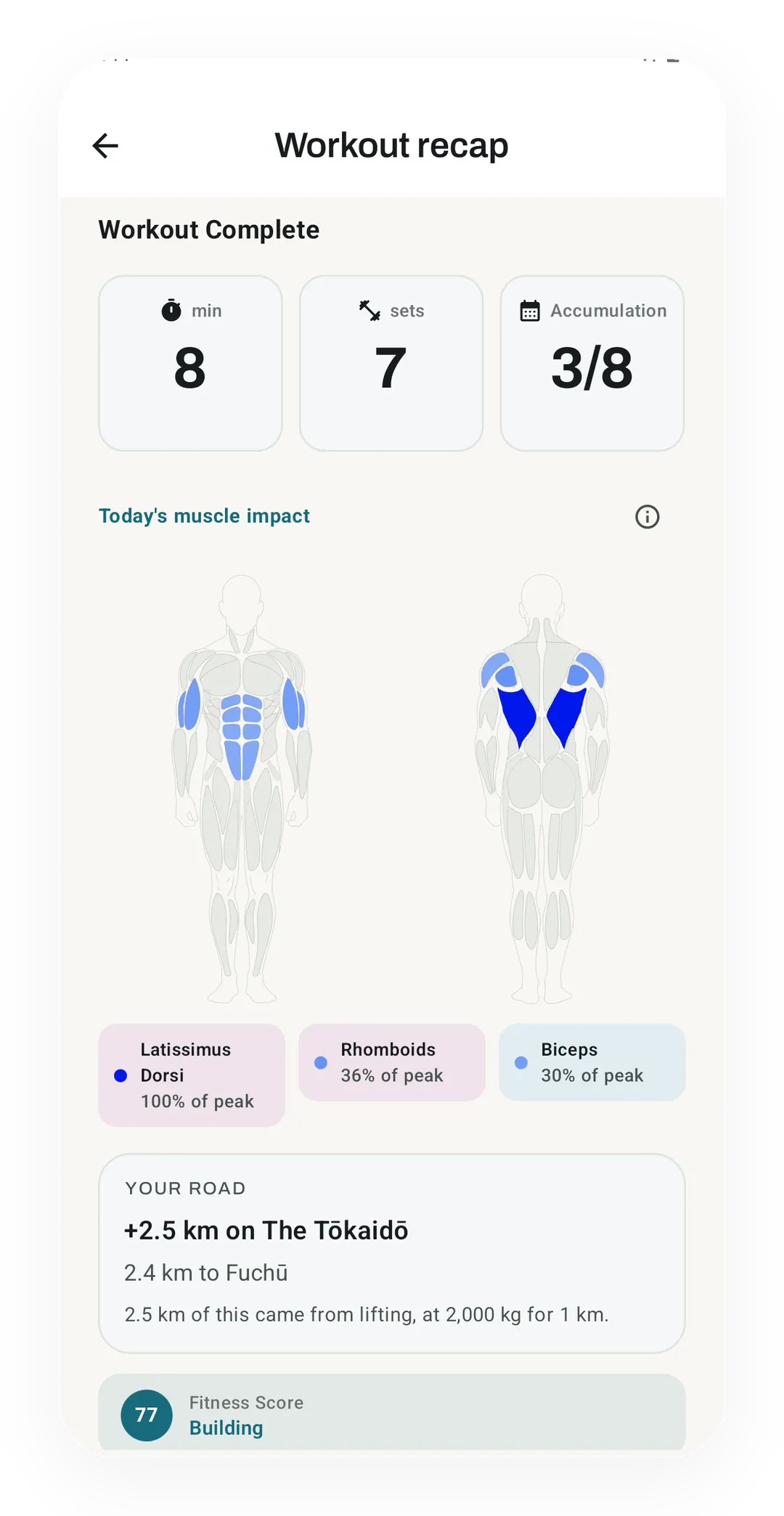
After a 7-set session, the recap shades the body by muscle and lists Latissimus Dorsi at 100%, Rhomboids at 36% and Biceps at 30% of peak.
The Exercise Galaxy places each of Kinoku’s 1,300+ built-in exercises by the muscles it works. It turns every move into a list of muscle percents and compares two moves by the angle between their lists. Each move is then tied to its closest matches, and those ties pull the stars into clusters, so near means the same muscles and not the same gear.
What a star is made of
Each star starts as one row of the app’s exercise catalog, which lists up to 11 muscles for a move with a percent for each. Take the barbell bench press, which the catalog lists as chest 100, front delts 60, triceps 60 and serratus 20. The build writes those figures into a list of 25 numbers, one slot for each muscle the app tracks. Every slot the bench press leaves out gets a zero.
The percents are the app’s estimates for crediting training volume, not lab measurements. When you log a set, Kinoku shares its work out across the muscles a move names. A percent says how much credit a muscle gets, not how hard it fired. The build also follows the app’s own import rules, which add a few helper muscles by exercise name, such as the rotator cuff on a lateral raise. Inside the app, an older set of figures can replace the catalog’s for some moves, the barbell bench press among them, so a phone may show slightly different numbers for those than the galaxy does.
How two moves are compared
The galaxy compares two moves by the angle between their lists, a measure called cosine similarity. The formula multiplies the matching slots, adds up the products, and divides by the length of each list.
similarity = (a1 × b1 + a2 × b2 + ... + a25 × b25) / (length of a × length of b)
length of a = square root of (a1² + a2² + ... + a25²)
The result runs from 0, for two moves with no muscle in common, to 1 for two moves with the same mix. A dumbbell bench press lists chest 100, front delts 60 and triceps 60, so next to the barbell bench press it scores 0.99. A run lists quads, calves, hamstrings, glutes and abs, which share no slot with the bench press, so that pair scores exactly 0.
Scaling a list up or down leaves the angle where it was, so a light move and a heavy move with the same mix count as twins. We chose that on purpose, because the galaxy maps which muscles a move works and not how much load it carries.
From neighbours to a map
The layout follows UMAP, short for uniform manifold approximation and projection, a method Leland McInnes, John Healy and James Melville put out in 2018. It keeps each point’s near neighbours close and lets far ones drift apart, which suits a catalog where you want to know what else works like a move.
The build first merges moves whose lists point the same way, because many of the 1,300+ moves share a mix with another move. Then it runs four steps:
- It links each mix to its 14 closest mixes and gives every link a weight, strongest for the nearest.
- It sets the starting spots with principal component analysis (PCA), which finds the three directions along which the catalog varies most.
- For 500 rounds it pulls linked stars toward each other and pushes each star away from a few random others, with steps that shrink every round.
- It puts each move back around its mix, on evenly spread points in a small ball from a Halton sequence. A group of look-alike moves then reads as a small cluster.
Every random choice comes from a generator with a fixed seed, and the arithmetic avoids anything whose last digit can change between computers. The same catalog therefore gives the same galaxy, star for star, on every build.
How the clusters get their names
The build sorts the stars into 16 clusters with k-means, a method Stuart Lloyd described in 1982. It places 16 centres and moves each one to the middle of the stars nearest to it, until no star changes cluster. Each cluster takes its name from its own stars. The name is the muscle most of them work hardest, plus a second muscle when that one leads at least a fifth of them. A movement pattern such as presses leads the name when more than half of the cluster shares it.
Where the map misleads
A picture in three dimensions cannot keep every distance from a list of 25 numbers, so some neighbours on screen are not neighbours in the data. The chest flyes are the clearest case. A dumbbell fly lists chest, front delts and serratus with no biceps at all, yet the flyes sit next to the curls, in a cluster named “Biceps and chest”. The two groups share only the front delts, and the layout had to put the chest-only moves somewhere.
The card finds the six closest moves from the full lists of 25 numbers, not from the picture, so its list is the better guide. The figures have limits of their own as well. They say nothing about gear, joint angles, range of motion or how hard a move is, and they cover the built-in catalog only, so your own custom moves never appear.
The body view
The page also has a body view, where each exercise becomes one light for every muscle it works. The lights sit on the app’s own muscle map, spread evenly inside each muscle by the same Halton points, and each one is sized by the catalog’s percent. Only the muscle under a light is data. Its spot inside that muscle, the depth of the figure and the poses are drawing, so the counts on the figure are the numbers to read.
Where Kinoku uses the same figures
In the app, per-muscle figures turn every set you log into work for each muscle. The Muscle Impact recap shades the body by that work after a session, while the Muscle Map colours the week. The Exercise Library lists each move’s muscles next to its form notes. The galaxy shows the whole catalog at once, and the app is where the same kind of numbers add up for your own training.
Track this in the app
Exercise Library
1,300+ built-in exercises with muscle data and unlimited custom moves are free. Pro adds custom form photos and assisted sorting.
Core tracking works offline, with no mandatory account.
Related features
1,300+ built-in exercises with muscle data and unlimited custom moves are free. Pro adds custom form photos and assisted sorting.
Frequency and training-volume maps are free. Pro adds recovery estimates, readiness context, and exercise picks.
A body shape colored by this session's effort per muscle, with the top 3 muscles shown as pills.