

Plate Math and Warm-Up Sets, Explained
How to work out the plates for each side of a barbell in kg or lb, why the heaviest plate goes first, and how warm-up sets climb to your working weight.
Kinoku in practice
Where this shows up in the app
 Open full-size image ↗
The plate sheet in the free app
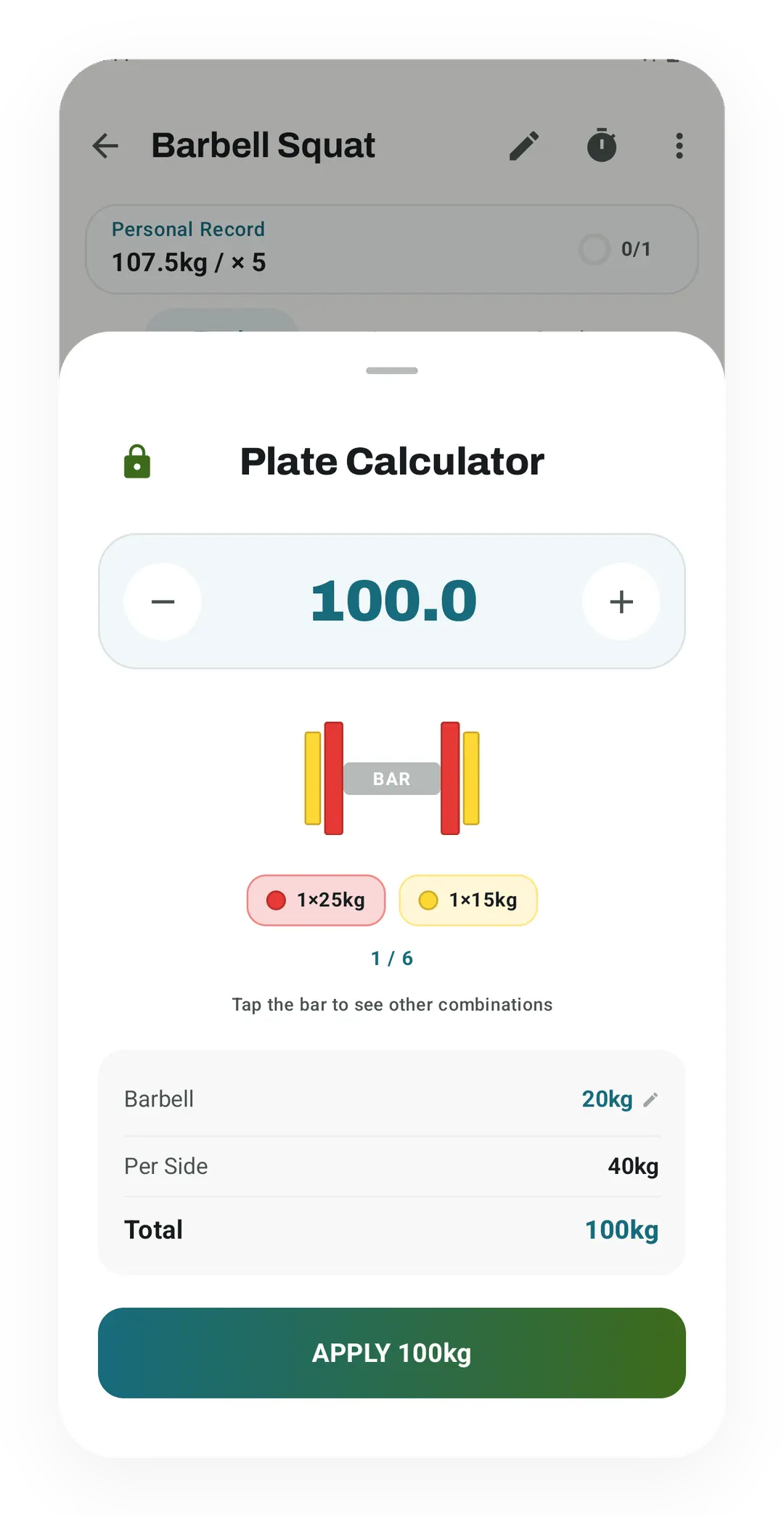
For 100 kg on a 20 kg bar, the sheet puts a 25 kg plate and a 15 kg plate on each side. The plate calculator is free; editing your plate list is a Pro setting.
Plate math answers one question: what do you slide onto each end of the bar to reach a weight? You take the bar away from the target and split what is left in half, because both sides carry the same load. The plate calculator does that sum, draws the loaded bar, and plans the warm-up sets that lead up to it.
The two steps
Say the plan calls for 100 kg and the bar weighs 20 kg. The plates need to add up to 80 kg, so each side gets 40 kg. Then you fill those 40 kg with the plates on the rack, starting with the heaviest one that still fits. A 25 kg plate leaves 15 kg to go, and a 15 kg plate closes the gap.
Pounds work the same way. For 225 lb on a 45 lb bar, the plates add up to 180 lb, so each side holds 90 lb, which loads as two 45 lb plates.
Why the heaviest plate goes first
Starting with the biggest plate keeps the stack short, which matters when you load and unload between sets. It also gives one fixed answer for a given rack, so the bar you load today matches the bar you wrote down last week. This is the rule the plate sheet in the Kinoku app follows, and the web calculator copies it.
The rule has one weak spot. With an unusual set of plates, starting big can leave a few kilos you can’t fill, even though a different mix would land on the number. If the result says you are short and the gap looks odd, try unticking the biggest plate to see whether a smaller mix gets there.
When the weight can’t be made
Small plates decide how fine your jumps can be. With 1.25 kg plates, the smallest change you can make is 2.5 kg, one small plate on each side. If your gym only goes down to 2.5 kg plates, the step becomes 5 kg, and a target like 102.5 kg can’t be loaded at all. The calculator then shows the closest weight below the target and how far short it is, so you can choose between that and the next step up.
Warm-up sets that climb to the work
A warm-up ramp gets you to a heavy set without wasting energy on the way there. The calculator uses the same steps as Kinoku’s Warmup Generator: 50, 60, 70 and 80 percent of the working weight, for 12, 8, 5 and 3 reps. Each step is rounded to a weight your plates can make, so every row comes with its own plate list.
For a 100 kg working set on a 20 kg bar, the ramp reads 50 kg for 12, 60 kg for 8, 70 kg for 5 and 80 kg for 3. Light working weights get a shorter ramp. When the working weight is at most one and a half times the bar, the ramp is a single set of ten with the empty bar, because the percentages would land on or below it.
These steps are the app’s defaults, not a finding from a study. If your coach or your program sets its own warm-up, that one comes first, and this ramp is a fair place to start when nothing else is written down.
What the calculator leaves out
- It doesn’t know what your bar weighs. Most gyms label theirs, and a bar with no label is worth weighing once.
- It treats every ticked plate as available in pairs, with no limit on how many.
- Collars add weight too, and the calculator leaves them out, so weigh yours if you want the exact total on the bar.
Doing it inside a workout
In the Kinoku app, the plate sheet opens from the menu of any barbell exercise while you log, and the weight you choose goes straight into the set. The warm-up ramp sits in the same screen as a button that adds the sets for you. Both are free, and Pro adds the setting to edit which plates your gym has.
Track this in the app
Plate Calculator
Load the bar fast with a visual plate layout. The calculator and bar-weight setting are free; Pro adds custom plate inventory settings.
Core tracking works offline, with no mandatory account.
Related features
Load the bar fast with a visual plate layout. The calculator and bar-weight setting are free; Pro adds custom plate inventory settings.
Warmup sets built from your working weight, bar weight, and unit system.
Every set, one tap. Track how hard each set felt, your rest timers, set types, and notes.