

A run, a lift and a yoga class in one day, logged properly
One day with a morning run, a gym session at lunch and an evening yoga class, each logged the way it happened and added up on one training scale.
Inside Kinoku
The app surfaces behind this story
 Open full-size image ↗
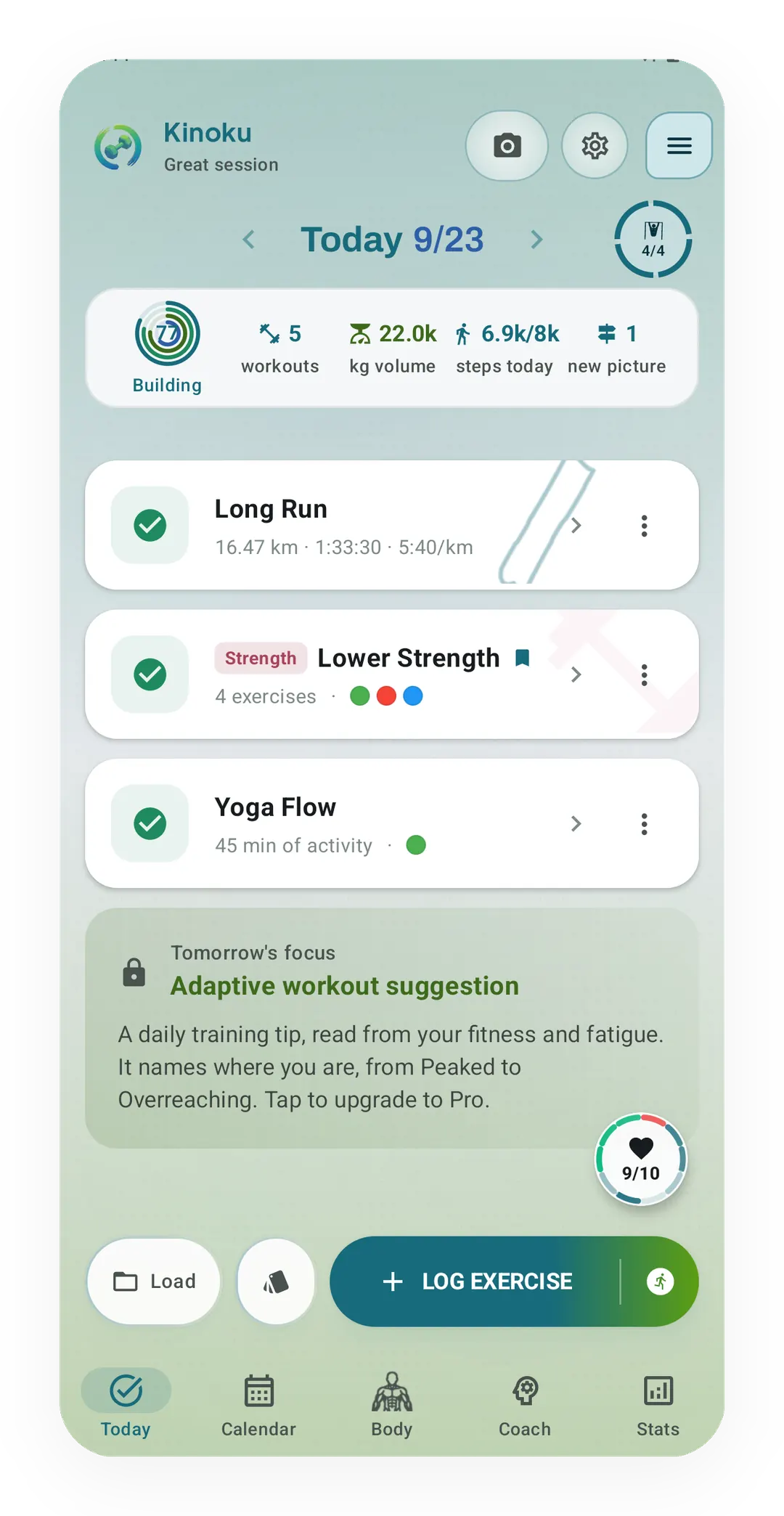
One day on the Today screen
The morning run, the Lower Strength session and the evening Yoga Flow class each get a card on one Today screen, under the week's workouts, the week's lifted volume and today's steps.
 Open full-size image ↗
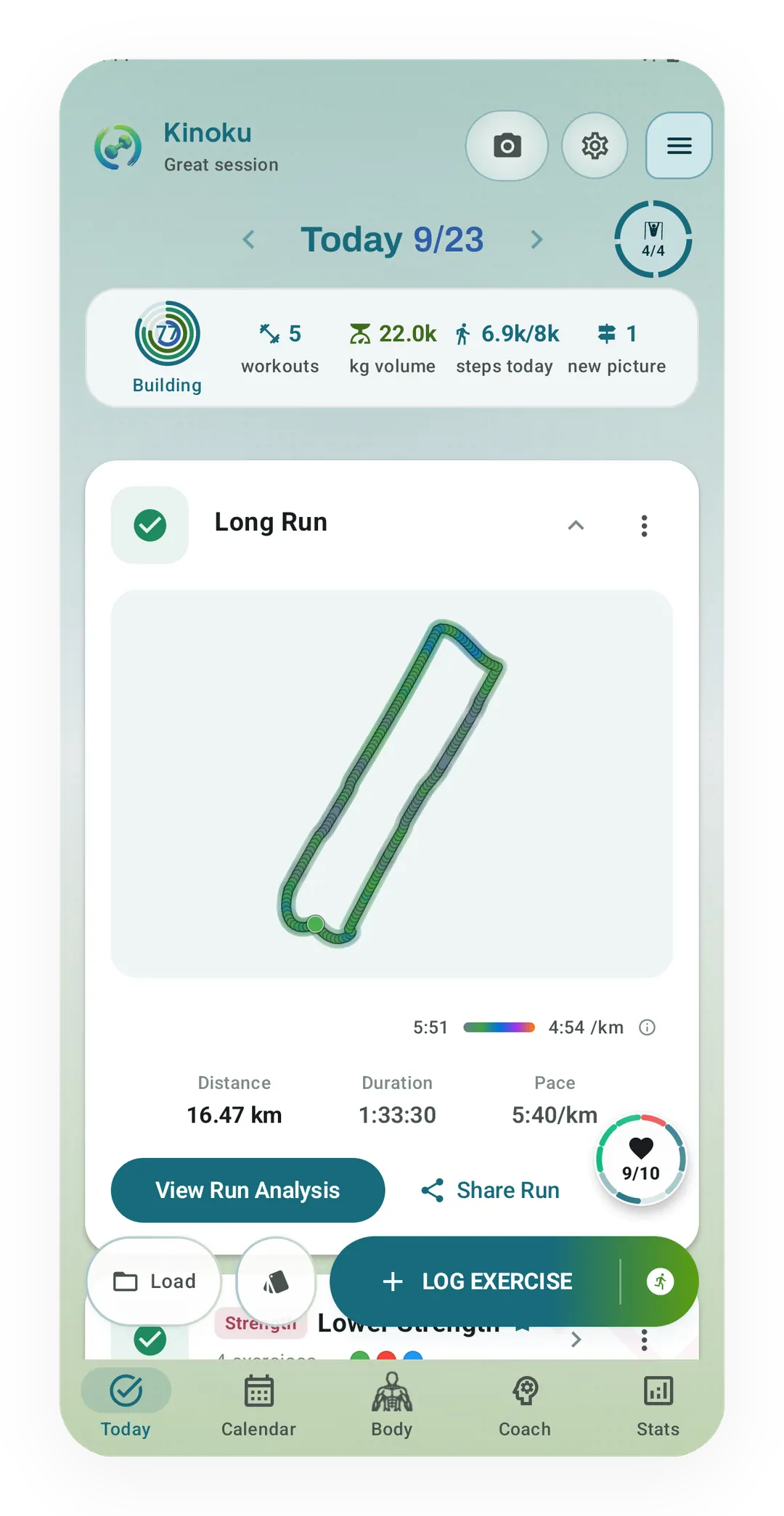
The run, opened
The newest run of the day opens with its route coloured by pace, then its distance, time and pace, and a button to the full run analysis.
 Open full-size image ↗
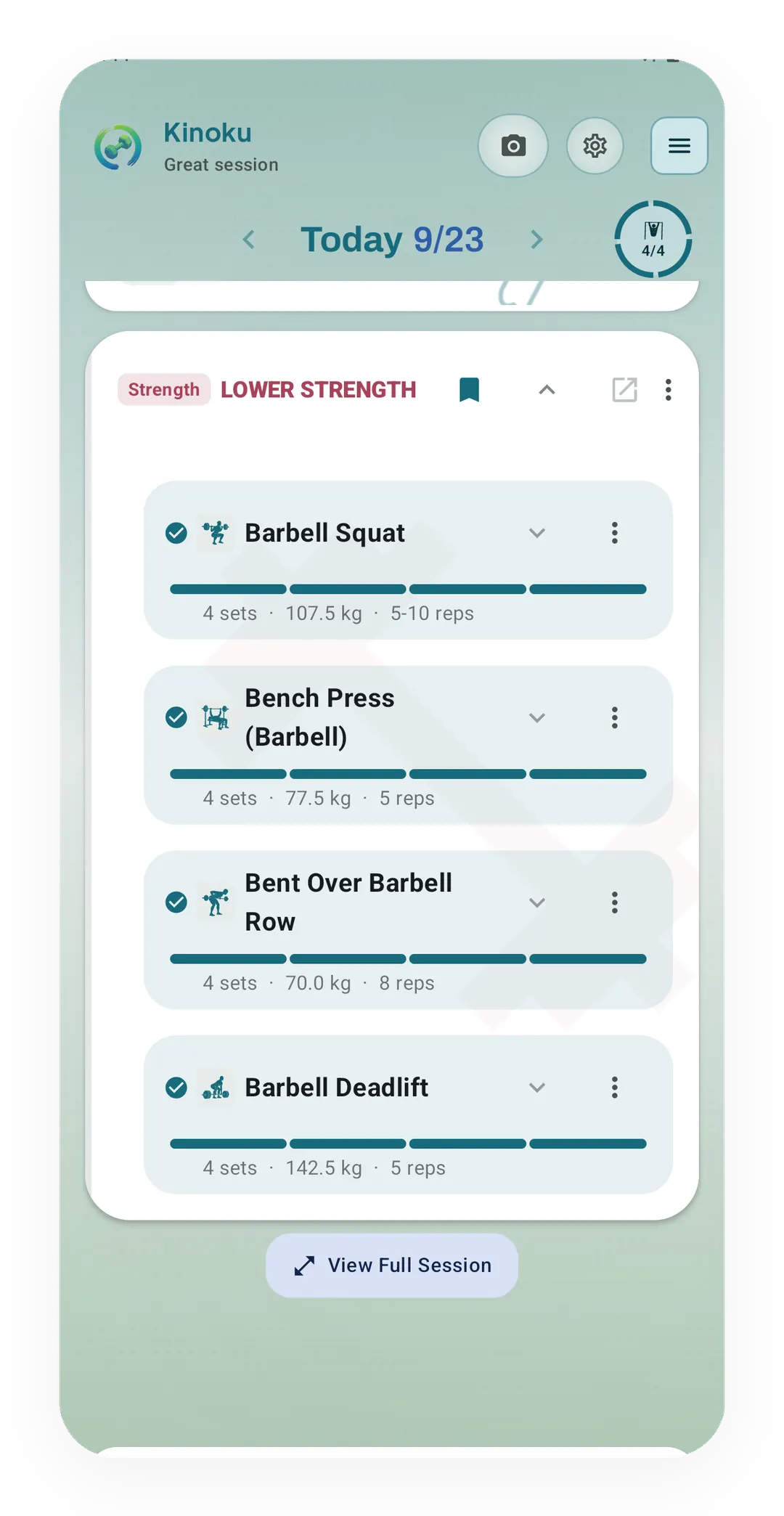
The gym session, opened
Opening the Lower Strength card shows each lift with its number of sets, its top weight and its reps.
 Open full-size image ↗
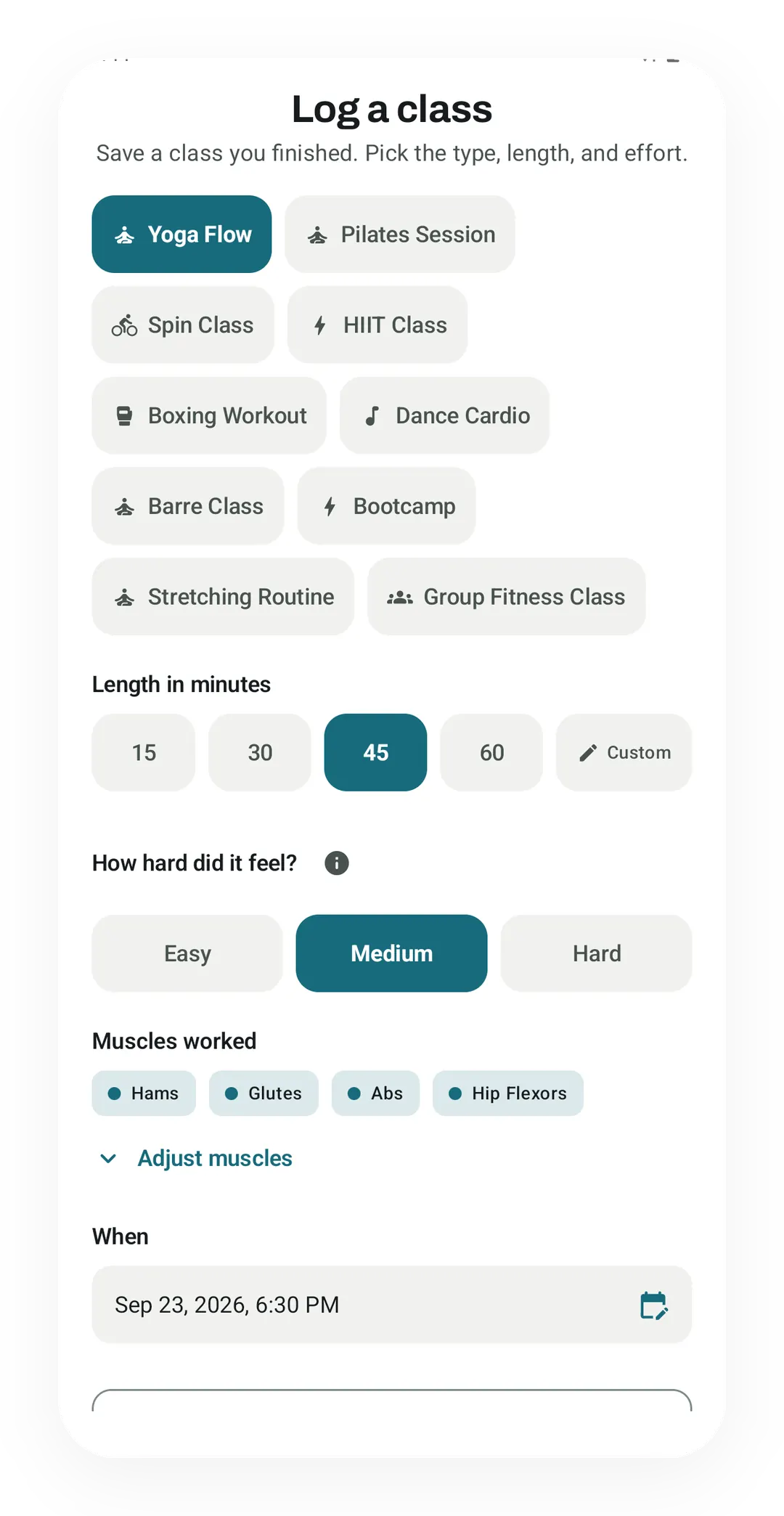
The class, before Save
Log a class with Yoga Flow, 45 minutes and Medium picked. The muscles fill in from the class type, and the start time follows from the length.
A day with a run, a gym session and a yoga class needs three kinds of record. The run needs its route and pace, the lifting needs its sets and reps, and the class needs its length and how hard it felt. Kept in one log in those shapes, the three sessions sit side by side and add up to one number for the day.
Why a mixed day ends up in two or three apps
A running app records the route but has no place for the sets of a squat, and a gym log keeps your sets but has no map. A yoga hour often goes unlogged, because it has no sets and no distance to enter. The day ends up split across apps, and none of them can say how hard the whole day was.
One example day
Take one Wednesday, which this post follows to the end:
- At 06:00, a long run of 16.47 km in 1:33:30, at 5:40 per kilometre.
- At 12:15, a Lower Strength session with squats, bench presses, barbell rows and deadlifts, four sets of each.
- At 18:30, a 45-minute yoga class that felt medium.
In Kinoku, each of the three gets its own card on the Today screen. Above the cards, a strip shows the week’s workouts, the week’s lifted volume and today’s steps, so the walking between sessions shows up too.
The run keeps its route, pace and splits
A run in Kinoku is a GPS record. The runner button at the end of Log Exercise opens a new run, and the phone records the route as you go. When the run ends, its card shows distance, time and pace, and the newest run of the day opens with its route map coloured by pace. View Run Analysis holds the splits and the rest of the run’s numbers.
The gym session keeps every set
The gym session is a list of lifts, each with its sets. Load opens your routines, and the routine you pick starts with its exercises in place. Each set takes a weight and a number of reps, and you can switch on a rate of perceived exertion (RPE), a score from 1 to 10 for how hard the set felt. Once the session is done, its card shows the scene you started it from and the number of exercises, and opening the card shows each lift with its sets.
The yoga class keeps its length and effort, without fake sets
A yoga class has no sets or distance, so Kinoku logs it with a sheet of its own called Log a class. The sheet opens from the Today screen, from the side menu or from search:
- Pick the class type. Yoga Flow sits next to Pilates, Spin, HIIT (high-intensity interval training) and six other types.
- Pick the length: 15, 30, 45 or 60 minutes, or type your own.
- Pick how hard it felt: Easy, Medium or Hard.
- Look over the muscles it fills in from the class type, and change them if your class worked something else.
- Check When, which starts out as the class having just ended, then tap Save.
The class is saved as finished, so no session is left running. On the calendar it shows under its own name, beside the run and the lift.
How the three sessions add up
Kinoku turns every session into points on one training-load scale, so a run, a lift and a class can be added together. Those points feed the Form curve, the free chart on the Coach screen that shows how fresh or tired you are. Here is what each session from the example day counts for:
| Session | What Kinoku reads | Load points |
|---|---|---|
| Long run, 16.47 km | Its running power estimate, or its heart rate or pace when there is no power estimate | 102.1 |
| Lower Strength, 14 working sets | Weight times reps for each working set, raised for the sets that felt hard | 121.5 |
| Yoga Flow, 45 minutes | Minutes times effort (6 for Medium), times 0.2 | 54.0 |
| The three sessions | 277.6 |
Warm-up and drop sets do not count toward the lifting score, which is why 14 of the 16 sets appear in the table. The class score follows Carl Foster’s session-RPE method (Foster and others, 2001), which multiplies the minutes by how hard the session felt. Brisk walking between the sessions adds a little more to the day, from its brisk minutes. The class adds no lifting volume, so the muscle map’s volume view still counts only the gym session. The methodology page explains how each kind of session is scored.
Where it stops
A class score is an estimate built from a length and one of three effort levels, so two very different 45-minute classes can score the same. Kinoku is also Android only, and it has no sync between two phones.
Run tracking, set logging, Log a class and the Form curve are all in the free version of Kinoku, and Pro adds a forecast to the Form curve and deeper run analysis.
Related features
Every set, one tap. Track how hard each set felt, your rest timers, set types, and notes.
Live pace, splits, a route map, and audio cues. Your run record is not uploaded to Kinoku; map tiles load when you view maps, and weather is a clear opt-in.
The lead card on the Coach screen shows how fresh or tired you are right now. One Form line sits over three soft bands: Fresh, OK, and Tired, with a state pill beside it. Tap Show fitness details for the fitness and fatigue lines behind it. The base chart is free for all. Pro adds forecast lines and a note in plain words.
Plan workouts on one calendar, with no limit on how many plans you keep or how far ahead you plan. Pro adds repeating schedules (weekly, custom days, or every few weeks), drag-to-move, bring-to-today, repeat-day, and day copy.
Try Kinoku
Core tracking works offline. No mandatory account. No Kinoku-hosted training-history cloud.
Get on Google Play →