

What's new in Kinoku 1.2
One paid plan instead of two, training programs and the calendar moved to free, and you can log a class you took.
Inside Kinoku
The app surfaces behind this story
 Open full-size image ↗
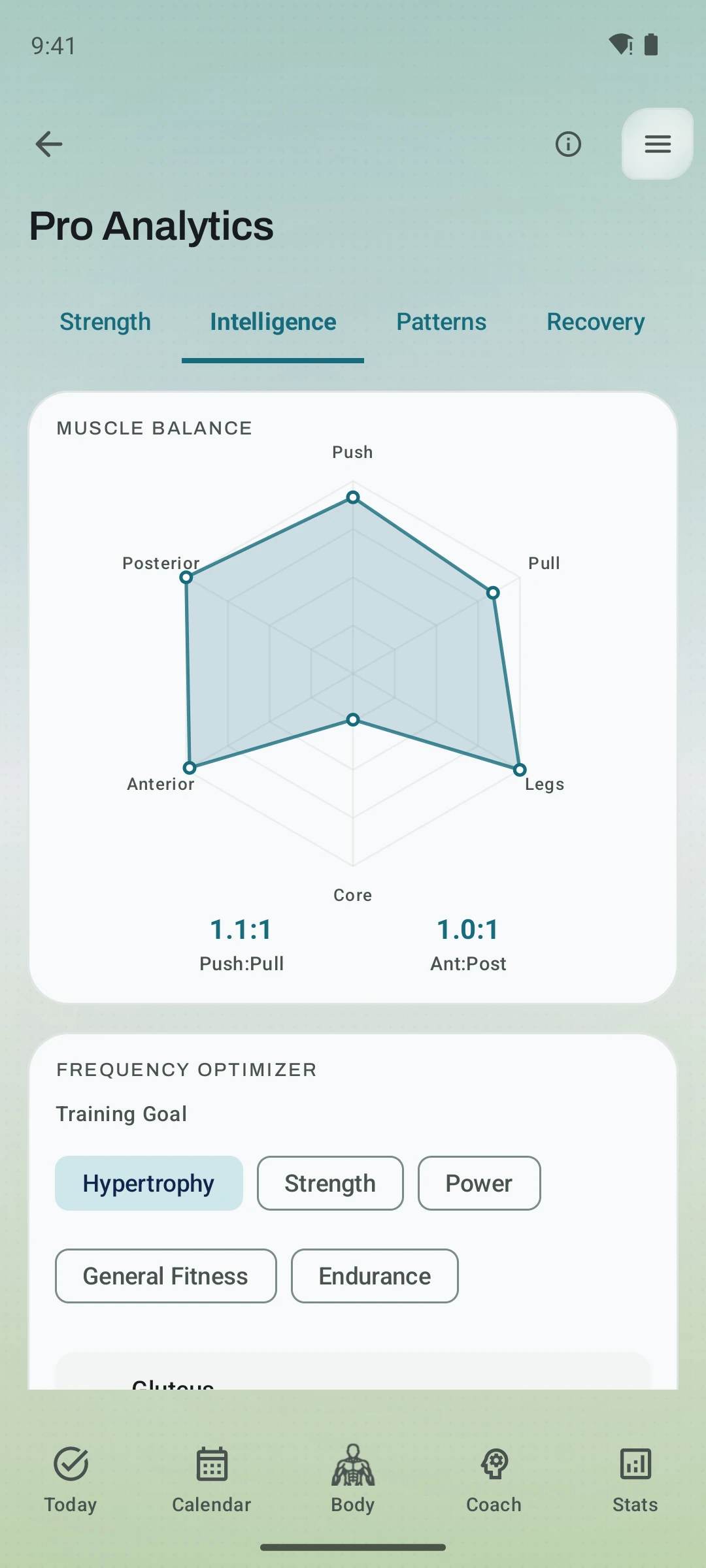
Deeper analysis, still readable
The 1.2 analytics work added richer strength and recovery views while keeping the underlying signals visible.
Kinoku 1.2 is mostly one decision and what came of it. There used to be two paid plans, and now there is one, so a lot of what sat behind a paywall does not sit there any more.
Here is everything that landed in this release.
Elite is gone
Everything Elite held moved into Pro, at the price Pro already cost. The analytics hub, Readiness, autoregulation, weight suggestions, Coach patterns, race predictions, and ghost run compare are all Pro now.
Nothing you already paid for costs more, and nothing you already had went away. If you were on Elite, you are on Pro with the same access.
The hub is called Pro Analytics instead of Elite Analytics, with the same tabs, the same numbers, and the same place in the menu.
Training programs are free
The whole periodization system moved to free, which means the builder, all 15 templates, and the named programs with their weight progression: 5/3/1, GZCLP (a beginner barbell program), nSuns. There is no cap on how many you keep or run.
Three things stay Pro, and they are the three that tune a program for you rather than run it: volume landmarks, reps in reserve (RIR) autoregulation, and readiness adaptation, while the program itself is yours.
The calendar stopped counting
Free users used to get ten planned workouts, two weeks ahead, and both limits are gone. You can plan what you want, as far out as you want.
Five shortcuts stay Pro: drag a plan to another day, pull one to today, repeat a day, move a whole day, and set a workout to repeat, while copying a day to today is free.
Custom metrics lost their limit too, so every type is open and importing a file no longer trims them.
Log a class you took
Pick the activity, how long it ran, how hard it felt, and the muscles it worked. Yoga, spin, HIIT (short, hard intervals) and barre are all in the list. The session lands on your calendar and on your muscle map like any other workout.
Logging a class takes a few taps, and it is free.
Edit an exercise while you train
Change an exercise’s name, type, gear, or muscles from the workout screen. Kinoku shows you what the change touches first, then asks whether your past workouts should come along or keep the old version.
Two things that used to go wrong stopped: an app update no longer puts our settings back over yours, and renaming a built-in move no longer makes the next update add it back under the old name.
Two new looks
Volt and Ensō Red join the theme list, which makes 25 themes in this release, 19 of them free. Both come with a matching home-screen icon, and Kinoku asks which look you want the first time you open it.
You can pin an icon by hand in Settings, under Appearance.
The watch app
The watch now asks for the permissions it needs. It never used to, so on newer watches a run crashed the moment you tapped Start, and heart rate stayed off entirely.
Text and buttons stay inside the round screen instead of being sliced by the curve. Your watch face shows the session by name with a stopwatch that counts with you, and tapping it takes you back. A workout you finish on the watch now arrives on your phone finished, even if the two were out of range at the time.
And the rest
Step tracking uses far less battery, and your run map explains its colors. Repeating your best set no longer shows a new personal record (PR) it did not earn. Rewards queue end to end instead of overlapping, so banked hours deliver what they say.
The full list is in the changelog.
Related features
A 4-phase planning stack. The builder, all 25 templates, named programs with auto-progression, the custom model, and unlimited active programs are free. Pro adds volume targets, readiness tuning, and auto set changes.
Plan workouts on one calendar, with no limit on how many plans you keep or how far ahead you plan. Pro adds repeating schedules (weekly, custom days, or every few weeks), drag-to-move, bring-to-today, repeat-day, and day copy.
Track anything with toggle, scale, value, duration, time-range, and combined metrics. Every type is free, and there is no limit on how many you keep active.
26 themes with color and motion: 20 free and 6 Pro (Ironwood, Sakura, Emerald Foil, Kamon, Obsidian, Aurora).
Try Kinoku
Core tracking works offline. No mandatory account. No Kinoku-hosted training-history cloud.
Get on Google Play →