

Why your workout log needs an edit history
When you edit or fix a past workout, a good log keeps the old values beside the new ones. Here is why that edit history matters, and how Kinoku keeps it local.
A workout log is a memory you can trust only when it keeps the edits as well as the results. Most logs keep the load you lifted, the run you did, the plan you made, and the note you wrote, and they show that final answer well. They help much less when you need to know how it got there.
Take one squat from last month, which now reads 102 pounds for ten reps and looks wrong. Did you fix a plate entry, change units, or take the set from an import that wrote it that way? The final row cannot tell you, and that squat is the example this post carries to the end.
The missing story matters, because we edit training data for normal reasons. We fix typos, move a session to the right date, tune a plan, or bring back a deleted item, and we may also bring years of logs in from another app. A useful log makes those fixes easy to grasp.
A final number hides its path
Small edits happen all the time around normal training. You enter 100 kilos when the bar was 100 pounds and then fix it, or you change a plan from three sets of eight to four sets of six. You rename a move so it fits what you did, fix a run date that fell after midnight, or import a file, find one bad batch, and undo it.
The record may now be right in each case, and the doubt comes later, when a chart moves or a plan looks new and you cannot recall why. With no edit history the app can show only the last value, so your mind has to fill in the rest. Memory is a poor home for a key part of the story, and it gets worse after months or years of use.
Five questions a useful history should answer
A good change record does not need tech terms, because it only has to answer five plain questions.
What happened? “Changed workout” is better than a raw table name, and “Restored from Trash” or “Imported a training file” tells you more still.
When did it happen? The time helps you link an edit to what you did that day, and a list split by date makes a batch easy to scan.
Where did it come from? A phone edit is not the same as a Wear update. Voice, a shortcut, an accepted suggestion, and a file import each have a source that helps explain the result.
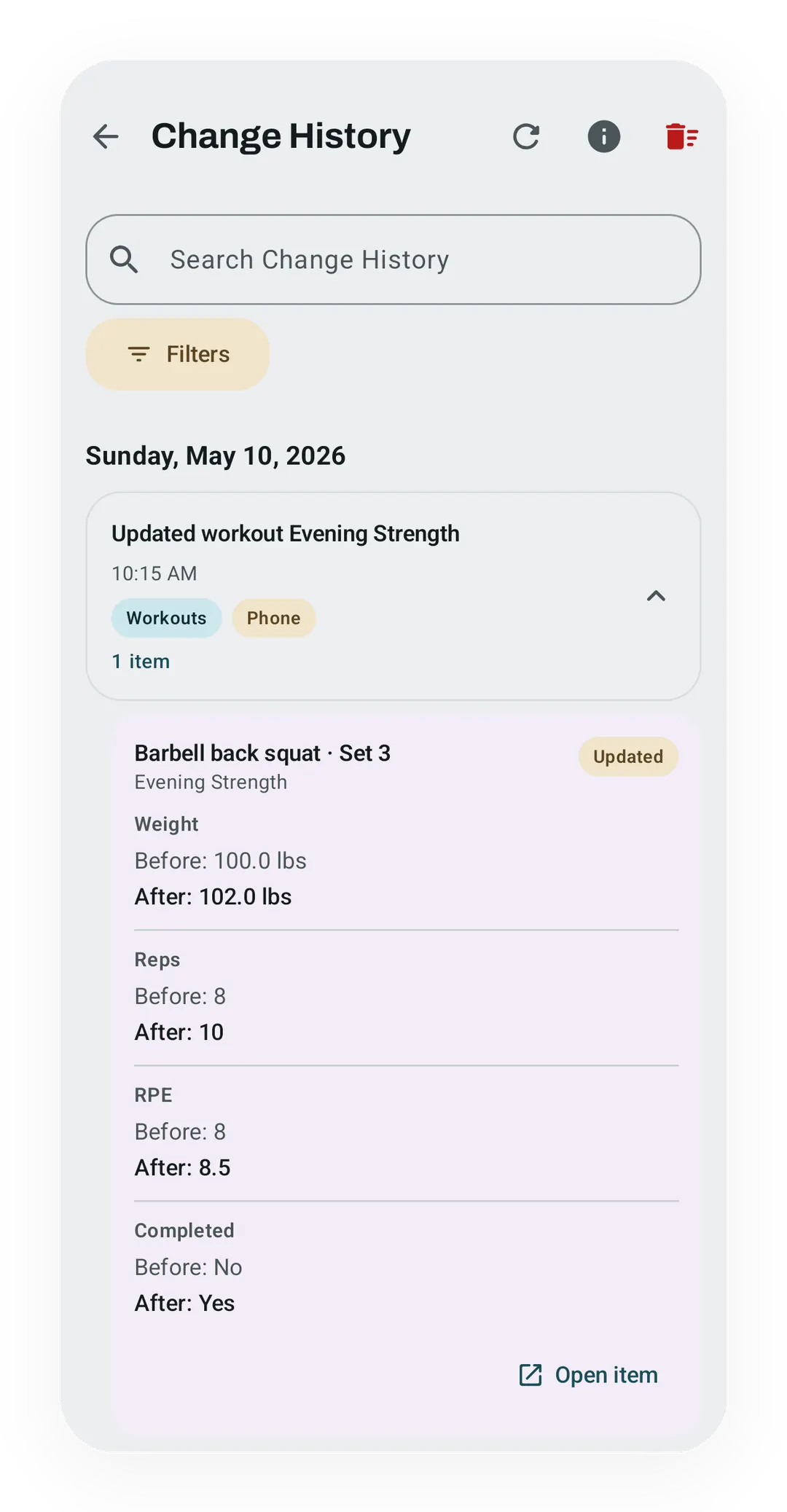
What changed? “Record changed” is too vague, while “Weight: 100 lb → 102 lb” and “Reps: 8 → 10” tell the story of that squat in two lines. Fields from one save stay together as one group.
What did the action affect? A plan move or a file import can touch many items, so the history shows one action first and lets you open its items when you need them.
This shape works beyond a workout, since it can explain a new metric or step goal, a new scene name, a photo restore, or a profile edit. The words may change, but the questions do not.
Readable history and undo are different tools
The common confusion is treating history as undo. Undo answers whether you can put an item back, while edit history answers what happened to it.
Putting both tools together sounds handy, but it brings hard choices. An old field may clash with a newer workout edit, an old plan may affect a session that began from it, and undo for a file import may not work like a change to one set. A read-only history keeps its promise clear: it keeps the facts, and you make the next edit on the screen that owns the data, where its rules and linked actions already live. Trash can bring back some deleted items, and a backup can bring back the whole app state.
This also keeps the history safe to read, because opening an old entry never changes the data you have now. In the squat example, the history tells you the 102 came from an edit of 100, and the set row is where you would change it again if 100 was right.
Transparency without surveillance
“History” can sound like a server watching every click, and it does not have to work that way. The useful line is a saved change to data you own, so a tap from one screen to the next is not a data change and a cache task is not one either. Sensor samples, Health Connect data, stats work, rebuilt records, and background recommendations do not belong next to a weight you changed.
This small scope makes the history easy to read, and it avoids a second feed of use data just to explain the first one.
Where it lives matters just as much. A local app can keep each change on the same phone as the data it describes, with no account or history server. If the record goes into a backup or export, the app says so, which leaves you to choose how to keep that file.
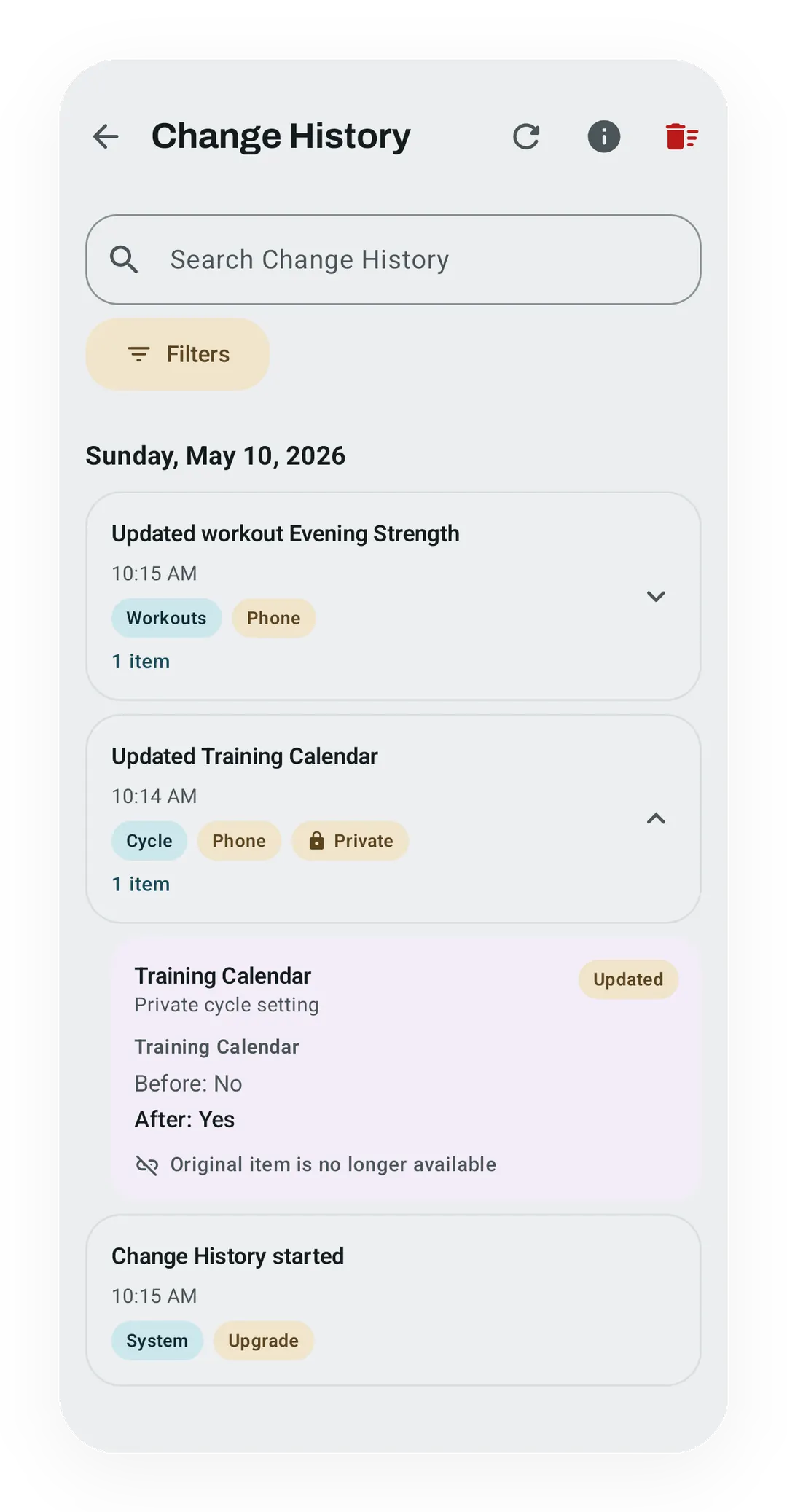
Private health data needs a firmer line. Cycle, symptom, and pregnancy changes can share one screen while their values stay in a private database, because joining two lists on screen does not join where they are kept.
Honest limits make the record more trustworthy
An edit history is more trustworthy when it says what it cannot know.
It cannot rebuild years of edits from final values, so the honest start is one mark after the feature arrives. Your old workouts remain, and no made-up edit stories appear around them. The squat example only has a path if the 100-to-102 edit happened after that mark.
It keeps names after an item is gone, because you may still need to know what changed. The old name and fields stay clear, and the link stays off when there is no live item to open.
Last, a clear action has to mean what it says. Removing the history does not delete the workouts or settings it once described, Delete all cycle data removes its private history too, and turning cycle tracking off does not erase that past.
How Kinoku puts this into practice
Kinoku’s Change History groups each saved action and shows plain before-and-after values. It also shows whether a change came from the phone, Wear, voice, a shortcut, an accepted suggestion, or an import. Search and filters do not load the whole list at once, and the screen is part of Kinoku Free.
The main history stays in Kinoku’s local training database, and private cycle history stays in its own database, so the two join only while you read the screen. Main history can travel in a normal backup or export, while private history takes the stricter path on the Data Sovereignty page.
The history starts when the feature reaches your installation, and it records user changes rather than background work. Because it is read-only, you can clear it after a confirmation but not use it to reverse an edit. Kinoku is Android only, so this record lives on one phone until you carry a backup file across yourself.
Those limits are part of the design, because a good log does not claim to recall what it never saw. The fixed part is the shape: one action, its source, its time, and the fields it changed, kept on your phone. The part that can still grow is how far that shape reaches, since the list of actions it records can grow with the app, and it will never reach back before the day it started.
Inside Kinoku
The app surfaces behind this story
 Open full-size image ↗
The correction stays understandable
One saved set edit shows the old and new weight, reps, RPE, and completion state together.
 Open full-size image ↗
One screen, two storage boundaries
A neutral private display setting can be read beside training changes without moving its value into the main database.
Related features
See saved edits as plain before-and-after changes, including imports and deleted targets. The history stays local, and private cycle changes stay in their own database.
Lossless backup, open CSV and JSON import, Strava import, and a scoped Export for AI handoff.
Deleted workouts and progress photos go to Trash for 30 days. A restored workout rewinds your program max, resyncs Health Connect, and updates bet progress.
Try Kinoku
Core tracking works offline. No mandatory account. No Kinoku-hosted training-history cloud.
Get on Google Play →