

Muscle Heatmap: Frequency vs Volume vs Recovery Explained
A muscle heatmap can track workout frequency, volume load, or recovery states. Learn how each anatomical heatmap works and which metric answers your question.
Kinoku in practice
Where this shows up in the app
 Open full-size image ↗
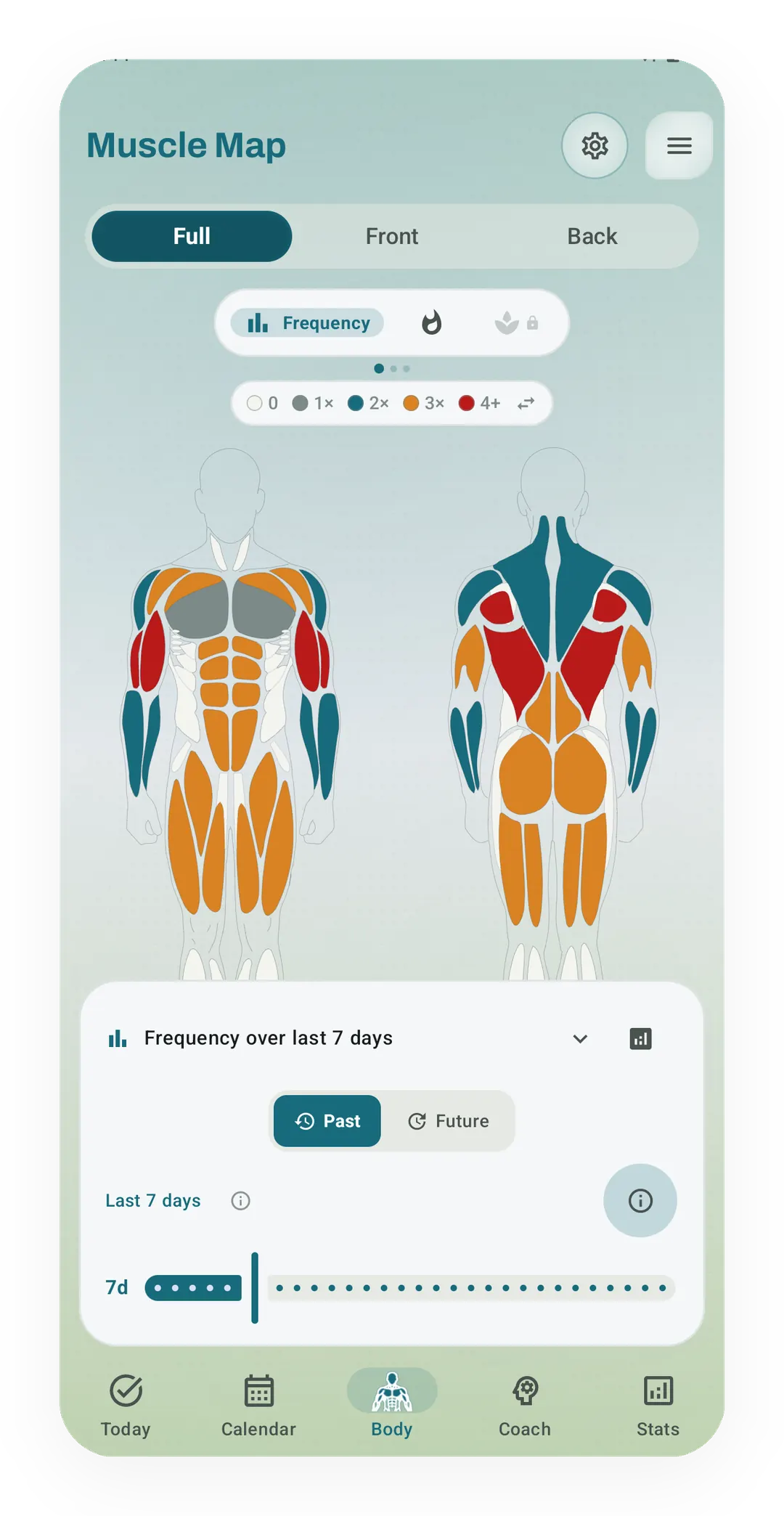
Muscle Map in Frequency mode
Frequency mode colors each muscle, front and back, by how many times it was trained in the chosen window, from 0 up to 4 or more.
Quickstart
A muscle heatmap in a workout tracker can answer three different questions, and the answer changes with the color scale. Frequency maps count how many times a workout touched a muscle, volume maps shade by how much weight you moved, and recovery maps guess when tired muscles are ready to lift again. Reading all three stops a lifter from mistaking light touches for real work.
What each muscle heatmap measures
A muscle heatmap draws a body, front and back, and colors each muscle from the sets you logged. The picture looks simple, yet three apps can shade the same body in three different ways. The difference comes down to the number behind the color.
Rear delts are a helpful example here, because they are the muscle lifters lose track of first.
Frequency heatmaps
A frequency heatmap counts how many workouts touched each muscle over a window of days, such as the last week or month. When you save a bench press, the chest gets one session credit whether you logged one warm set or five hard sets to failure.
Looking at frequency helps spot muscles you forgot to train. Small helper muscles like the rear delts, calves, and neck can easily slide out of a busy routine. A frequency map shows them in plain grey when you have not touched them in weeks.
The limit of a frequency map is that it treats all touches as equal. A lifter who touches their shoulders with light dumbbell swings gets a bright shoulder map. Yet the sets may be far too light to build strength.
Volume heatmaps
A volume heatmap replaces session counts with the weight you moved, multiplying kilograms by reps across every working set. The math also splits the load between the main mover and the helper muscles.
On a heavy deadlift, the glutes and lower back take the largest share of the work, while the upper back and forearms take smaller shares. Some logs also scale each set by effort. They give more weight to sets taken to failure or scored by rating of perceived exertion (RPE) or reps in reserve (RIR).
The strength of a volume heatmap is that it catches empty work. The numbers reveal when a muscle gets touched often without ever lifting real weight. The blind spot is recovery, because a muscle with high volume might be ready to grow or close to burning out.
Recovery heatmaps
A recovery heatmap asks a different question: how rested is each muscle right now, rather than how much weight it moved in the past? Recovery starts with the load from your last session and lets that fatigue fade over twenty-four to ninety-six hours.
Muscles move through four clear stages: fatigued immediately after a hard session, repairing while the muscle rebuilds, and ready or fresh once normal rest is back. Trackers with health links can tune these rest windows using sleep hours and heart rate variability (HRV) from a watch.
The main job of a recovery map is helping you pick what to train today. When your chest still shows as fatigued from Monday, you can switch to a pull day or give your upper body another day of rest. The limit of a recovery map is that no math model can feel a sore tendon or an aching joint.
Post-workout session heatmaps
A post-workout heatmap covers one workout alone, rather than a rolling window of seven or thirty days. The card shades the body by that session’s effort per muscle, setting the hardest-worked muscle to one hundred percent and scaling helper muscles down from there.
Seeing the recap right away shows the shape of a workout before older days muddy the view. You can check whether a leg workout hit the hamstrings as planned, and whether your lower back took more of the load than you wanted.
Side by side
The four maps answer different questions and leave different gaps.
| Frequency | Volume | Recovery | Session Impact | |
|---|---|---|---|---|
| Question | How often did I train? | How much work did I do? | Is the muscle ready? | What did this workout do? |
| Scale driver | Logged session count | Weight times reps | Hours rested and sleep | Share of hardest-hit muscle |
| Best window | 7 to 30 days | 7 to 30 days | Live today | Single workout |
| Blind spot | Treats warmups as full sets | Misses current soreness | Cannot feel joint pain | Misses whole-session weight |
| Free plan | Yes | Yes | Pro | Yes |
The four views work best together, because each one covers the gap the other three leave behind.
Which one Kinoku shows you, and where
Kinoku shows all four views, and it works them out on your Android phone with no cloud account, as of October 2026.
- The Muscle Map screen holds three switchable modes across 1, 3, 7, 14, and 30-day windows. Frequency mode counts sessions from 0 up to 4 or more, while Intensity mode shades muscles by volume scaled against your own past month. Both views are free and work without an internet connection.
- Volume math in
MuscleVolumeCalculator.ktworks out load from the muscles in the exercise list. Sets taken to failure get a 1.2 multiplier, drop sets get 0.8, and warmups stay out of volume totals completely. - Recovery mode is a Pro lens on the same body map that tracks four rest states: fresh, ready, repairing, and fatigued. The engine sets recovery windows between twenty-four and ninety-six hours based on your usual volume, and can tune them with sleep and heart rate variability (HRV) through Health Connect.
- Session Muscle Impact turns up on the post-workout summary sheet and share cards. The recap names the top three worked muscles as pills and draws a body map scaled to that workout’s hardest-hit muscle.
- The home-screen widget puts a seven-day body map on your Android home screen. Free users get a weekly frequency view, and Pro users can switch the widget to show live recovery states.
One limit is worth keeping in mind. The map colors only the sets you save in the app, so a workout you never log leaves no trace. An empty muscle on the screen shows a gap in your log before it shows a gap in your body.
When to use which
The question you have before or after a workout decides which map to open.
- If you are choosing what to train today, look at the Recovery map to check whether your main muscles have cleared their repairing state.
- If you want to catch neglected muscles, open the Frequency map over fourteen or thirty days to spot small helpers that missed out on training.
- If you want to know whether a muscle worked hard enough to grow, check the Volume map to see whether you moved enough weight over the week.
- If you just finished a workout, read the post-workout Muscle Impact card to make sure the target muscles took the brunt of the work.
Whichever you open, read the map as a guide rather than a rule. A green muscle on the recovery view can still feel sore. A pale muscle on the volume map might also have had a tough session of bodyweight holds.
Track this in Kinoku
Kinoku combines frequency, volume, and recovery maps in an offline fitness tracker for Android.
- Muscle Map: the two free rolling modes, the Pro recovery view, and tap-to-inspect muscle trends.
- Muscle Impact: the post-workout summary card and shareable body preset.
- Smart Today: workout suggestions guided by muscle recovery states.
- Pro Analytics: long-range muscle balance and training frequency analysis.
References
Common questions
What is the difference between a muscle frequency heatmap and a volume heatmap?
A frequency heatmap counts how many sessions touched a muscle, while a volume heatmap shades muscles by total workload moved. A frequency map treats one light set the same as six heavy sets, whereas a volume heatmap factors in weight, repetitions, and primary versus secondary muscle recruitment.
How does a muscle recovery map work in a workout tracker?
A recovery map estimates muscle readiness by decaying fatigue over twenty-four to ninety-six hours after your last workout. It moves muscles from fatigued back to fresh as rest accumulates, and some trackers adjust this recovery window with sleep and heart rate data from wearable sensors.
Which muscle heatmap should I look at before a workout?
Consult the recovery map before training to confirm that your target muscles have cleared their repairing state. If your prime movers still show as fatigued, you can adjust exercise selection or work a different muscle group that is already fresh.
Why do my rear delts look trained on frequency maps but stay pale on volume heatmaps?
Secondary muscles often get minor activation during compound pulls, which logs as a session hit on frequency maps. Because rows place the majority of the mechanical load on the back rather than the rear deltoids, a volume heatmap correctly reveals that direct shoulder workload was minimal.
Can a workout app calculate muscle heatmaps without cloud tracking?
Yes. Kinoku calculates frequency, volume, and recovery heatmaps entirely on your device using local SQLite queries. Your logged sets, body measurements, and recovery estimates remain stored on your phone rather than on an external server.
Track this in the app
Muscle Map
Frequency and training-volume maps are free. Pro adds recovery estimates, readiness context, and exercise picks.
Core tracking works offline, with no mandatory account.
Related features
Frequency and training-volume maps are free. Pro adds recovery estimates, readiness context, and exercise picks.
A body shape colored by this session's effort per muscle, with the top 3 muscles shown as pills.
A Today card shows the workout you are due for, the muscles it trains and a Start button. Free automatically spots your A/B/C rotation, follows the Rotation Groups you build, and lists routines that are due. Pro shades that body by how fresh each muscle is, and adds an easy-day pick when your sleep or HRV is low.
A Pro hub with five core tabs, plus a Cycle tab when cycle tracking is on. Its 20+ features include strength scores like DOTS, IPF GL, Wilks, and FFMI, the Banister Form Band, plateau alerts, ACWR, muscle balance, and cycle links.