

TRIMP vs TSS: How a Run Is Scored Without a Power Meter
TSS needs power and a threshold. TRIMP needs only heart rate. With no power meter, Kinoku scores a run as Banister TRIMP times 0.66, or a pace estimate.
Kinoku in practice
Where this shows up in the app
 Open full-size image ↗
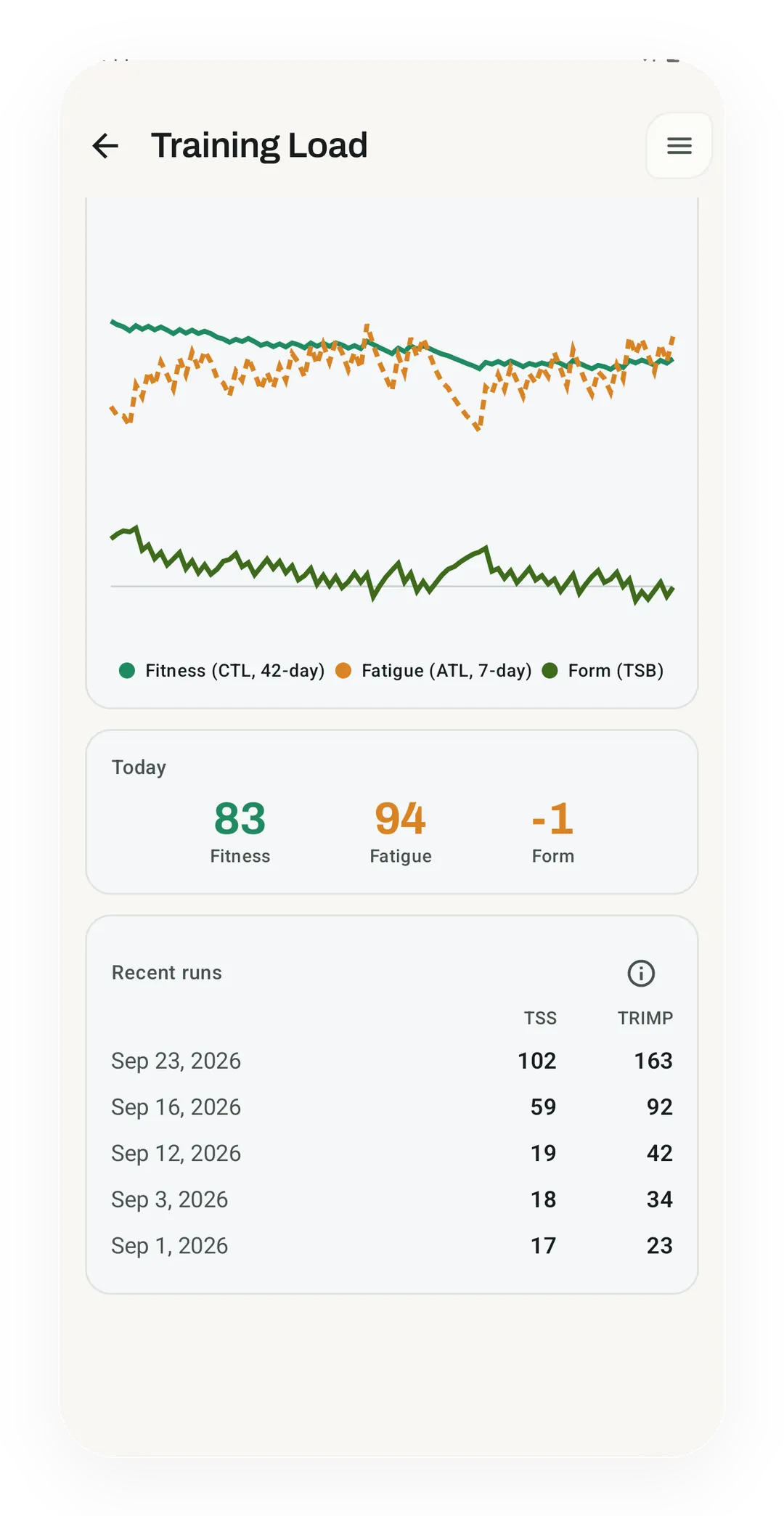
Recent runs, scored two ways
The Pro Training Load screen lists recent runs with a training stress score (TSS) and a Banister training impulse (TRIMP) for each, such as 102 and 163 on Sep 23. TSS fills in only once a functional threshold power (FTP) is set in Profile Settings.
Quickstart
The training stress score (TSS) needs power and a threshold, while training impulse (TRIMP) needs only heart rate, so without a power meter you get TRIMP. Kinoku scores each run in a fixed order: power TSS first, then Banister TRIMP times 0.66, then a pace-zone estimate, and it also stores an Edwards zone-weighted TRIMP.
The metric decoder lists which of these the app saves on each run.
What each score measures
Both scores answer one question, which is how much that run cost, and they just call different witnesses.
Banister TRIMP was set out by Eric Banister in 1991, and it reads heart rate second by second and weights the high readings more. A minute at 90% of your heart-rate reserve counts for much more than a minute at 60%. The score has no ceiling, so longer or harder means a bigger number.
Edwards TRIMP is the simpler cousin, written by Sally Edwards in 1993, and it counts your minutes in each of five heart-rate zones, where zone 1 minutes count once and zone 5 minutes count five times. The result is coarse enough to add up in your head.
TSS was written by Andrew Coggan for cycling with a power meter, and it compares your power with your functional threshold power (FTP), so one hour at FTP scores 100. The score reads the work you did rather than how your body felt about it.
Side by side
The three run scores on one grid, from the sensor each one needs to what moves it on a hot day.
| Banister TRIMP | Edwards TRIMP | TSS | |
|---|---|---|---|
| Year | 1991 | 1993 | 2000s |
| Input | Heart rate, per second | Minutes per heart-rate zone | Power and FTP |
| Personal settings | Max and resting heart rate | Max and resting heart rate | FTP |
| Anchor | None | None | 100 = one hour at FTP |
| Reads | Strain | Strain, in coarse steps | Work |
| Moves with heat or poor sleep | Yes | Yes | No |
The two TRIMP flavors share their inputs, while TSS shares nothing with them, and there is no clean formula between strain and work, so any bridge between the two is a choice someone made.
Which one Kinoku shows you, and where
Here is what the app does with each of the three scores, as of September 2026.
- Banister TRIMP is saved on every GPS run that recorded heart rate, using the published constants, so men get
b = 0.64andc = 1.92while women getb = 0.86andc = 1.67. With no sex set, the app uses the male pair, which is what the published TRIMP tables use. It needs your max and resting heart rate from Profile Settings. Left blank, the app estimates max as 208 minus 0.7 times your age, uses age 35 if it has no birth date, and defaults resting to 60.
HR_rel = (HR - HR_rest) / (HR_max - HR_rest)
TRIMP = sum of (minutes x HR_rel x b x e^(c x HR_rel))- Edwards TRIMP is saved next to it, from the same heart-rate data, and the zones are reserve bands. From 50% to 60% is zone 1, and each 10% step is the next zone up, while time under 50% is dropped.
Edwards = Z1 min x 1 + Z2 min x 2 + Z3 min x 3 + Z4 min x 4 + Z5 min x 5- TSS is saved only when you have typed an FTP into Profile Settings, and Kinoku does not read a running power meter. Its power figure is an estimate from your pace, the slope, and your body weight, so a Kinoku TSS is a power estimate against a threshold you set yourself. The app holds code to guess FTP from your best 20 minutes times 0.95, but that path is not wired in yet, so with no FTP there is no TSS.
IF  = power / FTP
TSS = (minutes / 60) x IF^2 x 100- Run load for the Form curve takes one score per run in a fixed order, where power TSS wins when it exists and Banister TRIMP times 0.66 comes next. A pace-zone estimate comes last: the run’s Training Effect, 0 to 5, times its minutes, times 0.6.
load = TSS
    or TRIMP_banister x 0.66
    or TrainingEffect x minutes x 0.6
Banister vs Edwards TRIMP
Banister is the one the app feeds into load, while Edwards is stored as a cross-check and lands in the CSV export, and no screen prints the Edwards number yet. The two can disagree on purpose, because Banister sees a hard surge inside a zone while Edwards only sees the zone, so a steady tempo and a spiky one can score the same.
Three limits are worth stating plainly. Heart rate drifts with heat, poor sleep, and illness, so TRIMP scores strain rather than work. The 0.66 factor is our own choice rather than a standard, since a 60-minute run at 75% of reserve comes to about 120 TRIMP, and 0.66 lands that near 80, the anchor the app uses across sports. Both TRIMP figures are computed on every run, and the Run Analytics load chart built from them is Pro, while the base Form curve on the Coach screen is free.
When to use which
Your gear picks the score for you more often than not, and these are the usual cases.
- If you run with a chest strap and no power meter, watch Banister TRIMP, which is the strongest score you can get from that gear.
- If you want a number you can check by hand, use Edwards, which is five zones and five weights.
- If you have a threshold you trust and want to ignore the weather, watch TSS, since the same splits give the same score on a hot day or a cool one.
- If you only care about the Form curve, skip the choice, because the app picks for you, in the order above.
Whichever you pick, read it against your own runs, because a score on its own says little, while the same loop scoring 30% higher than last month says a lot.
Track this in Kinoku
GPS run tracking is free, so the trace, the pace, and the map are yours on the free plan. Run Analytics is part of Pro, and its training load chart is built from these scores. The Form Band reads the run load into the fitness and fatigue curves, with its base Form curve on the Coach screen free and the forecast tails Pro. Zone Training, also Pro, shows your weekly easy-to-hard split.
All of this runs on your phone. No Kinoku server sees your heart rate or your FTP.
References
Common questions
What is the difference between TRIMP and TSS?
TRIMP (training impulse) needs only heart rate, while TSS (training stress score) needs power and a threshold, so without a power meter you get TRIMP. Andrew Coggan wrote TSS for cycling with a power meter, and it compares your power with your functional threshold power (FTP). TRIMP has no ceiling, so a longer or harder session means a bigger number.
How is Banister TRIMP calculated?
Banister TRIMP (training impulse), set out by Eric Banister in 1991, reads heart rate second by second and weights the high readings more. Each reading is a share of your heart-rate reserve, the gap between resting and max heart rate, so a minute at 90% of it counts for much more than a minute at 60%. The published constants are b = 0.64 and c = 1.92 for men, and b = 0.86 and c = 1.67 for women.
What is the difference between Banister and Edwards TRIMP?
Edwards TRIMP (training impulse), written by Sally Edwards in 1993, counts your minutes in each of five heart-rate zones, where zone 1 counts once and zone 5 counts five times. The result is coarse enough to add up in your head. Banister TRIMP sees a hard surge inside a zone while Edwards only sees the zone, so a steady tempo and a spiky one can score the same.
Does heat or poor sleep change a TRIMP score?
TRIMP (training impulse) moves with heat, poor sleep and illness, because heart rate drifts with all three, so it scores strain rather than work. TSS (training stress score) reads power, so the same splits give the same score on a hot day or a cool one. A TRIMP score reads best against your own runs, where the same loop scoring 30% higher than last month says a lot.
Can you convert TRIMP to TSS?
No clean formula links TRIMP (training impulse) and TSS (training stress score), so any bridge between the two is a choice someone made. The two TRIMP flavors share their inputs, while TSS shares none of them. TSS is anchored at 100 points for one hour at threshold power, and neither TRIMP flavor has an anchor.
How does Kinoku score a run without a power meter?
Kinoku scores each run in a fixed order: power TSS (training stress score) first, then Banister TRIMP (training impulse) times 0.66, then a pace-zone estimate. Kinoku saves a TSS only when you have typed an FTP (functional threshold power) into Profile Settings, and its power figure is an estimate from pace, slope and body weight. The 0.66 factor is our own choice. Run Analytics, which charts these scores, is Pro, and the base Form curve is free.
Track this in the app
Run Analytics
Offline run breakdown with splits, a fitness score from your runs, a pacing score, best efforts, race forecasts, and a compare card that stacks each run against your similar past runs.
Core tracking works offline, with no mandatory account.
Related features
Offline run breakdown with splits, a fitness score from your runs, a pacing score, best efforts, race forecasts, and a compare card that stacks each run against your similar past runs.
A fitness-and-fatigue curve built from the same published family of impulse-response models made popular by TrainingPeaks, and it works across gym, run, and brisk-step load.
Pace zones, easy-versus-hard balance, and a training effect score built into your runs.