

What does the Muscle Map show?
The Muscle Map colors a body figure by how often you trained each muscle, how much load it took, and, with Pro, how recovered it is.
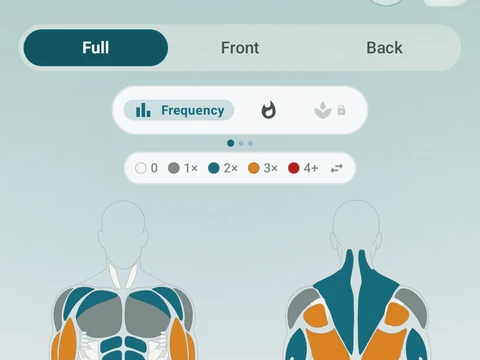
The Muscle Map is a body figure that colors each muscle by your recent training. It is the Muscles tab in the default bottom bar, and Muscle Map in the side menu. A bar on the screen switches between three views.
- Frequency counts how many workouts hit each muscle over the period you pick. A Future side can also project the coming days from your past training or your schedule.
- Intensity shows how much training volume each muscle took, so muscles you loaded harder look hotter. Only strength work adds volume here.
- Recovery estimates how rested each muscle is from the sets you logged, since the app cannot measure your body directly. Its Time Travel row previews the map a few hours or days ahead.
Frequency and Intensity are free. Recovery is part of Pro, so on the free plan its button carries a lock.
Tap any muscle to open its own page, with its stats, its weekly volume and the exercises that train it.
Runs and other cardio add nothing to Intensity, and they show up in Run Analytics, the Kinoku Score and Zone Training instead. Frequency is looser, because it counts every completed set, so a run can still count toward the leg muscles it uses.
In the app
Muscle Map
Frequency and training-volume maps are free. Pro adds recovery estimates, readiness context, and exercise picks.