

Can I change how much bodyweight an exercise uses?
Yes. In the exercise editor, turn on Bodyweight and edit Percent of body weight. New sets use your number, and logged sets keep theirs.
Yes. Open the exercise editor with the pencil on the exercise screen, or tap the exercise in the Exercise Library. Under Advanced, turn on Bodyweight, and a field called Body weight used per rep appears. Type your own number into Percent of body weight, anywhere from 5% to 100%.
Kinoku knows the share for several hundred moves by name, such as about 64% for a push-up and 100% for a pull-up. If it does not know your move, it uses 70% and says so under the field. Use the default puts the built-in value back.
Your number is saved with that exercise and applies to sets you log from then on. Sets you already logged keep the percent they were saved with, so your past Total Load and volume stay the same.
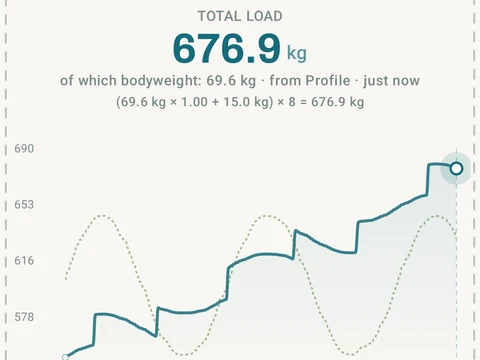
In the app
Bodyweight Total Load
Pull-ups, push-ups, and dips get real per-rep load from body-movement math, not just reps times one. The load math, snapshots, and Total Load chart are free; Pro scales the volume charts in Stats Analysis to your body weight.