

What does Total Load mean?
Total Load is the weight you move on a bodyweight exercise: the share of your body weight the move lifts, plus any added weight, times reps.
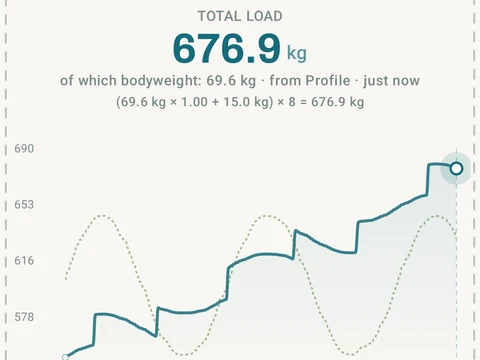
Total Load is the weight you really move on a bodyweight exercise such as a pull-up, push-up, dip or pistol squat. For each rep, Kinoku takes your body weight, scales it by how much of your body that move lifts, and adds any belt or vest weight on top. That number times your reps is the Total Load of the set.
You find it on the Graph tab of a bodyweight exercise, under Total Load. Each point is your best set from one session, and a dashed line shows the body weight part of it, so you can tell a stronger session apart from a heavier you. A switch above the chart moves between Absolute, in kilograms or pounds, and Relative, which divides the load by your body weight.
The chart only uses sets you completed while Kinoku knew your body weight. Older sets stay in your history but are left off this chart. Total Load is free.
In the app
Bodyweight Total Load
Pull-ups, push-ups, and dips get real per-rep load from body-movement math, not just reps times one. The load math, snapshots, and Total Load chart are free; Pro scales the volume charts in Stats Analysis to your body weight.