

Can I tie a routine to a YouTube video to follow along?
Yes. Paste a YouTube or Vimeo link into a routine's Guided routine section, and a play icon on the workout opens the video whenever you need it.
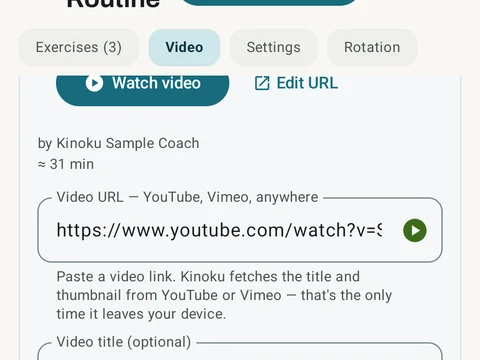
Yes. Open any routine and paste a YouTube or Vimeo link into the Guided routine section, and that routine becomes a guided session. A play icon then appears on the workout card, so you can open the video at any point while you train. You can also bookmark a moment in the video for each exercise.
When you paste a link, Kinoku asks YouTube or Vimeo once for the video’s title, author and thumbnail address, and saves them on your phone. Vimeo also sends the length. The thumbnail picture itself still loads from the video site whenever a card shows it. You can turn this lookup off with the Fetch video metadata switch, in Settings under Import & Export, and links still save without it.
If the YouTube description lists chapter times, Kinoku can build your exercise list from them. A card offers Add all to take every chapter, or Review to check each one first. Reading chapters takes a second call to YouTube, so it stays off until you turn on Detect chapters from YouTube videos in the same section. That switch only works while Fetch video metadata is on.
In the app
Follow-Along Videos
Paste a YouTube or Vimeo link on a routine. Kinoku can jump to exercise timestamps and, with the optional chapter lookup on, build a routine from chapters. The log stays local; opening the video uses the outside video service.