

RPE vs RIR: Which One to Log for Autoregulation
RIR is the number Kinoku's autoregulation reads, and RPE converts to it as RIR = 10 minus RPE. Here is the math, the target, and the load rules.
Kinoku in practice
Where this shows up in the app
 Open full-size image ↗
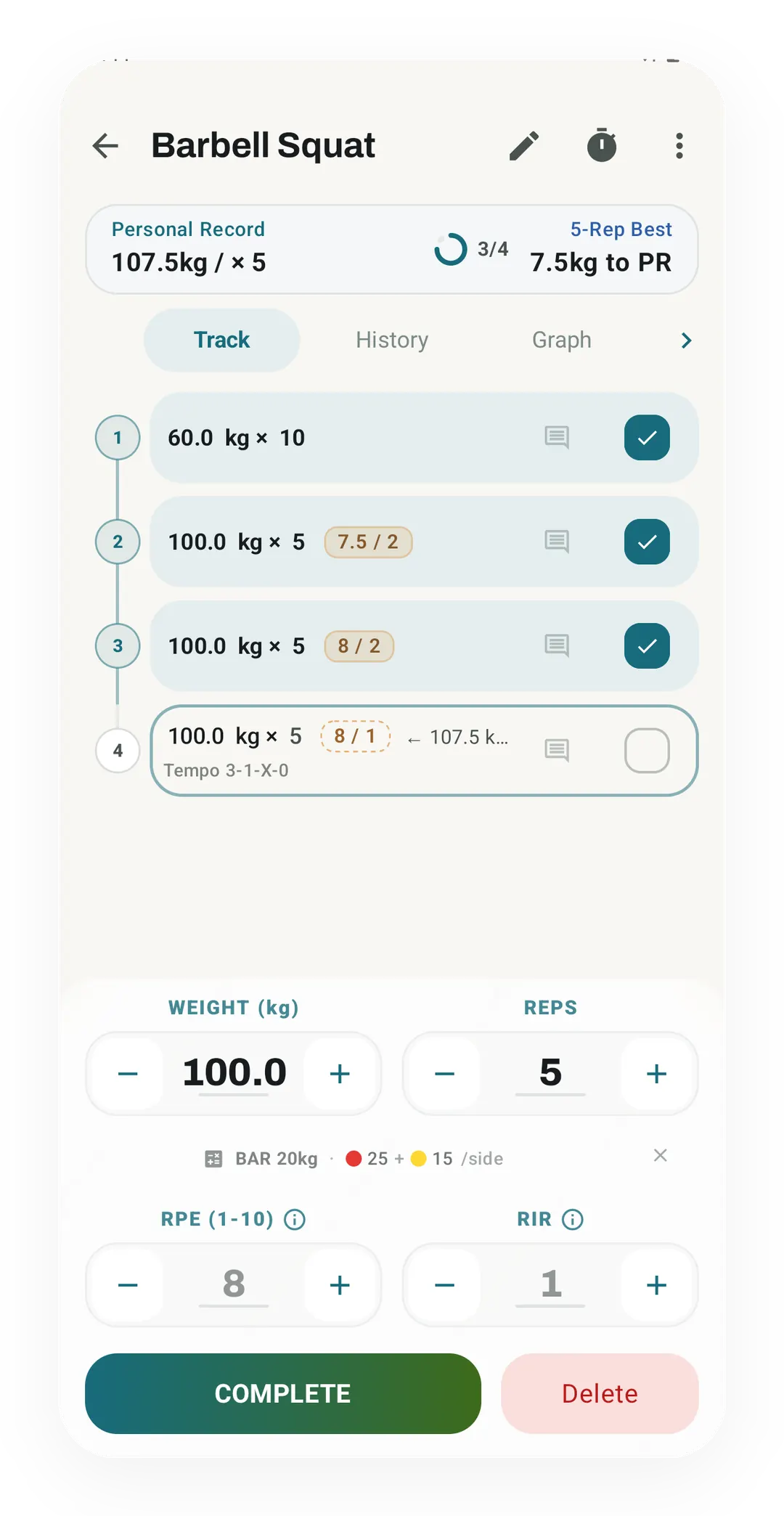
Effort next to load
Each Barbell Squat set row prints effort as one chip, rate of perceived exertion (RPE) over reps in reserve (RIR). Two sets of 100.0 kg × 5 carry 7.5 / 2 and 8 / 2, and the open fourth set has its own RPE and RIR fields in the editor below.
Quickstart
Reps in reserve (RIR) is the number to log, because that is what Kinoku’s autoregulation acts on. A rate of perceived exertion (RPE) rating is converted first, with RIR = 10 minus RPE, and a set marked as failure counts as 0 RIR. The engine targets 2 RIR by default, so when sets run too easy it adds a set, or 2.5% load once you have five sets. Sets that run too hard cut the load by 5%.
What each scale measures
Both scales answer one question, which is how close to failure that set was.
RPE rates the set from 1 to 10, where a 10 means you could not have done one more rep. The lifting version comes from Zourdos and colleagues in 2016, who pinned each point of the scale to a number of reps left. That is what makes it more than a feeling.
RIR counts the reps you could still have done with good form, so a 0 means you hit failure and a 2 means two more were there.
The two scales point in opposite directions, since RPE counts up from easy while RIR counts down to failure. The conversion is one line:
RIR = 10 - RPE
RPE 8  ->  2 RIR
RPE 9  ->  1 RIR
RPE 10 ->  0 RIR
One limit is worth stating plainly. Both numbers are a guess about a set that already ended, and Zourdos and colleagues found that newer lifters rated less accurately than experienced ones. The number gets better with practice, and it is never a measurement.
Side by side
The two scales on one grid, from the direction each one counts in to which one the app reads.
| RPE | RIR | |
|---|---|---|
| Direction | Counts up from easy | Counts down to failure |
| What you rate | How hard the set felt | Reps you had left |
| Range | 1 to 10 | 0 and up |
| Failure reads as | 10 | 0 |
| Half points | Yes, stored as a decimal | No, whole reps only |
| Easy to rate as a beginner | Harder, it is a feeling | Easier, it is a count |
| What autoregulation reads | Converted to RIR first | Read as logged |
Which one Kinoku shows you, and where
Both are free to log, and this is where each number goes inside the app, as of September 2026.
-
The set row has an RPE field and an RIR field. Each has its own switch in the RPE/RIR info sheet, so you can show one, the other, or both. When both are on, the row prints one chip in the form
8 / 2. RPE is stored as a decimal, so 8.5 is fine, while RIR is stored as a whole number. -
The autoregulation engine builds one number per set, called effective RIR. A set marked as a failure set counts as 0 RIR whatever else you typed, and otherwise your logged RIR is used as it is. If there is no RIR at all, the engine reads your RPE and converts it:
effectiveRir = 10 - RPE, clamped to 0..10A set with neither number carries no signal and is skipped. One thing worth knowing is that with RPE display on, the set row shows a faded suggestion from your history. Completing the set saves that number unless you change it, and the engine then reads it.
-
It needs two sets to decide. Only completed working sets count, so warmups and drop sets are left out while rest-pause and failure sets are in. Fewer than two sets with a signal means no change.
-
The rules read the average effective RIR against a target of 2. Too easy means the average is 3 or more, and the app then adds one working set for next time. Once you already have five working sets, it stops adding sets and raises load by 2.5% instead. Too hard means the average is 1 or less, or that at least half the sets sat at 0 RIR with the average below 2. Load then drops 5% and a fatigue flag is raised. If the RIR also fell by 3 or more from the first set to the last, over three or more sets, one set is cut too. Anything between the two is a hold.
PROGRESS_LOAD_SCALE = 1.025 (+2.5%) DELOAD_LOAD_SCALE = 0.95 (-5%) -
A program week can move the target. When a mesocycle week prescribes an RPE range, the target becomes 10 minus the midpoint, rounded, and held between 0 and 4. A peak week at RPE 9 targets 1 RIR, while a week at RPE 7 to 8.5 lands on the default of 2.
-
The RPE drift chart lives in Pro Analytics and reads your logged RPE. When a set has RIR and no RPE, it derives RPE as 10 minus RIR, and a logged RPE always wins over a derived one. The free Lift Progress state label reads the same drift as one input, without drawing the chart.
Two limits sit next to those facts. Autoregulation is one of the Pro tuning layers on top of the free program builder, so logging RPE or RIR and every chart on the free Stats screen stays free, while the RPE drift chart is part of Pro Analytics. The other limit is that the training load figure reads RPE only, so a set with RIR and no RPE counts as RPE 7 for load. The app applies Foster’s session-RPE method to timed sessions like a swim or a class rather than to individual sets.
When to use which
How you log decides what the app can act on, and these are the cases lifters ask about.
- If you run a program with autoregulation on, log RIR, because it is the number the engine reads with no conversion, so what you type is what it acts on.
- If you already think in RPE, keep logging RPE, since the engine converts it for you and half points survive the conversion, so RPE 8.5 becomes 1.5 RIR.
- If you are new to rating effort, try RIR, because “How many more could I have done?” is a count while “How hard was that?” is a feeling. A count is easier to get right in your first months.
- If you show both fields on one set, the row fills the other one for you, so typing RPE 8 gives RIR 2 and typing RIR 1 gives RPE 9. Autoregulation reads the RIR and the drift chart reads the RPE, and the two always add up to 10.
- If a set went to failure, mark it as a failure set, because the engine reads 0 RIR from the set type whatever you typed in the box.
- If you want the load figure to reflect effort, log RPE too, since that figure does not read RIR.
Whichever you pick, the rating is about the last rep rather than the whole set. A set of 12 can feel hard by rep 6 and still have 4 reps left at the end, and the end is where the number is taken.
Track this in Kinoku
Workout logging is free and holds both fields on every set, and the periodization builder is free too. RIR autoregulation is one of its Pro layers, next to volume landmarks and readiness tuning. The routine progress view and the lift progress screen are free, and they read the same set rows the engine does.
The conversion is fixed in the app rather than a setting, so if you log RPE your RIR is always 10 minus that number. The metric decoder covers how the rest of Kinoku’s numbers relate to each other.
If you are still choosing an app, the roundup of free workout trackers with RPE and RIR sets Kinoku beside six other logs and says which ones keep effort fields free.
References
Common questions
What is the difference between RPE and RIR?
RPE (rate of perceived exertion) rates a set from 1 to 10 by how hard it felt. RIR (reps in reserve) counts the reps you could still have done with good form. Both answer how close to failure a set was, but they count in opposite directions. The conversion is RIR = 10 minus RPE, so RPE 8 is the same as 2 RIR.
Is RPE or RIR easier for beginners?
RIR (reps in reserve) tends to be easier for newer lifters, because it is a count of how many more reps you could have done. RPE (rate of perceived exertion) asks how hard the set felt, which is a feeling. Zourdos and colleagues found that newer lifters rated less accurately than experienced ones. Either number gets better with practice, and both stay a guess about a set that already ended.
Is RPE or RIR rated on the last rep or the whole set?
An RPE (rate of perceived exertion) or RIR (reps in reserve) rating is about the last rep rather than the whole set. A set of 12 can feel hard by rep 6 and still have 4 reps left at the end, and the end is where the number is taken.
What is autoregulation in lifting?
Autoregulation adjusts the load from how hard your sets turn out to be. Helms and colleagues described the idea in 2016 as picking a target RIR (reps in reserve), rating each set, and changing the load from the gap between the two.
Which number does Kinoku's autoregulation read?
Kinoku's autoregulation reads RIR (reps in reserve), and it converts an RPE (rate of perceived exertion) rating with RIR = 10 minus RPE. Its default target is 2 RIR, and sets that run too easy add a set, or 2.5% load once you have five. Sets that run too hard cut the load by 5%. Logging either number is free, and autoregulation is a Pro layer on the free program builder.
Track this in the app
Periodization
A 4-phase planning stack. The builder, all 25 templates, named programs with auto-progression, the custom model, and unlimited active programs are free. Pro adds volume targets, readiness tuning, and auto set changes.
Core tracking works offline, with no mandatory account.
Related features
A 4-phase planning stack. The builder, all 25 templates, named programs with auto-progression, the custom model, and unlimited active programs are free. Pro adds volume targets, readiness tuning, and auto set changes.
Every set, one tap. Track how hard each set felt, your rest timers, set types, and notes.
Open a routine's stats and see the whole routine trend across every time you have done it: a work-done chart and a strength trend where each lift is measured against its own start, so a light move and a heavy move count the same. Plus a look-back on the recap after a big session.