

Free workout trackers with RPE and RIR (2026)
Seven gym apps that log effort on each set, and which ones keep RPE or RIR free or paid, quoted from each app's own pages and checked in Kinoku's code.
Boostcamp and Kinoku log RPE and RIR on every set for free; Hevy and Strong log RPE from 6 to 10, Liftosaur logs RPE per set, and StrengthLog and Alpha Progression list RPE, RIR or both under paid plans.
At a glance
| App | Best for | Better at | Main trade-off |
|---|---|---|---|
| Alpha Progression | Lifters who think in RIR and want plans where effort rises each week | Plans where sets and RIR effort climb week by week | Its homepage lists RIR under what Pro adds, and no RPE field is named |
| Boostcamp | Anyone after both effort fields at no cost, inside a large program library | Free RPE and RIR fields on every set, plus a builder for programs written in RPE | Its RPE field runs from 5 to 10, and Strength Score is Pro |
| Hevy | Lifters who rate effort in RPE and want last time's rating on screen | The previous column shows your last RPE for the same lift | No separate RIR field, and RPE runs from 6 to 10 |
| Kinoku | Android lifters who want RPE and RIR free with no account | Both fields free and filled from each other, with effort charts per lift | Android only for now, RIR in whole reps, and autoregulation and RPE drift are Pro |
| Liftosaur | Lifters who write their own RPE-based programs as scripts | Works out the load from an RPE target you write | Graphs are Premium, and its pages name no RIR field |
| StrengthLog | Subscribers who want RPE or RIR to feed an estimated one-rep max | Turns your RPE or RIR into an estimated one-rep max | Its listing puts RPE and RIR logging under the subscription, and it requires an account |
| Strong | Lifters who want an RPE button in the reps keyboard | RPE sits in the reps keyboard, with an RIR table in its help page | RPE runs from 6 to 10, and its pages name no RIR field |
Publisher disclosure
Kinoku, made by Dreamsoft Works, writes and publishes this page, and Kinoku is one of the apps on it. Every fact about another app is quoted from a page that app's maker publishes, opened on October 12, 2026. We give no score. The apps are grouped by which effort fields their own pages name, and every label points at a quoted sentence.
Quickstart
Boostcamp and Kinoku log a rate of perceived exertion (RPE) and reps in reserve (RIR) on every set for free. Hevy and Strong log RPE only, Liftosaur logs RPE in its free plan, and StrengthLog and Alpha Progression list effort tracking among their paid features. The apps are grouped by which effort fields their pages name, A to Z inside each group.
Which apps log RPE, RIR or both?
RPE rates how hard a set felt on a scale that tops out at 10, and RIR counts the reps you had left before failure. They describe the same thing from two sides, since RPE 8 means about two reps were left. The seven apps here split by which of the two their own pages name as a field you fill in.
- Both RPE and RIR as set fields: Boostcamp, Kinoku and StrengthLog. Boostcamp’s features page says “Every set has fields for both Rate of Perceived Exertion (RPE, 5 to 10) and Reps in Reserve (RIR).” StrengthLog names both in its listing, under the subscription.
- RPE only, with RIR read off the RPE scale: Hevy, Liftosaur and Strong. Hevy’s help page says RIR is not a separate option, and Strong’s help page prints a table that maps each RPE to an RIR.
- RIR only: Alpha Progression. Its listing says you can “Track weight, reps and RIR”, and the pages we read name no RPE field.
Whether a field is free is a second question, and the answers differ. Boostcamp says its RPE and RIR logging is free, Liftosaur says logging workouts is free, and Kinoku keeps both fields free. StrengthLog puts both under its subscription, and Alpha Progression’s plan table lists RIR in the Pro column. Hevy’s and Strong’s pages describe the RPE field without saying which plan it belongs to.
Side by side
The table sets out what each app’s own pages say about effort ratings, and a cell reads “Not stated” where none of the pages we opened says. Kinoku’s row comes from its code.
| App | RPE field | RIR field | Scale | Free or paid, per its pages | What else reads the number |
|---|---|---|---|---|---|
| Boostcamp | Yes | Yes | RPE 5 to 10 | Free | A builder for RPE programs, history trends |
| Kinoku | Yes | Yes | RPE 1 to 10 with halves, RIR in whole reps | Free to log and chart; autoregulation is Pro | Per-lift charts free; RPE drift and autoregulation Pro |
| StrengthLog | Yes | Yes | Not stated | Subscriber feature | Estimated one-rep max |
| Hevy | Yes | No, read off RPE | 6 to 10 | Not stated | Last RPE shown in the previous column |
| Liftosaur | Yes | Not stated | Not stated | Logging free; graphs Premium | Loads set from an RPE target in your program |
| Strong | Yes | Not stated; mapped from RPE | 6 to 10 | Not stated | Not stated |
| Alpha Progression | Not stated | Yes | Not stated | RIR listed under Pro | Pro weight and rep recommendations |
Each app, in its own words
Boostcamp
Best for: Anyone after both effort fields at no cost, inside a large program library.
Boostcamp is a program app with a workout log, and it publishes a page about this exact need. That page says “Boostcamp ships RPE and RIR as first-class set-level fields on the free tier.”
- What it does well: Its features page says “Workout tracking, RPE/RIR logging, the plate calculator, rest timers, basic personal record tracking, and building custom programs manually (with no cap) are all free.” Its own roundup adds that “every set you log can carry an RPE or RIR value alongside weight and reps, and it persists in your history for trend analysis.”
- What its pages say about effort: “The custom builder lets you write an RPE-driven program yourself, a top set at RPE 8 with back-offs a set percentage below, using a visual editor and no scripting.” Its listing says you can “Log sets, reps, and weight with RPE, RIR, and e1RM”, where e1RM means an estimated one-rep max.
- What its pages say about limits: The RPE field runs from 5 to 10. “Pro adds the Strength Score, a per-muscle volume heatmap, and 20+ exclusive coach programs”, and we print no price because the page gives two figures.
- Where it is the better pick: A lifter who wants to write an RPE program in a visual editor and log effort on each set without paying.
Boostcamp’s official listing is on Google Play, and our versus page, Kinoku vs Boostcamp, sets the two side by side.
Kinoku
Best for: Android lifters who want RPE and RIR free with no account.
Kinoku is a training app for Android with no account to create. Your workout record lives on no Kinoku server, but the phone’s own Android backup can include eligible app data. Both effort fields are part of the free set log.
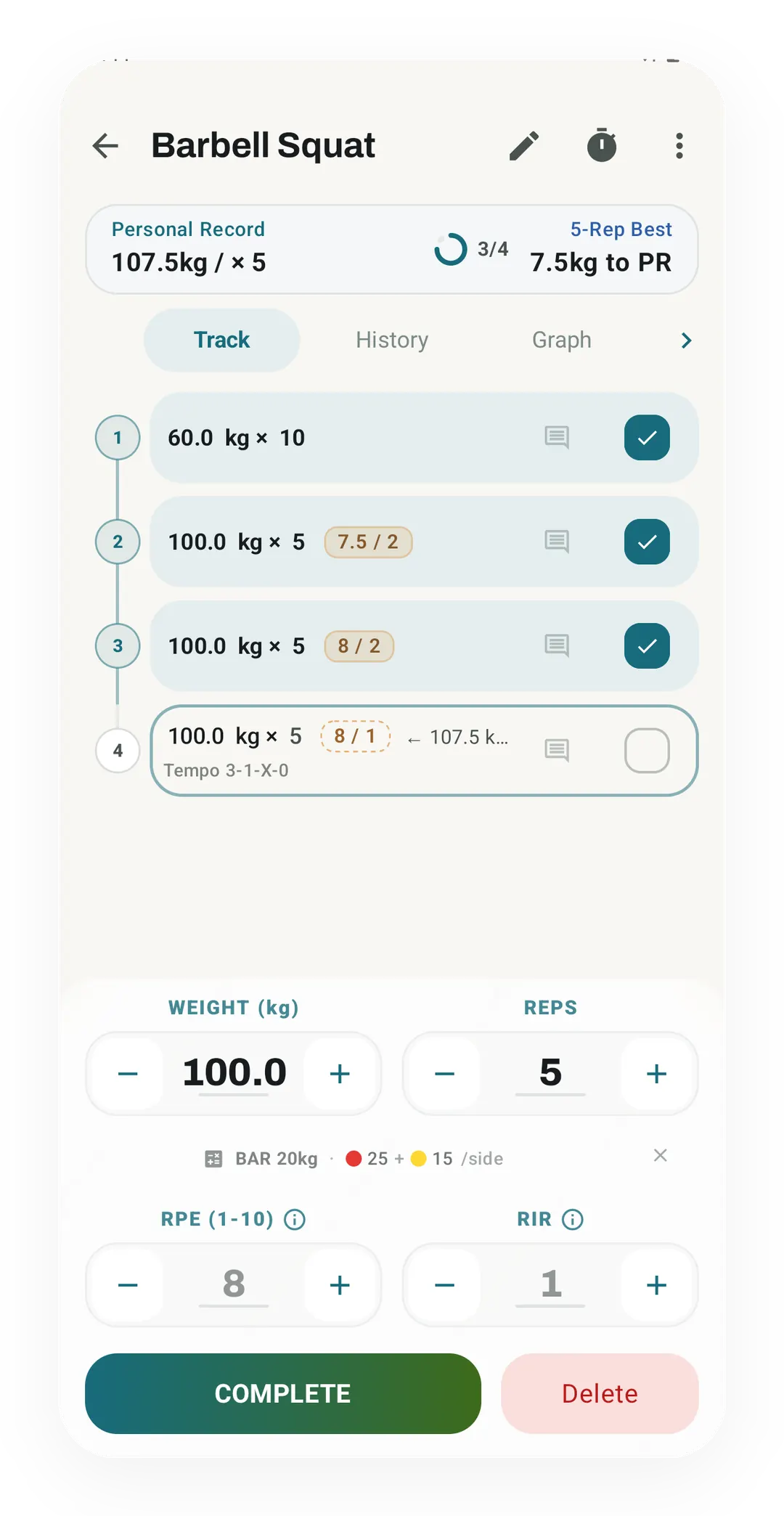
- What it does well: Each set has an RPE field from 1 to 10, with half points such as 8.5, and an RIR field. Both are off by default unless a training goal you pick turns them on, and you can switch either one under Per-Exercise Tracking in Settings or from the “Understanding RPE & RIR” sheet mid-workout. With both on, typing a number in one field fills in the other from it, and finished sets print the pair as one chip, such as 8 / 2.
- What it does with the numbers for free: Each lift’s Graph tab charts your average RPE and average RIR per session. A routine set can carry a target RPE, which shows as a hint on the set while you log. The CSV export writes both values for every set, and the importer reads the RPE column from Hevy and Strong files.
- What is Pro: Autoregulation reads your RIR after a workout from a program and adjusts the next session of that program by adding a set, raising the load or easing it off. Weight progression suggestions read your recent effort. Pro Analytics shows RPE drift, which is when top sets start to feel harder at the same weight. The RPE versus RIR page sets out the exact rules.
- What Kinoku does not do: Kinoku is an Android app with no iPhone version yet, and a record kept on one phone does not sync to a second phone. RIR is stored in whole reps, so a half rep is rounded away. Autoregulation acts only on workouts that belong to a program, and the training load figure reads RPE, not RIR.
Kinoku’s official listing is on Google Play, where it installs for free with no account to create.
StrengthLog
Best for: Subscribers who want RPE or RIR to feed an estimated one-rep max.
StrengthLog is a strength training log, and its homepage names both effort scales in one line. “Switch on our RPE/RiR feature and use it in your training log. We will automatically calculate your estimated 1RM based on this information.”
- What it does well: That rating feeds an estimated one-rep max (1RM), a number you can track. Its listing also names percentage of 1RM on the same line as RPE and RIR.
- What its pages say about limits: The listing places “Advanced logging features include % of 1RM, Rate of Perceived Exertion, Reps in Reserve, and quick stats for every set” under what a subscriber gains. The homepage adds that “only premium users can write their training programs using” percentages and RPE or RIR. Its homepage also says StrengthLog “began requiring an account”.
- Where it is the better pick: A lifter who plans to subscribe for its statistics and programs and wants the effort rating to turn into a strength estimate.
StrengthLog’s official listing is on Google Play, where the free and subscriber feature lists sit one after the other.
Hevy
Best for: Lifters who rate effort in RPE and want last time’s rating on screen.
Hevy is a workout log for phones, and its help centre gives a full article to its RPE option. “The Hevy app includes an RPE tracking feature, which you can enable in the settings.”
- What it does well: “The next time you complete the same exercise in an active workout, the previous column will display your last RPE.” Its feature page says “You can tap the RPE button for a specific set to select a value from 6 to 10”, and each value carries a short line on how many reps you likely had left.
- What its pages say about limits: RIR is not a separate option, and its help page says the RPE scale lets you estimate RIR instead. The pages we read do not say whether the RPE column is free or part of Hevy Pro.
- Where it is the better pick: A lifter who already thinks in RPE and wants a quick reminder of how hard the same lift felt last time.
Hevy’s official listing is on Google Play, and our versus page, Kinoku vs Hevy, sets the two side by side.
Liftosaur
Best for: Lifters who write their own RPE-based programs as scripts.
Liftosaur is a workout planner where you describe a program in its own scripting language, Liftoscript. Its homepage says you can “Log RPE per set and track how effort changes over time.”
- What it does well: You can “Set weights as % of 1RM or by RPE”, and the app then works out the load. That suits a program written as “a top set at RPE 8”, because the app turns the target into a weight for you.
- What its pages say about limits: Its Premium page says “Everything else is free: programs and the editor, Liftoscript, logging workouts, history, measurements entry, equipment, sharing, import and export.” Graphs sit in the Premium list, including the graph under an exercise, so tracking how effort changes over time on a chart needs Premium. Its pages name no RIR field.
- Where it is the better pick: A lifter who likes to write program logic and wants RPE to set the next load by a rule they control.
Its sync page says “You can use the app without an account and without a connection.” Liftosaur’s official listing is on Google Play.
Strong
Best for: Lifters who want an RPE button in the reps keyboard.
Strong is a gym log for phones, and its help centre has a short article on effort ratings. “Strong allows you to record RPE (Rate of Perceived Exertion) to accompany your rep recordings.”
- What it does well: “To edit RPE, simply select the Reps cell, and hit the RPE button in the keyboard.” The same page prints a table that pairs each RPE with an RIR, from RPE 6 at 4 reps left up to RPE 10 at none.
- What its pages say about limits: “While RPE scales can vary, we use a 6-10 scale to record RPE in Strong.” Its help page offers the table rather than a separate RIR field, and the pages we read do not say whether RPE is free or part of Strong PRO.
- Where it is the better pick: A Strong user who wants to add effort to sets they already log, with no new screen to learn.
Strong’s official listing is on Google Play, and our versus page, Kinoku vs Strong, sets the two side by side.
Alpha Progression
Best for: Lifters who think in RIR and want plans where effort rises each week.
Alpha Progression is a hypertrophy app built around plans and weight suggestions. Its listing says you can “Track weight, reps and RIR, take notes on your training, and let the rest timer tell you when it is time for the next set.”
- What it does well: You can “Structure your weight training in cycles and deloads, or create a progressive plan where sets and effort (RIR) increase week by week.” Its homepage says “Alpha Progression Pro recommends weights and reps based on your performance, whether you use a generated plan or your own.”
- What its pages say about limits: The plan table on its homepage lists “RIR, periodization, deloads” in the Pro column. The free version includes “unlimited workout logging, manually created plans, exercise videos, a rest timer, body measurements and CSV export.” The pages we read name no RPE field.
- Where it is the better pick: A lifter who rates sets in reps left, wants a plan that tightens effort week by week, and is happy to pay for the recommendations.
Its homepage also says “No account required”, and its official listing is on Google Play. Our versus page, Kinoku vs Alpha Progression, sets the two side by side.
What happens to the number after you log it?
Logging an effort rating is one job, and having an app act on it is another. The free plans here mostly keep the number for you to read, while an app that changes your next weight for you does so in a paid plan.
- Kept for you to read: Boostcamp says the rating stays in your history for trend analysis. Hevy shows your last RPE for the same lift in the previous column. Kinoku charts average RPE and average RIR per session for each lift, for free.
- Turned into another number: StrengthLog turns RPE or RIR into an estimated one-rep max, inside its subscription. Kinoku’s training load figure reads RPE, and its one-rep max estimate uses the Epley formula, which reads only weight and reps.
- Used to set the next load: Liftosaur sets a weight from an RPE target that you write into your program, and Boostcamp’s builder lets you write a top set at RPE 8. Alpha Progression’s Pro plan recommends weights and reps from your logs. Kinoku’s Pro autoregulation reads your RIR after a program workout. Too easy adds a set, or 2.5% load once you have five sets, and too hard cuts the load by 5%.
An effort rating is a guess about a set that already ended, and the RPE versus RIR page cites the research showing that newer lifters rate less accurately. An app that acts on the number can only be as good as the rating, so a few weeks of plain logging before you switch on any adjustment gives the number time to settle.
Moving your effort history between apps
RPE travels between apps more easily than RIR, because Kinoku reads an RPE column from Hevy and Strong files and their pages name no RIR field.
- Into Kinoku: The importer reads the RPE column in Hevy’s export file and in the Strong layout shown in Kinoku’s import format guide. Imported sets keep their RPE, and RIR stays empty because the importer reads no RIR column from them.
- Out of Kinoku: The CSV export writes RPE and RIR for every set, so both numbers leave with your history.
- Out of the others: Alpha Progression’s free version includes CSV export, and Liftosaur’s free plan includes import and export. Their pages do not say whether the effort column comes along.
How this list was checked
The checks for this page ran on October 12, 2026, against pages that each app’s maker runs: a Play listing, a help article or the maker’s own site.
- Effort fields in other apps: Every RPE, RIR or scale claim about a rival is copied word for word from its Play listing, help article or website, with a numbered source. We did not install the rival apps for this list, so no cell rests on our own test.
- Free or paid: A cell says free or paid only where the app’s own page says so. Hevy and Strong describe their RPE field without naming a plan, so their cells read “Not stated”.
- Kinoku: We read Kinoku’s effort facts in its source code: the switch for each field, the scale each field accepts, and the Pro check on autoregulation and Pro Analytics.
- Order: The apps are grouped by which effort fields their own pages name, and inside a group the apps run in alphabetical order. No app paid for a place here.
Frequently asked questions
Which free workout tracker logs both RPE and RIR on every set?
Boostcamp and Kinoku. Boostcamp’s own pages say RPE and RIR logging is free, with a field for each on every set. Kinoku keeps both fields free and fills one from the other when both are on. StrengthLog also names both, but its listing puts them under the subscription. Hevy and Strong log RPE only, and Alpha Progression’s pages name RIR only.
Is there an app that logs reps in reserve instead of RPE?
Yes. Alpha Progression’s listing says you can track weight, reps and reps in reserve (RIR), and its pages do not name an RPE field. Its homepage lists RIR under what Pro adds. In Kinoku you can show the RIR field alone and hide RPE. Hevy says on its help page that RIR is not a separate option.
Is there a free app that adjusts my weights from RPE or RIR?
None of the seven says it does this for free. Alpha Progression’s weight and rep recommendations come with Pro. In Kinoku, autoregulation reads your RIR after a program workout and changes the next session, and it is a Pro layer on the free program builder. Liftosaur sets a load from an RPE target you write into the program, which is a rule you write rather than an adjustment it makes for you.
Does Hevy have an RIR field?
No. Hevy’s help page says RIR is not available as a separate option. Its RPE scale runs from 6 to 10, and each number carries a short line about how many reps you likely had left, so you read RIR off the RPE scale. Strong’s pages name no RIR field either, and its help page has a table that maps each RPE to an RIR.
Is RPE logging free in StrengthLog?
Its Google Play listing says no. Rate of Perceived Exertion and Reps in Reserve sit in the list under “As a subscriber, you also gain access to”. Its homepage says only premium users can write programs using RPE or RIR. The free version logs unlimited workouts, and StrengthLog requires an account to use either version.
What RPE scale does each app use?
Hevy and Strong take RPE from 6 to 10, while Boostcamp’s features page says its field runs from 5 to 10. Kinoku takes RPE from 1 to 10 and keeps half points such as 8.5. The pages we read for StrengthLog and Liftosaur do not give a range.
Can I log RPE on only some sets?
Yes, in Hevy and Kinoku, and the other pages we read do not say. Hevy’s page says you can leave the RPE field blank on some sets even when it is on. In Kinoku you can leave the field empty. With RPE on, though, it can show a faded suggestion from your history, and finishing the set saves that number unless you change or clear it.
What does Kinoku do with RPE and RIR for free?
It stores both on every set and shows the pair as one chip, such as 8 / 2. It draws average RPE and average RIR per session on each lift’s Graph tab. A routine set can carry a target RPE, which shows as a hint while you log. A CSV export keeps both columns, and the importer reads the RPE column from Hevy and Strong files.
Which parts of Kinoku’s effort tracking are Pro?
Three things that read your effort are Pro. Autoregulation adjusts the next session of a program from your RIR. Weight progression suggestions take your recent effort into account. The RPE drift alert in Pro Analytics flags top sets that start to feel harder at the same weight. Logging both numbers, the charts, routine targets, import and export all stay free.
Can I move my RPE history from Hevy or Strong into Kinoku?
Yes. Kinoku’s CSV importer reads the RPE column in Hevy’s export and in the Strong layout its format guide shows. A review screen lets you check how each exercise name matched before you save. Hevy’s and Strong’s pages name no RIR field, so imported sets carry RPE only. Kinoku’s own export writes RPE and RIR for every set.
Which app uses RPE to estimate my one-rep max?
StrengthLog’s homepage says it calculates your estimated one-rep max from your RPE or RIR once you switch the feature on, which its listing places in the subscription. Boostcamp’s listing names an estimated one-rep max next to RPE and RIR without saying how they connect. Kinoku’s estimate uses the Epley formula, which reads only weight and reps.
Should I log RPE or RIR?
Either works, because one maps onto the other: RIR equals 10 minus RPE, so RPE 8 means about 2 reps left. Reps in reserve is a count, which many newer lifters find easier to judge than a feeling. Kinoku’s autoregulation reads RIR and converts an RPE rating first. Our page on RPE versus RIR covers the math and the research.
Related pages
- Best powerlifting apps for Android: Effort ratings are one row there, next to Sheiko and Smolov blocks and strength scores.
- RPE vs RIR: which one to log for autoregulation: The conversion, the default target and the exact rules Kinoku’s autoregulation follows.
- Workout logging: Every field on a Kinoku set, including RPE, RIR, set types and notes.
- Free gym apps with progressive overload tracking: Ten apps and how each one shows that you are getting stronger.
- Best workout program apps: Apps that run named programs, some of them written in RPE.
- Kinoku vs Hevy: Two loggers side by side, from routines to export.
- Periodization: The free program builder and its Pro tuning layers, autoregulation among them.
Which one fits you
- Choose Boostcamp if you want both effort fields at no cost and a visual builder for writing your own RPE program.
- Choose Kinoku if you want RPE and RIR free on Android with no account, and effort charts for each lift.
- Choose StrengthLog if you plan to subscribe anyway and want your effort rating to feed a one-rep max estimate.
- Choose Hevy if RPE alone is enough for you and seeing last session's rating next to the set helps.
- Choose Liftosaur if you like to write your own program logic and want loads set from an RPE target.
- Choose Strong if you already log in Strong and want to add an RPE rating from the reps keyboard.
- Choose Alpha Progression if you think in reps in reserve and want a plan that raises effort week by week, with Pro.
How this page is checked. Every fact about another app on this page comes from a page that app publishes, which we could open and quote on October 12, 2026. The sources, with the exact sentence each fact rests on, are listed just above. Every Kinoku fact is tied to the shipping app's code. The page carries no score; the apps are grouped by what their own pages say. If a fact here has gone stale, the support page is the fastest way to tell us.
Kinoku in practice
Where this shows up in the app
 Open full-size image ↗
RPE and RIR on one set
Real app capture, free tier. With both inputs switched on, the Barbell Squat set editor takes weight, reps, a rate of perceived exertion (RPE) and reps in reserve (RIR). Finished sets print the pair as 7.5 / 2 and 8 / 2.
One of the apps on this page
Kinoku is free to install
Core tracking works offline, with no account. An export from the app you use today can come along.
Android only for now, with an iPhone version in the works. Some depth is paid, and the pricing page says which parts.
Related features
Every set, one tap. Track how hard each set felt, your rest timers, set types, and notes.
A 4-phase planning stack. The builder, all 25 templates, named programs with auto-progression, the custom model, and unlimited active programs are free. Pro adds volume targets, readiness tuning, and auto set changes.
A Pro hub with five core tabs, plus a Cycle tab when cycle tracking is on. Its 20+ features include strength scores like DOTS, IPF GL, Wilks, and FFMI, the Banister Form Band, plateau alerts, ACWR, muscle balance, and cycle links.
Charts per exercise, PRs, your best one-rep estimate, volume trends, and date filters. Every exercise type gets a chart that fits it: Best, Total, and Avg Time for holds, Best and Total Reps for rep work, and Best and Total Distance for distance work, not just weight charts.