

Strong App Alternative: Kinoku vs Strong
Strong: a polished lifting logger with cloud sync on iPhone, Apple Watch and Android. Kinoku: Android only, no account, routines and charts free.
Kinoku fits an Android lifter who wants no account and no template cap; Strong fits a lifter on iPhone or Apple Watch who wants cloud sync between devices.
Publisher disclosure
Kinoku, made by Dreamsoft Works, writes and publishes this page. Every Strong product fact is quoted from a Strong page we opened on September 20, 2026, or observed in our own test of Strong 6.2.4 on an emulator on September 11, 2026. We say where Strong is the better pick, and we give no score.
Quickstart
Strong is a lifting logger on iPhone, Apple Watch and Android, with a free account and cloud sync between devices. Kinoku is Android only for now, with no account and no cloud sync, and it keeps routines and charts free while adding runs, a muscle map, and training programs. So pick Strong for iPhone or two-device sync, and pick Kinoku for Android, privacy, and depth.
What Strong does well
Strong has earned its name, and here is what its own pages promise, and what we would keep if we used it.
The account is free. Strong says so on its homepage [1], so you sign up once and the app is yours.
Your workouts follow you between devices. Strong Cloud keeps them in sync on its own [2], so you log on one device and read it on another.
It runs on iPhone, Apple Watch, and Android [3]. If you live in the Apple world, Strong is at home there, watch included.
It logs with no signal. In our test Strong took a set with flight mode on, saved it without a word, and still had it after a forced stop [14].
You can get your data out. Strong exports your workout history to a CSV file [4], which is a real exit door that not every app has.
What we tested
We installed Strong 6.2.4 from Google Play on September 11, 2026, on an emulator running Android 16, and took these steps:
- Open a fresh install and search for any way in that skips the account.
- Log in and step past the welcome dialog.
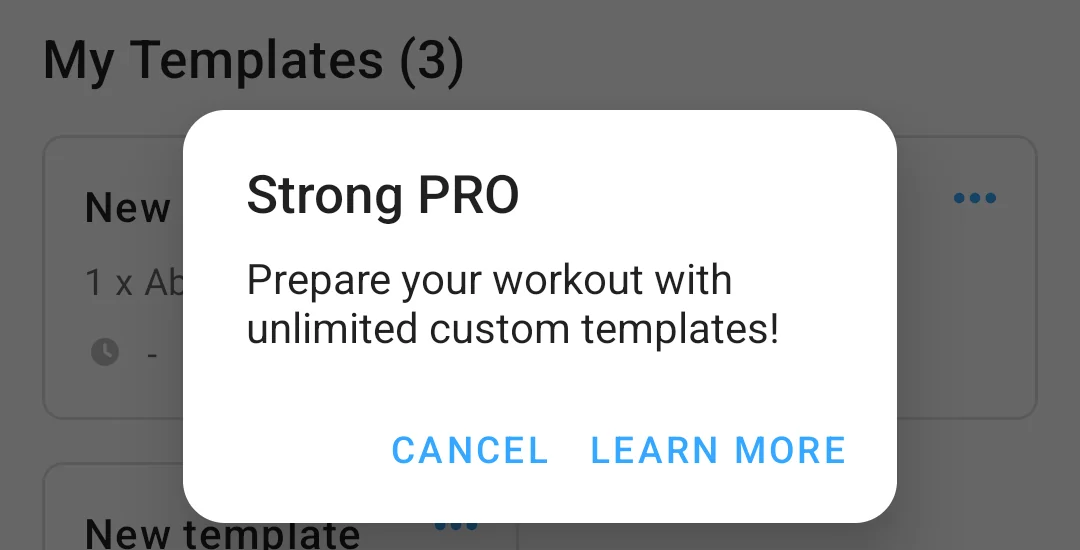
- Create templates, one at a time, until the app stopped us.
- Open the Strong PRO screen and note the prices it showed.
- Turn flight mode on, start an empty workout, log one set, and finish it.
- Force-stop the app, open it again, and check History.
- Turn the network back on and watch for any message.
- Find the export path and read the file it produced.
The app opened on a sign-in wall with no skip [10], so everything after step one ran on a Google account. Three templates saved without a word, and the fourth New template tap opened a Strong PRO dialog instead of the editor [11]. Its Learn More button led to a screen that states the cap as a number [12], and the price sheet behind that listed a monthly plan, a yearly plan, and a one-time buy [13]. With no network, Strong started an empty workout, took a 135 pound bench press set, and finished it with a summary card, and it showed no offline message at any point [14]. The set was still in History after a forced stop, and nothing changed when the network came back. The export lives under Settings, then Data management, and the file it shared is described in the moving-over section [15].
We did not test a per-workout set cap, the custom exercise path, or the watch app, so this page states nothing about them.
Kinoku got a lighter check on the same emulator, also with flight mode on, from a 1.2.0 test build that did not come from Google Play. The Today screen opened, the exercise search worked, a bench press workout took a 135 pound set, and the set was still there after a forced stop. What this page says about Kinoku’s backup and export comes from Kinoku’s own pages.
Side by side
Every Strong cell below rests on a Strong page or on our test, and the bracketed number names the source in the list at the end.
| Strong | Kinoku | |
|---|---|---|
| Account | Required before use, and free [5] [1]. The first screen offered sign-in only, with no guest path [10] | None |
| Where your data lives | Strong Cloud, on servers in the United States and other countries [2] [8] | On your phone. Backup is a file you own |
| Free routine or template cap | 3 workout templates [6]. The app said the same and blocked the fourth [11] [12] | No cap |
| Charts on the free plan | “Access to all Charts” is a Strong PRO feature [7], and the Profile tab shows the charts card locked [16] | Per-exercise charts, personal records, and volume trends are free. The Stats Analysis tab and the Pro Analytics hub are paid |
| Offline | Logged and saved a set with no network, and kept it across a forced stop [14] | Everything works offline. Map tiles, opt-in weather, and billing are the exceptions |
| Export | CSV [4]. It cannot be imported back into Strong [9] [15] | CSV, an Export for AI file, and a lossless backup file |
| Platforms | iPhone, Apple Watch, Android [3] | Android |
| Wear OS | Not stated on Strong’s pages | Yes, free |
| GPS runs | Not stated on Strong’s pages | Yes, free |
| Muscle map | Not stated on Strong’s pages | Free. Recovery view is Pro |
| Training programs | Not stated on Strong’s pages | Builder, 25 templates, 5/3/1, GZCLP (a linear-progression program built on tiered lifts), nSuns. All free |
| Languages | Not stated on Strong’s pages | 10 |
| Paid layer | Strong PRO adds unlimited templates and all charts [7]. Shown to us on September 14 at 5.62 euros a month, 32.72 euros a year, or 97.14 euros once [13] | Pro, US $39.99 a year, US $5.99 a month, or US $69.99 once |
Where a cell says “Not stated on Strong’s pages”, we found no Strong page that says either way and did not reach it in the parts of the app we walked. The cell makes no claim that Strong lacks the feature.
For Strong in a wider field, read the offline trackers roundup, the free tiers roundup, and our survey of Hevy alternatives.
Where Kinoku differs
No account: Kinoku never asks you to sign up, so you open the app and log a set.
Your training record stays on your phone. No Kinoku server holds it, and backup is a file you own, while eligible app data can go into your Android system backup. If you want to move phones, you carry the file.
Routines have no cap. Free users make as many routines as they like, and the free plan also has no cap on workouts, history, or custom exercises. A check in our build blocks a free feature moving behind Pro without a recorded sign-off.
All the basic charts are free. Per-exercise charts, personal records (PRs), your best one-rep estimate, and volume trends are on the free plan, and hold, rep, and distance work each get a chart that fits.
Runs, the muscle map, and programs are free too. GPS runs give you live pace, splits, and a route map, and the muscle map shows what your training hits and how often. The program builder, 25 templates, and named plans like 5/3/1, GZCLP, and nSuns are free, and Pro adds the tuning layers on top: volume targets, readiness, and auto set adjustment.
A real Wear OS app: the watch covers workouts, runs, steps, tiles, and watch face data, and all of that is free.
Ten languages: Kinoku ships in 10 languages, and the free plan gets all of them.
One paid plan: Pro is US $39.99 a year, US $5.99 a month, or US $69.99 once as Pro Lifetime. Those are the US prices, and Google Play shows your local price before you buy. Pro buys depth: run analytics, readiness, the Pro Analytics hub, and the smart layer, and the free app works without any of it.
Where Strong is the better pick
We mean this section, because some people should not switch.
You use an iPhone or an Apple Watch. Kinoku is not on iOS and has no watch app for Apple Watch, while Strong is on both [3], which settles it for a lot of people.
You want two devices that stay in sync on their own. Strong Cloud does that [2], while Kinoku has no cloud sync, so moving data between two of your own devices is a backup file rather than a live sync.
You want one simple job done well. Strong logs lifts, and if you never plan to track a run, a muscle map, or a program, Kinoku’s extra screens are weight you do not need. A single-purpose logger can be the better tool.
You already have a long history in Strong and are happy there. A switch costs an afternoon, so only make it if the reasons above pull you.
Moving over
Strong exports from Settings, then Data management, then Export data, and the app opens the Android share sheet with one CSV file [15]. Strong 6.2.4 wrote this header in our test, on an account set to pounds:
"Workout #";"Date";"Workout Name";"Duration (sec)";"Exercise Name";"Set Order";"Weight (kg)";"Reps";"RPE";"Distance (meters)";"Seconds";"Notes";"Workout Notes"Three things in that file are worth knowing before you import it. Strong writes the weight in kilograms whatever unit the app shows you, so our 135 pound set came out as 61.23492. The fields are split by semicolons rather than commas. And Strong adds one row per exercise whose set order reads Rest Timer, with the rest length in the Seconds column.
Kinoku’s importer spots the Strong layout by its Workout Name, Exercise Name, and Set Order columns, and the review screen shows the exercise-name matches before anything is saved. Exercise names get matched to Kinoku’s library, and unknown names become custom exercises.
One honest note from the test. Our Kinoku 1.2.0 test build detected the layout and imported the workout, then it dropped the weight from the set and turned the rest-timer row into a second, empty set. That Kinoku bug stayed in every release up to 1.5.0. Kinoku 1.6 reads the Weight (kg), Duration (sec) and Distance (meters) columns, skips the rest-timer rows, and imports a set marked W in the Set Order column as a warm-up. On an older release, the preview before you save shows which sets came in without a weight. Strong’s own page says its CSV cannot be imported back into Strong [9], and the app repeats it under Export data [15], so keep that file in any case. A Strong CSV carries no row ids either, so the same file imported twice lands as two copies, and Import History undoes each import on its own.
The backup page explains the import paths, and the import format page shows the layouts Kinoku reads, plus the ones it prefers.
What Kinoku does not do
Candor is cheaper than a refund, so here is the honest list.
- Android only for now. There is no iPhone app yet.
- No cloud sync between devices. Backup is a file. Restore it on the new phone yourself.
- No social layer. There is no feed and no friends list. Nobody sees your workouts unless you share a card.
- Some depth is paid. Run analytics, readiness, the Pro Analytics hub, recovery on the muscle map, and the six Pro themes cost money. The free plan is a complete app, but it is not the whole app.
- “Offline” has edges. Map tiles load when you view a map. Weather on a run is opt-in and calls Open-Meteo. Buying Pro goes through Google Play. Core logging, routines, programs, and stats work with no signal at all.
If Strong fits your life, use it, because it is a good app. If you are on Android and want your record kept on your own phone, Kinoku is built for that.
Related pages
- Best privacy-focused fitness apps for Android: Strong’s label lists five data types; here it sits beside ten other apps.
- Best Strong alternatives: Apps that lift Strong’s three-template ceiling.
- Best free apps to build your own workout routines: Where three free templates sit among eight apps for making your own plan.
- Hevy vs Strong: Comparing Hevy and Strong directly.
- Best workout apps without a subscription: Gym trackers that do not charge monthly fees.
- Best workout apps without an account: Trackers that work offline without registration.
- Kinoku vs Hevy: Head-to-head comparison with Hevy.
- Best apps for lifting and running in one app: Strong beside the apps that log runs too.
- Free workout trackers that log effort per set: Strong’s button for rating of perceived exertion beside six other apps, and which ones keep effort logging free.
- Best Fitbod alternatives: Strong beside five other apps for lifters who leave Fitbod’s generated sessions.
Which one fits you
- Choose Strong if you use an iPhone or an Apple Watch, or you want two devices kept in sync by Strong Cloud.
- Choose Kinoku if you are on Android, you want no account and no cap on templates or charts, and you want runs, a muscle map and training programs beside the lifting log.
Frequently asked questions
Does Strong work without an account?
No. Strong's help centre says all users will be prompted to sign up for an account before using Strong. The 6.2.4 build we tested opened on a screen with Register, Log in and three Continue with buttons and no guest path. The account is free, as Strong's homepage says. Kinoku has no account step at all.
Can I move my Strong history to Kinoku?
Strong exports a CSV from Settings, then Data management, then Export data, and Kinoku's importer knows that layout by its Workout Name, Exercise Name and Set Order columns. One honest note: in our September test, a Kinoku 1.2.0 build dropped the weight from the set and turned Strong's Rest Timer row into an empty set. Kinoku 1.6 fixes both, while older releases still have the bug, so the Strong file is worth keeping.
Is Kinoku free?
Yes, and the free plan has no cap on routines, workouts, history or custom exercises, and per-exercise charts and personal records are free too. Pro is the one paid plan, at US $39.99 a year, US $5.99 a month, or US $69.99 once as Pro Lifetime, and it buys run analytics, readiness, the Pro Analytics hub and the smart layer. Google Play shows your local price first.
How many workout templates does Strong allow for free?
Three. Strong's help centre says you can create up to 3 Workout Templates with the free version, and in our test the fourth New template tap opened a Strong PRO dialog whose Learn More screen read Current free limit: 3 templates. Strong PRO lifts the cap. Kinoku's routines have no cap on any plan.
Which one works offline?
Both logged a set with flight mode on. Strong 6.2.4 started an empty workout, took a bench-press set and finished it with a summary card, with no offline message, and the set was still in History after a forced stop. Kinoku logs, routines, programs and stats all work with no signal. It goes online for map tiles, Google Play billing, a check for gifted Pro access (at most twice a day) and features you choose, such as weather and diagnostics.
Which one has Wear OS?
Kinoku does, free, with the watch covering workouts, runs, steps, tiles and watch face data. Strong's help centre says it offers apps for iPhone, including Apple Watch, and Android, and the page does not mention Wear OS. That is not a claim that Strong lacks a Wear OS app, only that we found no Strong sentence about one.
Are charts free in Strong?
Strong's help centre lists Access to all Charts as a Strong PRO feature, and in our test the Profile tab showed a Charts, Analytics and Insights card with a crown icon in place of the charts. In Kinoku the per-exercise charts, personal records and volume trends are free, while the Stats Analysis tab and the Pro Analytics hub are paid.
Where does Strong store my data?
Strong's privacy policy says it stores user information on servers located in the United States and other countries, and Strong Cloud keeps your workouts synced between devices from there. Kinoku keeps your training record on your phone, with no Kinoku server behind it, and backup is a file you own; Android's own system backup may copy eligible app data to your Google account.
Test record
Tested September 11, 2026
- Environment
- Android Studio Pixel phone emulator Kinoku_Phone_Play, API 36, Android 16
- Strong
- Version 6.2.4 (version code 602006), installed from Google Play. Official listing
- Kinoku
- Version 1.2.0 (version code 30), a test build installed outside Google Play. Official listing
How this page is checked. Every Strong product fact on this page comes from a Strong page we could open and quote on September 20, 2026, or from the test recorded above. The sources, with the exact sentence each fact rests on, are listed just above. What we say about Strong's export file describes the layout Kinoku's importer reads. Every Kinoku fact is tied to the shipping app's code. If a fact here has gone stale, the support page is the fastest way to tell us.
Test evidence
What the tested builds showed
 Open full-size image ↗
Strong's free template limit, in its own words
Cropped emulator capture. With three templates saved, the fourth New template tap in Strong 6.2.4 opened this dialog. Its Learn More button led to a screen that reads Current free limit: 3 templates.
 Open full-size image ↗
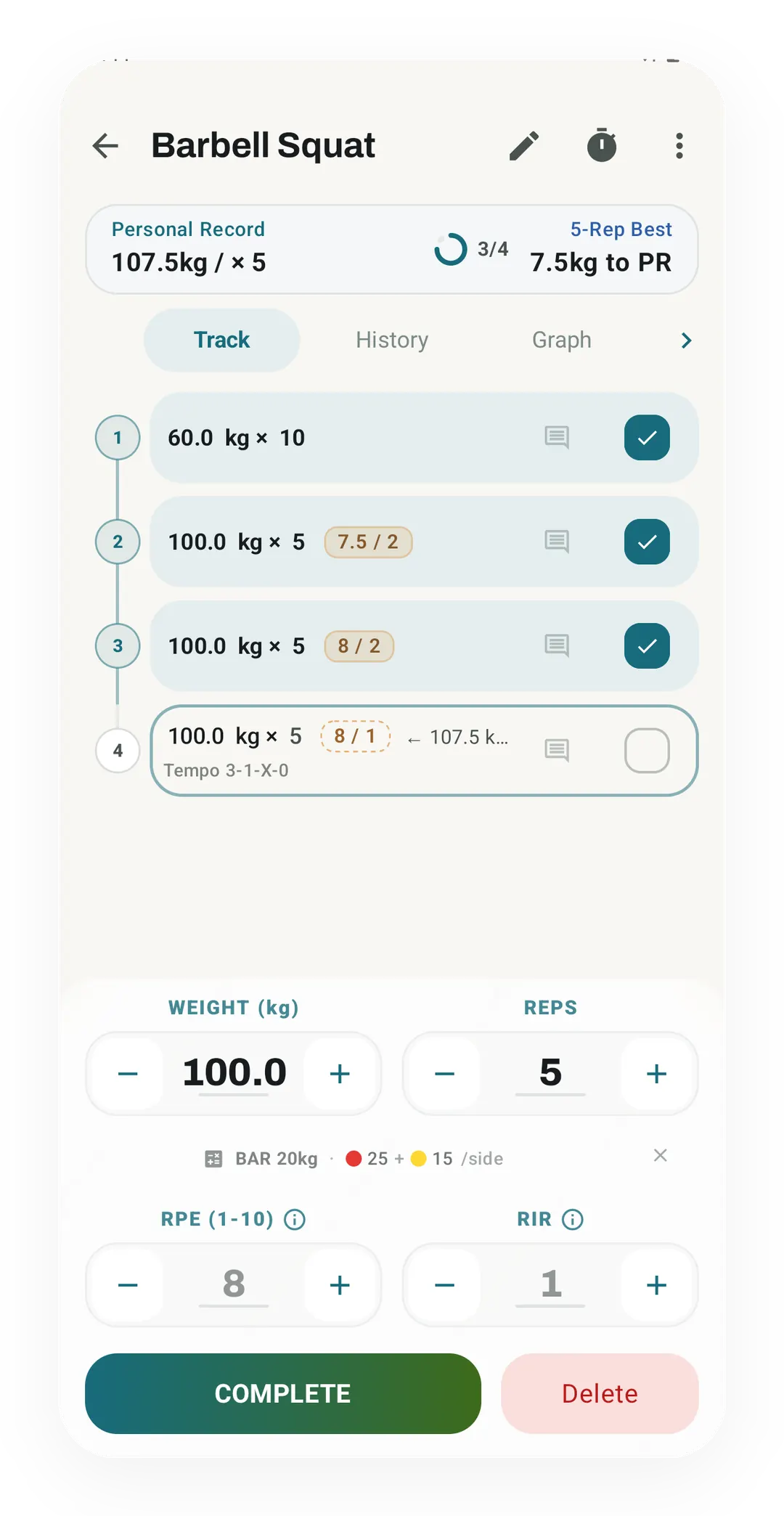
Set entry, the Kinoku way
The same job Strong does well: a set row with weight and reps, here 100 kg for 5 at a rate of perceived exertion (RPE) of 8 with 2 reps in reserve (RIR). Every part of this screen is on the free plan.
Try the other side of the table
Kinoku is free to install
Core tracking works offline, with no account. Your export from Strong can come along.
Android only for now, with an iPhone version in the works. Some depth is paid, and the pricing page says which parts.
Related features
Unlimited routines, Smart Sync, Starter Packs, and follow-along links are free, and so are Rotation Groups that cycle through several routines for you.
Charts per exercise, PRs, your best one-rep estimate, volume trends, and date filters. Every exercise type gets a chart that fits it: Best, Total, and Avg Time for holds, Best and Total Reps for rep work, and Best and Total Distance for distance work, not just weight charts.
Lossless backup, open CSV and JSON import, Strava import, and a scoped Export for AI handoff.