

Hevy vs Strong (2026): Free Limits, Feed, Watches and Price
Hevy vs Strong from their own pages and our tests: free limits, the friends feed, Apple Watch and Wear OS, prices, logging tools and moving your history.
Hevy suits lifters who want a friends feed, a web view, Wear OS and an importer for Strong files; Strong suits lifters on a barbell routine who want a log with no feed; Kinoku suits Android lifters who want no account.
At a glance
| App | Best for | Better at | Main trade-off |
|---|---|---|---|
| Hevy | Lifters who want friends to follow, a web view, and a watch app on Apple Watch or Wear OS | A friends feed, a web view, Wear OS, an importer for Strong files, and Trainer in Pro | A sign-up before the first set, seven free custom exercises, and a public default on new workouts in our test |
| Kinoku | Android lifters who want no account and no cap on routines or custom exercises | No account, no cap on routines or custom exercises, free charts and a free Wear OS app | Android only, with no iPhone app, web view or feed |
| Strong | Lifters on a barbell routine such as StrongLifts 5x5 who want a log with no feed | No feed to post to, and a free template limit its own help centre and app both state | Three free templates, all charts and both calculators under Strong PRO, and an account first |
Publisher disclosure
Kinoku, made by Dreamsoft Works, writes and publishes this page, and Kinoku is one of the apps on it. Every fact about Hevy or Strong is quoted from a page that app's maker publishes, opened on October 18, 2026, or observed in our own emulator tests in September 2026. We give no score. The apps are listed A to Z, and every label points at a quoted sentence or a dated test observation.
Quickstart
Hevy and Strong both log sets and reps well, and they part ways on company. Hevy builds in a friends feed, a web view, a Wear OS app and an importer for Strong files, while Strong keeps a log with no feed that its listing says is made for barbell routines. Both ask for an account before the first set.
This is a referee page, so the apps sit in no order and get no score. Every row and label rests on a sentence the app’s maker publishes or on a dated test on our emulator.
Side by side
Each cell quotes the app’s own pages or our September emulator tests. Where a cell says “Not stated”, we found no page that says either way, which is not a claim that the app lacks the feature.
| Hevy | Strong | |
|---|---|---|
| Platforms | iPhone, Android, web, Apple Watch and Wear OS | iPhone, Apple Watch and Android |
| Account before the first set | Yes, in our test | Yes (“All users will be prompted to sign up”) |
| Free routines or templates | Hevy’s own pages disagree, so no figure here | 3 templates |
| Free custom exercises | 7 | Not stated |
| Friends feed | Yes, with follows and a workout feed | Not on its pages; a share sheet sends workouts to friends |
| New workout visibility | Everyone, preselected in our test | No feed to post to |
| Charts on the free plan | Muscle charts free; advanced statistics in Pro | “Access to all Charts” listed under Strong PRO |
| Calculators | Plate calculators listed; Warm-Up Calculator in Pro | Plate and warm-up calculators under Strong PRO |
| A plan that sets your weights | Hevy Trainer, in Pro | Not stated |
| Effort rating per set | 6 to 10 | 6 to 10 |
| Exercise videos | “free high-quality videos” | “a growing library of animated videos” |
| Body measurements | Body weight and waist free; the rest in Pro | “Record Body Part Measurements” under Strong PRO |
| Strava sync | Yes | Not stated |
| Export | CSV, “can not be imported back into Hevy” | CSV, “cannot be imported back into Strong” |
| Import from the other app | Reads Strong’s CSV | Not stated |
| Paid plan, one test account | 3.49 euros a month on September 6 | 5.62 euros a month on September 14 |
| With no signal | Logs the set, then shows “1 workout failed to upload” until online | Logs the set, with no message |
What Hevy and Strong each do well
Both apps cover the basics a lifter reaches for between sets, and each one’s pages lead with a different idea of what a gym log is for.
- Hevy is built for training with friends. Its homepage says “Build routines and track progress with friends.”, and its help centre lists a personalized workout feed and a way to follow other Hevy users and interact with their workouts.
- Hevy reaches more screens. Its help centre names the iPhone and Android apps, a web browser, Apple Watch and Wear OS, and says that free and Pro users alike can track workouts across multiple devices.
- Strong is built around the barbell. Its Play listing says “Strong is optimized for a progressive barbell routine such as Starting Strength or StrongLifts 5x5” and adds that it adapts to any other routine you choose.
- Strong keeps its limits in plain view. Its help centre puts the free limit at three workout templates, and the app showed the same figure on its Strong PRO screen in our test.
Which one has a feed, and who sees your workouts?
The feed is the clearest line between the two apps, so it is the first thing worth settling.
- Hevy’s Home tab is a feed. In our test of Hevy 3.1.12, the first item on a new account was a welcome post from Hevy’s founder with a Follow button. Its help centre also lists syncing completed workouts with Strava.
- Hevy leaned toward sharing on a new account. The Save Workout sheet preselected Everyone, above the line “This workout is publicly available to all users on Hevy.” Private sat one tap away on the same sheet.
- Strong describes no feed. In our test its five tabs were Profile, History, Workout, Exercises and Measure, with no feed among them. Its help centre covers templates, an account and cloud sync, and its listing describes a share sheet that “makes sharing routines and workouts with friends easier than ever”. You open that sheet yourself, and nothing posts on its own.
What does each free plan hold?
Both free plans log every workout you do, and both put some of the extras behind a paid plan.
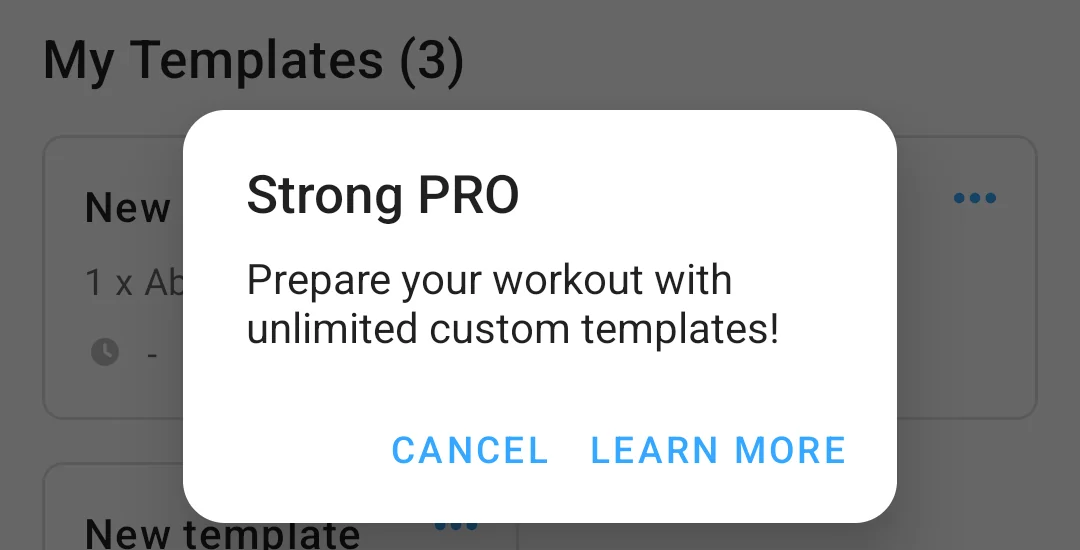
- Strong stops at three templates. Its help centre says so, and in our test the fourth New template tap opened a Strong PRO dialog with “Current free limit: 3 templates” behind its Learn More button. The Strong PRO page also lists body part measurements, access to all charts, a plate calculator and a warm-up calculator.
- Strong keeps your log open either way. The same page says “your workout data will always be available whether you are a Strong PRO user or not.”
- Hevy’s routine count depends on which Hevy page you read. Its Play listing says “Create an unlimited amount of routines” and names no plan. Its help centre, edited in October 2026, names a lower free limit and says Hevy Pro users can create unlimited routines. We print no Hevy figure until its pages agree.
- Hevy stops at seven custom exercises. Its help centre says “Free users can create up to 7 custom exercises.”, and in our test the eighth one opened an upgrade sheet with the same number.
- Hevy keeps the muscle charts free. Its chart page says the seven-day body graph and body distribution are “available without a Pro plan”, and Pro adds advanced statistics, the Warm-Up Calculator and more body measurements than weight and waist.
Watches, web and the devices you train with
Watch support matters to lifters who leave the phone in a locker, and here the two apps differ most.
- Hevy names both watches. Its homepage says “Leave your phone in the locker room, and track your workouts completely from your Apple Watch or WearOS device.” Its Play listing adds “Easily track your workouts on your Wear OS Watch”.
- Strong names Apple Watch. Strong’s help centre names its apps for iPhone, with Apple Watch included, and for Android. The page does not mention Wear OS, so we make no claim about a Strong Wear OS app either way.
- Hevy has a web view. Its homepage offers “a big screen view of your routines, exercise progress, and see your friend’s workouts”. Strong’s pages that we opened name no web app.
- Both sync between your devices. Strong says “Strong Cloud keeps your workouts automatically synced between devices”, and Hevy’s account works across multiple devices on the free plan as well as Pro.
Logging tools and plans that set your weights
Set by set, the two apps log much the same things, and the gap opens only when you want the app to plan for you.
- Set types. Hevy marks sets as warmup, normal, drop, failure and supersets. Strong tags sets as warm up, failure or drop sets, and it groups exercises into supersets.
- Effort rating. Both record the rating of perceived exertion (RPE) for a set on a 6 to 10 scale. Hevy’s guide says you tap the RPE button on a set, and Strong’s help centre says it uses “a 6-10 scale to record RPE in Strong”.
- Exercise videos. Hevy’s listing promises “free high-quality videos for you to focus on your form”, and Strong’s lists “Detailed exercise instructions with a growing library of animated videos”.
- A plan that adjusts. Hevy Trainer “creates personalized programs with built-in progressive overload” and “automatically adjusts your working weights”, and Hevy’s page says “Trainer is a Pro feature.” Strong’s pages describe templates you build yourself and name no plan that sets weights for you.
What each one costs
Neither app prints a single price on its web pages, so the in-app sheets from our tests are the only side-by-side we can offer.
- Hevy Pro. On September 6, 2026, the Hevy Pro screen priced a month at 3.49 euros, a year at 26.49 euros and Lifetime at 79.99 euros.
- Strong PRO. On September 14, 2026, the price sheet priced a month at 5.62 euros after a one-month free trial, a year at 32.72 euros and Strong PRO Forever at 97.14 euros.
Both figures come from one test account in the currency of its Google Play country. Strong’s help centre says “Prices may vary between regions”, and store prices can move from week to week, so the price in your own store is the one that counts.
Moving from Strong to Hevy
This is the one direction with a path on the app maker’s own page, and it carries your workouts but not your templates.
- Hevy reads Strong’s file. Hevy’s import page says “Hevy supports importing your Strong data through a CSV file, so your past workouts, exercises, and sets carry over in just a few minutes.”
- Templates stay behind. The same page answers “Are saved routines imported?” with a no, and suggests opening an imported workout and saving it as a routine to rebuild your regulars.
- Both exports run one way. Strong’s help centre says “exported files cannot be imported back into Strong”, and Hevy’s Export Data screen said its file “can not be imported back into Hevy” in our test.
Neither of Strong’s pages that we opened describes reading a Hevy file, so this page claims no import in that direction.
Logging with no signal
Both apps kept a set we logged with flight mode on, and they differed in what they told us.
Strong 6.2.4 started an empty workout, took a 135 pound bench press set and showed its “That’s workout 1” summary on Finish, with no offline or sync message at any step. The set was still in History after a forced stop. Hevy 3.1.12 also took the set, and its Home tab then read “1 workout failed to upload” under a No internet connection bar until the network came back.
Each app, in its own words
Hevy
Best for: Lifters who want friends to follow, a web view, and a watch app on Apple Watch or Wear OS.
Hevy’s homepage sums the app up as “a free workout tracker for iOS and Android”, and the app adds a feed on its Home tab and apps for both watch platforms.
- What it does well. A friends feed, a web view, Apple Watch and Wear OS apps, Strava sync, free muscle charts, and an importer for Strong files.
- What its pages say about limits. Seven free custom exercises, and Trainer, the Warm-Up Calculator and more body measurements in Pro. Its own pages disagree on free routines.
- Where it is the better pick. Lifters who train with friends, wear a Wear OS watch, want a web view, or are leaving Strong with a CSV file in hand.
- Where Hevy differs. An account before the first set, and on a new account in our test, workouts set to Everyone by default.
Strong
Best for: Lifters on a barbell routine such as StrongLifts 5x5 who want a log with no feed.
Strong is a plain workout logger on iPhone, Apple Watch and Android, whose listing says it is “optimized for a progressive barbell routine”.
- What it does well. Set tagging, supersets, animated exercise videos, a 6 to 10 effort scale, and Strong Cloud sync between devices.
- What its pages say about limits. Three free templates, with unlimited templates, all charts, both calculators and body part measurements under Strong PRO.
- Where it is the better pick. Lifters who want no feed and nothing to post, and who run a fixed barbell program that a few templates cover.
- Where Strong differs. An account before use, no Wear OS app on its pages, and no web view or import from another app that its pages describe.
Kinoku
Best for: Android lifters who want no account and no cap on routines or custom exercises.
Kinoku is the app that publishes this page, and it is a third option for lifters on Android rather than a side in the Hevy and Strong question.
- What it does well. No account, no cap on routines or custom exercises, free charts and a muscle map, a free Wear OS app, and an importer that reads a Hevy CSV file.
- What its pages say about limits. What ships free stays free, and no plan shows ads. Pro is one paid plan, at US $5.99 a month or US $39.99 a year, for run analytics, readiness and the deeper analytics hub.
- Where it is the better pick. Android lifters who want no sign-up and no cap, and who want their log kept on the phone.
- What Kinoku does not do: Kinoku has no iPhone app or Apple Watch app yet, no web view and no feed. Releases up to 1.5.0 also bring in a Strong 6.2.4 export without its weights, a Kinoku bug that version 1.6 fixes.
How this comparison was checked
Each claim on this page rests on a sentence the app’s maker publishes, or on a dated test on our emulator.
- First-party sources. We read Hevy’s homepage, feature pages, import page, help centre and Play listing, and Strong’s help centre, homepage and Play listing, on October 18, 2026.
- Device tests. We tested Hevy 3.1.12 on September 6, 2026, and Strong 6.2.4 on September 11 and 14, 2026, on an Android 16 emulator, and each observation source’s note gives its date.
- What we left out. Hevy’s free routine figure stays off the page, because its Play listing and its help centre disagree on it today.
- No sponsor. Neither company had a say in this page, and it prints no score.
Frequently asked questions
Is Hevy better than Strong?
Neither one is better on every measure their own pages state. Hevy gives you a friends feed, a web view, a Wear OS app and an importer for Strong files, and its Trainer plan sets your weights if you pay for Pro. Strong keeps a log with no feed, and its listing says it is made for barbell routines such as StrongLifts 5x5. The choice comes down to whether you want the feed and which watch you wear.
How many routines can I make for free in Hevy and Strong?
Strong’s help centre says you can create up to 3 Workout Templates on the free version, and in our test the fourth template opened a Strong PRO dialog. Hevy’s own pages disagree with each other. Its Play listing says Create an unlimited amount of routines, while its help centre names a lower free limit and puts unlimited routines in Hevy Pro. Until those two agree, this page prints no figure for Hevy.
Can I import my Strong data into Hevy?
Yes. Hevy’s import page says it supports importing your Strong data through a CSV file, so past workouts, exercises and sets carry over. The same page says saved routines do not come across, though workout names do, so you can save an imported workout as a routine again. Strong’s help centre says its exported files cannot be imported back into Strong, so the move runs one way.
Does Strong have a Wear OS app?
Strong’s help centre says it offers apps for iPhone, including Apple Watch, and Android, and the page does not mention Wear OS. We read that as no Strong sentence about a Wear OS app either way, not as proof that none exists. Hevy names both watches, and its homepage says you can track your workouts completely from your Apple Watch or a Wear OS device.
Do Hevy and Strong need an account?
Yes, both of them. Strong’s help centre says all users will be prompted to sign up for an account before using Strong, and its homepage says the account is free. In our test, the first screen of Hevy 3.1.12 asked us to sign up with Google or an email address, or to log in, and it had no guest path. Each account then keeps your log in step across your devices.
Is Hevy or Strong cheaper?
On one test account, in euros, Hevy Pro showed 3.49 a month, 26.49 a year or 79.99 once on September 6, 2026. Strong PRO showed 5.62 a month, 32.72 a year or 97.14 once on September 14. On that account Hevy cost less on every plan. Strong’s help centre says prices may vary between regions, so the price in your own store is the one that counts.
Are my workouts public on Hevy, and does Strong have a feed?
On a new Hevy account in our test, the Save Workout sheet preselected Everyone, with a line saying the workout is publicly available to all users on Hevy. Private was one tap away on the same sheet. Strong’s pages describe no feed at all, and its Play listing describes a share sheet for sending routines and workouts to friends when you choose to.
Is there a free alternative to Hevy and Strong on Android?
Kinoku is one, on Android only. It asks for no account, puts no cap on routines or custom exercises, and has a free Wear OS app. It reads a Hevy CSV file, and since version 1.6 it reads a Strong 6.2.4 export with the weights that earlier releases dropped. It has no iPhone app, no web view and no feed.
Related pages
- Best Strong alternatives: Six apps sorted by free routine cap, for lifters leaving Strong.
- Best Hevy alternatives: Six apps sorted by free routine cap, for lifters leaving Hevy.
- Workout apps with CSV export: which apps export your history, and which read another app’s file.
- Best free gym apps for Wear OS: the watch question in more depth.
- Kinoku vs Hevy: Kinoku and Hevy in detail.
- Kinoku vs Strong: Kinoku and Strong in detail.
- FitNotes vs Hevy: the same kind of head-to-head, with FitNotes in place of Strong.
- Hevy vs JEFIT (a lifting planner on iPhone, Android and the web): Hevy against a third big logger, on caps, plans and prices.
- Hevy vs Caliber: Hevy next to an app that sells coach-written plans and a personal trainer.
- Boostcamp vs Hevy: Hevy beside a program library, on who sets the next weight.
Which one fits you
- Choose Hevy if you want friends to follow and a web view, you log from an Apple Watch or a Wear OS watch, or you are leaving Strong with a CSV file to bring along.
- Choose Strong if you want a log with no feed on iPhone, Apple Watch or Android, you run a barbell routine such as StrongLifts 5x5, and three free templates or Strong PRO cover your plan.
- Choose Kinoku if you train on Android and want no account and no cap on routines or custom exercises, with free charts and a free Wear OS app.
Test record
Tested September 6, 2026
- Environment
- Android Studio Pixel phone emulator Kinoku_Phone_Play, API 36, Android 16
- Hevy
- Version 3.1.12 (version code 3289233), installed from Google Play, tested September 6, 2026. Official listing
- Strong
- Version 6.2.4 (version code 602006), installed from Google Play, tested September 11 and 14, 2026. Official listing
How this page is checked. Every fact about another app on this page comes from a page that app publishes, which we could open and quote on October 18, 2026, or from a dated emulator test named in that source's note. The sources, with the exact sentence each fact rests on, are listed just above. Every Kinoku fact is tied to the shipping app's code. The page carries no score; the apps are grouped by what their own pages say. If a fact here has gone stale, the support page is the fastest way to tell us.
Test evidence
What the tested builds showed
 Open full-size image ↗
Strong's free template limit
Cropped emulator capture. In Strong 6.2.4, attempting to add a fourth workout template triggers a dialog reading Current free limit: 3 templates.
One of the apps on this page
Kinoku is free to install
Core tracking works offline, with no account. An export from the app you use today can come along.
Android only for now, with an iPhone version in the works. Some depth is paid, and the pricing page says which parts.
Related features
Unlimited routines, Smart Sync, Starter Packs, and follow-along links are free, and so are Rotation Groups that cycle through several routines for you.
Charts per exercise, PRs, your best one-rep estimate, volume trends, and date filters. Every exercise type gets a chart that fits it: Best, Total, and Avg Time for holds, Best and Total Reps for rep work, and Best and Total Distance for distance work, not just weight charts.
A real watch app for workouts, runs, steps, tiles, and watch face data.