

Hevy vs Caliber (2026): Free Limits, Coaching and Watches
Hevy vs Caliber from their own pages: what each free plan holds, plans and a paid coach, friends, watches, Android, and how to move your log.
Caliber suits lifters who want a free log now and a paid plan or coach later; Hevy suits lifters who want friends, a web view and a watch app; Kinoku suits Android lifters who want no account.
At a glance
| App | Best for | Better at | Main trade-off |
|---|---|---|---|
| Caliber | Lifters who want a free log now and maybe a paid coach later | Unlimited free workouts, coach videos, private Workout Circles, and a link that lets ChatGPT and Claude read your log | Custom exercises, supersets and coach plans sit in Caliber Plus, and its pages name no watch app |
| Hevy | Lifters who train with friends and want the app on a watch and in a web browser | A friends feed, a web view, both watch platforms, 7 free custom exercises and supersets | Your log lives in a Hevy account, Trainer is in Pro, and its own pages disagree on free routines |
| Kinoku | Android lifters who want no account, plus free custom moves, supersets and programs | No account, no cap on routines or custom exercises, and free named programs that set the next weight | Android only, with no coach, no feed, no web view and no how-to videos of its own |
Publisher disclosure
Kinoku, made by Dreamsoft Works, writes and publishes this page, and Kinoku is one of the apps on it. Every fact about Hevy or Caliber is quoted from a page that app's maker publishes, opened on October 27, 2026. We give no score. The apps are listed A to Z, and every label points at a quoted sentence.
Quickstart
Hevy and Caliber both log sets and reps on iPhone and Android, and they part ways on the help they sell. Hevy adds friends, a web view and two watch platforms around its log, while Caliber adds coach-designed plans and a paid personal trainer. Kinoku is a third option for Android lifters who want no account.
We give no score on this page. The apps are listed A to Z, and each row and label rests on a sentence the app’s maker publishes, read on October 27, 2026.
What Hevy and Caliber each do well
Each app is good at a different part of training, and their own pages put that part first.
- Caliber grows with you into coaching. Its listing describes three layers: a free version, a paid Caliber Plus with coach-designed training plans, and one-to-one guidance from a personal trainer on top.
- Caliber teaches the lifts on the free plan. The free list includes “step-by-step videos and pro tips from Caliber coaches”, plus private Workout Circles where a personal best you hit is shared with the group.
- Hevy keeps you in touch with other lifters. Its help centre lists ways to follow other Hevy users, comment on their workouts and see a personalized workout feed.
- Hevy runs on the most screens. The same page names iPhone and Android apps, a web browser view, Apple Watch and Wear OS, and says free users can track workouts across multiple devices too.
Side by side
Each cell comes from the app’s own pages. A cell that reads “Not stated” marks a row none of the pages we opened covers either way.
| Caliber | Hevy | Kinoku | |
|---|---|---|---|
| Platforms | iPhone and Android | iPhone, Android, web, Apple Watch and Wear OS | Android and Wear OS |
| Account | Log in with your email and password | Your log is stored on your Hevy account | None |
| Free workouts or routines | “unlimited workouts” | Its pages disagree, so no figure here | No cap |
| Free custom exercises | In Caliber Plus | Up to 7 | No cap |
| Supersets | Creating them is in Caliber Plus | A set type, with no Pro tag | Free |
| Ready-made plans | Coach-designed plans in Caliber Plus | Hevy Trainer, in Pro | 25 templates and a builder, free |
| A human coach | One-to-one coaching, paid | Hevy Coach is software for a trainer you hire | None |
| Friends | Private Workout Circles and public communities | Follows, comments and a feed | None |
| Exercise videos | Step-by-step videos, free | “free high-quality videos” | None built in; saved YouTube links |
| Link to ChatGPT or Claude | Read-only connector, free accounts too | Not stated | An Export for AI file you share |
| Health Connect | Syncs cardio, nutrition and body stats | Not stated | Reads and writes, free |
| Export | CSV, and strength workouts to Strava | A file from your profile, and Strava sync | CSV, a ZIP backup and Export for AI |
| With no signal | Offline Mode added in the October 23 update | “Workout Offline” listed for its watch apps | Works offline, with no upload step |
What does each free plan hold?
Caliber’s free plan lets you log unlimited workouts, and each app moves a different tool into its paid plan.
- Caliber. The listing says the free version lets you “Create and track unlimited workouts” and train solo or with friends. Its Caliber Plus list then names custom exercises, supersets, exercise swaps and progress photos, so a move missing from the library costs money sooner in Caliber than in Hevy. The Strength Score, which rates your strength for your age and gender, sits in Caliber Plus too.
- Hevy. Its help centre says “Free users can create up to 7 custom exercises.”, and it lists supersets beside warm-up, drop and failure sets, with no Pro tag. For routines, Hevy’s Play listing promises “Create an unlimited amount of routines”, but a line in its help centre sets a lower number for free accounts. We print neither figure until the two pages agree.
- Kinoku. Routines, custom exercises, supersets and history have no cap on the free plan, and so do the program builder and all 25 of its templates.
Coaching, plans and who picks your weights
The help each app sells for the plan itself is where Hevy and Caliber differ most.
- Caliber sells a person. Its listing describes one-to-one guidance from a personal trainer, with a fully customized training and nutrition plan, in-app chat and video messaging, and weekly progress reviews. Its FAQ adds a 30-day money-back guarantee on that coaching program.
- Caliber Plus sells the plans. Below the coach, Caliber Plus holds the coach-designed training plans, which its listing describes as “structured plans tailored to your goals, experience level and schedule”.
- Hevy sells an algorithm. Hevy Trainer “automatically adjusts your working weights”, and its own page answers the free question with “No, Trainer is a Pro feature.”
- Hevy Coach is for your trainer. Hevy also makes Hevy Coach, “Built by the Hevy team.”, where a trainer can manage and assign programs for clients, so it matters only when your own trainer works in it.
- Kinoku has no coach. Its named programs set the next weight on the free plan. They include 5/3/1 by Jim Wendler, GZCLP (a barbell program built on tiered lifts) by Cody Lefever and nSuns from the r/nSuns community, and its weight suggestions outside a program are part of Pro.
Friends, circles and feeds
Both apps bring other lifters into the app, in two different shapes.
- Hevy is built around a feed. You follow other users, comment on their workouts and read a feed of activity, and its help centre also lists syncing finished workouts with Strava.
- Caliber starts small. Workout Circles are private chats with friends and family where a new best is shared with the group. Its workout app page also lists “Public communities to interact with other users”.
- Kinoku has no feed. There are no follows, circles or comments, and no Kinoku server receives your workouts.
Watches, phones and logging with no signal
Watch support and offline logging matter most to lifters who leave the phone in a locker.
- Hevy names both watches. Its homepage says you can “track your workouts completely from your Apple Watch or WearOS device”, and it lists Workout Offline among the watch features.
- Caliber names phones only. Its get-app page tells you to “launch the App Store or Play Store on your phone”, and the Caliber pages we opened name no watch app. Its listing’s notes for the October 23, 2026 update say it “added support for Offline Mode”.
- Accounts hold both logs. Hevy’s help centre says “Your account information is stored on your Hevy account, not on the device you are using.” Caliber’s get-app page asks you to log in using your email address and password.
- Kinoku keeps the log on the phone. It has a free Wear OS app, no Apple Watch app and no account, and it logs with no signal because it has nothing to upload.
Your data: export, Strava and AI assistants
Both apps let your log leave the app, and Caliber adds a live link to two AI chat apps.
- Caliber. Its FAQ says “You can export your training history as a CSV from the app”, and you can send strength workouts to Strava. It also runs an official, read-only connector built on the Model Context Protocol (MCP), which lets ChatGPT and Claude read your workouts and plans. Its connector page says “the MCP server works with free Caliber accounts.”
- Hevy. Its help centre says you can export data from your profile to “save a copy, review it in a spreadsheet, share it with a coach, or use it outside of the app.”
- Kinoku. Its importer reads a Hevy CSV export into the log on your phone. Kinoku has no importer written for Caliber’s file, so this page claims none. For an AI assistant, Kinoku’s Export for AI makes a small file you share yourself, and nothing connects to Kinoku from outside.
Each app, in its own words
Caliber
Best for: Lifters who want a free log now and maybe a paid coach later.
Caliber’s listing calls it “a science-based strength training app”, and it is the one app here that sells a human coach on top of the log.
- What it does well. Unlimited free workouts, step-by-step coach videos, private Workout Circles, Health Connect sync, and a read-only link for ChatGPT and Claude on free accounts.
- What its pages say about limits. Custom exercises, supersets, exercise swaps, progress photos, the Strength Score and coach-designed plans are all in Caliber Plus. The pages we opened print no price for Caliber Plus or for coaching.
- Where it is the better pick. A lifter who wants to learn the lifts from video and may hire a trainer later gets both in Caliber. The Hevy pages we opened offer no coach for hire, and Kinoku has none.
- Where Caliber differs. It asks you to log in, and its pages name no watch app and no web view.
Hevy
Best for: Lifters who train with friends and want the app on a watch and in a web browser.
Hevy’s homepage calls it “a free workout tracker for iOS and Android”, and its help centre adds a web view and both watch platforms.
- What it does well. A friends feed with follows and comments, Strava sync, exercise videos, apps for Apple Watch and Wear OS, and a web view of your routines.
- What its pages say about limits. Up to 7 free custom exercises, Hevy Trainer in Pro, and a free routine limit its listing and help centre state differently.
- Where it is the better pick. If you log next to friends, wear an Apple Watch or want a big-screen view on a computer, Hevy covers more of that than Caliber or Kinoku.
- Where Hevy differs. Your log lives in a Hevy account, and its pages offer an algorithm in Pro rather than a coach for hire.
Kinoku
Best for: Android lifters who want no account, plus free custom moves, supersets and programs.
Kinoku is our app, and this page is ours too. It runs on Android, logs both lifting and running, and keeps the whole record on the phone with no account, which makes it a third choice beside Hevy and Caliber.
- What it does well. Custom exercises, supersets and routines with no cap and no account, free programs such as 5/3/1 that set the next weight, a free Wear OS app, and an import for Hevy CSV files.
- Where its limits are. A feature that ships free never moves behind the paywall, and no plan carries ads. The paid plan, Pro, costs US $5.99 a month or US $39.99 a year and adds readiness, run analytics and the Pro Analytics Hub.
- Where it is the better pick. An Android lifter who wants custom moves and supersets without a paid plan, and a program that sets the weights, with no sign-up.
- What Kinoku does not do: it is Android only for now, with an iPhone version on the roadmap and no Apple Watch app. It has no web view, no feed, no coach for hire and no video library of its own. You can save a YouTube link to any exercise and play it from the workout screen.
How this comparison was checked
Every claim about Hevy and Caliber rests on a sentence from a page its maker publishes.
- Their own pages. We read Caliber’s Google Play listing, homepage, workout app page, FAQ, get-app page and connector page, and Hevy’s homepage, Play listing, help centre, Trainer page and the Hevy Coach site, on October 27, 2026.
- Kinoku’s side. Kinoku facts come from the app’s own feature list, and each free or Pro line matches the tier check in the app’s code.
- What we left out. Hevy’s free routine figure, because its listing and help centre disagree, and the prices of Hevy Pro and Caliber Plus. Caliber’s pages print no price, and the price in your own store is the one to go by.
- No sponsor. Neither company had a say in this page, and neither paid for a place on it.
Frequently asked questions
Is Hevy or Caliber better?
It turns on what kind of help you want. Caliber grows from a free log into coach-designed plans in Caliber Plus and a paid one-to-one trainer. Hevy grows into friends, a web view and two watch platforms, with an automatic plan in Pro. Neither app leads on every row of the table, so this page gives no score.
Is Caliber available on Android?
Yes. Caliber Strength Training is on Google Play from Caliber Fitness, Inc., and its get-app page sends you to the App Store or the Play Store. Hevy is on both phone platforms too. The Caliber pages we opened name no watch app, while Hevy names Apple Watch and Wear OS, and Kinoku runs on Android phones and Wear OS watches.
What does each app give you for free?
Caliber’s listing says the free version lets you create and track unlimited workouts, and it puts custom exercises and supersets in Caliber Plus. Hevy’s help centre lets a free account make up to 7 custom exercises and lists supersets with no Pro tag, while its routine limit reads differently on two of its own pages. Kinoku’s free plan has no cap on routines or custom exercises.
Can I get a real coach in Hevy or Caliber?
In Caliber, yes, as a paid layer. Its listing describes one-to-one guidance from a personal trainer, with a training and nutrition plan, chat and weekly reviews. The Hevy pages we opened offer no coach for hire. Its Trainer is an automatic plan in Pro, and Hevy Coach is separate software a trainer you hire can use to assign you programs.
Does Hevy or Caliber have a watch app?
Hevy does, on both watch platforms. Its homepage says you can track your workouts completely from your Apple Watch or a Wear OS device, and it lists Workout Offline there. The Caliber pages we opened point to phone app stores only and name no watch app. Kinoku has a free Wear OS app and no Apple Watch app.
Do Hevy and Caliber need an account?
Both describe one. Hevy’s help centre says your account information is stored on your Hevy account rather than on the device you are using. Caliber’s get-app page tells you to download the app and then log in using your email address and password. Kinoku has no account, and no Kinoku server holds your training record.
Can I move my history from Hevy or Caliber to Kinoku?
From Hevy, yes. Hevy exports your workouts from your profile as a file a spreadsheet opens, and Kinoku’s importer reads that Hevy CSV. Caliber’s FAQ says you can export your training history as a CSV, but Kinoku has no importer written for it. The Kinoku import format page shows a layout an AI assistant can turn such a file into.
Can Hevy or Caliber connect to ChatGPT or Claude?
Caliber can. Its FAQ describes an official, read-only connector that lets ChatGPT and Claude read your workouts, records, plans and body stats, and it works with free accounts. The Hevy pages we opened describe no such link. Kinoku has an Export for AI file you share with the assistant you pick, and Kinoku itself does not connect to it.
Related pages
- Boostcamp vs Hevy: Hevy next to a program library app, on plans, free limits and the feed.
- Hevy vs Strong: Hevy beside the other set-table logger.
- FitNotes vs Hevy: Hevy against a free Android log with no account.
- Kinoku vs Hevy: Kinoku and Hevy, row by row.
- Best Hevy alternatives: Six apps sorted by free routine cap.
- Best free apps to build your own workout routines: what each free plan limits when you build, Caliber included.
- The Kinoku import format: the file layouts Kinoku reads, for moving a log over.
Which one fits you
- Choose Caliber if the stock exercise list covers your training, you learn lifts from coach videos, and you may pay for a plan or a trainer later.
- Choose Hevy if you train with friends, log from an Apple Watch or a Wear OS watch, or want a web view, and a few free custom exercises cover you.
- Choose Kinoku if you train on Android with no account and want free custom exercises, supersets, a Wear OS app and programs that set the next weight.
How this page is checked. Every fact about another app on this page comes from a page that app publishes, which we could open and quote on October 27, 2026. The sources, with the exact sentence each fact rests on, are listed just above. Every Kinoku fact is tied to the shipping app's code. The page carries no score; the apps are grouped by what their own pages say. If a fact here has gone stale, the support page is the fastest way to tell us.
Kinoku in practice
Where this shows up in the app
 Open full-size image ↗
Making your own exercise
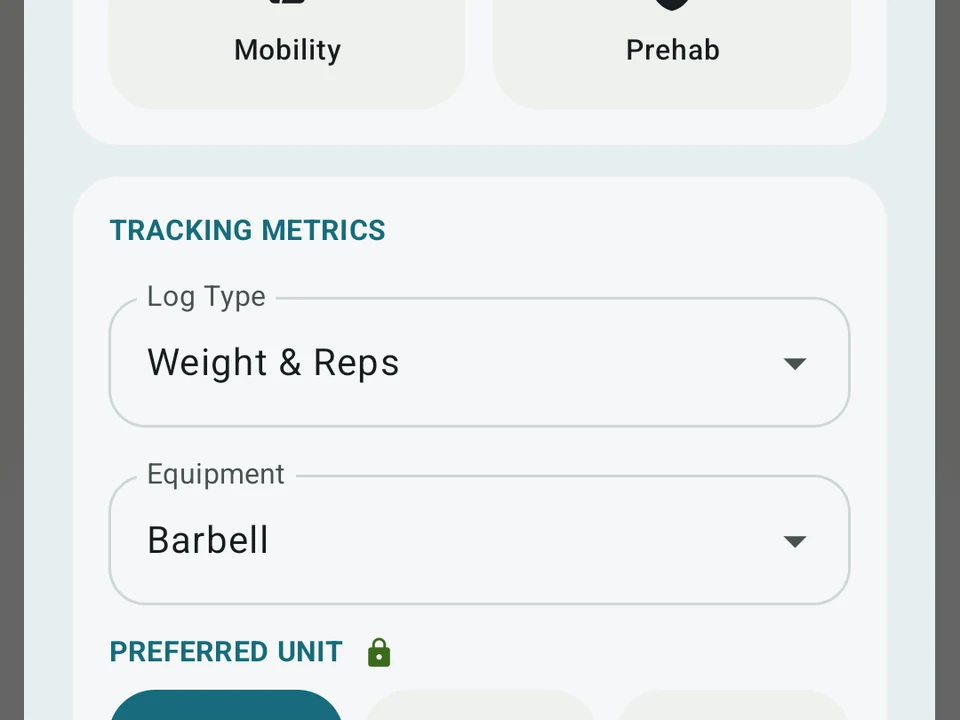
Real app capture. Kinoku's exercise editor, where a move you add gets its log type and equipment, here weight and reps on a barbell. The free plan puts no cap on how many you make.
One of the apps on this page
Kinoku is free to install
Core tracking works offline, with no account. An export from the app you use today can come along.
Android only for now, with an iPhone version in the works. Some depth is paid, and the pricing page says which parts.
Related features
Unlimited routines, Smart Sync, Starter Packs, and follow-along links are free, and so are Rotation Groups that cycle through several routines for you.
A 4-phase planning stack. The builder, all 25 templates, named programs with auto-progression, the custom model, and unlimited active programs are free. Pro adds volume targets, readiness tuning, and auto set changes.
A real watch app for workouts, runs, steps, tiles, and watch face data.