

Hevy Alternative: Kinoku vs Hevy
Hevy is a free social lifting log; Pro lifts its routine and custom-exercise caps. Kinoku has no account, no caps on the basics, and adds runs and programs.
Kinoku fits a lifter on Android who wants no account and no routine cap; Hevy fits a lifter who wants a social feed, an iPhone or an Apple Watch.
Publisher disclosure
Kinoku, made by Dreamsoft Works, writes and publishes this page. Every Hevy product fact is quoted from a Hevy page we opened on September 20, 2026, or observed in our own test of Hevy 3.1.12 on an emulator on September 6, 2026. We say where Hevy is the better pick, and we give no score.
Quickstart
Hevy is a free lifting log with a social feed, apps on both phone platforms and both watch platforms, and a paid tier that lifts its free caps. It asks for an account before you can log a set. Kinoku asks for no account, keeps the basics free with no caps, and adds GPS runs, a muscle map, and training programs. So Hevy is the pick if you want friends and an iPhone, and Kinoku is the pick if you want your log to yourself on Android. If you are comparing several options, see our roundup of the best Hevy alternatives.
What Hevy does well
Hevy earns its place, and its own homepage and its own app back these up.
- Free on both platforms. Hevy says it plainly: a free workout tracker for iOS and Android [1].
- Both watches. You can leave the phone in the locker and log from an Apple Watch or a Wear OS device [2].
- A desktop view. Hevy on the desktop gives a big screen for routines, progress, and friends’ workouts [3].
- Friends. Hevy is built around a feed [13]. You build routines and track progress with friends [4].
- A clean set log. In our test the workout screen was fast and clear, with weight, reps, and a tick in one row per set, and a rest timer above each exercise [12].
- CSV export. Your whole history exports to a CSV file from Settings, and Hevy says the file cannot be imported back into Hevy [9].
That last line matters for anyone who moves apps, in either direction, and we come back to it below.
What we tested
On September 6, 2026 we installed Hevy 3.1.12 from Google Play on an Android 16 emulator and walked it in this order:
- Open the app fresh and look for a way in without an account.
- Register, then step through the setup questions.
- Create routines, one at a time, until the app stopped us.
- Create custom exercises the same way.
- Turn flight mode on, stop the app, open it again, and log one set.
- Turn the network back on and watch what happens to that set.
- Open the Pro screen and note the prices it showed.
- Find the export path and read the file it produced.
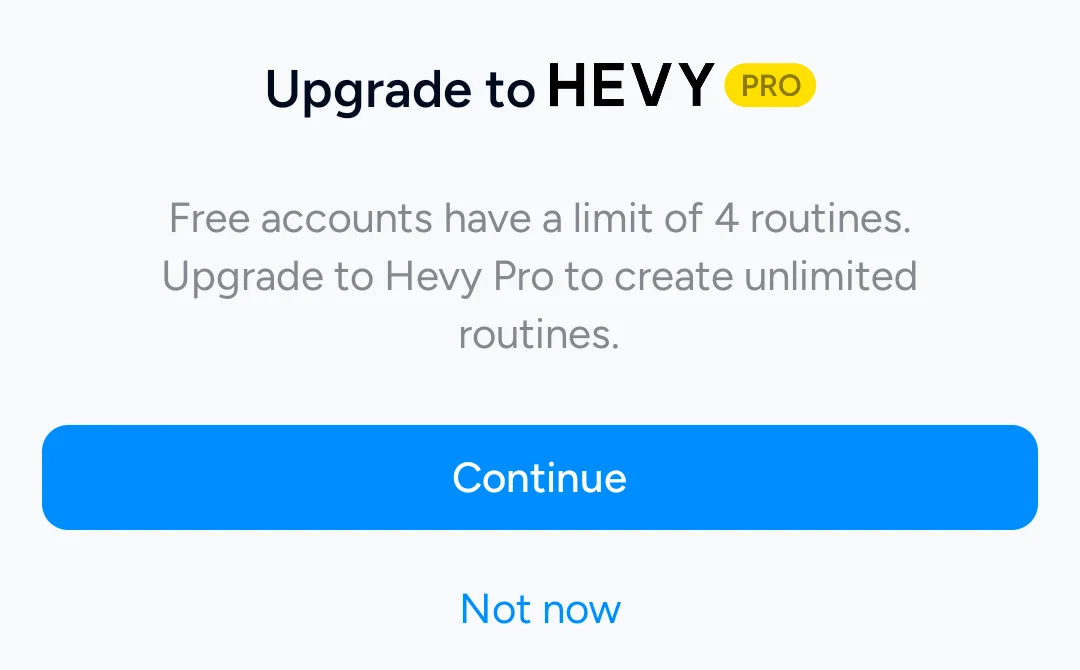
The app opened on a sign-up wall with no skip [5], so everything after step one ran on a fresh account. The routine block came on the fifth routine [6], and the custom exercise block came on the eighth exercise [7]. With no network, Hevy let us start a routine, log a 175 pound set, and save it, and the Home tab then showed a “No internet connection” bar and a note that one workout had failed to upload [10]. The profile listed no workouts until the network came back, and the set survived a forced stop in between. The export produced a file named workout_data.csv, and we read its header, which is printed in the moving-over section.
We did not test the per-workout set cap, because reaching it would take more sets than one test session holds, so this page states nothing about it.
Kinoku 1.2.0 got a lighter check on the same emulator, also with flight mode on: the Today screen opened, the exercise list loaded, and a bench-press workout took a 175 pound set with no warning. Kinoku’s backup and export facts on this page come from its own documentation.
Side by side
Hevy’s own homepage and our test fill the left column, and Kinoku fills the right. Each bracketed number is a Hevy source, listed at the end of the page.
| Hevy | Kinoku | |
|---|---|---|
| Account | Needed before the first set. Google or email [5]. | None. No email, no password. |
| Where your data lives | Workouts upload to Hevy once the network is there [10]. | On your phone, and eligible app data can go into your Android system backup. |
| Price of the core app | Free [1]. | Free. No caps on workouts, routines, or history. |
| Free routine cap | 4 [6]. | None. |
| Free custom exercises | 7 [7]. | None. |
| Offline | Logs and saves with no network. The upload waits and retries [10]. | Everything works offline. Map tiles, opt-in weather, and billing are the exceptions. |
| Export | CSV of the whole history. It cannot be imported back into Hevy [9]. | CSV, a lossless ZIP backup, and an Export for AI. |
| Platforms | iOS, Android, Apple Watch, Wear OS, and desktop [1] [2] [3]. | Android and Wear OS. |
| Social | A feed and friends [4] [13]. | None. |
| Workout privacy | Everyone was the preselected visibility on a new account [11]. | Nothing is posted anywhere. |
| GPS run tracking | Not stated on Hevy’s pages. | Free. Live pace, splits, a route map, and audio cues. |
| Muscle map | Not stated on Hevy’s pages. | Free. Frequency and volume maps. Pro adds recovery. |
| Training programs | Not stated on Hevy’s pages. | Free. Twenty-five templates, a builder, and the named plans 5/3/1, GZCLP (a beginner barbell program), and nSuns. |
| Languages | Not stated on Hevy’s pages. | 10. |
| Paid layer | Hevy Pro. Shown to us on September 6 at 3.49 euros a month, 26.49 euros a year, or 79.99 euros once [8]. | Pro. US $5.99 each month, US $39.99 for a year, or US $69.99 once. Analytics, readiness, and the smart layer. |
“Not stated on Hevy’s pages” means we did not find that fact on a Hevy page we could quote or in the parts of the app we walked, and it does not mean the app lacks it.
Three roundups set Hevy beside other apps: best Hevy alternatives, logging offline without an account, and free plans compared.
Where Kinoku differs
Each point below is free unless it says Pro, and the first three are the ones a Hevy user asks about.
- No account, ever. You open the app and log a set. There is no sign-up wall and no username.
- No caps on the basics. Routines, custom exercises, workouts, and history have no limit on the free plan. A build check blocks a free feature from moving behind Pro without a recorded sign-off.
- Nothing is public. There is no feed, so a workout cannot be posted by default, because there is nowhere for it to go.
- GPS runs. Kinoku records your route, pace, and splits, and reads cues out loud as you run. The map fetches its tiles only when you open it, and weather stays off until you turn it on.
- A muscle map. Frequency and training-volume views show what your log hits. Pro adds recovery estimates and readiness context.
- Training programs. Twenty-five templates, a builder for your own, and the named plans 5/3/1, GZCLP, and nSuns, with no cap on how many you keep.
- Readiness. Pro reads sleep, muscle recovery, lifting load, and heart rate variability (HRV) when it is there. Then it suggests how hard to go today.
- Pro. One paid plan, at US $5.99 each month, US $39.99 for a year, or US $69.99 once as Pro Lifetime. It buys the analytics hub, run analytics, and the smart layer, and the app works without it.
Where Hevy is the better pick
Some people should stay with Hevy, and we mean that.
- You use an iPhone or an Apple Watch. Hevy runs on both [1] [2]. Kinoku is Android and Wear OS only for now.
- You train with friends. Hevy’s feed and follows [13] are the point of the app for many people [4]. Kinoku has none of that.
- You want your log on more than one device. Your workouts upload to your Hevy account [10], and the desktop view reads them from there [3]. Kinoku moves between phones by a backup file you restore yourself.
- Your log already lives there. If you like Hevy and your history is in it, that is a good reason to stay. Nobody needs to switch apps for the sake of it.
Moving over
Hevy exports your whole history as one CSV file from Settings, then Export & Import Data, then Export Data, then Export Workouts [9]. Hevy 3.1.12 wrote this header in our test, on an account set to pounds:
"title","start_time","end_time","description","exercise_title","superset_id","exercise_notes","set_index","set_type","weight_lbs","reps","distance_miles","duration_seconds","rpe"Hevy names the weight and distance columns after your unit setting, so an account set to kilograms writes weight_kg and distance_km instead, which we confirmed by switching the test account over. Hevy also writes the month and the exercise names in whatever language the app is set to, so set Hevy to English before you export if you can, because Kinoku matches exercise names against an English catalog. Kinoku’s importer reads the Hevy layout, and the review screen shows the exercise-name matches before anything is saved. The import is one batch that Import History can undo. The backup page walks through it, and the import format page shows the layouts the importer reads.
One honest note from the test. Kinoku 1.2.0 did not read this Hevy file well: it rejected the pounds version, and it put a kilograms version on the wrong date. We fixed both the same day, and the fix shipped in Kinoku 1.3.0, so from that version on, Kinoku reads the pounds file and puts each workout on the right date. Hevy’s own page says its CSV cannot be imported back into Hevy [9], so keep that file in any case. And a Hevy CSV has no row ids, so importing the same file twice makes two copies that Import History in Kinoku can undo.
What Kinoku does not do
- Android only for now. There is no iPhone app or Apple Watch app yet. Hevy has both [1] [2].
- No cloud sync between devices. Backup is a file you own, and eligible app data can also arrive through Android’s own new-phone restore.
- No social layer. There is no feed and no follower list.
- Some depth is paid. Pro holds the analytics hub, run analytics, and readiness, and the pricing page lists each part.
- “Offline” has edges. A map fetches its tiles over the network when you open it, weather is a call you opt into, and Google Play handles billing.
If those limits are fine, and you want a log with no account and no caps, Kinoku is worth a look. If you want friends in the picture or an iPhone in your pocket, Hevy is a solid place to stay.
Related pages
- Best privacy-focused fitness apps for Android: Hevy’s Play label read beside ten other apps, from no data at all to twelve types.
- Best Hevy alternatives: Replacing Hevy’s four-routine cap.
- Best free apps to build your own workout routines: Hevy’s routine and custom-exercise caps beside seven other builders.
- Hevy vs Strong: Neutral referee head-to-head comparison.
- Best workout apps without a subscription: Trackers that avoid monthly subscription fees.
- Best workout apps without an account: Private fitness trackers with no account requirement.
- Kinoku vs Strong: Comparing offline tracking with Strong.
- Best apps for lifting and running in one app: Hevy beside the apps that log runs too.
- FitNotes vs Hevy: Hevy next to the account-free FitNotes log, with Kinoku third.
- Hevy vs JEFIT (a lifting planner on iPhone, Android and the web): the free limits and prices of both.
- Best Samsung Health alternatives: Hevy and Kinoku as gym logs for people who leave Samsung Health, next to four other apps.
- Best StrongLifts alternatives: Which apps set your next 5x5 weight for free, and where Hevy Trainer fits.
- Free workout trackers that log effort per set: Hevy’s 6 to 10 column for rating of perceived exertion (RPE) next to six apps that log effort, some with a field for reps in reserve.
- Best Gymshark Training app alternatives: Six Android apps for Gymshark Training users, from trainer-led classes to trackers like Hevy.
- Best calisthenics workout tracker apps for Android: Hevy’s bodyweight volume rule beside six apps built for pull-ups, dips and holds.
- Free workout year in review apps: Hevy’s December recap next to four others, with when each one appears and which plan it needs.
- Best Fitbod alternatives: Hevy’s paid plan builder next to five other apps for lifters leaving Fitbod.
- Hevy vs Caliber: Hevy beside a log that sells a human coach, with Kinoku as a third option.
Which one fits you
- Choose Hevy if you train with friends on a feed, you use an iPhone or an Apple Watch, or you want your log on a phone and a desktop through one account.
- Choose Kinoku if you are on Android, you want no account and no cap on routines or custom exercises, and you want GPS runs and training programs in the same app as your lifts.
Frequently asked questions
Does Hevy work without an account?
Not in the build we tested. Hevy 3.1.12 opened on a screen offering Sign up with Google, Sign up with Email and Log in, and we found no skip or guest path on it. Kinoku asks for no account at all, so the first set goes into the log without an email, a password or a username.
Can I move my Hevy history to Kinoku?
Yes. Hevy exports your whole history as one CSV file, named workout_data.csv, from Settings, then Export & Import Data, then Export Data. Kinoku reads that layout, and its review screen shows the exercise-name matches before anything is saved. Set Hevy to English first if you can, because it writes exercise names in the app's language and Kinoku matches against an English catalog.
Is Kinoku free?
Yes, and the free plan has no cap on routines, custom exercises, workouts or history, which is where it parts from Hevy's free account. Pro is the one paid layer, at US $5.99 a month or US $39.99 a year, and a Pro Lifetime option is listed at US $69.99. Pro buys the analytics hub, run analytics and readiness, and the app works without it.
Which one works offline?
Both log offline, in different ways. In our test Hevy took a set with flight mode on, then showed a No internet connection bar and a note that one workout had failed to upload, and it uploaded once the network returned. Kinoku keeps the whole log on the phone, so nothing waits to upload. It goes online for map tiles, Google Play billing, a check for gifted Pro access (at most twice a day) and features you choose, such as weather and diagnostics.
Does Kinoku have a social feed?
No. There is no feed, no follower list and no way to post a workout inside the app, so nothing you log can become public by default. If you want to show a session, you share a card to another app yourself. Hevy's Home tab is a feed, and its homepage says you build routines and track progress with friends.
Which one has Wear OS?
Both. Hevy's homepage says you can leave the phone in the locker room and track a workout from an Apple Watch or a Wear OS device. Kinoku's watch app is free on Wear OS and covers workouts, runs and steps, and it syncs back to the phone on its own. Kinoku has no Apple Watch app, because it does not run on iOS.
How many routines can I make on Hevy's free plan?
Four. On the fifth New Routine tap, Hevy 3.1.12 showed a sheet reading that free accounts have a limit of 4 routines, and a matching sheet appeared on the eighth custom exercise with a limit of 7. Hevy Pro lifts both caps. Kinoku's free plan sets no cap on routines or custom exercises, and a build check blocks a free feature moving behind Pro without a recorded sign-off.
Are Hevy workouts public by default?
On the new account in our test, the Save Workout sheet preselected Everyone, with a line saying the workout is publicly available to all users on Hevy, and Private was one tap away on the same sheet. So the default is public unless you change it. In Kinoku a workout has no visibility setting, because there is nowhere for it to be posted.
Test record
Tested September 6, 2026
- Environment
- Android Studio Pixel phone emulator, API 36, Android 16
- Hevy
- Version 3.1.12 (version code 3289233), installed from Google Play. Official listing
- Kinoku
- Version 1.2.0 (version code 30), test build. Official listing
How this page is checked. Every Hevy product fact on this page comes from a Hevy page we could open and quote on September 20, 2026, or from the test recorded above. The sources, with the exact sentence each fact rests on, are listed just above. What we say about Hevy's export file describes the layout Kinoku's importer reads. Every Kinoku fact is tied to the shipping app's code. If a fact here has gone stale, the support page is the fastest way to tell us.
Test evidence
What the tested builds showed
 Open full-size image ↗
Hevy's free routine limit, in its own words
Cropped emulator capture. On the fifth New Routine tap, Hevy 3.1.12 showed this sheet. A matching sheet, with 7 custom exercises in place of 4 routines, appeared on the eighth custom exercise.
 Open full-size image ↗
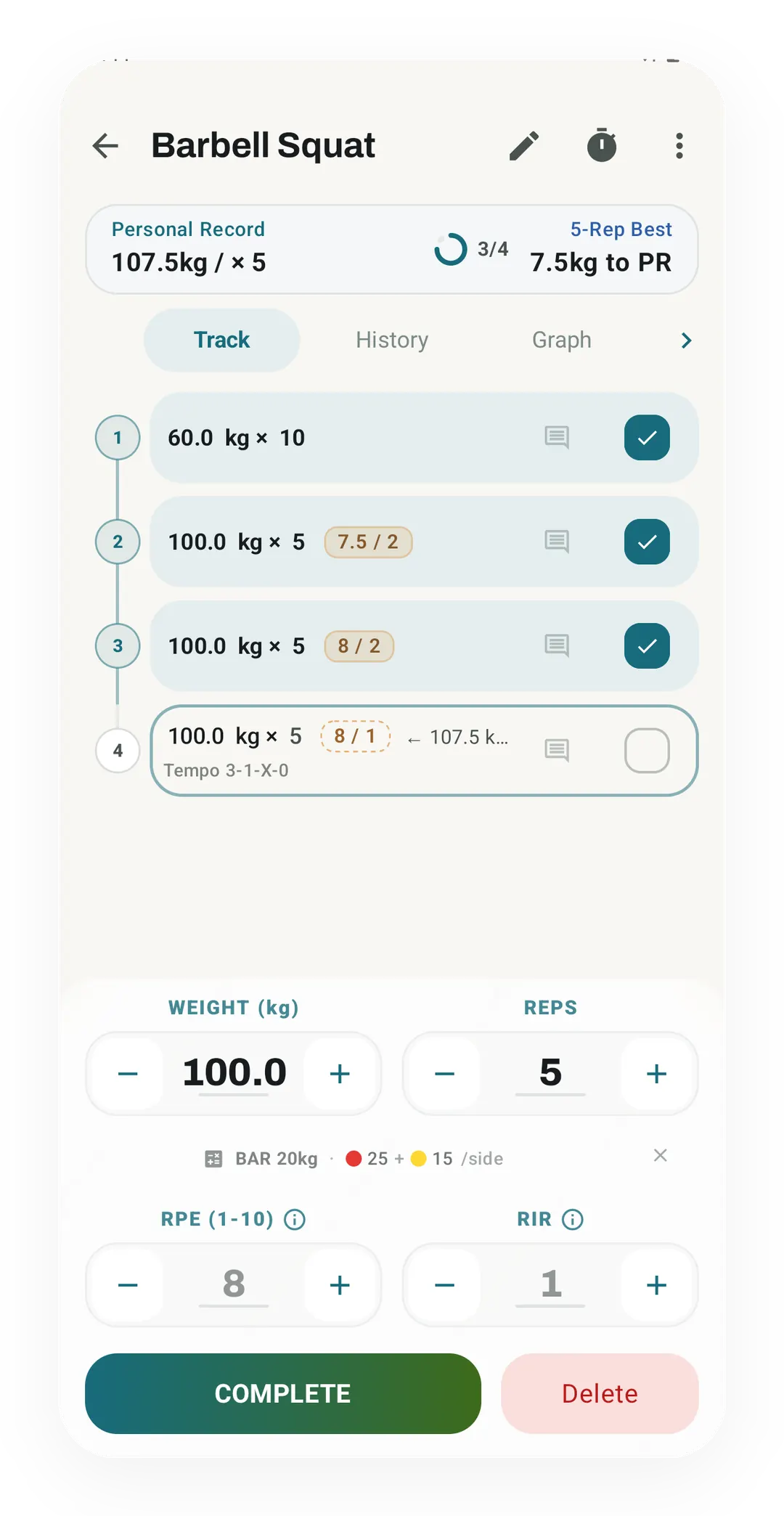
Set entry, mid-workout
The same job Hevy does, in Kinoku, where each squat set logs its weight and reps. The 100 kg sets read 7.5 and 8 for rate of perceived exertion (RPE), with 2 reps in reserve (RIR).
Try the other side of the table
Kinoku is free to install
Core tracking works offline, with no account. Your export from Hevy can come along.
Android only for now, with an iPhone version in the works. Some depth is paid, and the pricing page says which parts.
Related features
Every set, one tap. Track how hard each set felt, your rest timers, set types, and notes.
Lossless backup, open CSV and JSON import, Strava import, and a scoped Export for AI handoff.
Frequency and training-volume maps are free. Pro adds recovery estimates, readiness context, and exercise picks.