

Best Gymshark Training app alternatives (2026)
Six Android apps for Gymshark Training users, now that Gymshark says the app is no longer available to download on Android, with video and account facts.
Gymshark says its Training app is no longer available to download on Android; Nike Training Club and Sweat lead the session, Fitbod builds it for you, and Hevy, JEFIT and Kinoku log the workouts you build, Kinoku with no account.
At a glance
| App | Best for | Better than Gymshark Training app at | Main trade-off |
|---|---|---|---|
| Fitbod | People who want each gym or home session built for them around their equipment | A new session for your goals and equipment each time, with multi-angle exercise videos | Three free workouts, then a subscription to keep logging |
| Hevy | People who want to build their own gym or home routines, with free exercise videos and friends | Free exercise videos, a routine planner and routines you can copy from friends | Sign-up first, and a free routine limit showed in our test |
| JEFIT | People who want a large exercise library and ready-made gym programs to download | Over 1,400 exercises with guided instructions, plus built-in programs and splits | Sign-up first, and ad-free use and video demos sit in Elite |
| Kinoku | Android users who want to build and log their own workouts with no account | Unlimited free routines, 1,300+ exercises with form notes, and no account | No trainer-led workouts, no built-in exercise videos, and Android only for now |
| Nike Training Club | People who want free trainer-led gym and home workouts and programs that run for weeks | Trainer-led classes and weeks-long programs, free for Nike Members | Video classes only in the countries its listing names, and no workout builder on its listing |
| Sweat | Women who want a named trainer's program to follow at home or in the gym | Programs from named trainers, with exercise videos, audio cues and swaps | Ongoing use needs a paid subscription after the free trial |
Publisher disclosure
Kinoku, made by Dreamsoft Works, writes and publishes this page, and Kinoku is one of the apps on it. Every fact about another app, and every Gymshark statement about the Training app, is quoted from a page that company publishes, opened on October 12, 2026, or seen in our own dated emulator tests of Hevy and JEFIT. We give no score. The apps are grouped by what their own pages say, and every label points at a quoted sentence.
Quickstart
Gymshark says its Training app is no longer available to download on Android, and that it will get no more fixes or new features. Nike Training Club, Sweat and Fitbod plan or lead the session, while Hevy, JEFIT (a gym tracker) and Kinoku log workouts you build. Groups follow each app’s listing, A to Z inside each.
What has Gymshark said about the Training app?
Gymshark’s support page describes a free app with two halves. One half hands you workouts: “Choose from a wide range of workouts and training plans tailored to your goals, environment, and equipment.” You could also “Train like your favourite Gymshark athletes with exclusive routines they actually use.” The other half is your own: you could “Create your own workouts with personalised sets, reps, and rest”, and “Every exercise includes a detailed video guide”. The same page says “The Gymshark Training App is free”.
The same page now carries three statements about where the app stands.
- On Android: “The Training app is no longer available to download on Android.” Gymshark adds, “If you’ve had it before, you might still be able to get it back”, and points to the Google Play Store settings, where a list shows apps that are not installed.
- On updates: Gymshark says the Training App “will no longer be updated with any fixes or new features”, and it names both the iPhone and the Android app in that sentence.
- On iPhone: “Download the app from the iOS App Store in most locations worldwide.”
None of the Gymshark pages we read gives a date when the app stops working on a phone that already has it, and this page does not guess one. Gymshark’s separate shopping app, the Gymshark App, is still listed for Android, but its support page describes shopping rather than workouts. What follows is for anyone on Android who wants a new home for their training.
Which Gymshark Training alternatives lead the workout, and which log the one you build?
Gymshark Training did two jobs, so the six apps here split by which job their own listing opens with.
- The app plans or leads the session: Fitbod, Nike Training Club and Sweat. Fitbod’s listing says “Each training session is custom-built for your fitness level, goals and home or gym workout equipment.” Nike Training Club lists trainer-led classes and weeks-long programs, and Sweat calls itself “a personal training app featuring co-founder and elite head trainer, Kayla Itsines.”
- You build the session and log it: Hevy, JEFIT and Kinoku. Hevy’s listing opens with “Get strong by logging your workouts and tracking your progress with Hevy”, and JEFIT calls itself a tracker “to plan your weight training, log workouts, and track exercise progress.” Kinoku logs your sets against routines you write yourself.
People who mostly pressed play on a Gymshark workout will find the first group closer. People who mostly built their own workouts and ticked off sets will find the second group closer.
Side by side
Every cell below comes from that app’s Play listing, homepage, pricing page or help page, or from our dated emulator test where the cell says so. A cell reads “Not stated” when no page we could open covers it.
| App | Workouts made for you | Video for each exercise | Build your own | No-equipment workouts | Account | Paid layer |
|---|---|---|---|---|---|---|
| Fitbod | Each session built by its software | “multi-angle videos of each” exercise | Save or build workouts | Built around the gear you have | Not stated | Three free workouts, then a subscription |
| Nike Training Club | Trainer-led classes (on video in twelve named countries) and programs | Not stated | Not stated | “Equipment-free workouts” | Free for Nike Members | Not stated |
| Sweat | Trainer programs, “70+ programs” | “video demonstrations” | Not stated | Workouts with “no equipment” | Not stated | Subscription after a 7-day trial |
| Hevy | Routines copied from friends | “free high-quality videos” | Routines and “home workouts” | Home workouts you set up | Sign-up, no guest path (our test) | Hevy Pro; 4 free routines in our test |
| JEFIT | Built-in programs and splits | Video instructions; demos listed under Elite | Custom workouts and routines | Instant workouts, “no fixed gym required” | Sign-up, no guest path (our test) | Elite: ad-free, video demos |
| Kinoku | Written program templates, free | No; form notes, plus YouTube links you add | Unlimited routines, free | Bodyweight moves in the library | None | Pro: circuit timer, deeper charts |
Each app, in its own words
Fitbod
Best for: People who want each gym or home session built for them around their equipment.
Fitbod is a planner that writes your next session for you. Its listing says “Fitbod is a personalized workout planner that uses AI to help you make progress.”
- What it does well: “Each training session is custom-built for your fitness level, goals and home or gym workout equipment.” It promises “Hi-res, multi-angle videos of each fitness exercise” with “Easy-to-understand, detailed exercise instructions”. You can also “Save, build or use your favorite strength training workouts”, and the library covers “Cardio, mobility, pregnancy-safe exercises and more”.
- What its pages say about limits: Fitbod’s cancellation page says “New users are provided with a trial period of 3 free workouts to see if Fitbod is a good fit.” It goes on: “After this trial period, if you do not purchase a subscription, you will no longer be able to start or log workouts.”
- Where it is the better pick: A Gymshark user who liked workouts “tailored to your goals, environment, and equipment” and wants a fresh one each day rather than a fixed plan.
- Where Fitbod differs: Its sessions come from software rather than from named trainers or athletes. It is “Integrated with Wear OS, with quick access to your workout with the Tile”. Official listing: Google Play.
Nike Training Club
Best for: People who want free trainer-led gym and home workouts and programs that run for weeks.
Nike Training Club is Nike’s workout app. Nike’s own page says it offers “free guidance from your favorite trainers, athletes, and wellness experts.”
- What it does well: Its listing says “Nike Members get free access to the latest strength training, conditioning, yoga, pilates, recovery and mindfulness content.” It offers “Home workouts: Whiteboard and trainer-led workouts made for small spaces, travel and lack of equipment” and “Gym workouts: Curated strength and conditioning workouts and programs designed for the gym”. You can “Achieve your goals with weeks-long workout programs for the gym or home”, and “Track achievements: Log completed workouts and celebrate accomplishments”.
- What its pages say about limits: The listing offers to “Choose from multiple trainer-led, Video On Demand” classes, and an asterisk limits those classes to twelve named countries. Its “Premiere workouts” line, “Work out with elite athletes and entertainers”, carries the same asterisk.
- Where it is the better pick: A Gymshark user who mostly followed athlete and trainer workouts and wants that at no cost.
- Where Nike Training Club differs: Its listing describes workouts to follow and does not mention a builder for your own sets, reps and rest. Official listing: Google Play.
Sweat
Best for: Women who want a named trainer’s program to follow at home or in the gym.
Sweat’s homepage calls it “The leading fitness app designed by women, for women”. Its listing describes “a personal training app featuring co-founder and elite head trainer, Kayla Itsines.”
- What it does well: The homepage lists “70+ programs”. The listing names “Exercise descriptions and video demonstrations”, “Exercise substitutions to make movements harder or easier” and “Trainer audio cues”. You can “Log weights used during gym-based programs” and use a “Planner to schedule your workouts and track your weekly progress”. Its training styles include “Pregnancy and postnatal”.
- What its pages say about limits: “Sweat is free to download. Ongoing use requires an active subscription, available on a monthly or yearly basis.” The homepage offers to “Start your 7-day free trial”.
- Where it is the better pick: A Gymshark user who wants one trainer’s program from week to week, with a coach’s voice in the ear and swaps for moves that feel too hard or too easy.
- Where Sweat differs: Workouts suit “no equipment, free weights or machines”, with express sessions “when you are short on time”. Its listing does not describe a builder for your own workouts. Official listing: Google Play.
Hevy
Best for: People who want to build their own gym or home routines, with free exercise videos and friends.
Hevy’s homepage calls it “a free workout tracker” for both phone systems, and its listing centres on logging the routines you plan.
- What it does well: Its listing offers “Hundreds of exercises with free high-quality videos for you to focus on your form”. You can “Create gym routines or home workouts and use the routine planner to prepare your sessions ahead of time”, “Customize automatic rest timers”, and follow friends by “following their lifts and copying their routines”.
- What its pages say about limits: The listing says you can “Create an unlimited amount of routines”. In our September 6, 2026 emulator test, Hevy 3.1.12 showed a sheet that read “Free accounts have a limit of 4 routines.” The two do not agree, and this page does not say which holds today. The same test opened on a sign-up screen with no guest path.
- Where it is the better pick: A Gymshark user who mostly used the custom builder, wants a video beside each common lift, and likes training next to friends.
- Where Hevy differs: It has no trainer-led sessions on its listing, though routines can come from friends. Official listing: Google Play. Side-by-side page: Kinoku vs Hevy.
JEFIT
Best for: People who want a large exercise library and ready-made gym programs to download.
JEFIT’s listing calls it “the ultimate workout tracker to plan your weight training, log workouts, and track exercise progress.”
- What it does well: Its pricing page lists “Over 1,400 Exercises with guided instructions” in the free Basic plan. The listing says you can “Build your own custom workouts, exercises, and personalized gym routines” and “Download and follow the built-in bodybuilding programs, fitness splits, and strength routines”. An instant workout lets you “set your time, equipment, and muscle focus, no fixed gym required”.
- What its pages say about limits: The listing describes “video instructions and animations to help you nail your form”, while the pricing page lists “Video exercise demonstrations” and an “Ad-free experience” under Elite. Neither page says which videos are free. In our September 11, 2026 emulator test, JEFIT 17.4.4 asked for a sign-up before any workout, with no guest path.
- Where it is the better pick: A Gymshark user who wants a big library and a program to download for the gym, and who does not mind a sign-up.
- Where JEFIT differs: Its plans are written programs rather than trainer-led videos. Official listing: Google Play. Side-by-side page: Kinoku vs JEFIT.
Kinoku
Best for: Android users who want to build and log their own workouts with no account.
Kinoku is a free training app for Android with no account to create and no ads, and no Kinoku server holds your routines and history.
- What it does well: Routines are free and unlimited, with supersets, drop sets and rest-pause sets. The library holds 1,300+ exercises with form notes on every built-in move, and you can add as many custom moves as you like. A follow-along routine holds a YouTube or Vimeo link that opens when you start, and both it and the 25 written program templates are free. A ladder of 132 achievements and 41 challenge templates tracks the long haul, and 24 of those achievements are Pro.
- What its pages say about limits: Kinoku has no built-in exercise videos. Each move’s info sheet offers a YouTube search, and form images ship with some moves and not others. The rest timer is free, and a saved rest time for each exercise is Pro. The form notes are in English in every language the app supports.
- Where it is the better pick: A Gymshark user who built their own workouts, wants unlimited routines at no cost, and would rather not make an account.
- What Kinoku does not do: Kinoku has no trainer-led workouts, no athlete routines and no session written for you each day, though it does suggest which of your own routines is due. Kinoku is an Android app with no iPhone version yet, and it keeps no Kinoku server copy, so two phones cannot share one record. Eligible app data can still go into your Android system backup. The timer for circuits and high-intensity interval training (HIIT) is Pro, and Kinoku has no Gymshark importer.
Following a video while you train
Gymshark’s promise that “Every exercise includes a detailed video guide” is the feature many people will miss most, and the six apps handle video in three different ways.
- A video for each exercise, inside the app: Fitbod, Sweat, Hevy and JEFIT name exercise videos on their own pages. Fitbod promises them for each exercise, Sweat lists video demonstrations with trainer audio cues, Hevy offers them for hundreds of exercises, and JEFIT lists video demonstrations under Elite.
- A whole class on video: Nike Training Club offers trainer-led classes on demand in the twelve countries its listing names.
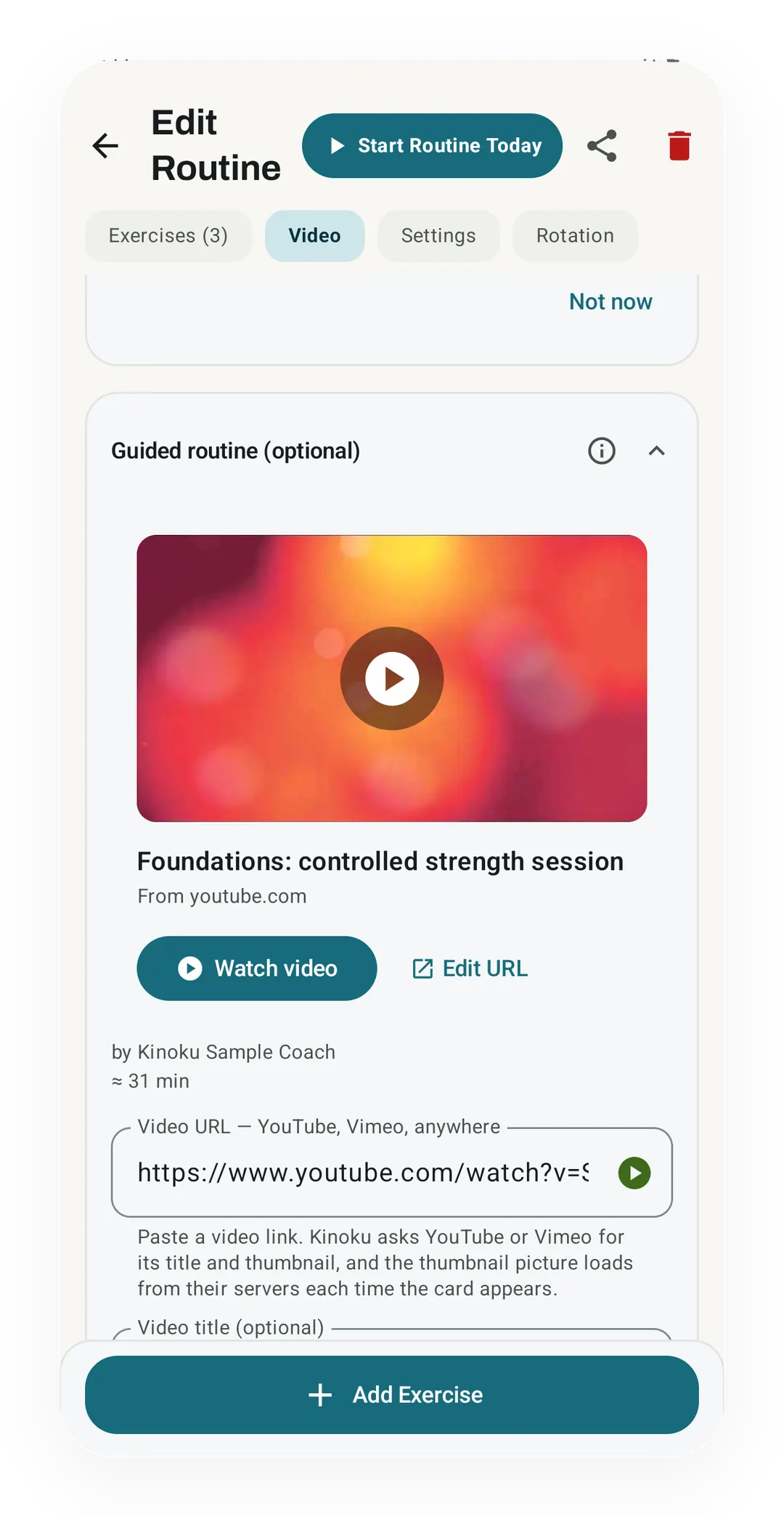
- A video you bring: Kinoku ships no videos of its own. A follow-along routine holds a link to any YouTube or Vimeo workout you already like, and the video opens in your own video app when you start.
In Kinoku, you can pin a moment in the video to each exercise, so a chip on the card jumps the video to that move. If you follow the video and log nothing, Kinoku asks whether to save the time you watched, so the session still lands in your history. Watched time never counts as lifted weight, so your volume and records stay as they were. The video itself lives on a service Kinoku does not run, and a link can be taken down or made private at any time.
Moving your Gymshark routines
None of the Gymshark pages we read mentions an export of your workouts, and none of the six apps here names a Gymshark importer. So moving over usually means typing your routines in again.
Kinoku makes that faster with a paste option. On the Import screen you can paste a plan as plain text, with a line for each exercise such as “Bench Press: 3 sets x 5 reps”, and Kinoku turns it into routines. A note app or an AI assistant can help you write that text from memory. Your past Gymshark history does not come across this way, only the routines.
How this list was checked
Every fact about Gymshark and the other apps comes from a page the company itself publishes, opened on October 12, 2026, unless a cell names our own emulator test.
- Gymshark’s statements: Each sentence about the Training app is quoted from Gymshark’s own support centre. The English pages for the UK and the United States read the same that day.
- Other apps: Fitbod, Nike Training Club, Sweat, Hevy and JEFIT facts are quoted from their Play listings, plus Nike’s app page, Sweat’s homepage, Hevy’s homepage, JEFIT’s pricing page and Fitbod’s cancellation page. Fitbod’s site blocks scripted reads, so we read its two sentences in a browser.
- Device tests: The Hevy and JEFIT sign-up screens and the Hevy routine sheet come from our own emulator tests on September 6 and September 11, 2026, with the version in each source.
- Kinoku: Each Kinoku claim was checked against the app’s source code, its tier checks and its own feature pages.
- Order: Fitbod, Nike Training Club and Sweat come first because their listings open with sessions they plan or lead, and Hevy, JEFIT and Kinoku follow because theirs open with logging. Each group runs A to Z, and no app paid for its place.
Frequently asked questions
Is the Gymshark Training app still on Android?
Gymshark’s support page says the Training app is no longer available to download on Android. The same page says it will no longer get fixes or new features on either the iPhone or the Android app. The iPhone version can still be downloaded in most places, Gymshark says. None of the Gymshark pages we read gives a date when the Android app stops working.
Can I still use Gymshark Training if I downloaded it before?
Gymshark says that if you have had the app before, you might still be able to get it back. Its support page points to the Google Play Store settings, where a list shows apps that are not installed on the phone. Gymshark also says the app will get no more fixes, so by its own account a bug that turns up later stays as it is.
Is the Gymshark app on Google Play the same as the Training app?
No. Gymshark’s support centre describes a separate Gymshark App, listed on the Google Play Store for Android users. That page calls it your go-to for all things Gymshark and describes shopping features, such as new drops, checkout and a wishlist. It does not describe workouts, so it does not replace the Training app’s sessions or its tracker.
Which app is most like Gymshark Training on Android?
Gymshark Training did two jobs, so the answer depends on which one you used. For sessions made by trainers, Nike Training Club and Sweat come closest, and Fitbod builds each session for you. For the custom workout builder and the tracker, Hevy, JEFIT and Kinoku let you set your own sets and reps and log them.
Is there a free app with trainer-led workouts for Android?
Nike Training Club. Its listing says Nike Members get free access to strength, conditioning, yoga, pilates, recovery and mindfulness content, including trainer-led home workouts. Its on-demand video classes carry a note that limits them to twelve named countries. Sweat also leads you with trainers, but its listing says ongoing use requires a subscription, and its homepage offers a 7-day free trial.
Is there an app that lets me build my own workouts with sets, reps and rest?
Hevy, JEFIT and Kinoku all do, and Fitbod lets you save or build workouts next to the ones it makes. Hevy’s listing names custom rest timers, and JEFIT’s lets you build custom workouts and routines. Kinoku’s routines are free and unlimited, with supersets and drop sets. Its rest timer is free, and a saved rest time for each exercise is Pro.
Which apps show a video for each exercise?
Fitbod’s listing promises multi-angle videos of each exercise, and Sweat lists exercise video demonstrations. Hevy offers hundreds of exercises with free videos. JEFIT’s listing describes video instructions, while its pricing page lists video demonstrations under Elite. Kinoku has no built-in videos: each move has written form notes, and you can attach a YouTube video you pick.
Which Gymshark Training alternatives work without an account?
Kinoku is the only app here whose pages say it needs no account. In our own emulator tests, Hevy and JEFIT both opened on a sign-up screen with no guest path. Nike Training Club’s listing frames its free content as access for Nike Members. Fitbod’s and Sweat’s pages that we read do not state their account rule in plain words.
Can I move my Gymshark Training workouts to another app?
None of the Gymshark pages we read mentions an export, and none of the six apps here names a Gymshark importer, Kinoku included. A routine you know by heart can be typed in again. In Kinoku, you can also paste a plan as plain text on the Import screen, such as a line per exercise with sets and reps, and it builds the routines.
Which of these apps have workouts with no equipment?
Nike Training Club lists equipment-free bodyweight training and home workouts made for small spaces. Sweat offers workouts with no equipment and short express sessions. Fitbod builds each session around the gear you have at home or in a gym. Hevy and Kinoku log home workouts you set up yourself, and Kinoku’s library holds bodyweight moves next to its gym ones.
Are these Gymshark Training alternatives free?
Each one has a different deal. Nike Training Club is free for Nike Members. Fitbod gives three free workouts, then needs a subscription to keep logging. Sweat has a seven-day free trial, then a subscription. Hevy and JEFIT have free tiers and sell Hevy Pro and JEFIT Elite. Kinoku logs workouts for free, and Pro adds deeper charts and a circuit timer.
What does Kinoku not do that Gymshark Training did?
Kinoku has no trainer-led workouts, no Gymshark athlete routines and no built-in exercise videos. It does not pick a session for you the way a guided plan does, though its written program templates are free. Kinoku has no iPhone app yet, and its timer for circuits and high-intensity intervals is a Pro feature.
Related pages
- Best Hevy alternatives: Android lifting apps for people who want to build and log their own routines.
- Kinoku vs Hevy: Routines, exercise videos and the sign-up, side by side.
- Kinoku vs JEFIT: The exercise library, the programs and what Elite adds.
- Best workout apps without an account: Trackers you can start without signing up.
- Best workout program apps: Apps with written programs that move your weights up for you.
- Follow-along videos: How Kinoku opens a YouTube or Vimeo workout and logs it with your sets.
- Exercise Library: The 1,300+ moves, their form notes, and where the catalog stops.
- Import format: Routines from pasted text, and the files Kinoku reads.
Which one fits you
- Choose Fitbod if you liked having a session picked for you, you train at home or in a gym, and a subscription after three free workouts is fine.
- Choose Nike Training Club if you want trainer-led classes and programs at no cost, you are fine joining as a Nike Member, and you rarely build your own workouts.
- Choose Sweat if you want to follow one trainer's program from week to week, with videos and audio cues, and a subscription is fine.
- Choose Hevy if you build your own routines, you like free exercise videos, and a sign-up and a friends feed suit you.
- Choose JEFIT if you want a big exercise library and programs to download, a sign-up is fine, and you may pay for Elite.
- Choose Kinoku if you build your own routines and want them unlimited and free, with no account, and you can live without trainer videos.
How this page is checked. Every fact about another app on this page comes from a page that app publishes, which we could open and quote on October 12, 2026. The sources, with the exact sentence each fact rests on, are listed just above. Every Kinoku fact is tied to the shipping app's code. The page carries no score; the apps are grouped by what their own pages say. If a fact here has gone stale, the support page is the fastest way to tell us.
Kinoku in practice
Where this shows up in the app
 Open full-size image ↗
A workout video on a saved routine
Real app capture, free tier. A follow-along routine keeps its video link on the Video tab, with its title, channel and length. The sets you log sit on the same routine, one tab over, and the video opens in your own video app.
One of the apps on this page
Kinoku is free to install
Core tracking works offline, with no account. An export from the app you use today can come along.
Android only for now, with an iPhone version in the works. Some depth is paid, and the pricing page says which parts.
Related features
Paste a YouTube or Vimeo link on a routine. Kinoku can jump to exercise timestamps and, with the optional chapter lookup on, build a routine from chapters. The log stays local; opening the video uses the outside video service.
1,300+ built-in exercises with muscle data and unlimited custom moves are free. Pro adds custom form photos and assisted sorting.
Unlimited routines, Smart Sync, Starter Packs, and follow-along links are free, and so are Rotation Groups that cycle through several routines for you.
132 achievements across 13 groups. The whole ladder stays visible; 24 of them and the Achievement Timeline require Pro.