

Best Workout Apps Without an Account (2026)
Tired of mandatory sign-ups for simple gym logging? Compare workout trackers that work without an account, from Kinoku and FitNotes to Strong and Hevy.
FitNotes and Kinoku log a set with no account, by their own pages and our test; Hevy and Strong open on a sign-up wall with no skip path.
At a glance
| App | Best for | Better at | Main trade-off |
|---|---|---|---|
| FitNotes | Lifters who want an Android notebook with no account, no ads, no paid plan | Free to use with no paid tier, where the account apps sell one | Android only, and its pages describe no run tracking |
| Kinoku | Lifters and runners who want no account, unlimited routines and a full ZIP backup | Unlimited free routines, custom exercises, GPS runs and a Wear OS app | Android only for now, with no sync between two phones |
| Hevy | Lifters who want to train with friends on iOS, Android, a watch and desktop | A friends feed, a desktop view and iOS, which the no-account apps lack | Sign-up before the first set, and four free routines |
| Strong | Lifters who log on an iPhone and Apple Watch and want both in step | Strong Cloud syncs devices, which neither no-account app does | Sign-up before the first set, and three free templates |
Publisher disclosure
Kinoku, made by Dreamsoft Works, writes and publishes this page, and Kinoku is one of the apps on it. Every fact about another app is quoted from a page that app publishes, opened on September 20, 2026, or observed in our own emulator tests. We give no score. Where the list is ordered, the caption names the measure, and every label points at a quoted sentence.
Quickstart
FitNotes and Kinoku log a set with no account, by their own pages and by our test, while Hevy and Strong open on a sign-up wall with no skip path. The list is ordered by account policy, the apps that ask for no account first, and the table caption says so. A label here rests on a sentence the app publishes or on a dated test on our emulator, and nothing carries a score.
Why workout apps ask for your email
Recording sets and reps does not need a server. When an app asks you to sign up first, its own pages usually say why.
- The record lives on a server. Strong’s help centre says “Strong Cloud keeps your workouts automatically synced between devices”, and its privacy policy says “We store user information on servers located in the United States and other countries.”
- The app is social. Hevy’s homepage says “Build routines and track progress with friends.” A feed needs an identity to follow.
- The paid plan is tied to the account. Hevy’s upgrade sheet reads “Free accounts have a limit of 4 routines.”
- A dropped signal shows up as a failed upload. In our Hevy test with flight mode on, the Home tab read “1 workout failed to upload” until the network came back.
How account-free apps store your data
An app with no account keeps your history in a database on the phone’s own storage.
- No sign-up screen. You open the app after installing it and log a set, with no name or email typed anywhere.
- Offline by nature. With no server to reach, the app loads the same in a basement gym with no signal. In our test, FitNotes 25.1 saved a set with the phone offline.
- A record you can carry. Android backs app data up to your own Google Drive, and Kinoku adds a full ZIP backup and CSV or JSON exports you control.
- No account to lose. Nobody can close an account that does not exist.
Side by side
We filled each cell from a quoted sentence or from our first-launch test, and “Not stated” marks a feature that no page we could open mentions.
| App | Account required | Offline logging | Free routine cap | Watch app | Export |
|---|---|---|---|---|---|
| FitNotes | No (“You are not required to register an account”) | Yes, in our test | No cap stated; no paid plan | Not stated | Not stated |
| Kinoku | No account | Yes, by design | Unlimited | Yes, Wear OS | Full ZIP, CSV, JSON |
| Hevy | Yes, sign-up wall in our test | Logged, then “1 workout failed to upload” until online | 4 routines | Apple Watch and Wear OS | CSV, not re-importable into Hevy |
| Strong | Yes (“All users will be prompted to sign up”) | Not stated | 3 templates | Apple Watch; Wear OS not mentioned | CSV |
Each app, in its own words
FitNotes
Best for: Lifters who want an Android notebook with no account, no ads, no paid plan.
FitNotes is an Android gym log by James Gay that has kept the same plain shape for more than a decade.
- What it does well. Its homepage calls it “A clean, simple, powerful workout tracking app only available on Android.” It opens fast and asks for nothing about you.
- What its pages say about limits. The privacy policy says “You are not required to register an account in order to use FitNotes.” The homepage says “Free to use and no ads - ever”.
- Where it is the better pick. Lifters who want a fast digital notebook and nothing more.
- Where FitNotes differs. Run tracking, a watch app and an iPhone app are absent from its pages.
Kinoku
Best for: Lifters and runners who want no account, unlimited routines and a full ZIP backup.
Kinoku is a free Android app for lifters and runners that never asks who you are.
- What it does well. You build routines, log sessions, add custom exercises and record GPS runs with no email and no password, and none of it is capped. A full ZIP backup and CSV or JSON exports move the record wherever you like, and Android backs the app up to your own Google Drive.
- What its pages say about limits. Logging, routines, history and the muscle map are free. A paid plan adds run analytics, readiness and deeper charts, and never adds an account.
- Where it is the better pick. Lifters who want a modern app with plate math, rest timers and a muscle recovery map, with the whole record on their own phone.
- What Kinoku does not do: Kinoku is Android only for now and has no desktop site, though an iPhone version is in the works. It has no social feed, and with no company server two phones do not sync in real time.
Hevy
Best for: Lifters who want to train with friends on iOS, Android, a watch and desktop.
Hevy is a social gym tracker built around a feed.
- What it does well. Its homepage says “Hevy is a free workout tracker for iOS and Android.” It adds “Build routines and track progress with friends.”, promises logging “completely from your Apple Watch or WearOS device”, and offers a desktop with “a big screen view of your routines” and your friends’ workouts.
- What its pages say about limits. In our test, Hevy 3.1.12 opened on a screen offering Sign up with Google, Sign up with Email and Log in, with no skip or guest path. The fifth New Routine tap showed “Free accounts have a limit of 4 routines.”
- Where it is the better pick. Lifters who want their friends inside the app and a website on the side, on any phone.
- Where Hevy differs. An account comes before the first set, and the record goes to Hevy’s server. Its Export Data screen says “Exported data can not be imported back into Hevy.”
Strong
Best for: Lifters who log on an iPhone and Apple Watch and want both in step.
Strong is a widely used workout logger with a set table many later apps copied.
- What it does well. Its help centre puts it as “We offer apps for iPhone (including Apple Watch) and Android.” and “Strong Cloud keeps your workouts automatically synced between devices”.
- What its pages say about limits. Every user is “prompted to sign up for an account before using Strong.” Our test found a first screen with Register and Log in, three social sign-ins, and no skip path. The free plan allows three workout templates.
- Where it is the better pick. Lifters on an iPhone and an Apple Watch who want the two in step without thinking about it.
- Where Strong differs: Sign-up comes first, the privacy policy places user information on servers in the United States and other countries, and free templates stop at three.
What happens to your data if an app shuts down?
When an app’s record lives on a company server, your history is only as safe as that company. If the service closes, or changes its plans, the rows you logged are on their side of the line.
An app with no account keeps working as long as the phone does. The history sits in a file on your own storage, so the app opens and logs sets whether the developer is still around or not. Kinoku’s ZIP backup and CSV export exist for that reason: the record is yours to carry to whatever comes next.
How this list was checked
Every row and label on this page points at a public page or at a first-launch test we ran ourselves.
- First-party citations. We read each privacy policy, help article and homepage quoted here on September 20, 2026.
- Emulator tests. We installed each app on an Android 16 emulator and walked its first launch, as the dated notes on each observation source describe.
- No paid rankings. No app paid for a spot. The list is ordered by account policy, and ties stay alphabetical.
Frequently asked questions
Which workout tracker apps work without an account?
FitNotes and Kinoku work without an account. FitNotes’ privacy policy says you are not required to register an account, and in our test FitNotes 25.1 saved a bench press set with the phone offline and no account. Kinoku has no sign-up screen at all. Hevy and Strong both opened on a sign-up wall in our tests, with no skip or guest path.
How do I back up my workouts without a cloud account?
Two ways on Android. The system backs app data up to your own Google Drive when the phone charges on Wi-Fi, and that needs no account inside the app. Kinoku also writes a full ZIP backup with its database, photos and settings, and exports CSV and JSON tables, so you can move the record to a new phone yourself.
Why do most gym apps ask for a login?
Because their record lives on the company’s server, and a login is how the server tells your rows from someone else’s. Strong’s help centre says Strong Cloud keeps your workouts synced between devices, and its privacy policy says user information is stored on servers in the United States and other countries. Hevy’s homepage builds the app around tracking progress with friends, which also needs an identity.
Is my workout data private if an app uses an account?
It is stored under that company’s privacy policy, and the policy says where. Strong’s says user information is stored on servers in the United States and other countries. An account app can also lose a workout when the network drops: in our Hevy test with flight mode on, the Home tab read 1 workout failed to upload until the network came back.
Which no-account app fits Android best?
Both of the no-account apps here are Android apps. FitNotes calls itself an app only available on Android and suits lifters who want a bare notebook with no paid plan. Kinoku suits lifters who also run, want a Wear OS app, a muscle recovery map and unlimited routines, and want a full ZIP backup they control.
Do the no-account apps work offline?
Yes. Neither needs a server to log a set. In our test, FitNotes 25.1 saved a set with the phone offline, and Kinoku works offline by design, because the record is on the phone. Kinoku goes online for map tiles on a run, Google Play billing, a check for gifted Pro access at most twice a day, and features you choose, such as weather.
Can I move my Hevy or Strong history to a no-account app?
Yes. Hevy’s Export Data screen exports your entire workout and measurement history to a CSV file, and Strong’s help centre describes an export to a spreadsheet friendly CSV format. Kinoku imports both files. FitNotes states no import for either on the pages we opened, so this page does not claim one.
Does a no-account app mean no smartwatch?
Not with Kinoku, which has a free Wear OS app that syncs to the phone without a cloud. FitNotes’ pages do not mention a watch. Among the account apps, Hevy’s homepage names Apple Watch and Wear OS, and Strong’s help centre names an Apple Watch app beside its iPhone app.
Do the no-account apps show ads?
No. FitNotes’ homepage says free to use and no ads, ever, and Kinoku shows no ads on any plan. Neither has a paid plan that removes ads, because there are none to remove. Strong’s help centre also says no ads, ever, so an account does not mean ads either.
What do I give up by skipping an account?
Two things the account apps state. Strong Cloud keeps workouts synced between devices, so a phone and an Apple Watch stay in step. Hevy’s homepage offers a friends feed and a desktop view of your routines. Neither FitNotes nor Kinoku keeps your log on a server, so neither offers a feed, a website or live sync between two phones.
What does Kinoku not do?
Kinoku is Android only for now, with no desktop website. It has no social feed and no company server, so two phones do not sync in real time; the record moves by Android backup or a ZIP file. Some depth, such as run analytics and readiness, sits in a paid plan, while logging, routines and history stay free.
Is there a workout app with no login that also tracks runs?
Kinoku is the one app here that does both: it asks for no account, and it records GPS runs with pace, splits and a route map next to your gym sets. FitNotes needs no account either, but its pages describe gym logging and no run tracking. Hevy and Strong opened on a sign-up wall in our tests before the first set.
Is there a workout app for iPhone that needs no account?
Not among the four apps on this page. FitNotes calls itself an app only available on Android, and Kinoku has no iPhone app yet, though one is in the works. Hevy and Strong both run on iPhone, and both opened on a sign-up wall in our tests. This page tested no iPhone-only apps, so it cannot name one that skips the account.
Related pages
- Best privacy-focused fitness apps for Android: Past the account wall, what eleven apps declare they collect on Google Play.
- Best offline workout tracker apps for Android: Apps that log with no signal, tested on a device.
- Best free workout tracker apps for Android: Free plans compared by what they include.
- Best workout apps without a subscription: Which free plans cap routines and which do not.
- Kinoku vs FitNotes: Two private, account-free Android trackers in detail.
- Kinoku vs Strong: Offline tracking next to a cloud logger.
- Free run tracker apps with no account for Android: The same account question, asked of GPS run trackers.
- Best Google Fit alternatives: Step counters and workout apps compared by account, for Google Fit users.
- Best Samsung Health alternatives: Samsung says its app needs a Samsung account; these six apps say what they ask for instead.
- Best Gymshark Training app alternatives: Six apps for former Gymshark Training users, with each one’s sign-up rule.
Which one fits you
- Choose FitNotes if you want an Android log that is free to use with no ads, asks for no account, and skips every social feature.
- Choose Kinoku if you want no account, unlimited routines and custom exercises, a run log, and a full ZIP backup you can carry anywhere.
- Choose Hevy if you want to build routines and track progress with friends, and creating an account is a fair trade for that.
- Choose Strong if you log on an iPhone and an Apple Watch and want Strong Cloud to keep both in step, and three free templates are enough.
Test record
Tested September 11, 2026
- Environment
- Android Studio Pixel phone emulator Kinoku_Phone_Play, API 36, Android 16
- FitNotes
- Version 25.1, installed from Google Play. Official listing
- Hevy
- Version 3.1.12 (version code 3289233), installed from Google Play. Official listing
- Kinoku
- Version 1.2.0 (version code 30), a test build installed outside Google Play. Official listing
- Strong
- Version 6.2.4 (version code 602006), installed from Google Play. Official listing
How this page is checked. Every fact about another app on this page comes from a page that app publishes, which we could open and quote on September 20, 2026, or from a dated emulator test named in that source's note. The sources, with the exact sentence each fact rests on, are listed just above. Every Kinoku fact is tied to the shipping app's code. The page carries no score; the caption above names the measure the list is ordered by. If a fact here has gone stale, the support page is the fastest way to tell us.
Test evidence
What the tested builds showed
 Open full-size image ↗
FitNotes logging sets with no account
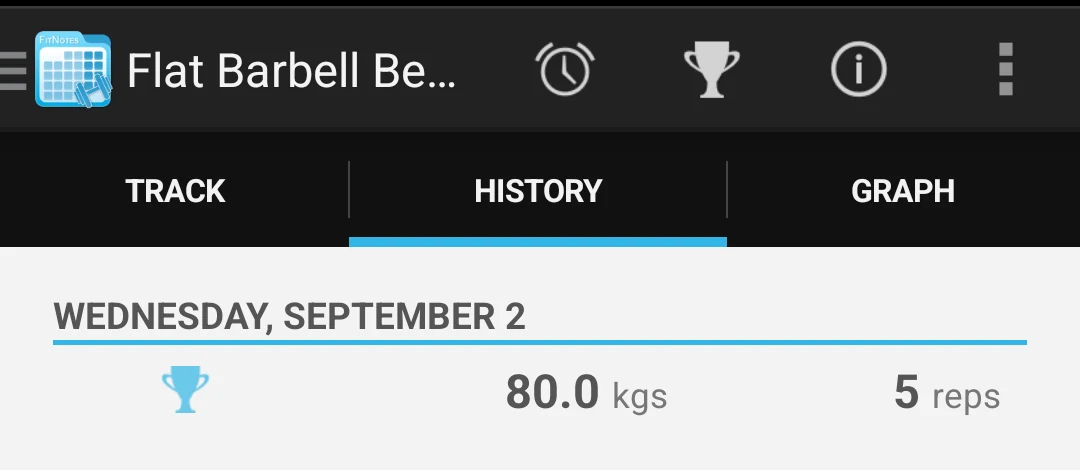
Cropped emulator capture. With the phone offline and no account registered, FitNotes 25.1 saved an 80 kg by 5 bench-press set directly to the device.
One of the apps on this page
Kinoku is free to install
Core tracking works offline, with no account. An export from the app you use today can come along.
Android only for now, with an iPhone version in the works. Some depth is paid, and the pricing page says which parts.
Related features
Lossless backup, open CSV and JSON import, Strava import, and a scoped Export for AI handoff.
Charts per exercise, PRs, your best one-rep estimate, volume trends, and date filters. Every exercise type gets a chart that fits it: Best, Total, and Avg Time for holds, Best and Total Reps for rep work, and Best and Total Distance for distance work, not just weight charts.
Unlimited routines, Smart Sync, Starter Packs, and follow-along links are free, and so are Rotation Groups that cycle through several routines for you.