

Best Workout Apps Without a Subscription (2026)
Compare workout apps that do not lock routines behind monthly fees, from Kinoku and FitNotes to Caliber, Strong, and Hevy.
FitNotes, Kinoku and Caliber state no routine or workout cap on their free plans; Strong caps free templates at three and Hevy caps free routines at four.
At a glance
| App | Best for | Better at | Main trade-off |
|---|---|---|---|
| Caliber | Lifters who want unlimited free workouts and exercise videos, maybe a coach later | Unlimited workouts and 800+ exercises free, where Strong and Hevy cap routines | Custom exercises and supersets sit in Caliber Plus, and coaching is the product |
| FitNotes | Android lifters who want a plain log with no subscription, no ads, no account | No paid plan at all; every other app here sells one | Android only, and its pages describe no run tracking |
| Hevy | Lifters who want a friends feed and desktop view, with four routines enough | A friends feed, a desktop view, Apple Watch and Wear OS | Free accounts stop at four routines, and the app needs an account |
| Kinoku | Lifters and runners who want unlimited routines, no account, no ads, Pro optional | Unlimited free routines, custom exercises, GPS runs and charts, with no account | Android only for now, and run analytics and readiness sit in the paid plan |
| Strong | Lifters on an iPhone and Apple Watch whose split fits in three templates | Strong Cloud syncs devices, which the free-plan apps do not | Three free templates, charts under PRO, and an account before use |
Publisher disclosure
Kinoku, made by Dreamsoft Works, writes and publishes this page, and Kinoku is one of the apps on it. Every fact about another app is quoted from a page that app publishes, opened on September 20, 2026, or observed in our own emulator tests. We give no score. Where the list is ordered, the caption names the measure, and every label points at a quoted sentence.
Quickstart
FitNotes, Kinoku and Caliber state no routine or workout cap on their free plans, while Strong caps free templates at three and Hevy caps free routines at four. The apps are grouped by what their own pages say about pricing, alphabetical inside a group, and each label rests on a sentence the app publishes or on a dated emulator test. There is no score.
Why lifters avoid subscription workout apps
Logging a barbell set is simple work a phone can do alone. Even so, two of the most used gym apps tie the number of routines you can save to a paid plan, in their own words.
- The cap is the product. Strong’s help centre allows “up to 3 Workout Templates with the free version of Strong”, and Hevy’s upgrade sheet reads “Free accounts have a limit of 4 routines.”
- The record lives on a server. Strong’s help centre says “Strong Cloud keeps your workouts automatically synced between devices”, which is a cost someone pays.
- An account comes first. Strong’s help centre says users are “prompted to sign up for an account before using Strong.” Hevy’s first screen, in our test, offered sign-up or log-in and nothing else.
- The export is one-way. Hevy’s Export Data screen says “Exported data can not be imported back into Hevy.”
How different apps handle pricing
The five apps here take four different paths.
- No paid plan at all. FitNotes describes itself as “Free to use and no ads - ever”, and no page of its names a paid tier.
- A free plan with optional coaching. Caliber’s Play listing describes a “Free Version” with “unlimited workouts”, a “Caliber Plus” upgrade and a “Premium Coaching” tier with a one-on-one coach.
- A free plan with an optional Pro. Kinoku’s logging, routines, custom exercises, runs and charts are free with no cap, and a single paid plan adds run analytics and readiness.
- A free plan with a cap. Strong stops at three templates and Hevy at four routines until you pay.
Side by side
Every cell rests on a first-party sentence or on our emulator test, and “Not stated” marks a feature no page we could open covers.
| App | Free routine limit | Ads on the free plan | Paid plan | Account required |
|---|---|---|---|---|
| Caliber | “unlimited workouts” on the free version | Not stated | Caliber Plus, and Premium Coaching | “train solo or with friends”; not stated outright |
| FitNotes | No cap stated; no paid plan | None (“no ads - ever”) | None stated | No (“not required to register an account”) |
| Hevy | 4 routines | Not stated | Hevy Pro | Yes, sign-up wall in our test |
| Kinoku | Unlimited | None | Pro, optional | No account |
| Strong | 3 templates | None (“And no ads, ever.”) | Strong PRO | Yes (“All users will be prompted to sign up”) |
Each app, in its own words
Caliber
Best for: Lifters who want unlimited free workouts and exercise videos, maybe a coach later.
Caliber pairs a free workout logger with paid coaching from remote trainers.
- What it does well. Its Play listing says “Free Version. Create and track unlimited workouts, access 800+ exercises, and train solo or with friends.” and promises to “Learn proper form with step-by-step videos and pro tips from Caliber coaches.”
- What its pages say about limits. Under its Caliber Plus heading, marked as an optional upgrade, the listing places the ability to “create custom exercises and supersets, swap exercises, upload progress photos, and more.” Under its Premium Coaching heading, also marked optional, you “Train 1-on-1 with a dedicated coach”.
- Where it is the better pick. Lifters who want exercise video on every movement and no cap on workouts, and who may want a coach down the line.
- Where Caliber differs. Custom exercises and supersets sit in Plus, the listing states no ad policy, and the app is built to lead toward coaching.
FitNotes
Best for: Android lifters who want a plain log with no subscription, no ads, no account.
FitNotes is an Android gym notebook by James Gay that has no paid plan.
- What it does well. Its homepage calls the app “only available on Android” and sums it up as clean, simple and powerful. It opens fast, uses little battery and asks nothing about you.
- What its pages say about limits. “Free to use and no ads - ever” on the homepage, and the privacy policy adds that registering an account is not required.
- Where it is the better pick. Lifters who want a notebook with no fee, no animations and no social tools.
- Where FitNotes differs. Its pages mention no run tracking, no watch and no iPhone version.
Hevy
Best for: Lifters who want a friends feed and desktop view, with four routines enough.
Hevy is a social gym tracker with a clean set table.
- What it does well. Its homepage calls Hevy “a free workout tracker for iOS and Android” built to “track progress with friends”, names “your Apple Watch or WearOS device”, and offers a desktop with “a big screen view of your routines”.
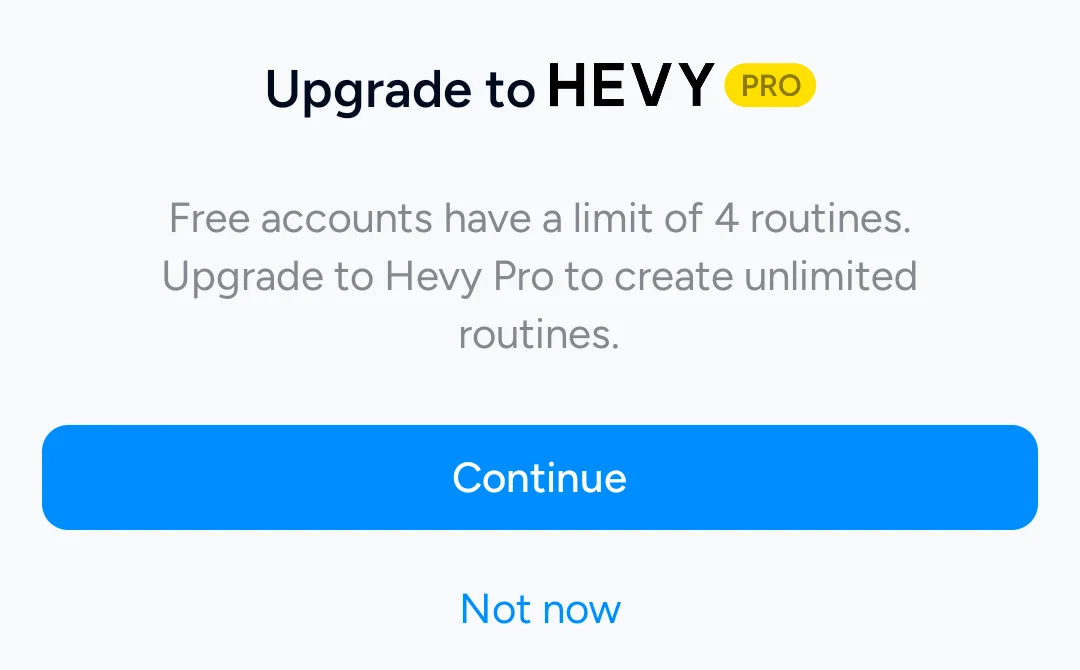
- What its pages say about limits. The fifth New Routine tap in Hevy 3.1.12 brought up “Free accounts have a limit of 4 routines. Upgrade to Hevy Pro to create unlimited routines.”
- Where it is the better pick. Lifters who want a feed of friends and a website on the side.
- Where Hevy differs. Saving a fifth routine takes Hevy Pro, and the first screen asked for an account with no skip path in our test.
Kinoku
Best for: Lifters and runners who want unlimited routines, no account, no ads, Pro optional.
Kinoku is a free Android app that keeps every routine, set and run on the phone.
- What it does well. Routines, custom exercises, GPS runs, history, charts and the muscle map are free, with no cap and no account. A full ZIP backup and CSV or JSON exports keep the record yours, and Android backs the app up to your own Google Drive.
- What its pages say about limits. What ships free stays free, and there are no ads on any plan. Pro is one paid plan for run analytics, readiness, coach patterns and the deeper analytics hub.
- Where it is the better pick. Lifters who want a modern tracker that works offline, with no fee for the parts they use every day.
- What Kinoku does not do: Kinoku has no desktop site, and its iPhone version is still being built. It has no social feed and no company server for live sync between phones, and its deeper analytics are paid.
Strong
Best for: Lifters on an iPhone and Apple Watch whose split fits in three templates.
Strong is one of the earliest phone gym loggers, with a set table many later apps copied.
- What it does well. The help centre lists “We offer apps for iPhone (including Apple Watch) and Android.” and “And no ads, ever.” Strong Cloud keeps devices in step.
- What its pages say about limits. The free version stops at “up to 3 Workout Templates with the free version of Strong”, the PRO page lists “Access to all Charts” as paid, and every user is “prompted to sign up for an account before using Strong.”
- Where it is the better pick. Lifters on an iPhone and an Apple Watch who train a three-day split and want the two devices synced.
- Where Strong differs. A fourth template, and the charts, take Strong PRO, and sign-up comes first.
The true cost of a subscription tracker
A monthly fee is small on any one day and large over a training life. The apps that charge one keep the record on their server and tie the routine cap to the plan, so the fee buys the sync and removes the cap at the same time.
An app that keeps the record on the phone has no server bill to pass on. Android backs it up to your own Google Drive, and a ZIP or CSV export moves it. What a free plan includes is then a choice the maker states on a page, and this page quotes those pages rather than guessing at prices.
How this list was checked
Nothing on this page rests on memory: each cell, label and answer traces to a public page or to a dated emulator test.
- First-party citations. We read each homepage, help article and store listing quoted here on September 20, 2026.
- Emulator tests. We confirmed the Hevy routine cap and the sign-up walls on an Android 16 emulator, as the dated notes on each observation source describe.
- No prices. We print no subscription price, because store prices change by country and by week and this page only prints a figure when one first-party page shows exactly one.
- No paid rankings. No app paid for a spot, and the apps stay alphabetical inside each group.
Frequently asked questions
Which workout tracker has no monthly subscription at all?
FitNotes. Its homepage promises no ads, ever, and nothing on its pages names a paid plan. Kinoku and Caliber both have a free plan with no routine or workout cap and a paid plan you can leave alone. Strong and Hevy also have free plans, but each caps what you can save until you pay.
Is there a free gym app with no ads?
Yes. FitNotes’ homepage says no ads, ever, Kinoku shows no ads on any plan, and Strong’s help centre says no ads, ever. Hevy’s homepage and Caliber’s Play listing do not state an ad policy either way, so this page does not say.
Why do apps like Hevy and Strong charge a subscription?
Their pages point at two things. Strong’s help centre says Strong Cloud keeps your workouts synced between devices, and servers cost money to run. Both also sell the cap itself: Strong’s free version allows three templates, Hevy’s upgrade sheet reads free accounts have a limit of 4 routines, and paying removes the cap.
Can I keep my workout history if I cancel a subscription?
The safest move is to export before you cancel. Strong’s help page on export offers a spreadsheet friendly CSV format. Hevy’s Export Data screen writes your whole workout and measurement history to a CSV file, and warns that the file cannot come back into Hevy. Kinoku imports both files.
Does Kinoku need a subscription to log workouts?
No. Logging, routines, custom exercises, rest timers, GPS runs, history, charts and the muscle map are free, with no cap and no account. Pro is a single paid plan for run analytics, readiness, coach patterns and the deeper analytics hub. What ships free stays free, which is a public promise on this site.
Is Caliber free?
Its Google Play listing describes a Free Version that lets you create and track unlimited workouts, access 800+ exercises, and train solo or with friends. Caliber Plus, an optional upgrade, is where the listing places custom exercises, supersets, progress photos and nutrition targets, and Premium Coaching is a second paid tier with a one-on-one coach.
What does a free plan cost you in routines?
That depends on the app, because FitNotes and Kinoku state no cap while the others differ. Caliber’s listing says unlimited workouts on the free version. Strong’s help centre allows three workout templates with the free version, and Hevy’s upgrade sheet stops free accounts at four routines. A five-day split fits on the first three and not on the last two.
Which free-plan apps work without an account?
FitNotes and Kinoku. FitNotes’ privacy policy says registering an account is not required, and Kinoku has no sign-up screen. Strong’s help centre prompts every user to sign up before use, Hevy’s first screen had no way past sign-up in our test, and Caliber’s free version is described as training solo or with friends, which needs an identity.
Do any free plans include charts?
Kinoku’s stats and muscle map are free on every plan. Strong’s help centre puts access to all charts under Strong PRO, so a free Strong account logs sets and waits on the charts. Hevy’s homepage, Caliber’s listing and FitNotes’ pages do not state which charts are free, so this page does not say.
Which of these apps run on iPhone?
Strong’s help centre names iPhone, Apple Watch and Android apps. Hevy’s homepage says iOS and Android. Caliber’s Play listing is its Android side, and this page does not claim more. FitNotes describes itself as only available on Android, and Kinoku stays on Android until its iPhone app is ready.
What does Kinoku not do?
Kinoku runs on Android only for now, so there is no iPhone app yet and no desktop website. It has no social feed and no company server, which means two phones do not sync in real time; the record moves by Android backup or a ZIP file. Run analytics, readiness and the deeper analytics hub sit in the paid plan.
Related pages
- Best privacy-focused fitness apps for Android: No subscription and little data: eleven apps sorted by their Play labels.
- Best free workout tracker apps for Android: Free plans on Google Play compared by what they include.
- Best offline workout tracker apps for Android: Apps that log with no signal, tested on a device.
- Best Strong alternatives: Loggers sorted by how they handle Strong’s three-template cap.
- Best Hevy alternatives: Apps that replace Hevy’s four-routine limit.
- Kinoku vs FitNotes: Two subscription-free Android trackers in detail.
- Hevy vs Caliber: What each free plan covers, from Caliber’s unlimited workouts to Hevy’s custom exercise cap.
Which one fits you
- Choose Caliber if you want unlimited free workouts with step-by-step exercise videos, and a paid coach is something you might want later.
- Choose FitNotes if you want an Android log that is free to use with no ads and asks for no account, and nothing else.
- Choose Hevy if you want to build routines and track progress with friends, and four free routines cover your split.
- Choose Kinoku if you want unlimited free routines and custom exercises, GPS runs, free charts and no account, with a paid plan you can ignore.
- Choose Strong if you train on an iPhone and an Apple Watch, three templates are enough, and Strong Cloud sync matters to you.
Test record
Tested September 11, 2026
- Environment
- Android Studio Pixel phone emulator Kinoku_Phone_Play, API 36, Android 16
- FitNotes
- Version 25.1, installed from Google Play. Official listing
- Hevy
- Version 3.1.12 (version code 3289233), installed from Google Play. Official listing
- Kinoku
- Version 1.2.0 (version code 30), a test build installed outside Google Play. Official listing
- Strong
- Version 6.2.4 (version code 602006), installed from Google Play. Official listing
How this page is checked. Every fact about another app on this page comes from a page that app publishes, which we could open and quote on September 20, 2026, or from a dated emulator test named in that source's note. The sources, with the exact sentence each fact rests on, are listed just above. Every Kinoku fact is tied to the shipping app's code. The page carries no score; the apps are grouped by what their own pages say. If a fact here has gone stale, the support page is the fastest way to tell us.
Test evidence
What the tested builds showed
 Open full-size image ↗
Routine caps on subscription-based workout apps
Cropped emulator capture. Trying to save more than four routines on Hevy's free plan opens this upgrade sheet, asking for an ongoing subscription.
One of the apps on this page
Kinoku is free to install
Core tracking works offline, with no account. An export from the app you use today can come along.
Android only for now, with an iPhone version in the works. Some depth is paid, and the pricing page says which parts.
Related features
Unlimited routines, Smart Sync, Starter Packs, and follow-along links are free, and so are Rotation Groups that cycle through several routines for you.
Charts per exercise, PRs, your best one-rep estimate, volume trends, and date filters. Every exercise type gets a chart that fits it: Best, Total, and Avg Time for holds, Best and Total Reps for rep work, and Best and Total Distance for distance work, not just weight charts.
Lossless backup, open CSV and JSON import, Strava import, and a scoped Export for AI handoff.