

Which workout tracker apps for Android work fully offline?
Kinoku, FitNotes and GymLog log workouts with no account and no connection, and Kinoku adds GPS runs. Hevy, JEFIT and Strong log offline after sign-up.
Kinoku logs lifting and GPS runs with no connection and no account, though its maps and opt-in weather line go online; FitNotes and GymLog are lifting logs with no account, and Hevy, JEFIT and Strong log offline after sign-up.
At a glance
| App | Best for | Better at | Main trade-off |
|---|---|---|---|
| Kinoku | Lifting and GPS runs logged with no connection and no account | Records GPS runs as well as sets in one free app, with no sign-up | Not fully offline: map tiles load online, and weather is an opt-in call |
| FitNotes | An Android lifting log without an account | Free with no ads by its own homepage, and it kept our set with no network | Android only; its CSV export cannot restore a backup |
| GymLog | A small open-source lifting log that never goes online | Its listing says fully offline, with all data stored on the device | Installs from F-Droid or an APK file, and Android cloud backup is off |
| Hevy | Offline lifting between check-ins with training friends | Runs on iPhone, Android, both watch platforms and the desktop | Account first; workouts upload when the network returns |
| JEFIT | Offline entry with phone and web access | A web app beside the phone apps, with offline entries that sync later | Account first; watch support is listed under Elite |
| Strong | Offline lifting with workouts synced across devices | Strong Cloud keeps workouts synced between your devices | Account first; exported CSV files cannot be imported back |
Publisher disclosure
Kinoku, made by Dreamsoft Works, writes and publishes this page, and Kinoku is one of the apps on it. Every fact about another app is quoted from a page that app publishes, rechecked on October 21, 2026, or observed in our own emulator tests of FitNotes 25.1 on September 2, Hevy 3.1.12 on September 6, and Strong 6.2.4 and JEFIT 17.4.4 on September 11, 2026. We give no score. Where the list is ordered, the caption names the measure, and every label points at a quoted sentence.
Quickstart
Three of these six apps log workouts with no account and no connection: Kinoku, FitNotes and GymLog. Kinoku also records GPS runs, though its maps load online. Hevy, JEFIT (a lifting app), and Strong ask for an account first, then log offline and sync later. The order follows those three groups, with no score, and stays alphabetical inside each group.
Which apps work offline with no account?
No account, with lifting and GPS runs in one log
Kinoku asks for no account, and no Kinoku server holds your training history. The record sits in the app’s private storage on your phone, and logging sets, routines and runs works with no signal. It is not fully offline, because a map fetches its tiles when you view it and the weather line on a run is a network call you turn on.
No account, and the record lives on the phone
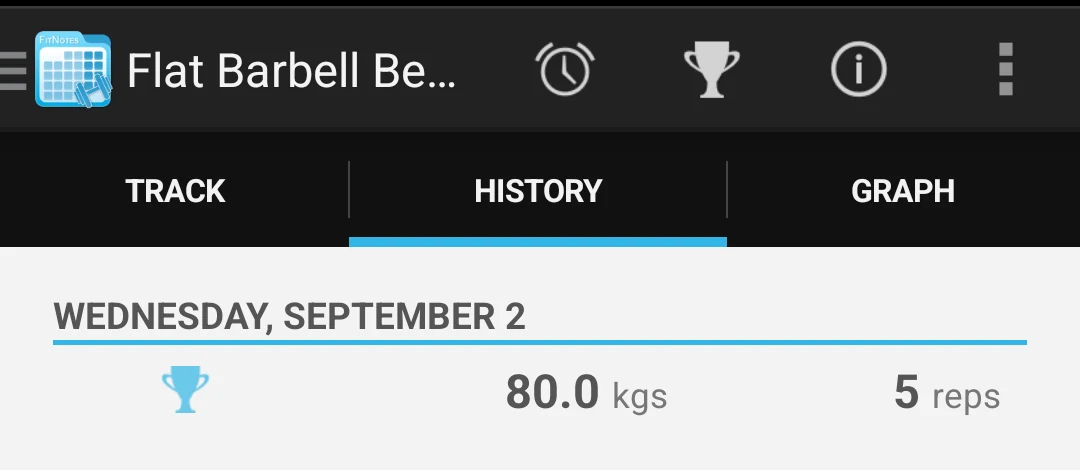
FitNotes says you are not required to register an account [1], and that every workout you record is stored on your device [2]. In our test it saved a bench press set with the network off and listed it in the exercise history [3].
GymLog’s listing says it is fully offline, with all data stored on your device [31], and its project page says there is nothing to sign up for [33]. We did not test it ourselves.
Account first, then offline entry that syncs later
Hevy opened on a sign-up screen with no skip in our test [4]. With flight mode on it still logged and saved a set, showed a banner that one workout had failed to upload, and sent it when the network came back [5].
JEFIT put a sign-up wall after its questionnaire, with no guest path [6]. Its blog says the app allows offline entry and syncs across Android and iOS [7], and in our test a set logged with no network was still counted after a forced stop [8].
Strong’s first screen offered register, log in, or a Google, Facebook, or Apple sign-in, with no guest path [9]. The account is free [10], and Strong Cloud keeps your workouts synced between devices [11]. With no network Strong took a set, finished the workout, and kept it across a forced stop [12].
Side by side
Each cell rests on a page the app publishes or on a test we ran, and the bracketed number names the source. Kinoku’s row comes from its own code and documentation, so it carries no bracket.
| App | Account required | Logs a set offline | Where your record lives | Export | Platforms |
|---|---|---|---|---|---|
| Kinoku | No | Yes, in our test. Map tiles and the opt-in weather line need a connection | On your phone | CSV, a full backup file, and Export for AI | Android and Wear OS |
| FitNotes | No [1] | Yes, in our test [3] | On your phone [2] | CSV, plus its own backup file. The CSV cannot be restored into FitNotes [13] | Android only [14] |
| GymLog | No [33] | Its listing says fully offline [31]. Not tested by us | On your phone, left out of Android cloud backup [31] [34] | An export file that a new install imports [37] | Android [32], from F-Droid |
| Hevy | Yes, before the first set [4] | Yes. The upload waited and retried [5] | Uploads to your Hevy account once the network is there [5] | One CSV with the whole history, and Hevy says it cannot be imported back [15] | iOS, Android, Apple Watch, Wear OS, and desktop [16] [17] [18] |
| JEFIT | Yes, after a questionnaire and an Elite offer [6] | Yes, in our test [8]. Its blog says offline entry with sync [7] | Its servers, or your device, per its privacy policy [19] | Not stated on a page we could open | iOS, Android, and web [20]. A watch app under Elite [21] |
| Strong | Yes, and the account is free [9] [10] | Yes, in our test [12] | Strong Cloud, on servers in the United States and other countries [11] [22] | CSV [23], and it cannot be imported back into Strong [24] | iPhone, Apple Watch, and Android [25] |
Kinoku’s row, from its own pages: there is no account to make, and no Kinoku server holds your history. Workouts, routines, history, and runs have no caps on the free plan, and there are zero ads on every tier. The backup ZIP restores on a new phone, and the app runs on Android with a Wear OS companion. “Not stated on a page we could open” means no page from that app says either way, which is not a claim that the app lacks the feature.
Each app, in its own words
Kinoku
Kinoku fits lifters who also run and want both records in one Android app that works with no signal and no account. The free plan logs sets, routines and GPS runs, with no cap on your saved workouts or history. It also includes a muscle map, training programs and a Wear OS companion; Pro adds deeper analysis and recovery guidance.
Backup is a ZIP file you own, and Android’s own system backup may copy eligible app data to your Google account. The importer reads several lifting-app and Strava file layouts, with a review screen before anything is saved. Support for a layout does not promise a clean import: the Strong comparison records a weight and extra-set bug that remains unresolved.
On September 11, 2026 we ran a test build of Kinoku 1.2.0, installed outside Google Play, on the same emulator as Strong and JEFIT, with flight mode on. The Today screen opened, the set sheet took 135 pounds for 5 reps of a barbell bench press, and the set was still listed after a forced stop. The listing is Kinoku on Google Play.
Kinoku is not fully offline. Viewing a map fetches its tiles from OpenFreeMap, and weather on a run uses a separate call when you turn that feature on. Purchases and subscription checks go through Google Play, while core workout logging runs on your phone. Kinoku is Android only for now, with no web app or live cloud sync between devices. A second phone gets the record through a backup file you move yourself, or through Android’s own backup and transfer. Kinoku has no social feed; sharing cards, exporting files and optional integrations are separate choices you control. The pricing page names the paid features, and the data guide explains what can leave the phone.
FitNotes
FitNotes gets the basics right, with a fast set log that asks for no account and keeps the record on the phone. Its privacy page says you are not required to register [1], and that workout data is stored locally on your device [2]. The homepage says free to use with no ads, ever [26]. For a spare copy it has its own Backup option and an opt-in Google Drive backup about an hour after each workout [27]. The CSV export is for reading elsewhere, because FitNotes says data cannot be restored from it [13].
FitNotes is the better pick if you want one small app that logs sets and reps and nothing else, or if you want no paid plan in the picture. It is Android only, and its FAQ page says there are no plans for an iPhone version at the moment [14].
FitNotes on Google Play, and our Kinoku vs FitNotes page.
GymLog
GymLog is a small open-source lifting log, described on its GitHub project page as a simple, privacy-focused Android app for tracking your gym workouts [32]. Its F-Droid listing says it is fully offline, with all data stored locally on your device [31]. The project page says there is nothing to sign up for [33] and that the app is completely free with no monetization [35]. The exercise library holds weight and cardio types [36], though nothing on its pages names GPS.
GymLog is the better pick if you want the smallest possible log that never touches the network, and you are happy to install apps from F-Droid. It also says your workout data is not included in Android cloud backups [34], so a spare copy is the export file you save yourself [37]. Its project page points to F-Droid and an APK download rather than Google Play, and we did not test it on our emulator.
GymLog on F-Droid, and we have no versus page for it yet.
Hevy
Hevy is a clean, free lifting log with a social feed, on both phone platforms, both watch platforms, and the desktop [16] [17] [18]. It asks for an account before the first set, with no way past that screen [4]. Offline, the log still works: with flight mode on Hevy saved our set, told us one workout had failed to upload, and sent it once the network came back [5]. On privacy, the Save Workout sheet preselected Everyone on our new account, with a note that the workout is publicly available to all users on Hevy, and Private was one tap away [28]. Your whole history exports to a CSV file, which Hevy says cannot be imported back [15].
Hevy is the better pick if you use an iPhone or an Apple Watch, if you train with friends and want their workouts in a feed [29], or if you want your log on more than one device through your account.
Hevy on Google Play, and our Kinoku vs Hevy page.
JEFIT
JEFIT runs on iOS, Android, and the web, per its support page [20], with a watch app under its Elite plan [21]. Its blog says the app allows offline entry and syncs across Android and iOS [7]. In our test, with flight mode on, the Instant tab built a workout, the log took a bench press set, and End & Save Workout kept it with no message [8]. The account came after a questionnaire of about twenty steps and an Elite offer, with no guest path [6]. Its privacy policy says information may be uploaded to the company’s servers or simply stored on your device [19], and the share card after our first workout had Share to community switched on before we touched it [30]. JEFIT’s pages that we could open do not say how to export a log.
JEFIT is the better pick if you use an iPhone, if you want a browser view of your training, or if you want a phone and a web app that sync on their own.
JEFIT on Google Play, and our Kinoku vs JEFIT page.
Strong
Strong is a polished lifting logger on iPhone, Apple Watch, and Android [25], and Strong Cloud keeps your workouts synced between devices [11]. The account is free [10] and comes first, because the opening screen offered register, log in, or a Google, Facebook, or Apple sign-in, with no guest path [9]. Offline logging worked with no fuss: Strong started an empty workout with flight mode on, took a set, finished it with a summary, and still had it in History after a forced stop [12]. Your record sits in Strong Cloud, on servers in the United States and other countries [22]. Export is a CSV file [23], and Strong says exported files cannot be imported back [24].
Strong is the better pick if you use an iPhone or an Apple Watch, or if you want two devices that stay in sync without a file to carry.
Strong on Google Play, and our Kinoku vs Strong page.
How this list was checked
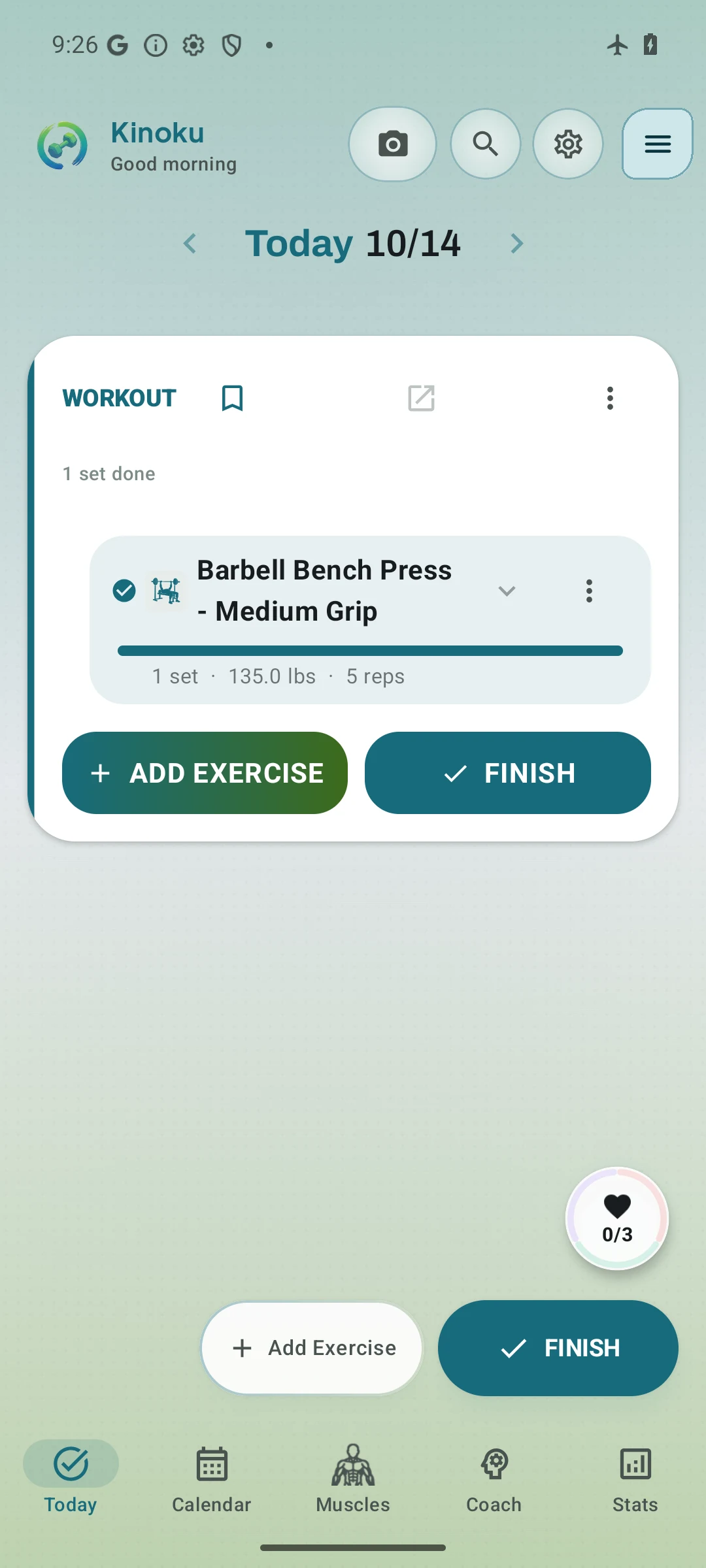
We repeated Kinoku’s offline check on October 14, 2026 with version 1.5.0, build 40, on the Android 16 emulator. The test used a locally signed copy of the release bundle, installed outside Google Play with empty app data. Flight mode was on before setup, and we logged a 135-pound bench press set for five reps without an account. The completed set survived a forced stop and restart while the emulator still had no active network. The new capture shows that result; it does not test map loading, watch sync, billing or a full restore.
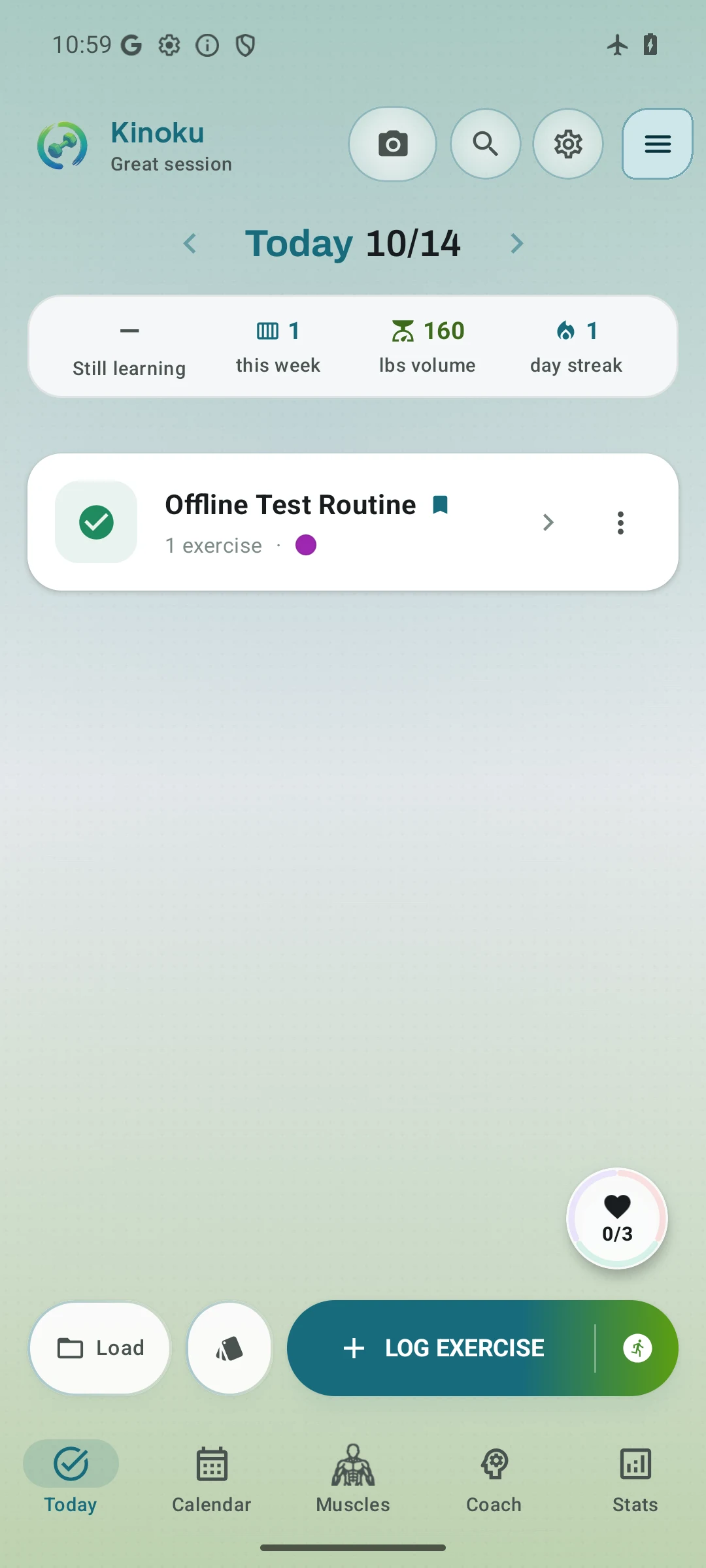
In a second fresh test that day, we created Offline Test Curl, logged 20 pounds for eight reps and saved it as a routine. We finished the workout, forced the app to stop and reopened it with flight mode still on. Today showed the routine as complete. We then saved a full backup and a CSV export to local files, and checked that both held the routine and completed set.
Saving the first routine earned one day of Pro. The steps after that ran with the reward active, without a purchase. This test checks the offline path; the free tier’s access to routines, backups and exports was checked in code. We did not test restoring the backup into the app.
Every fact about another app on this page is a sentence from a page that app publishes, rechecked on October 21, 2026, or a thing we saw on screen in a test we ran. The sources list at the end holds the exact sentence behind each bracketed number, and a fact in neither place is not on this page.
The tests ran on an Android Studio Pixel phone emulator on Android 16. FitNotes 25.1 was tested on September 2, 2026, and Hevy 3.1.12 on September 6, each recorded on its own versus page. Strong 6.2.4, JEFIT 17.4.4, and a test build of Kinoku 1.2.0 were tested on September 11, 2026, and the test record under this page lists those versions. Every test logged one set with flight mode on. The Hevy, JEFIT, and Strong tests also looked for a way in without an account, stopped the app by force with the set logged, and turned the network back on to watch for any message.
GymLog joined the list on October 21, 2026, from its F-Droid listing and its GitHub project page, and we have not run it on the emulator. The page gives no score. The order follows one checkable measure, named in the table caption: no account plus GPS runs, then no account, then an account first.
Frequently asked questions
Which workout tracker apps for Android work fully offline?
Kinoku, FitNotes and GymLog log workouts with no connection and no account, and Kinoku also records GPS runs in the same app. Kinoku is not fully offline, because map tiles load when you view a map and the weather line on a run is a network call you turn on. Hevy, JEFIT, and Strong also logged a set with flight mode on in our tests, once an account was made.
Which gym apps work without internet on Android?
The five apps we tested logged a set without internet on an Android 16 phone emulator with flight mode on, and GymLog’s own listing says it is fully offline. FitNotes is Android only, GymLog is an Android app from F-Droid, and Kinoku runs on Android with a Wear OS companion. Hevy, JEFIT, and Strong also run on the iPhone, and Hevy has a Wear OS app as well.
Which workout apps work on a flight, in airplane mode?
Five of the six apps here logged a set with flight mode on in our tests, and GymLog’s own listing says it is fully offline. Kinoku, FitNotes and GymLog ask for no account, so nothing has to be set up online before the flight. Hevy, JEFIT, and Strong ask for an account before the first workout, and making one takes a connection. In Kinoku, map tiles and the opt-in weather line wait until the phone is back online.
Does a workout tracker need an account to work offline?
No, because the account and the network are separate questions. Kinoku, FitNotes and GymLog take no account and keep the record on the phone. Hevy, JEFIT, and Strong ask for an account first, and in our tests each one still logged a set with flight mode on, then synced or waited until the network came back. An account decides where the record ends up, not whether the log works in a basement gym.
Which workout apps work without cloud sync?
Kinoku, FitNotes and GymLog work without cloud sync, three of the six apps here. FitNotes says workout data is stored locally on your mobile device, and its optional Google Drive backup uploads a copy. GymLog turns Android cloud backup off, so the record leaves the phone only in a file you export. Kinoku keeps the record in the app’s private storage with no Kinoku server behind it, and Android system backup may copy eligible data to your Google account. Hevy, JEFIT, and Strong sync the record to an account, though JEFIT’s policy also allows the data to be kept on the device.
Does Hevy work offline?
Yes, Hevy logs offline once you have an account. In our test, Hevy 3.1.12 opened on a sign-up screen with no skip. With flight mode on it still saved a set, showed a banner that one workout had failed to upload, and sent the workout once the network came back.
Does JEFIT work offline?
JEFIT logs offline, and its blog says the app allows offline entry and syncs across Android and iOS. In our test the Instant tab built a workout with flight mode on, the log took a bench press set, and End & Save Workout kept it. The account came after a questionnaire of about twenty steps and an Elite offer, with no guest path.
Does Strong work offline?
Yes, Strong took a set with no network in our test, finished the workout with a summary, and still had it in History after a forced stop. The account comes first, because the opening screen offered register, log in, or a Google, Facebook, or Apple sign-in with no guest path. The account is free, and Strong Cloud keeps your workouts synced between devices.
Can I move my log from Hevy or Strong to an offline app?
Yes, by file. Hevy exports the whole history as one CSV from Settings, and says the file cannot be imported back into Hevy. Strong exports a CSV too, and says the same about its own file. Kinoku’s importer reads both layouts and shows a review screen before it saves. From version 1.3.0 on, Kinoku reads Hevy’s file without the bugs our test found, and version 1.6 fixes the Strong weight bug, as the Hevy and Strong pages describe. Either way, the original file is worth keeping.
What happens to an offline log when the phone is lost?
The log goes with it unless a copy exists elsewhere, which is the cost of a record that lives on the phone. FitNotes has its own Backup option and an opt-in Google Drive backup about an hour after each workout. Kinoku writes a full backup ZIP you keep on a drive you pick, and Android system backup may hold eligible app data too. Strong Cloud keeps workouts synced between devices, and Hevy uploads each workout to your account once the network is there.
Is offline the same as private?
No, because offline says the log works with no signal, and private says where the record goes and who can see it. Hevy logged offline in our test, and its Save Workout sheet preselected Everyone on a new account. JEFIT logged offline too, and its share card had Share to community switched on by default. FitNotes says the record stays on the phone, and Kinoku has no feed, so there is nowhere for a workout to be posted.
Related pages
- Free run trackers without an account: how account-free running differs from recording offline after sign-up.
- Best privacy-focused fitness apps for Android: the question after offline: what each app’s own Play label says it collects.
- Best Hevy alternatives
- Best gamified fitness apps for Android: which apps turn training into a game, and what each game rewards.
- Kinoku vs FitNotes
- Kinoku vs Hevy
- Kinoku vs JEFIT
- Kinoku vs Strong
- Kinoku vs Strava for GPS runs
- Offline-first fitness tracking, the learn page on where a record lives and what Kinoku gives up for it
Which one fits you
- Choose Kinoku if you want lifting and GPS runs in one free log that works with no signal and no account, and maps that load online are fine.
- Choose FitNotes if you want an Android lifting log with no account, with an optional Google Drive backup for a spare copy.
- Choose GymLog if you want a small open-source lifting log that never goes online, and you can install it from F-Droid.
- Choose Hevy if you want friends' workouts in a feed and can make an account before logging offline.
- Choose JEFIT if you want Android, iPhone and web access, with offline entries that sync once the network returns.
- Choose Strong if you want an offline lifting log whose account keeps workouts in sync across your devices.
Test record
Tested September 11, 2026
- Environment
- Android Studio Pixel phone emulator Kinoku_Phone_Play, API 36, Android 16
- Kinoku
- Version 1.2.0 (version code 30), a test build installed outside Google Play. Official listing
- JEFIT
- Version 17.4.4 (version code 2093), installed from Google Play. Official listing
- Strong
- Version 6.2.4 (version code 602006), installed from Google Play. Official listing
How this page is checked. Every fact about another app on this page comes from a page that app publishes, which we could open and quote on October 27, 2026, or from a dated emulator test named in that source's note. The sources, with the exact sentence each fact rests on, are listed just above. Every Kinoku fact is tied to the shipping app's code. The page carries no score; the caption above names the measure the list is ordered by. If a fact here has gone stale, the support page is the fastest way to tell us.
Test evidence
What the tested builds showed
 Open full-size image ↗
Kinoku 1.5.0 kept the completed set after a restart
October 14, 2026, Android 16 emulator. We installed a locally signed copy of release build 40, started with empty app data and logged without an account. With flight mode on, a completed 135-pound, five-rep bench press set remained after we force-stopped and reopened Kinoku. This checks one set, not every offline feature.
 Open full-size image ↗
A finished routine, still there after an offline restart
October 14, 2026, Kinoku 1.5.0 on the same Android 16 emulator. With flight mode on, we created a custom exercise, saved a routine and finished its workout. The completed session stayed after a forced restart. Saving the routine earned one day of Pro, so the later steps ran with that reward active.
 Open full-size image ↗
FitNotes kept the logged set with no network
Cropped emulator capture from September 2, 2026. With flight mode on, FitNotes 25.1 saved an 80 kg by 5 bench press set and listed it in the exercise History tab.
 Open full-size image ↗
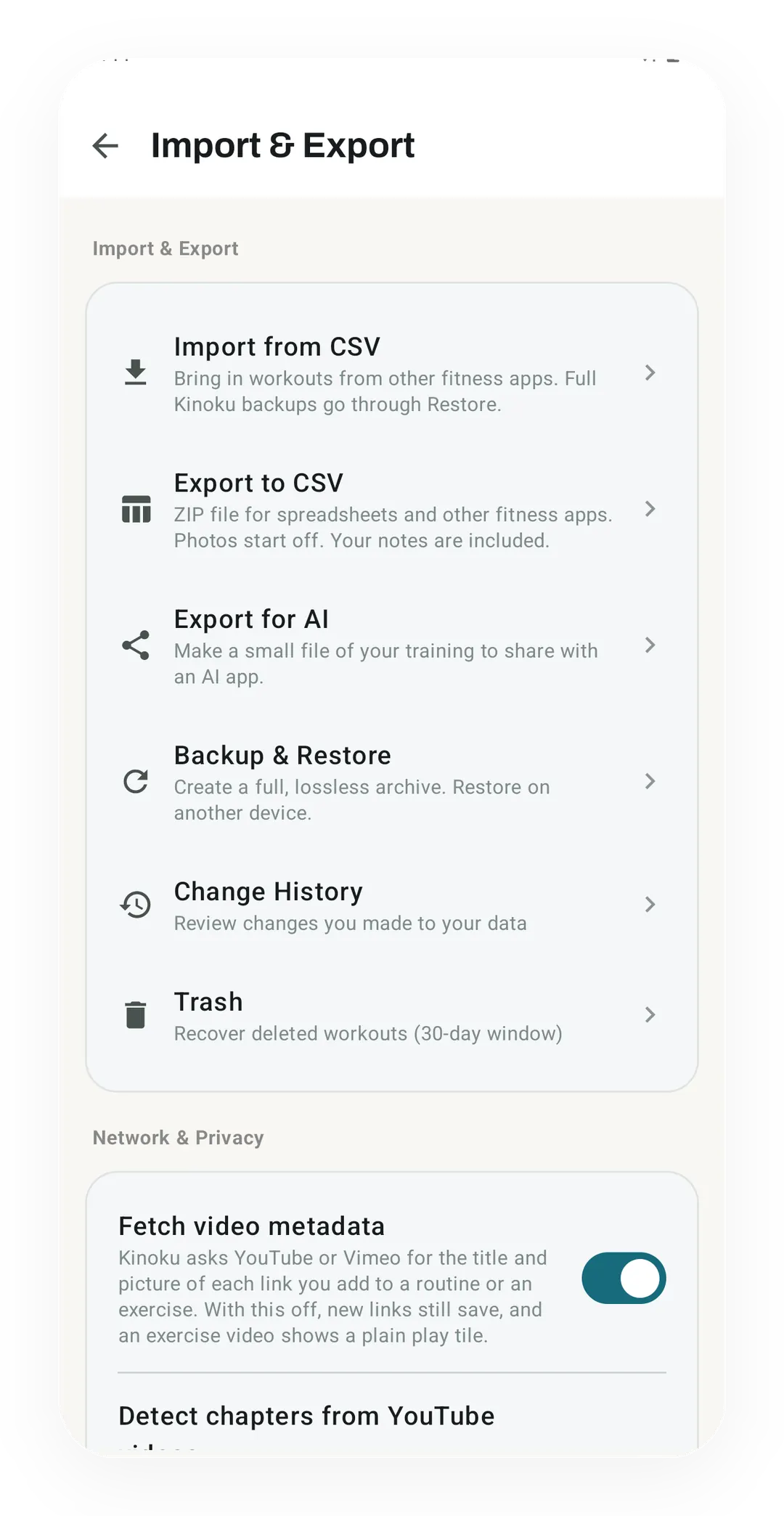
Kinoku's data controls
Backup and restore, CSV import and export, Change History and Trash sit together on Kinoku's Import & Export screen, and each one runs on the phone with no account behind it.
One of the apps on this page
Kinoku is free to install
Core tracking works offline, with no account. An export from the app you use today can come along.
Android only for now, with an iPhone version in the works. Some depth is paid, and the pricing page says which parts.
Related features
Lossless backup, open CSV and JSON import, Strava import, and a scoped Export for AI handoff.
Every set, one tap. Track how hard each set felt, your rest timers, set types, and notes.
Bring your Strava history with no login token. Choose the Strava archive ZIP once; Kinoku reads activities.csv and supported route files from it on your phone. Kinoku never touches Strava's servers.