

Strava Alternative for Privacy: Kinoku vs Strava
Strava is the social network for runners, and recording is free. Kinoku is a private run tracker with no account and no feed. Which one fits you.
Kinoku fits a runner on Android who wants the numbers kept on the phone with no account; Strava fits a runner who wants the feed, segments and an iPhone.
Publisher disclosure
Kinoku, made by Dreamsoft Works, writes and publishes this page. Every Strava product fact is quoted from a Strava page we opened on September 20, 2026. What we say about Strava's export file describes the layout Kinoku's importer reads. We say where Strava is the better pick, and we give no score.
Quickstart
Strava is the social network for runners and riders, and recording is free [1], while analytics, routes and offline maps need a subscription [3]. Kinoku records GPS runs offline with no account, and tracking is free while the deeper analytics are Pro, with no feed and no segments. So pick Strava if you run with a crowd online, and pick Kinoku for the numbers, kept on your phone.
What Strava does well
Strava is free to record with, and its own support page says there is no cost to record and share your activities [1].
Recording works without a data connection, because the app uses no data while it records, unless you view maps or turn on its live features [2]. Once you are back online, it sends the activity to Strava’s servers [2], so a run in a dead zone still counts.
A subscription adds the training layer, so subscribers can download routes to their phone for offline use [3]. They also get Fitness & Freshness and the Training Log [3], and the same page names leaderboards among what subscribers get [3].
Strava runs on Android, iOS, Wear OS 3 and above, Apple Watch, and the web [5].
Side by side
Strava speaks for itself in the left column, through its own support and legal pages. The bracketed numbers lead to those pages at the end.
| Strava | Kinoku | |
|---|---|---|
| Account | Free sign-up [7]. | None. |
| Where your data lives | Strava’s servers in the United States [6]. | On your phone. Android system backup may copy it to your Google account. |
| Recording | Free [1]. No data used while recording, unless you view maps or use its live features [2]. | Free. Live pace, splits, a route map, and audio cues. Works offline. |
| Training analytics | Fitness & Freshness and the Training Log, for subscribers [3]. | Running Progress is free. The Run Analytics dashboard is Pro. |
| Routes and offline maps | Routes download for offline use, for subscribers [3]. | No route planner. Map tiles load over the network. A heatmap of your own runs is Pro. |
| Export | GPX, TCX or FIT per activity, and a bulk archive, on the website only [4]. | CSV tables, a full backup file, and Export for AI. All free. |
| Platforms | Android, iOS, Wear OS 3 and above, Apple Watch, web [5]. | Android and Wear OS. |
| Social feed | Yes. Leaderboards are for subscribers [3]. | None. |
| Heart-rate zones | Not stated on Strava’s pages. | Five heart-rate zones per run, free, when the run has heart rate. Zone Training’s weekly split is pace-based and Pro. |
| Training load | Fitness & Freshness, for subscribers [3]. | Weekly training load and the fitness and fatigue curve, in Pro. The base Form chart on the Coach screen is free. |
Strava also appears in the roundup of what each free tier includes, next to five lifting apps.
Where Kinoku differs
There is no account, so you install the app and start a run, and nothing asks for an email.
Your runs stay on your phone, because Kinoku does not upload your run history to a Kinoku server. Android system backup may copy the app’s data to your Google account, like it does for other apps, and that is the one copy that can leave the phone, with Android controlling it rather than us.
Run tracking is free, and it is the full thing. You get live pace and distance, splits, a route map, and audio cues for cadence, hills and heat. Weather notes are an opt-in, from Open-Meteo, and shoe mileage adds up on its own. After the run you get the map, the splits table, average pace, distance, time and elevation gain. Running Progress is free too: best-effort records, a fitness estimate, and trends for pace, fitness, distance and speed.
The deeper layer is Pro, and Run Analytics is a dashboard with race-time forecasts, pacing scores and weekly training load. Zone Training puts each run into pace zones, from Recovery to Race, and scores the effort from 0 to 5. The fitness and fatigue curve in Pro Analytics shows your load as long-term fitness, short-term fatigue and a form band, while the base Form chart on the Coach screen stays free. Pro is US $39.99 a year or US $5.99 a month, and Google Play shows it in your local currency.
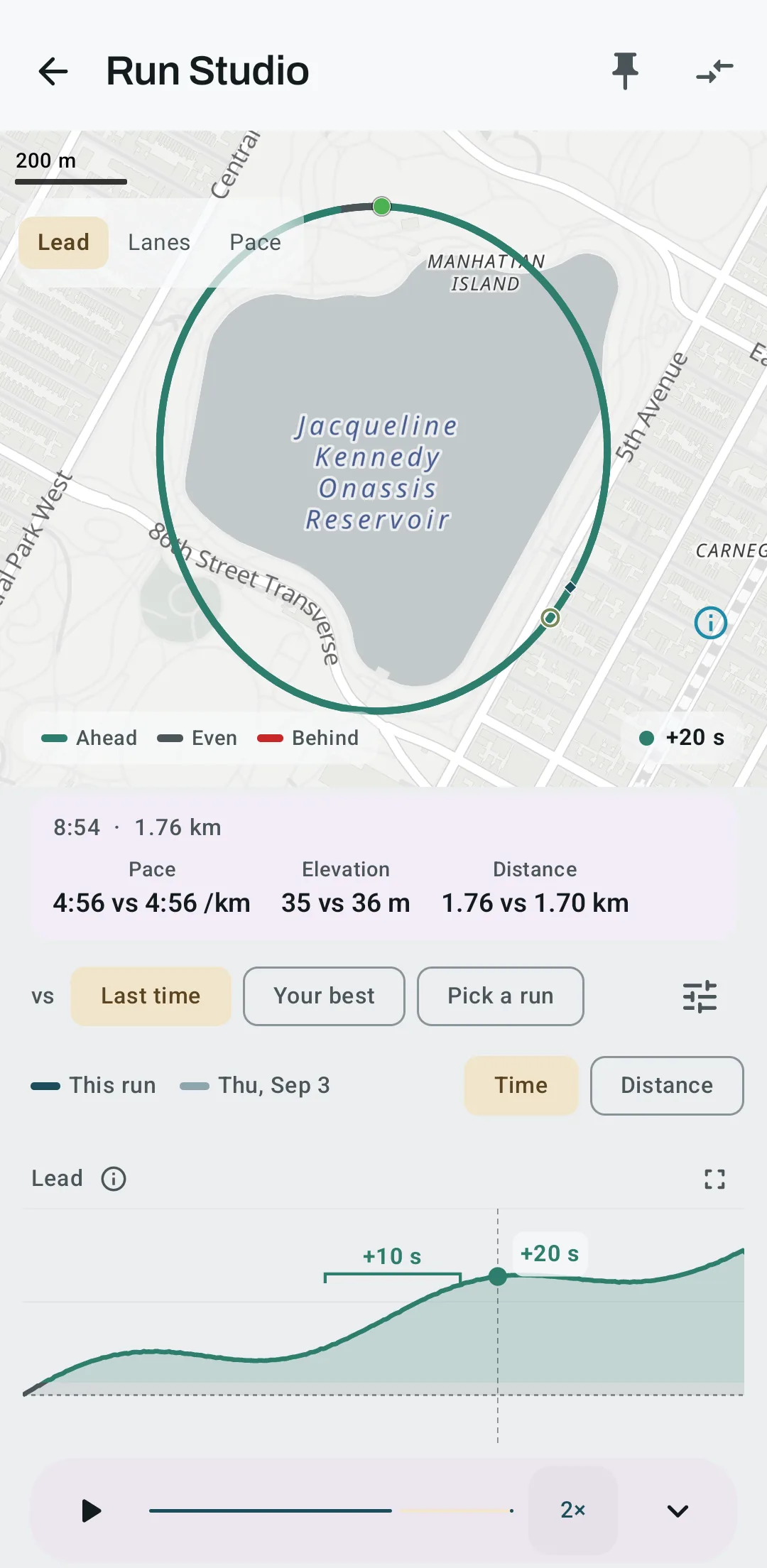
Pro can also set one of your runs against another. Run Studio draws the second run as a faint ghost on every chart, and a Lead chart shows the seconds you gained or lost along the route. On a route you run often, the map turns the color of whoever was ahead at each spot.
There is a real Wear OS app, so you can start a run from the watch, track heart rate the whole time, and see your splits on your wrist. The watch syncs back to the phone on its own.
Kinoku reads a Strava archive, and the section below says how.
Where Strava is the better pick
Strava wins in a few cases, and we would rather say so here than have you find out later.
- You want the social layer. The feed, segments and leaderboards. Kinoku has none of that, on purpose. If your friends are on Strava, that alone is a good reason to stay.
- You use an iPhone or an Apple Watch. Strava runs on iOS and Apple Watch [5]. Kinoku is Android only for now.
- You want routes you can plan and take offline. Strava subscribers can download routes to their phone for offline use [3]. Kinoku has no route planner, and its map tiles need a connection.
- You run on a lot of devices. Strava covers Android, iOS, two watch platforms and the web [5]. Kinoku is one phone plus one watch.
- You want a dead-zone run to sync to a website later. Strava does that [2]. Kinoku keeps the run on the phone, and there is no website to sync to.
Moving over
Strava lets you download all your data, and its own page says export is only available on the Strava website, not in the app [4]. From the website you can pull a bulk archive, which arrives as a ZIP with an activities.csv file and one route file per activity.
Kinoku reads that ZIP as it is, so there is no need to unzip it first. Choose the file in Kinoku, and the import runs on your phone, reading each run’s distance, moving time, heart rate, elevation and name from the spreadsheet. Kinoku reads the route, pace and climb from each map file, and old personal records show up on their true dates. The import is free, with no cap on how many activities you bring in, and the Strava Import page has the full list of what comes across and what does not.
This is a copy, so Strava keeps your history and your Strava account is untouched. Kinoku never logs in to Strava and never talks to its servers, and you can keep posting there if you like.
What Kinoku does not do
A short list, so you can decide with the edges in view.
- Android only for now. There is no web app, and the iPhone app is in the works.
- No social layer. There is no feed. Nobody sees your runs unless you share a card.
- No segments. Kinoku does not score you against other people on a stretch of road.
- No cloud sync. Kinoku has no account that keeps runs in step between two phones in use. A new phone gets them from a backup file you move, or from Android’s own backup and transfer of eligible app data.
- Run analytics depth is paid. Recording and Running Progress are free. Run Analytics, Zone Training and the route heatmap are Pro.
- Map tiles need a connection. The run records offline. Viewing the map afterwards loads tiles from the map provider.
- No
.tcxroutes. When an activity in the archive comes as a.tcxfile, Kinoku keeps its distance, time and heart rate but does not read the map from that file yet.
Related pages
- Best privacy-focused fitness apps for Android: The two data types Strava’s label lists as shared, and the labels of nine more apps.
- Best apps for lifting and running in one app: Strava beside the apps that log lifts and runs in one history.
- One app or two: tracking lifts and runs together: what one load curve sees that two apps cannot.
- Kinoku vs Activ.run: the other app that logs both.
- Best Strava alternatives: three apps for runners leaving the feed or the subscription.
- Best gamified fitness apps for Android: Strava’s challenges and badges beside six other apps that turn training into a game.
- Free run tracker apps with no account for Android: three open-source trackers that also skip the account, beside Kinoku and Strava.
- Best Samsung Health alternatives: Strava beside five other apps for Galaxy users, with each one’s account and Health Connect facts.
- Best Runkeeper alternatives: Strava’s batch upload beside five other homes for a Runkeeper history.
- Free workout year in review apps: What Strava’s pages say about Year in Sport, set beside four other yearly recaps.
- Best apps to compare your runs on Android: Strava’s Matched Activities and segments, beside how seven other apps compare runs.
Which one fits you
- Choose Strava if you run with friends on a feed, you use an iPhone or an Apple Watch, or you want routes you can plan and take offline as a subscriber.
- Choose Kinoku if you run on Android, you want no account and a run record kept on your phone with no Kinoku server behind it, and you want your lifts and your runs in one log.
Frequently asked questions
Is Strava free?
Yes, for recording. Strava's support page says it is a free app and there is no cost to record and share your activities. A subscription adds the training layer, and the same support site lists Fitness & Freshness, the Training Log, leaderboards and offline route maps among subscriber features. Kinoku's run tracking is free too, with the deeper Run Analytics dashboard in Pro.
Can I move my Strava history to Kinoku?
Yes. Strava's own page says exporting your data is only available on the Strava website, and from there you can request a bulk archive. It arrives as a ZIP holding an activities.csv file and one route file per activity. Kinoku reads that ZIP as it is, on the phone, and the import is free with no cap on how many activities you bring in.
Is Kinoku free?
Recording is free and complete: live pace and distance, splits, a route map, audio cues, and Running Progress with best-effort records and trends. Pro is the one paid layer, at US $39.99 a year or US $5.99 a month, and it holds the Run Analytics dashboard, Zone Training and the route heatmap. The pricing page lists each part of Pro.
Which one works offline?
Both record with no signal. Strava's support page says there is no data usage while recording unless you view maps or turn on Live Segments or Beacon, and the app syncs the activity to Strava's servers once you are back online. Kinoku records offline and keeps the run on the phone, with no upload step, and its map tiles load over the network when you open the map afterwards.
Does Kinoku have a social feed or segments?
No. Kinoku has no feed, no followers and no segments, so it never scores you against other people on a stretch of road, and nobody sees a run unless you share a card yourself. Strava is built around those things, and its support site names leaderboards among what subscribers get, which makes it the pick for anyone who runs with a crowd online.
Which one has Wear OS?
Both. Strava's support page says it only supports Wear OS 3.0 and above, and the same page is where Strava lists Apple Watch alongside Android, iOS and the web. Kinoku's Wear OS app can start a run from the watch, track heart rate the whole time and show splits on the wrist, and it syncs to the phone on its own. Kinoku has no app for the Apple Watch.
Where is my run data stored?
Strava's privacy policy says your information will be transferred, processed and stored in the United States. Kinoku does not upload your run history to a Kinoku server, so it stays on your phone. The one copy that can leave the phone is the Android system backup to your Google account, which Android controls in the same way it does for other apps.
Does Kinoku read every file in a Strava archive?
Not yet. GPX route files come across with the route, pace and climb, and Kinoku unpacks the ones Strava ships gzipped, so old personal records show up on their true dates. When an activity in the archive comes as a TCX file, Kinoku keeps its distance, time and heart rate from the spreadsheet but does not read the map from that file. The Strava Import page lists what comes across and what does not.
How this page is checked. Every Strava product fact on this page comes from a Strava page we could open and quote on September 20, 2026. The sources, with the exact sentence each fact rests on, are listed just above. What we say about Strava's export file describes the layout Kinoku's importer reads. Every Kinoku fact is tied to the shipping app's code. If a fact here has gone stale, the support page is the fastest way to tell us.
Kinoku in practice
Where this shows up in the app
 Open full-size image ↗
A Kinoku run, colored by pace
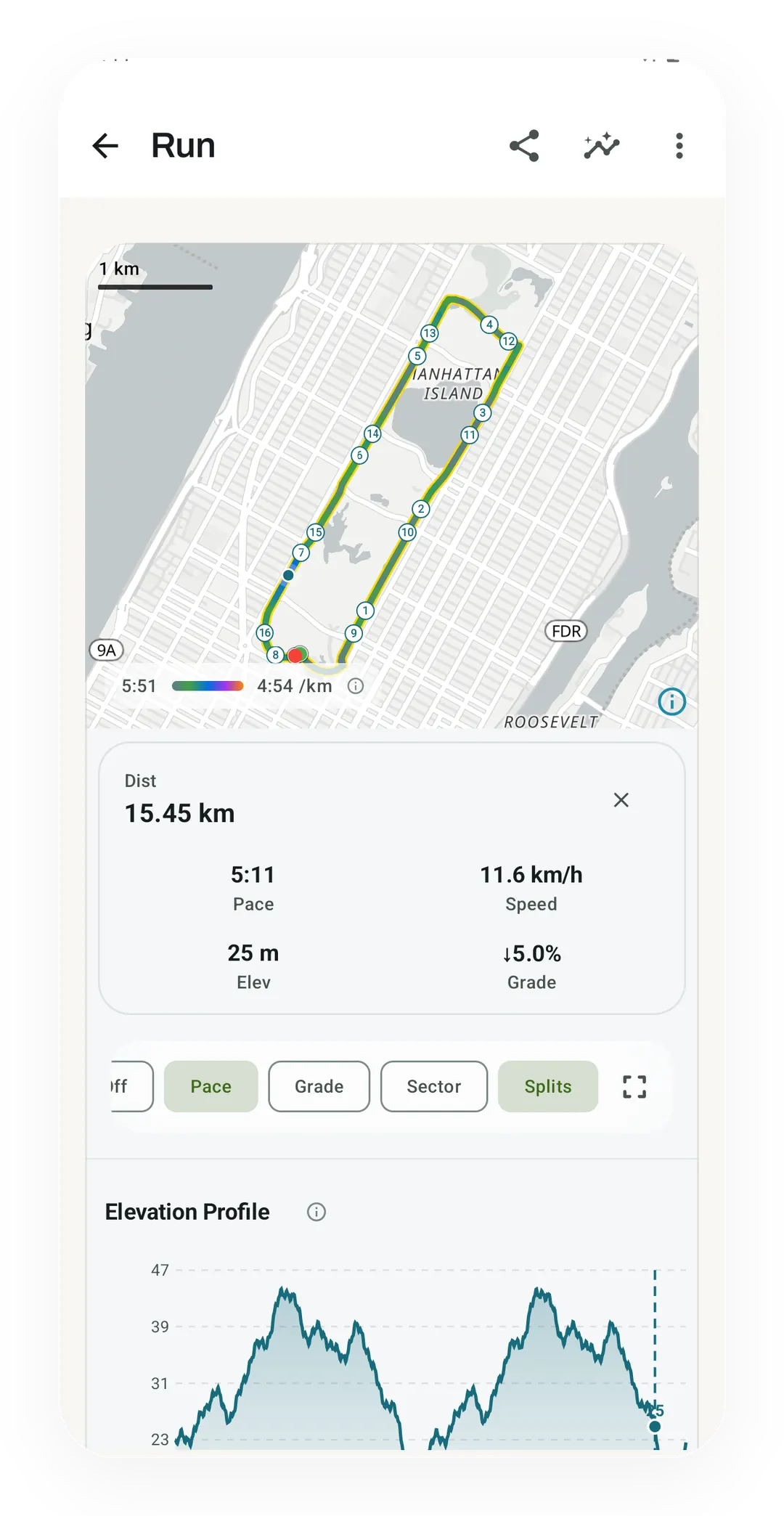
On the free plan, the run screen colors the route by pace from 5:51 to 4:54 /km, with numbered splits and the elevation underneath. Runs brought over from a Strava archive land on this same screen.
 Open full-size image ↗
Two of your runs, side by side
On Pro, two tempo runs on the same 2.7 km loop, with the route in the color of whoever led and a chart of the lead in seconds.
Try the other side of the table
Kinoku is free to install
Core tracking works offline, with no account. Your export from Strava can come along.
Android only for now, with an iPhone version in the works. Some depth is paid, and the pricing page says which parts.
Related features
Live pace, splits, a route map, and audio cues. Your run record is not uploaded to Kinoku; map tiles load when you view maps, and weather is a clear opt-in.
Offline run breakdown with splits, a fitness score from your runs, a pacing score, best efforts, race forecasts, and a compare card that stacks each run against your similar past runs.
Bring your Strava history with no login token. Choose the Strava archive ZIP once; Kinoku reads activities.csv and supported route files from it on your phone. Kinoku never touches Strava's servers.