

Free run tracker apps with no account for Android (2026)
Compare sign-up, GPX and CSV export, offline maps, watches and free-plan limits in five Android running apps, with sources and clear trade-offs.
Kinoku suits runners who lift and want both in one Android history with no account; export is CSV, not GPX. FitoTrack and OpenTracks suit GPX files, while RunnerUp offers uploads to Strava.
At a glance
| App | Best for | Better at | Main trade-off |
|---|---|---|---|
| FitoTrack | Runners who also ride or hike and want GPX files in and out of an open-source app | GPX export and import, maps saved for offline use, and cycling and hiking modes | Its pages describe no watch app |
| Kinoku | Runners who lift and want both in one Android history, with no account | Free run and lift tracking, Wear OS support, CSV route export and local backups | No GPX export or cycling mode, and the deeper run dashboard is Pro |
| OpenTracks | Runners and riders who want a tracker with no internet access and Bluetooth sensors | No internet access at all, bike sensors for speed, cadence and power, and GPX export | Free on F-Droid only; the Google Play copy is a paid download |
| RunnerUp | Runners who train intervals by pace or heart rate and send runs on to Strava, with no RunnerUp account | Garmin-style interval workouts, heart rate zones, a Wear OS companion and automatic uploads | Its map tracks by default until you switch that off, and the F-Droid build drops the watch app |
| Strava | Runners who want a feed, segments and friends, and are fine with an account | A social feed, segments with leaderboards, and sync with Garmin and Apple Watch | An account is required, and your information is stored in the United States |
Publisher disclosure
Kinoku, made by Dreamsoft Works, publishes this page and appears in the list. Competitor sources were checked on October 14, 2026; older store observations keep their dates. We did not test the rival apps on a device. Account policies inferred from their pages are marked. No app paid for a place.
Quickstart
FitoTrack and OpenTracks offer GPX files for runners who want to move routes between apps. RunnerUp names automatic uploads to other services. Kinoku is a fit when you run and lift, want both in one Android history, and need no account. Its free export uses CSV tables, including route points, rather than GPX.
That file choice matters before you move. GPX is a common route file, while CSV is a table you can open in a spreadsheet. If the app you want to send runs to accepts only GPX, Kinoku’s export will not fill that need.
Strava is included as the account-based option for a club feed and segments. The table marks what each source states and where the account policy is an inference.
Which run trackers need no account?
Kinoku has no account system, and RunnerUp explicitly says no user registration is needed. We include FitoTrack and OpenTracks as privacy-focused options based on their published design. Their sources do not state an account rule in those words, and we have not tested their sign-up screens.
- Explicit no sign-up: RunnerUp’s listing names no user registration [1], and Kinoku lets you record without a profile or login.
- Inferred from the published design: FitoTrack declares no data collection [2] and no tracking [3]. OpenTracks states no internet access [4] or cloud integration [5]. Those are the basis for inclusion, not a hands-on account test.
- Account required: Strava’s terms require sign-up [6], after which recording is free [7].
Side by side
Each cell rests on a sentence from the app’s listing, its F-Droid page (an open-source app store) or its own site, and the bracketed number names the source. Kinoku’s row comes from its own code, so it carries no bracket, and “Not stated” marks a point that no page we could open covers.
| App | Account | Ads and cost | Network while you record | Runs as files | Watch |
|---|---|---|---|---|---|
| FitoTrack | No account inferred; listing declares no data collected [2] | No ads [3] | Maps you can download for offline use [8] | GPX export and GPX import [9] | Not stated |
| Kinoku | None | No ads; run tracking is free, and the deeper run dashboard is Pro | Records with no signal; map tiles, Play billing, a gifted Pro access check and features you turn on, such as weather and diagnostics, go online | CSV export with route points, and a full backup ZIP; no GPX | Wear OS app, free |
| OpenTracks | No account inferred; no internet access [4] | No ads [10]; free on F-Droid, filed under donations for Google Play [11] | No internet access [4] | GPX, plus two Google Earth formats [12] | Stats on a watch through Gadgetbridge [13] |
| RunnerUp | No user registration [1] | No ads and no in-app purchases [14] | Not stated | Automatic upload to Strava, Runalyze and others [15] | Wear OS companion [16] |
| Strava | Required [6] | Recording is free [7]; a subscription adds more [17] | No data used unless you view maps or turn on live features [18] | GPX, TCX or FIT per activity, from the website only [19] | Wear OS 3.0 and later [20] |
Each app, in its own words
FitoTrack
Best for: Runners who also ride or hike and want GPX files in and out of an open-source app.
FitoTrack is an open-source tracker that logs runs, rides and hikes and draws each one on a map with charts beside it.
- What it does well: Its listing says that whether you are running, cycling or hiking, FitoTrack shows the most important information with detailed charts [21]. The project wiki lists voice announcements during a run, heart rate from Bluetooth sensors and interval training [22], plus maps you can download for use offline [8]. A workout goes out as a GPX file, and GPX files come in, several at a time [9].
- What its pages say about accounts: The listing never mentions an account at all. Its data safety section declares that the app collects no data [2], and its feature list says there is neither advertising nor tracking, with the code open under the GPLv3 (a free software license) [3].
- Where it is the better pick: A runner who also rides and hikes, or who wants every run as a GPX file for another app, gets both here. Its listing states no ads or tracking; we have not checked the first-run screens.
- Where FitoTrack differs: Its pages describe no watch app, so we leave watch support unconfirmed. Official listing: Google Play.
Kinoku
Best for: Runners who lift and want both in one Android history, with no account.
Kinoku records GPS runs and gym sessions in the same workout history on Android, with no sign-up. Daily steps have their own screen.
- What it does well: Run tracking is free, with live pace and distance, splits, a route map colored by pace, and voice cues for cadence, hills and heat. Running Progress is free as well, and it adds best-effort records, a fitness estimate, and trends for pace and distance. The free Wear OS app starts a run from the wrist and tracks heart rate as you go. CSV export includes route points, and a separate full backup keeps a copy for Kinoku.
- What its pages say about accounts: There is no account at any point, and no Kinoku server holds your runs. The record sits in the app’s private storage, and Android’s own system backup may copy eligible app data to your Google account. Kinoku reaches the network for map tiles while a map is open, for Google Play billing, for a check on gifted Pro access at most twice a day, and for features you turn on, such as weather and diagnostics.
- Where it is the better pick: A runner who lifts and wants both kinds of workout in one history, with no sign-up or ads. Free run records and lifting stats keep the week in view.
- What Kinoku does not do: Kinoku writes no GPX file, since its CSV export keeps route points as rows in a table and its backup ZIP is meant for Kinoku itself. It has no cycling mode, and it does not pair with a Bluetooth chest strap, so heart rate comes from its watch app or, after the run, from Health Connect when you switch that on. Its code is not public, there is no iPhone app yet, and the Run Analytics dashboard past its overview tab, zone training and the route heatmap are part of Pro. Listing: Kinoku on Google Play.
OpenTracks
Best for: Runners and riders who want a tracker with no internet access and Bluetooth sensors.
OpenTracks is an open-source sport tracker for runs, walks and rides, and it is built around having no internet access at all.
- What it does well: Its F-Droid page says it records as you run or walk and gives you a bike computer with a bigger screen for cycling [23]. It reads Bluetooth sensors for heart rate, and for speed, cadence and power on a bike [24]. Tracks export as GPX or in two Google Earth formats [12], and its code page says it can show statistics on a smart watch through Gadgetbridge [13].
- What its pages say about accounts: None of them mention one. The feature list says there is no internet access and no extra permission [4], and the homepage says OpenTracks and its companion map app have no cloud integration [5].
- Where it is the better pick: A runner who wants a tracker that cannot reach the internet at all, or a rider with Bluetooth speed, cadence or power sensors, which Kinoku does not read.
- Where OpenTracks differs: It costs nothing on F-Droid, while its code page files the Google Play copy under donations, and on the day we checked, that listing was a paid download [11]. We print no price, and the license is Apache 2.0 [10]. Official listing: F-Droid.
RunnerUp
Best for: Runners who train intervals by pace or heart rate and send runs on to Strava, with no RunnerUp account.
RunnerUp is an open-source GPS tracker built around structured workouts and audio cues [25].
- What it does well: Its listing describes runs with a target pace or heart rate zone, interval workouts modeled after Garmin’s, and heart rate zones you set up yourself [26]. It reads Bluetooth heart rate monitors, among other kinds [27], and it can upload each activity to Strava, Runalyze and other services on its own [15]. A Wear OS companion shows basic numbers and gives you pause, resume and next-lap controls [16].
- What its pages say about accounts: The listing says there is no user registration [1], along with no ads and no in-app purchases [14]. Its asterisk points to a note that the map service it uses tracks by default when you view activities on the map, which you can switch off from the map’s logo [28]. The data safety section also says the app may share location, personal info, and health and fitness data with third parties, and the listing does not tie that to a feature [29].
- Where it is the better pick: A runner who follows set interval sessions, or who wants Strava to keep receiving runs while the app that records them asks for no account. The upload itself goes to your account on the service you pick.
- Where RunnerUp differs: The F-Droid build uses a different map and drops the Wear OS app, which needs Google’s non-free Play services [30]. Official listing: Google Play.
Strava
Best for: Runners who want a feed, segments and friends, and are fine with an account.
Strava is a social app for runners and riders, and it is here as the account-first choice that the other four apps stand next to.
- What it does well: Its listing describes a feed of real efforts from real people, and segments where you race others to the top of the leaderboards [31]. It syncs with devices such as Apple Watch, Garmin, Fitbit and Peloton [32], and its support pages cover Wear OS 3.0 and later [20]. Recording and sharing cost nothing [7], and the listing describes a free version next to a paid one [33].
- What its pages say about accounts: Its terms say that to use the service you must sign up and create an account [6]. The privacy policy says information from users outside the United States is moved there, processed and stored [34]. While you record, the app uses no data unless you open the map or turn on its live features, and it syncs the activity to Strava’s servers afterwards [18].
- Where it is the better pick: A runner whose club and friends post there, who races segments, or who wants routes to download for offline use as a subscriber [17].
- Where Strava differs: Export happens only on the Strava website, as GPX, TCX or FIT files per activity or as a bulk archive [19]. We print no Strava price, because its pricing pages disagreed with each other when we read them. Official listing: Google Play. Versus page: Kinoku vs Strava.
Exporting runs from Kinoku
Kinoku’s CSV export is free and saves a ZIP of tables. When your history has GPS points, it includes route_points.csv with each point’s latitude, longitude, time and workout link. Run summaries appear in run_analytics.csv, while workouts and sets have their own tables.
Use CSV when you want to inspect your records in a spreadsheet or keep a readable copy. Use the full backup for a copy you can restore in Kinoku. Neither file is a GPX route, and neither automatically sends a run to Strava or Garmin.
To try it, record a short run, finish it and open it from History. In Settings, open Import / Export and choose Export All Data. Save the file somewhere you can find, then check that the ZIP contains route points from that run. Keep a backup outside the phone if you want protection against losing the device.
What about bringing old Strava runs in?
Kinoku supports some Strava ZIP layouts, but support is limited. Archives containing only FIT route files are not supported, and some archive layouts may not be recognized. GPX routes in a recognized archive can come in with the activity rows. A successful preview of your own file matters more than the app name on the export.
Keep the original archive and check dates, distance and route presence before saving. We have not tested a full account migration for this page. FitoTrack’s GPX import is another option if you already have separate route files [9].
How this list was checked
Competitor web sources were checked on October 14, 2026. The source list holds the exact text behind each numbered citation, while dated store observations retain their September dates.
- Rival apps: We ran no device test for FitoTrack, OpenTracks, RunnerUp or Strava. Their account, file and watch claims come from the listed sources, with inferences marked.
- Kinoku: Feature and tier claims were checked against the app code and its feature pages. Run recording and CSV export are free; the deeper analytics listed above need Pro.
- Order: Apps with no stated sign-up requirement come first, alphabetically. This includes the two inferred policies, while Strava’s explicit account requirement puts it last.
Frequently asked questions
Can I track a run without making an account?
Kinoku and RunnerUp explicitly allow it. Kinoku has no account system, and RunnerUp’s listing says no user registration is needed. FitoTrack declares no data collection, while OpenTracks states no internet access or cloud integration. We infer no sign-up from those designs but have not tested their first-run screens. Strava’s terms require an account.
Which of these run trackers are open source?
Three of them. FitoTrack’s code is open under the GPLv3, and OpenTracks is licensed under Apache 2.0, another free software license. RunnerUp calls itself an open source GPS tracker on its F-Droid page. Kinoku’s code is not public today. Strava’s listing does not describe its app as open source, and this page makes no claim about Strava’s code.
Do these apps record a run with no signal?
The apps differ in what they do with the network while you run. OpenTracks has no internet access at all, while FitoTrack can download maps ahead of time. Strava’s support page says recording uses no data unless you open the map or its live features, and the run syncs later. Kinoku saves the run on the phone, with no upload step.
Can I export my runs as GPX files?
FitoTrack’s wiki lists GPX export and GPX import, and OpenTracks exports tracks as GPX or in two Google Earth formats. Strava exports GPX, TCX or FIT files per activity, but only from its website. RunnerUp’s listing describes uploads to other services rather than a file export. Kinoku writes no GPX file at all, and its CSV export holds each run’s route points as rows in a table.
Which of these run trackers has a Wear OS app?
Kinoku has a free Wear OS app that starts a run and tracks heart rate from the wrist, then syncs to the phone. RunnerUp’s Google Play version has a Wear OS companion with basic numbers and pause, resume and next-lap controls, though its F-Droid build leaves it out. Strava supports Wear OS 3.0 and later. FitoTrack’s pages describe no watch app, and OpenTracks points to Gadgetbridge for watch alerts.
Can I pair a Bluetooth heart rate strap?
OpenTracks reads Bluetooth heart rate sensors, and on a bike it also reads speed, cadence and power sensors. FitoTrack’s wiki lists heart rate from Bluetooth sensors, and RunnerUp’s listing names Bluetooth heart rate monitors among others. Kinoku does not pair with a strap itself, because its heart rate comes from its Wear OS app, or after the run from Health Connect when you switch that on.
Is OpenTracks free?
On F-Droid, yes, because its code page labels that download “Free (F-Droid)”. The same page puts the Google Play badge under donations, and on September 26, 2026 the Google Play listing offered OpenTracks as a paid download with the same description as the F-Droid one. We print no price for it. Either way the app is open source under the Apache 2.0 license.
Where does my run history live in each app?
OpenTracks has no internet access, and its homepage says it has no cloud integration. FitoTrack’s listing declares no data collected. RunnerUp’s listing says it may share location and health data with third parties. Kinoku keeps runs in its private storage with no Kinoku server, though Android system backup may copy them to your Google account. Strava stores your information in the United States.
Can I keep sending runs to Strava without recording in Strava?
RunnerUp lists automatic uploads to Strava and Runalyze, which use your account on the destination service. FitoTrack and OpenTracks offer GPX files you can move yourself. Kinoku has no Strava upload and writes no GPX file. Its CSV export is useful for your own records, but it is not a direct replacement for that upload workflow.
Can I bring my Strava history into a no-account app?
FitoTrack lists GPX import, including several files at once. Kinoku supports some Strava ZIP layouts with GPX routes, but FIT-only archives are unsupported and some layouts may not be recognized. Keep the original archive and check the preview before saving. We have not verified a full account migration here. Strava provides its export through the website.
Do any of these apps show ads?
FitoTrack, OpenTracks and RunnerUp each say in their listings that they carry no ads, and RunnerUp adds that it has no in-app purchases. Kinoku shows no ads on any plan, free or Pro. Strava’s listing describes a free version next to a subscription with premium features, and its text does not mention ads either way, so this page makes no claim about them.
What does Kinoku not do that these apps do?
Kinoku writes no GPX file, has no cycling mode and does not pair with a Bluetooth strap, and the open-source apps cover each of those in some form. Its code is not public, it runs on Android and Wear OS only for now, and it has no feed like Strava’s. The Run Analytics dashboard past its overview tab, zone training and the route heatmap are part of Pro.
Related pages
- Best privacy-focused fitness apps for Android: FitoTrack, OpenTracks and Kinoku again, now sorted by their Play data labels.
- Kinoku vs Strava: The feed, the subscription and the Strava archive, side by side.
- Best Strava alternatives: Three apps for runners who want to leave Strava’s feed or subscription.
- Best offline workout tracker apps for Android: The same account question, asked of gym logs.
- Best apps for lifting and running in one app: For runners who want the gym in the same history.
- GPS Run Tracking: What Kinoku records on every run, on the free plan.
- Offline-first fitness tracking: Where a training record lives, and what Kinoku gives up to keep it there.
- Best Runkeeper alternatives: For runners leaving Runkeeper’s OneASICS sign-up, with where its GPX files can go.
- Best apps to compare your runs on Android: FitoTrack and OpenTracks again, this time asked whether they can put two runs next to each other.
- Best Nike Run Club alternatives: For Nike Run Club users who want a run log with no Nike account.
Which one fits you
- Choose FitoTrack if you ride and hike as well as run, and you want GPX files in and out of an open-source app with no ads.
- Choose Kinoku if you want runs and lifting in one Android history, with no account, and CSV export suits your needs.
- Choose OpenTracks if you want a tracker with no internet access at all, or you ride with Bluetooth speed, cadence or power sensors.
- Choose RunnerUp if you train intervals by pace or heart rate zone and want runs sent on to Strava or Runalyze, with no RunnerUp account.
- Choose Strava if your friends and club are on its feed, you race segments, or your watch is a Garmin or an Apple Watch.
How this page is checked. Every fact about another app on this page comes from a page that app publishes, which we could open and quote on October 14, 2026. The sources, with the exact sentence each fact rests on, are listed just above. Every Kinoku fact is tied to the shipping app's code. The page carries no score; the caption above names the measure the list is ordered by. If a fact here has gone stale, the support page is the fastest way to tell us.
Kinoku in practice
Where this shows up in the app
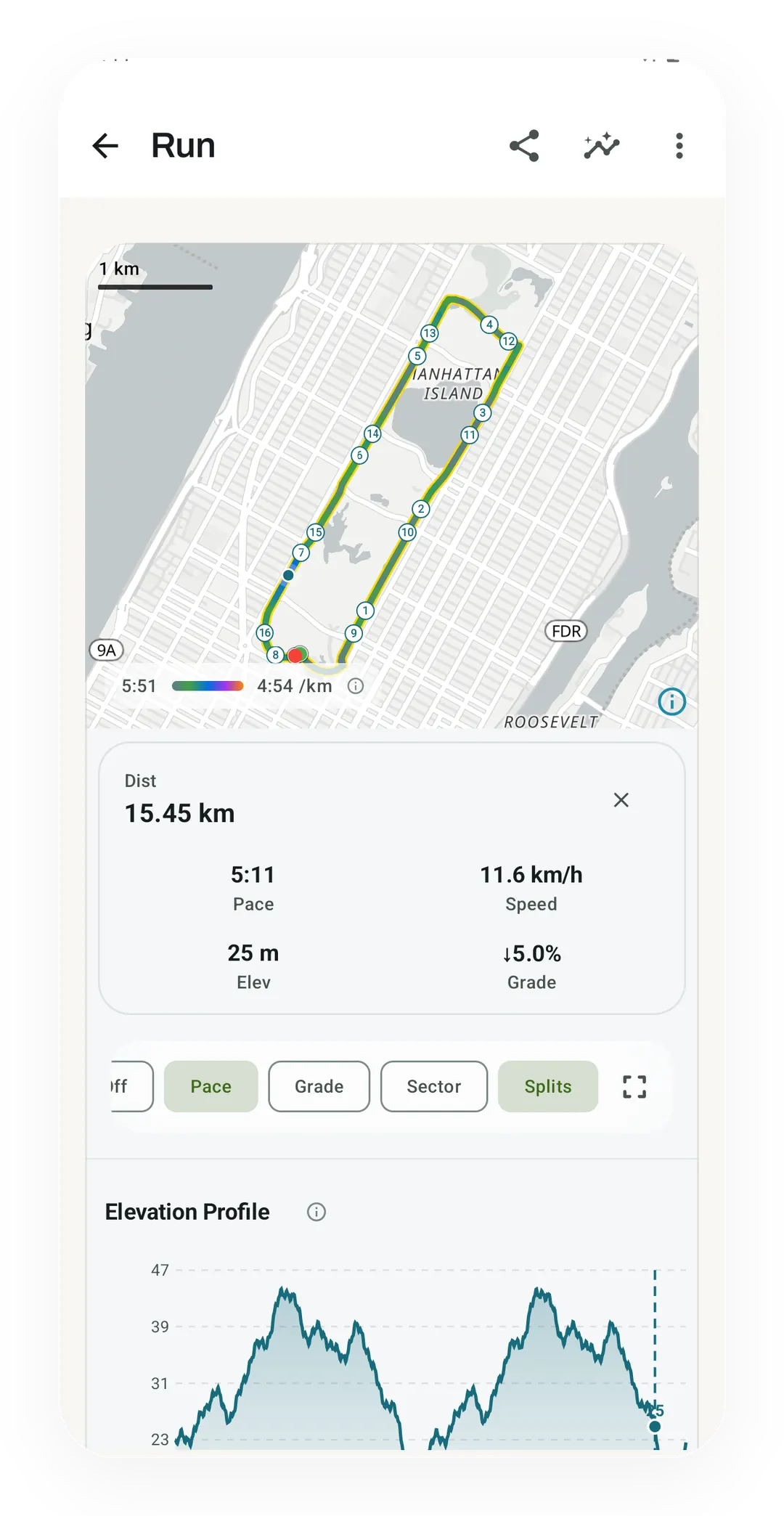 Open full-size image ↗
Demo data: the free run summary
This screen uses demo data to show the run summary, pace colors, splits and elevation. It illustrates free features; it is not a field test of GPS accuracy.
One of the apps on this page
Kinoku is free to install
Core tracking works offline, with no account. An export from the app you use today can come along.
Android only for now, with an iPhone version in the works. Some depth is paid, and the pricing page says which parts.
Related features
Live pace, splits, a route map, and audio cues. Your run record is not uploaded to Kinoku; map tiles load when you view maps, and weather is a clear opt-in.
Your run records and whether you are getting faster, over time. It reads your best efforts and a fitness estimate, never plain average pace, and only claims progress when the trend is sure.
A real watch app for workouts, runs, steps, tiles, and watch face data.