

Best Runkeeper alternatives (2026)
Six Android run trackers for Runkeeper users, grouped by whether they take your exported GPX files, with account, watch and plan facts from each app.
Runkeeper exports your runs as GPX files from its website, and FitoTrack, OpenTracks and Strava can read them; adidas Running and Nike Run Club add coached plans, and Kinoku records free GPS runs with no account but cannot import that history.
At a glance
| App | Best for | Better than Runkeeper at | Main trade-off |
|---|---|---|---|
| adidas Running | Runners who want coached race plans and many sports in one tracker | Personalized plans from 5K to marathon, interval training, cadence and Wear OS tiles | Its listing carries the Contains ads label, and GPX import is not stated on a page we could open |
| FitoTrack | Runkeeper users who want their GPX history back in a free, open-source app | Imports several GPX files at once, plus interval sets, voice announcements and offline maps | Its pages describe no watch app and no training plans |
| Kinoku | Runkeeper users who want free GPS runs with no account, next to a gym log | No account, spoken splits, free intervals, shoe mileage and a free Wear OS app | No Runkeeper or GPX importer, no live tracking and no race plans |
| Nike Run Club | Runners who want audio-guided runs and training plans in supported countries | Audio Guided Runs, training plans, shoe tagging and support for all Wear OS watches | Plans and Guided Runs are limited by country, and the listing invites you to become a Nike Member |
| OpenTracks | Runners who want a GPS log with no internet access at all, and Bluetooth sensors | No internet access, voice announcements, Bluetooth heart rate, and GPX in and out | Free on F-Droid only, and its GPX importer is named in release notes, not the feature list |
| Strava | Runkeeper users whose friends are on Strava and who want their old runs uploaded | Uploads GPX files from your computer in batches, plus a feed, segments and a Wear OS app | An account is required, and free accounts upload 15 files a batch rather than 25 |
Publisher disclosure
Kinoku, made by Dreamsoft Works, writes and publishes this page, and Kinoku is one of the apps on it. Every fact about Runkeeper and the other apps is quoted from a page that company publishes, opened on October 12, 2026. We ran no device test for this page. We give no score. The apps are grouped by what their own pages say, and every label points at a quoted sentence.
Quickstart
Runkeeper exports your runs as GPX files from its website, and FitoTrack, OpenTracks and Strava can read them. Nike Run Club and the adidas Running app add coached plans, while Kinoku records free runs with no account but cannot import that history. Groups follow each app’s own pages, A to Z, with no score.
What Runkeeper does, and what Runkeeper Go adds
Runkeeper belongs to ASICS (the running shoe maker), and its listing describes a full GPS tracker: “Log your distance (miles or km), speed, splits, pace, calories, and more.” Its “Audio Cues” read out your pace, distance, splits and time as you run, and its Shoe Tracker keeps count of the miles on each pair.
The free app and Runkeeper Go split the features like this, going by Runkeeper’s own pages.
- In the app’s listing: GPS tracking, audio cues, a shoe tracker, and indoor tracking that times “treadmill, elliptical and gym workouts in stopwatch mode.” The help centre also shows you how to build custom intervals “outside of any training plan”.
- Listed as Runkeeper Go features: Live Tracking, Advanced Fitness Reports, Personalized Race Training Plans, Running For Exercise, Goal Insights and full access to Guided Workouts. The help page adds: “Note: Runkeeper Go is a subscription service.”
- Behind it all, an account: After you install the app, the help centre says “you will be prompted to either sign up for a new OneASICS account or log in to an existing account.” Each run then syncs to Runkeeper.com.
The listing carries the Contains ads and In-app purchases labels. No Runkeeper page we read prints one Go price, so this page prints none. A runner looks elsewhere for a few common reasons: no account at all, no ads, a log that holds gym work too, or simply a different set of plans.
Which Runkeeper alternatives can take your exported GPX files?
Moving years of runs is the hard part of leaving Runkeeper, so the six apps here are grouped by what their own pages say about importing GPX files, the format Runkeeper’s export gives you.
- GPX import named on the app’s own pages: FitoTrack, OpenTracks and Strava. FitoTrack’s wiki lists “Import workouts from GPX”, several files at once. Strava’s support page says it accepts GPX, TCX and FIT files of 25 megabytes or less. OpenTracks names a GPX importer in its release notes.
- No GPX import on the pages we read: adidas Running, Kinoku and Nike Run Club. The adidas help article on importing redirected to a page that refused us, so the table says not stated. Nike Run Club’s listing does not mention importing runs. Kinoku has no GPX importer at all, and this page says so plainly.
Side by side
Every cell below traces to a line in the app’s store listing, its F-Droid page (an open-source app store), its help pages or its own site. Kinoku’s row comes from its own code, and “Not stated” marks a point no page we could open covers.
| App | Takes Runkeeper’s GPX files | Account | Plans or guided runs | Watch | Ads or paid layer |
|---|---|---|---|---|---|
| FitoTrack | Yes, several at once | None mentioned; “No data collected” | Interval sets you build | Not stated | “neither advertisement nor tracking” |
| OpenTracks | Importer named in its release notes | None mentioned; no internet access | Not stated | Not stated | “No ads.” Free on F-Droid |
| Strava | Yes, from its website, 25 or 15 a batch | Required | Not stated | Wear OS app | Free version and a subscription |
| adidas Running | Not stated | An adidas Running account is named | Coach and plans, 5K to marathon | Wear OS tiles | “Contains ads” label |
| Kinoku | No | None | Interval workouts you build; no race plans | Wear OS app, free | No ads; deeper run dashboard is Pro |
| Nike Run Club | Not stated | You become a Nike Member | Training Plans and Guided Runs, by country | All Wear OS watches | Not stated |
Each app, in its own words
FitoTrack
Best for: Runkeeper users who want their GPX history back in a free, open-source app.
FitoTrack is an open-source tracker for runs, rides and hikes, and its listing says it “will show you the most important information, with detailed charts and statistics.”
- What it does well: The project wiki lists “Import workouts from GPX”, with “also multiple files at once” beneath it, which suits a folder of Runkeeper files. It exports a workout as GPX too, and it lets you “create/edit/delete your own interval sets”. Voice announcements and offline maps you download in advance are on the same list.
- What its pages say about limits: The listing says “There is neither advertisement nor tracking, and the source code is open and licensed under the GPLv3.” Its data safety section declares “No data collected”, so there is no account to make, though the listing never uses the word.
- Where it is the better pick: A Runkeeper user who wants the old routes back on a map in a free app, and who builds their own interval sessions.
- Where FitoTrack differs: Its pages describe no watch app and no training plans, and they do not mention shoe tracking. Official listing: Google Play.
OpenTracks
Best for: Runners who want a GPS log with no internet access at all, and Bluetooth sensors.
OpenTracks records your runs and walks on the phone, and its F-Droid page says riders get a bike computer “with a bigger screen” as well.
- What it does well: Its feature list names “Voice announcements.” and Bluetooth sensors for heart rate, plus speed, cadence and power on a bike. It exports tracks as GPX or in two Google Earth formats, and its release notes fix a bug in the GPX importer, so files come in as well as go out.
- What its pages say about limits: “No Internet access or extra permissions.” and “No ads.” The code page files the Google Play copy under donations and labels the F-Droid download free, so we print no price.
- Where it is the better pick: A runner who wants a tracker that cannot reach the internet, or who pairs a Bluetooth heart rate strap.
- Where OpenTracks differs: The GPX importer appears in its release notes and not in the feature list, so a test with one file before a whole history is the careful route. Its pages describe no plans and no watch app of its own. Official listing: F-Droid.
Strava
Best for: Runkeeper users whose friends are on Strava and who want their old runs uploaded.
Strava is a social app for runners and riders, and it takes up to 25 files a batch from its website, or 15 on a free account.
- What it does well: Its bulk upload article lists GPX, TCX and FIT files up to 25 megabytes each, sent from Strava.com, which covers a whole Runkeeper folder over a few batches. The listing describes a feed of “real efforts from real people” and segments with leaderboards. Its Wear OS app has a tile and a complication for starting an activity from the watch face.
- What its pages say about limits: Its terms ask every user to sign up for an account before using the service. For uploads, “Subscribers can upload up to 25 files at a time; athletes who are not subscribed to Strava can upload 15 files at a time.” Its privacy policy says your information is stored in the United States.
- Where it is the better pick: A runner whose club already posts on Strava and who wants years of Runkeeper runs uploaded from a computer.
- Where Strava differs: Recording costs nothing, and the listing describes a free version beside a paid one “with premium features”. Strava’s pages show more than one price, so this page prints none. Official listing: Google Play. Versus page: Kinoku vs Strava.
adidas Running
Best for: Runners who want coached race plans and many sports in one tracker.
The adidas Running listing describes a tracker for “90+ sports & activities”, runs and rides among them.
- What it does well: You can “Monitor running and biking distance, heart rate, pace, calories burned & cadence”, and “Train with a running coach and personalized plans for 5K, 10K, half-marathon & marathon”. It offers “Interval training to boost speed and stamina” and two Wear OS tiles, one for six months of stats and one to start an activity.
- What its pages say about limits: The listing carries the Contains ads label. It asks you to “Link your adidas Running account to your favorite wearable device”, and it does not say in plain words whether an account comes first.
- Where it is the better pick: A Runkeeper Go user who mostly used the race plans, and who tracks rides or other sports as well.
- Where adidas Running differs: Its help article on importing activities redirected to a page that refused our request on October 12, 2026, so the page states no GPX import for it. Official listing: Google Play.
Kinoku
Best for: Runkeeper users who want free GPS runs with no account, next to a gym log.
Kinoku is an Android app for runners who lift, and it keeps each GPS run in the same history as gym sessions and daily steps, with no account to create.
- What it does well: Run tracking is free, with live pace and distance, splits, a route map colored by pace, and voice cues you switch on. Those cues announce each kilometer or mile split with its pace and your total so far, and they can warn you about a dropping cadence, a long climb or heat. The Interval Editor builds your own sessions for free, shoe mileage adds up each run against your default pair, and the free Wear OS app starts a run from the wrist.
- What its pages say about limits: The six-tab Run Analytics dashboard, race-time forecasts, Zone Training and the route heatmap are Pro, while Running Progress, with best efforts and pace trends, is free. Comparing one run with another is Pro as well, and since Kinoku 1.6 it shows the gap in seconds along your route. Map tiles load over the network, and Android’s own system backup can copy the record to your Google account.
- Where it is the better pick: A Runkeeper user who wants spoken splits and a free run log with no account and no ads, and who lifts as well as runs.
- What Kinoku does not do: Kinoku cannot import a Runkeeper export or any loose GPX file, since its run importer reads only a Strava archive. It has no live tracking, no race training plans, no coach-led audio workouts, no feed and no running groups. It is Android only until the iPhone version ships, and it writes no GPX file.
Nike Run Club
Best for: Runners who want audio-guided runs and training plans in supported countries.
Nike Run Club (NRC) lists its tracking under the heading “RUN TRACKER FREE”, and its listing also offers Guided Runs and Training Plans.
- What it does well: You can “Track cardio, running speed, GPS, elevation, heart rate & more”, follow “NRC Training Plans”, and “Get started with our library of Guided Runs”. Its shoe tagging is a “Distance tracker for all your shoes”, and “NRC is supported on all Wear OS watches and many more, including Garmin”.
- What its pages say about limits: Training Plans are offered in nine countries, which the listing names, and Guided Runs “in select countries”. The listing asks you to “become a Nike Member”, and it does not say in plain words whether you can run without signing up.
- Where it is the better pick: A Runkeeper user who liked the guided workouts and wants a voice in their ear during a run.
- Where Nike Run Club differs: Its listing does not mention importing runs from a file or exporting them, so a Runkeeper history has no stated way in. Official listing: Google Play.
Moving your Runkeeper history
Runkeeper’s export runs on its website, and it gives you files you then carry to the next app. Its help page lays out the steps.
- On Runkeeper.com, open the settings gear, then Account Settings, then the Export Data tab.
- Pick a start date and an end date, and start the export. The page refreshes until the files are ready.
- The download page then offers “Individual GPX activity files, along with master CSV files for cardio activities, measurements, strength training and sleep”. The download stays up for seven days.
Two gaps come with it. Runkeeper’s page says “Manually entered activities are also not exportable because of the lack of GPS data.” Health Connect is no help either, because Runkeeper’s page says “it is not possible to sync your Runkeeper data to Health Connect”. So the GPX files are the only bridge.
Where those files can go:
- Strava: Upload them from Strava.com, 25 at a time with a subscription and 15 without.
- FitoTrack: Its importer takes several GPX files at once, on the phone.
- OpenTracks: Its release notes describe a GPX importer, though its feature list names only export.
- Kinoku: No. There is no Runkeeper or GPX importer, so the routes and splits do not come across. Kinoku’s CSV layout can carry a run’s distance and time as a cardio set, and an AI assistant can rewrite Runkeeper’s activity CSV into that layout from the import format page. Those runs land without a map.
What a Runkeeper user gives up, app by app
Each switch trades away part of Runkeeper, and the six apps’ pages show which parts.
- Spoken pace and splits: Kinoku announces each split once you switch its voice cues on, and FitoTrack and OpenTracks list voice announcements. Nike Run Club talks you through Guided Runs instead.
- Race training plans: adidas Running and Nike Run Club offer plans, Nike’s in nine countries. Kinoku has none, FitoTrack’s and OpenTracks’ pages describe none, and Strava’s listing we quote names none.
- Live tracking for family on race day: Runkeeper lists it as a Go feature. Strava’s support page names a live feature called Beacon, and none of the other five pages we read describes live location sharing.
- Shoe mileage: Kinoku tracks it for free, and Nike Run Club tags each pair.
- Custom intervals: Kinoku’s Interval Editor and FitoTrack’s interval sets cover it, and adidas Running lists interval training. None of them reads Runkeeper’s saved workouts, so each plan is rebuilt by hand.
How this list was checked
Every fact about Runkeeper and the five other apps comes from a page that company publishes, opened on October 12, 2026.
- Runkeeper’s side: Each statement about Runkeeper and Runkeeper Go is quoted from its Google Play listing or its help centre, including the export steps and the Health Connect page.
- Other apps: Each cell is a sentence from a Google Play listing, an F-Droid page, a project wiki, a help article or a terms page. We ran no device test, so a cell with no sentence reads “Not stated”.
- Kinoku: Kinoku’s facts come from its code and its feature pages, including what its importer reads and which run screens are Pro.
- Order: The apps are grouped by whether their own pages name a GPX import, with each group in A to Z order, and no app paid for its place.
Frequently asked questions
Is Runkeeper free?
Runkeeper has a free app and a paid layer called Runkeeper Go. Its help centre says Go is a subscription service and lists live tracking, advanced fitness reports, race training plans and full access to guided workouts among Go features. The Google Play listing carries the Contains ads and In-app purchases labels. We print no Go price, because no Runkeeper page we read gave one figure.
How do I export my Runkeeper data?
Runkeeper’s help centre describes the export on Runkeeper.com, under the settings gear, Account Settings and the Export Data tab. You pick a start and end date, and the page then offers one GPX file per activity plus summary CSV files. The download stays up for seven days, and activities you typed in by hand have no GPX file, since they carry no GPS data.
Which app can import my Runkeeper GPX files?
FitoTrack’s wiki lists GPX import, several files at a time, and OpenTracks’ release notes describe a GPX importer. Strava takes GPX, TCX and FIT files from its website, 25 at a time for subscribers and 15 for free accounts. We found no GPX import on the pages we could open for adidas Running or Nike Run Club, and Kinoku has none.
Can Kinoku import my Runkeeper history?
No. Kinoku has no Runkeeper importer and does not read loose GPX files, so your Runkeeper routes and splits stay out. Its run importer reads only a Strava archive. A Kinoku CSV can carry each run’s distance and time as a cardio set, without the map, if you or an AI assistant rewrite Runkeeper’s activity CSV into that layout.
Is there an app like Runkeeper that works without an account?
Yes, three of the six. Kinoku has no account at any point, and no Kinoku server holds its runs. FitoTrack declares that it collects no data, and OpenTracks has no internet access, so neither has an account to make. Runkeeper prompts you to sign up for a OneASICS account after you install it, and Strava’s terms require one.
Is there an app that reads out my pace and splits like Runkeeper does?
Several of these apps talk to you during a run. Kinoku can announce each kilometer or mile split with its pace and your total distance, once you switch on voice cues and split announcements in its run settings. FitoTrack and OpenTracks both list voice announcements, and Nike Run Club offers a library of audio Guided Runs. Runkeeper’s listing says its audio cues give pace, distance, splits and time.
Which Runkeeper alternative has a Wear OS app?
Four of them. Kinoku’s Wear OS app is free and records a run with heart rate from the wrist. Strava’s watch app has a tile and a complication, adidas Running offers two tiles, and Nike Run Club says it supports all Wear OS watches. Runkeeper’s own help page says its Wear OS app is in beta. FitoTrack’s and OpenTracks’ pages describe no watch app of their own.
Which app has race training plans like Runkeeper Go?
The adidas Running listing offers a running coach and personalized plans for 5K, 10K, half marathon and marathon. Nike Run Club’s listing offers training plans in nine countries and Guided Runs in select countries. Kinoku has no race plans, and FitoTrack’s and OpenTracks’ pages describe none. Kinoku and FitoTrack let you build interval sessions yourself. Strava’s listing we quote names no plans.
Can Health Connect move my Runkeeper runs to another app?
No. Runkeeper’s help page says it is not possible to sync your Runkeeper data to Health Connect, only from Health Connect into Runkeeper. So Health Connect cannot carry your Runkeeper history to Kinoku or any other app. The traffic runs the other way: turning the link on brings the last 30 days of activities from Health Connect into Runkeeper.
Is there an app that tracks shoe mileage like Runkeeper?
Kinoku tracks shoe mileage for free, and runs add up against your default pair so you can see when a pair is wearing out. Nike Run Club’s listing describes a distance tracker for all your shoes. Runkeeper’s listing has its own Shoe Tracker. FitoTrack, OpenTracks, Strava and adidas Running do not mention shoe mileage on the pages we quote.
Which Runkeeper alternative suits someone who also lifts weights?
Kinoku logs gym sets, reps and routines in the same history as its GPS runs, and both feed one fitness curve. Runkeeper’s listing tracks gym workouts in a stopwatch mode, which times the session rather than logging each set. The adidas Running app lists more than 90 sports and activities, and the other apps here record runs, walks and rides.
What does Kinoku not do that Runkeeper does?
Kinoku has no live location sharing, no race training plans and no coach-led audio workouts. It has no website to view your runs, and it runs on Android and Wear OS only, with no iPhone app yet. It cannot import a Runkeeper export, and it keeps no Kinoku server copy, so there is no sync between two phones.
Related pages
- Best Strava alternatives: Run apps for people leaving Strava’s feed or subscription, with Strava’s own archive steps.
- Free run tracker apps with no account for Android: FitoTrack, OpenTracks and RunnerUp beside Kinoku, sorted by account policy.
- Kinoku vs Strava: For a Runkeeper user torn between the two, how Strava’s feed and paid tier compare with a log that needs no account.
- Best apps for lifting and running in one app: For runners who want the gym in the same history.
- Free workout trackers with Health Connect: What each app reads from and writes to Health Connect, Runkeeper included.
- GPS Run Tracking: What Kinoku records on every run, on the free plan.
- Interval Editor: How to rebuild a Runkeeper interval workout in Kinoku.
- How to move your workout history to another app: What survives a move between apps, and what does not.
- Best apps to compare your runs on Android: Runkeeper’s paid Workout Comparison beside seven other apps and how each sets runs side by side.
- Best Nike Run Club alternatives: The same search for Nike’s free run app, with coached runs set apart from plain GPS logs.
Which one fits you
- Choose FitoTrack if you want your Runkeeper GPX files back in a free, open-source app with no ads, and you build your own intervals.
- Choose OpenTracks if you want a tracker that never goes online, you pair Bluetooth sensors, and you get it from F-Droid.
- Choose Strava if your friends and club are on Strava, an account is fine, and you want years of Runkeeper runs uploaded from a computer.
- Choose adidas Running if you want a coach's plan for a 5K or a marathon, you track more than running, and ads are fine.
- Choose Kinoku if you want free GPS runs with spoken splits and no account, you also lift, and you can leave your Runkeeper history where it is.
- Choose Nike Run Club if you liked Runkeeper's guided workouts, you live where Nike offers its plans, and a Nike Member account is fine.
How this page is checked. Every fact about another app on this page comes from a page that app publishes, which we could open and quote on October 12, 2026. The sources, with the exact sentence each fact rests on, are listed just above. Every Kinoku fact is tied to the shipping app's code. The page carries no score; the apps are grouped by what their own pages say. If a fact here has gone stale, the support page is the fastest way to tell us.
Kinoku in practice
Where this shows up in the app
 Open full-size image ↗
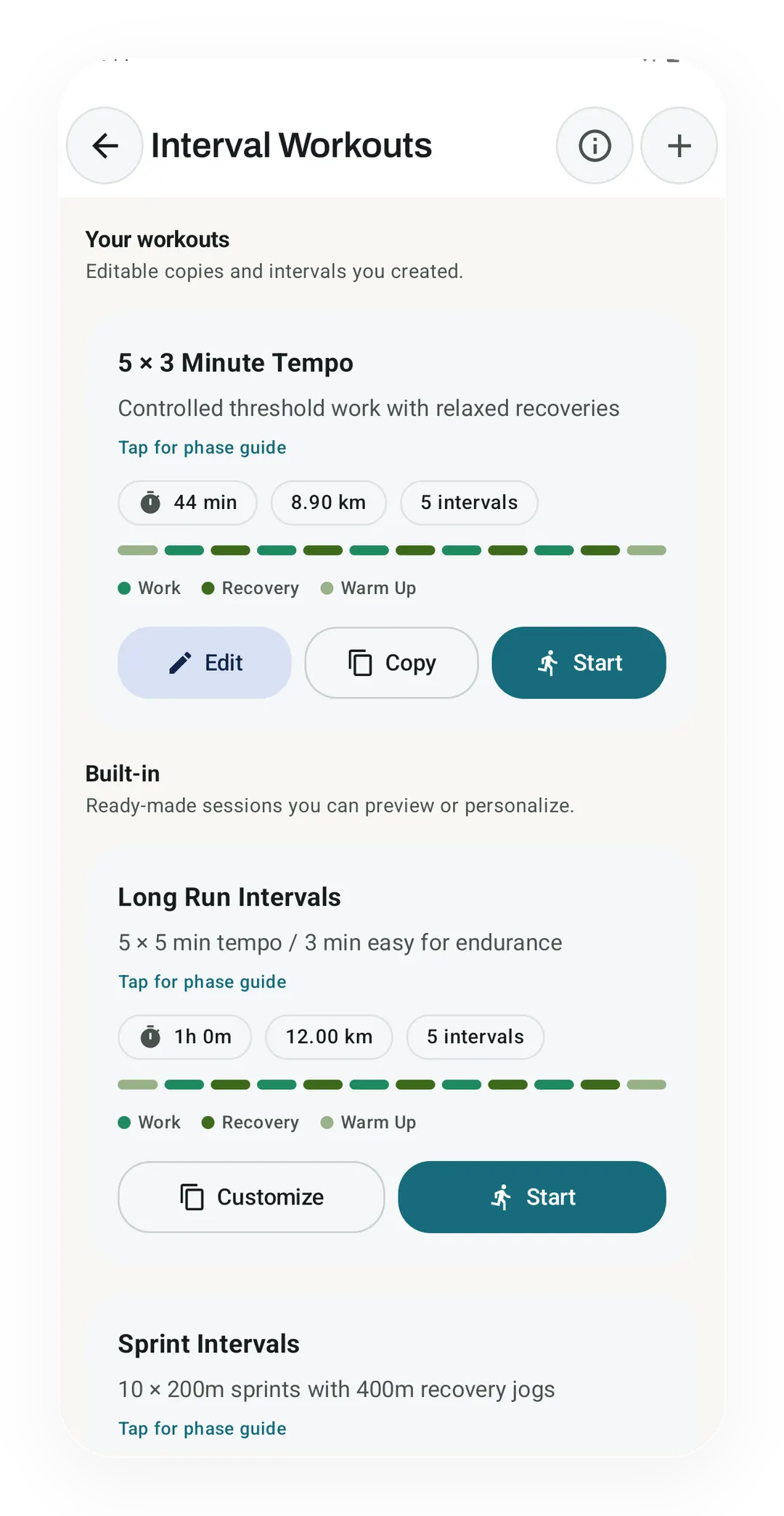
Intervals you build yourself, on the free plan
Real app capture, free tier. Your own 5 × 3 Minute Tempo, at 44 min and 8.90 km, sits above Kinoku's built-in plans with Edit, Copy and Start. Runkeeper users who made custom intervals can rebuild them here, though Kinoku cannot import them.
One of the apps on this page
Kinoku is free to install
Core tracking works offline, with no account. An export from the app you use today can come along.
Android only for now, with an iPhone version in the works. Some depth is paid, and the pricing page says which parts.
Related features
Live pace, splits, a route map, and audio cues. Your run record is not uploaded to Kinoku; map tiles load when you view maps, and weather is a clear opt-in.
Build custom interval workouts step by step: warm-up, work, recovery, and repeats. Or copy a built-in one and tune it.
Tracks the life of your running shoes, with wear-out targets and data that survives a new phone.
A real watch app for workouts, runs, steps, tiles, and watch face data.
Bring your Strava history with no login token. Choose the Strava archive ZIP once; Kinoku reads activities.csv and supported route files from it on your phone. Kinoku never touches Strava's servers.