

Which workout tracker syncs with Health Connect? (2026)
Ten workout trackers compared from their own pages: what each one reads from and writes to Android Health Connect, what is free, and what needs an account.
Kinoku syncs finished workouts to Health Connect on its free plan with no account; Alpha Progression, Liftosaur, Strava and StrengthLog also read and write it with a free version, and StrongLifts sends workouts on a subscription.
At a glance
| App | Best for | Better at | Main trade-off |
|---|---|---|---|
| Kinoku | Syncing workouts with Health Connect for free, with no account, for lifters and runners | Writes finished workouts and steps, and reads sleep, heart, body data and watch runs, all free | Android only for now, and it writes workouts and steps but not body measurements |
| Alpha Progression | Lifters who want built plans that share weight, body fat and workouts, with no account | Names the four kinds of data it shares, and says no account is required | Building a plan needs a connection, and the tier of the sync is not stated |
| Liftosaur | Lifters who want workouts sent out and sleep, weight and food data read back | The most detailed page here on what goes each way | Needs Android 14 or newer, and reads 30 days of sleep and food on Android |
| Strava | Runners and riders who want GPS activities sent to Health Connect | Sends time, distance and calories from GPS activities, and reads weight | Its page names GPS activities only, and an account is required |
| StrengthLog | Lifters who want a free log that lists Health Connect sharing as a free feature | Its listing puts Health Connect sharing under Free Features | Watch heart rate shows during a workout but is not saved in the app |
| Samsung Health | People in Samsung's apps who want steps, exercise, heart rate and sleep shared | Syncs four kinds of activity data in both directions | A Samsung account is required, and some content is paid |
| StrongLifts | StrongLifts users who want each workout's name, length and calories sent to Health Connect | Names what other apps see: the workout name, its length and calories burned | Its listing says it needs a subscription to use |
| Hevy | Lifters who want a free social log that lists Health Connect as an integration | Runs on iOS, Android, Apple Watch and Wear OS | Its readable pages do not say which data syncs, or in which direction |
| Strong | Lifters already on Strong who want Health Connect turned on | Its privacy policy says data it receives stays on the phone | An account comes first, and the data types are not named |
| ASICS Runkeeper | Runners who want other apps' activities pulled into one run log | Pulls the past 30 days of activities from Health Connect | It reads only, so Runkeeper data does not go to Health Connect |
Publisher disclosure
Kinoku, made by Dreamsoft Works, writes and publishes this page, and Kinoku is one of the apps on it. Every fact about another app is quoted from a page that app's maker publishes, opened on October 21, 2026. We give no score. Where the list is ordered, the caption names the measure, and every label points at a quoted sentence.
Quickstart
Ten workout trackers sync with Android Health Connect by their own pages, and Kinoku writes your finished workouts there on its free plan with no account. Alpha Progression, Liftosaur, Strava and StrengthLog also read and write it with a free version. The order follows that measure, named in the table caption, with no score.
Which workout trackers read and write Health Connect?
Health Connect is Android’s shared store for health and fitness data. Google’s listing says it keeps the data “from your apps in one place, offline and on your device”, and you choose which apps can reach each kind of data. An app can read from it, write to it, or do both, and the pages below say which.
- Writes workouts for free, with no account. Kinoku sends each finished workout to Health Connect on its free plan, and there is no account to make.
- Both ways, and free to use by their own pages. Alpha Progression, Liftosaur, Strava and StrengthLog name data going in each direction and a free version.
- Syncs, with paid content or a subscription. Samsung Health syncs steps, exercise, heart rate and sleep in both directions, and its listing says some content needs an optional paid subscription. StrongLifts sends each workout’s name, length and calories, and its listing says the app needs a subscription.
- Named, with no detail we could read. Strong’s privacy policy says “read and/or write” without naming the data, and Hevy lists Health Connect as one of its integrations.
- One direction. ASICS Runkeeper (a run tracker from the sports brand ASICS) reads activities from Health Connect, and its help page says Runkeeper data cannot go the other way.
Writing out puts your gym sessions next to your steps and sleep in every other health app on the phone. Reading in saves typing your weight twice, and for a log like Kinoku’s it brings a run your watch recorded into the same history as your sets. Google keeps a “Works with Health Connect” collection on Google Play, which is where we found Alpha Progression.
Side by side
We filled each cell from a sentence the app’s maker publishes, and “Not stated” marks a point no page we could open covers.
| App | Reads from Health Connect | Writes to Health Connect | Free to use, by its own page | Account |
|---|---|---|---|---|
| Kinoku | Steps, sleep, weight, body fat, heart readings, workouts from other apps | Finished workouts, steps | Yes; period import is the one Pro part | None |
| Alpha Progression | Activity energy, weight, body fat, exercise (one list for both ways) | The same list | Yes, a “Forever free version” | “No account required” |
| Liftosaur | Bodyweight, body fat, sleep, calories, protein | Finished workouts with active calories, bodyweight, body fat | Yes; its Premium page leaves health sync off the paid list | Not stated |
| Strava | Weight | Time, distance and calories from GPS activities | A free version and a paid one | Required |
| StrengthLog | Bodyweight; Wear OS heart rate during a workout | Your logged data, listed under Free Features | Yes | Not stated |
| Samsung Health | Steps, exercise, heart rate, sleep | The same list | Some content is in an optional paid plan | Samsung account |
| StrongLifts | Body weight, which its page says comes through Google Fit | Workout name, length and calories burned | No, “requires a subscription to use” | Not stated |
| Hevy | Not stated | Not stated | Yes, “a free workout tracker” | Not stated on these pages |
| Strong | “read and/or write”, data not named | The same | Free accounts, 3 free templates | Required |
| ASICS Runkeeper | The past 30 days of activities | No, by its own help page | Not stated in a sentence | Not stated |
Each app, in its own words
Kinoku
Best for: Syncing workouts with Health Connect for free, with no account, for lifters and runners.
Kinoku is a free Android tracker for lifts, runs and steps that keeps its whole record on the phone. Every read and write below is free, and the workout write is a switch you turn on.
- What it does well. It reads steps, sleep, weight, body fat, resting heart rate and heart rate variability, plus blood pressure, blood sugar and hydration when you track them. It also brings in the runs, walks, rides, hikes and swims another app saved to Health Connect, so a watch run lands in the same history as your sets.
- What it writes back. Each finished workout goes out as an exercise session with its title, activity type, start and end time, and the steps its own step tracker counted go out too. Your sets, reps, weights and effort ratings stay in Kinoku.
- Where it is the better pick. You train with a watch from another brand and want those sessions, your sleep and your gym log in one place, with no account.
- What Kinoku does not do: It writes no weight, body fat or sleep, which it only reads. Its iPhone app is still to come, and there is no sync between two phones. Reading period entries into its cycle history is the one Pro part.
Alpha Progression
Best for: Lifters who want built plans that share weight, body fat and workouts, with no account.
Alpha Progression is a lifting app that builds training plans, and it sits in Google’s own “Works with Health Connect” collection.
- What it does well. Its homepage lists “Cross-device sync Apple Health & Health Connect” next to “No account required” and a “Forever free version”.
- What its pages say about Health Connect. The privacy policy names four kinds of data it accesses or shares with your consent: activity energy, weight, body fat percentage and exercise. Data it receives is “directly displayed to you in the app in lists and charts.”
- Where it is the better pick. Lifters who want a plan built for them, with their body data in the same charts.
- Where it differs. Its blog says “Generating a plan or standalone workout requires an internet connection,” and its pages do not say whether the sync sits in the free version or in Pro.
Liftosaur
Best for: Lifters who want workouts sent out and sleep, weight and food data read back.
Liftosaur is a workout planner, and its health sync page is the most detailed one we found.
- What it does well. Its page says it can “Send finished workouts and body measurements to Apple Health or Health Connect, and read bodyweight, body fat, sleep, calories and protein back into the app.” Workouts go out “with start time, end time and active calories.”
- What its pages say about limits. It “connects to Apple Health on iOS 15 and newer, and to Health Connect on Android 14 and newer.” For sleep, calories and protein, the page says that on Android “it reads the last 30, because Health Connect does not return older records,” and “The web app has no health sync.”
- Where it is the better pick. Lifters on a recent phone who want their food and sleep numbers inside the planner.
- Where it differs. Its Premium page lists what Premium turns on, health sync is not on that list, and it says “Everything else is free”. The bodyweight and sleep graphs are part of Premium.
Strava
Best for: Runners and riders who want GPS activities sent to Health Connect.
Strava is a social tracker for runs, rides and other GPS sports.
- What it does well. Its support page says “Strava syncs with Health Connect to send time, distance, and calorie data from GPS-based activities and to receive weight data.”
- What its pages say about limits. The listing says “Strava includes both a free version and a subscription version with premium features.” The terms say “To use the Services, you must sign up and create an account.”
- Where it is the better pick. Outdoor athletes who want their GPS sessions to count in every other health app.
- Where it differs. The support page names GPS-based activities, so this page does not claim that a gym session with no route goes out.
StrengthLog
Best for: Lifters who want a free log that lists Health Connect sharing as a free feature.
StrengthLog is a strength training log with a free core and a premium layer.
- What it does well. Its listing puts “Share your data with Health Connect” under Free Features, beside “Log unlimited workouts.” It also says “We give you 100% gains and 0% ads”.
- What its pages say about Health Connect. It can read your bodyweight, and it can “read your heart rate data from Health Connect when using a Wear OS device.” Its help page says that from version 6.8 the old Google Fit option “is replaced with Health Connect instead.”
- Where it is the better pick. Lifters who want Health Connect sharing on a free plan, in the maker’s own words.
- Where it differs. Watch heart rate “won’t be saved in our app; it will only be saved in Health Connect.” A premium subscription adds “more advanced statistics” and “our full library of training programs”.
Samsung Health
Best for: People in Samsung’s apps who want steps, exercise, heart rate and sleep shared.
Samsung Health is Samsung’s own health and fitness app.
- What it does well. Samsung’s developer FAQ says “Activity data, such as steps and exercise, heart rate, and sleep, are synchronized between Samsung Health and Health Connect.”
- What its pages say about limits. Samsung’s support page says “With the Samsung Health app version 6.15 and later, you must sign into your Samsung account to use Samsung Health.” The listing adds “Some contents are only available through an optional paid subscription.” and “Tablets and some mobile devices are not supported”.
- Where it is the better pick. People already signed in to Samsung who want those readings to reach other apps.
- Where it differs. A Samsung account comes before anything else.
StrongLifts
Best for: StrongLifts users who want each workout’s name, length and calories sent to Health Connect.
StrongLifts is a weight lifting log for people who follow its program.
- What it does well. Its help page says “Stronglifts can sync your workouts, workout duration, calories burned, and body weight with Health Connect when using an Android device.” You turn it on by granting permission to send your workouts there.
- What its pages say about Health Connect. “Stronglifts will export the name of your workouts, workout duration, and calories burned.” For body weight, the same page says “Stronglifts will pull your body weight from Google Fit so you don’t need to enter it manually.”
- Where it is the better pick. Lifters who already log in StrongLifts and want each session counted in their other health apps.
- Where it differs. Its listing says “StrongLifts is free to download, but requires a subscription to use.”
Hevy
Best for: Lifters who want a free social log that lists Health Connect as an integration.
Hevy is a social gym tracker built around a feed of friends’ workouts.
- What it does well. Hevy calls itself “a free workout tracker for iOS and Android” on its homepage, and its own roundup page lists it as “Available On iOS Android Apple Watch WearOS”.
- What its pages say about Health Connect. The same roundup page lists “Integrations Strava Apple Health Health Connect ChatGPT”. Hevy’s help articles on Health Connect refused our automated reads, so this page does not say which data moves or in which direction.
- Where it is the better pick. Lifters who want a social log on any phone and watch.
- Where it differs. For this question, the gap is detail: the pages we could read name Health Connect and stop there.
Strong
Best for: Lifters already on Strong who want Health Connect turned on.
Strong is a widely used workout logger with apps for iPhone and Android.
- What it does well. Its homepage says “Strong Accounts are Free Forever”, and its privacy policy says data it receives “is stored locally on your device and is not uploaded to Strong servers.”
- What its pages say about Health Connect. “If you enable Health Connect integration, you will be able to read and/or write health and fitness information from Health Connect according to the permissions you provide.” Its help page says “Strong 6.0 for Android supports Health Connect, and is currently available in public beta.”
- Where it is the better pick. Lifters who already log in Strong and want its sessions beside their other health data.
- Where it differs. Its help centre says every user is asked to make an account before the app opens, and the free version allows three workout templates.
ASICS Runkeeper
Best for: Runners who want other apps’ activities pulled into one run log.
ASICS Runkeeper is a run tracker from ASICS.
- What it does well. Its help page says “Enabling this connection will automatically sync the past 30 days of activities from Health Connect to Runkeeper.”
- What its pages say about limits. “At this time, it is not possible to sync your Runkeeper data to Health Connect, you will only be able to sync data from Health Connect to Runkeeper.”
- Where it is the better pick. Runners who record on a watch and want the runs in Runkeeper’s history.
- Where it differs. Its listing carries the “Contains ads” and “In-app purchases” labels.
How this list was checked
We built this list from the makers’ own pages and nothing else.
- First-party citations. We first read each help page, privacy policy, homepage and Play listing quoted here on October 4, 2026, and a script matched every quote against the page’s own text again on October 21, 2026, when StrongLifts joined the list.
- What we left out. Fitbod’s pages refused our automated reads, and JEFIT (a lifting app), FitNotes and Boostcamp say nothing about Health Connect on a page we could open, so none of them is on the list.
- Nobody paid to be here. No app bought a place on this page. The order follows what each app’s own pages say, and ties stay alphabetical.
Frequently asked questions
Which workout tracker syncs with Health Connect?
All ten apps here name Health Connect on their own pages. Kinoku writes finished workouts there on its free plan with no account. Alpha Progression, Liftosaur, Strava and StrengthLog also read and write it with a free version, Samsung Health syncs both ways, and StrongLifts sends workouts on a subscription. Strong and Hevy name it without listing the data, and ASICS Runkeeper only reads.
What is Health Connect?
It is Android’s own store for health and fitness data. Google’s listing says it keeps the data from your apps in one place, offline and on your device. Google’s help page adds that you choose which apps can reach your data and which kinds of data each app gets.
Does Hevy work with Health Connect?
Hevy’s own roundup page lists Health Connect among its integrations, beside Strava, Apple Health and ChatGPT. Its help articles on the topic refused our automated reads, so this page does not say which data Hevy sends or receives.
Does Strong sync with Health Connect?
Yes, by its privacy policy, which says you can read and write health and fitness data from Health Connect within the permissions you give. It also says data Strong receives stays on your device and is not uploaded to Strong’s servers. The policy does not name the data types, and its help page still calls the Android version a public beta.
Does StrongLifts sync with Health Connect?
Yes, its help page says it can sync your workouts, workout duration, calories burned and body weight with Health Connect on Android. Other apps see the workout name, its length and the calories, and the same page describes body weight coming in through Google Fit. StrongLifts’ listing says the app is free to download but needs a subscription to use.
Can a gym app pull in the workouts my watch recorded?
Some can, once the watch’s own app saves them to Health Connect. Kinoku brings in the runs, walks, rides, hikes and swims of the last seven days. ASICS Runkeeper’s help page says it syncs the past 30 days of activities, and Samsung’s developer FAQ says exercise data syncs between Samsung Health and Health Connect.
Which apps send my strength workouts to Health Connect?
Liftosaur writes finished workouts with start time, end time and active calories, and Kinoku writes each finished workout as an exercise session. Alpha Progression lists exercise among the data it shares, and StrengthLog’s listing names sharing your data with Health Connect as a free feature. StrongLifts sends each workout’s name, length and calories. In Kinoku the sets, reps and weights stay in the app.
Is my data in the cloud when apps share it through Health Connect?
Health Connect keeps the data on your phone, by Google’s own help page. What happens next depends on each app. Strong says data it receives is not uploaded to its servers, Strava and Samsung Health need an account by their own pages, and Kinoku has no account or server for the data to reach.
Does Strava send workouts to Health Connect?
Its support page says it sends time, distance and calories from GPS-based activities and reads your weight. A gym session with no GPS route is not named there, so this page does not claim Strava sends one. Strava’s terms say you need an account to use it.
Which Health Connect apps work without an account?
Alpha Progression’s homepage says no account is required, and Kinoku has no sign-up screen at all. Strong says every user is prompted to sign up first, Strava’s terms require an account, and Samsung Health needs a Samsung account from version 6.15 on. The other pages here do not say either way.
Does Samsung Health share data with other apps?
Yes, through Health Connect. Samsung’s developer FAQ says steps, exercise, heart rate and sleep are synchronized between Samsung Health and Health Connect, where any app you allow can read them. Samsung Health needs a Samsung account, and some of its content sits in an optional paid plan.
What does Kinoku not do with Health Connect?
Kinoku writes finished workouts and steps, but not your weight, body fat or sleep, which it only reads. Reading period entries into its cycle history is the one Pro part, and Kinoku never writes those back. It is Android only for now, and two phones do not sync with each other.
Related pages
- Health Connect in Kinoku: Every reading Kinoku takes and the two records it writes back.
- Best Google Fit alternatives: Step counters and workout apps for people leaving Google Fit.
- Best apps for lifting and running in one app: Apps that keep gym sets and GPS runs in one history.
- Best Strava alternatives: Run trackers compared by what they keep free.
- Best workout apps without an account: Which gym apps log a set before any sign-up.
- Best privacy-focused fitness apps for Android: What eleven apps declare they collect on Google Play.
- Kinoku vs Strong: Offline tracking next to a cloud logger.
- Kinoku vs Alpha Progression: A free log next to a plan builder.
- Best Samsung Health alternatives: Which apps can read what Samsung Health writes to Health Connect, quoted from Samsung’s developer page.
- Workout apps that track your menstrual cycle: Which training apps track your cycle too, and which ones read period entries from Health Connect.
- Best Runkeeper alternatives: Why Health Connect cannot carry a Runkeeper history, and what can.
Which one fits you
- Choose Kinoku if you want your workouts synced with Health Connect for free and with no account, and your watch runs, sleep and heart readings in the same log.
- Choose Alpha Progression if you want a lifting plan built for you, no account, and your weight and body fat in the same charts.
- Choose Liftosaur if your phone runs Android 14 or newer and you want sleep, calories and protein read into your lifting app.
- Choose Strava if you mostly run or ride outdoors and want those GPS activities to reach every other health app.
- Choose StrengthLog if you want a strength log whose own listing names Health Connect sharing as a free feature.
- Choose Samsung Health if you already use a Samsung account and want steps, exercise, heart rate and sleep shared with other apps.
- Choose StrongLifts if you already train with StrongLifts, a subscription is fine, and you want each session counted in your other health apps.
- Choose Hevy if you want a social gym log on any phone and watch, and the details of its Health Connect link matter less to you.
- Choose Strong if you already log in Strong and want its Health Connect link, and an account is fine.
- Choose ASICS Runkeeper if you record runs elsewhere and want the last month of them pulled into Runkeeper.
How this page is checked. Every fact about another app on this page comes from a page that app publishes, which we could open and quote on October 21, 2026. The sources, with the exact sentence each fact rests on, are listed just above. Every Kinoku fact is tied to the shipping app's code. The page carries no score; the caption above names the measure the list is ordered by. If a fact here has gone stale, the support page is the fastest way to tell us.
Kinoku in practice
Where this shows up in the app
 Open full-size image ↗
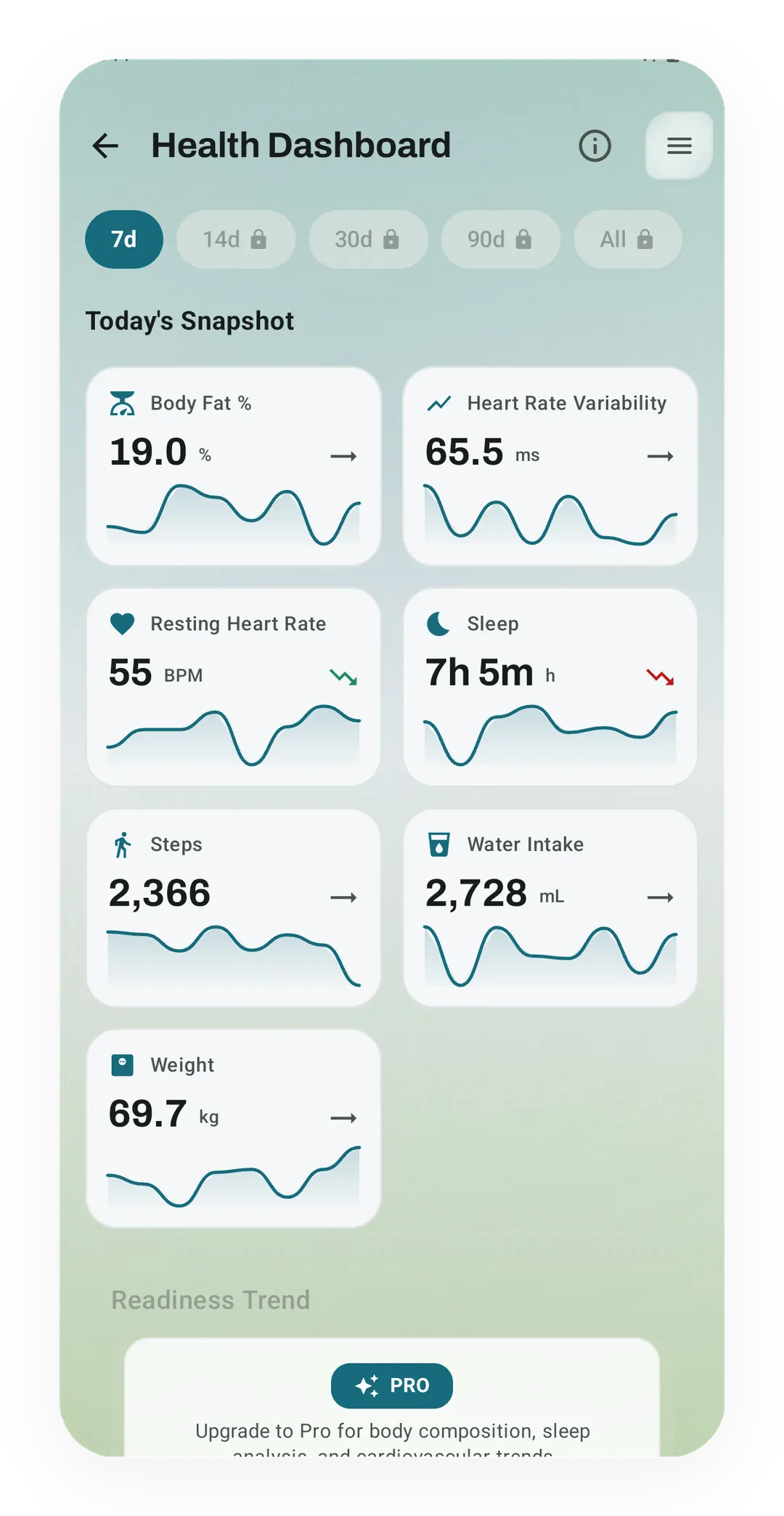
Kinoku's Health Dashboard with readings from Health Connect
On the free plan, the Health Dashboard shows 7 days of readings that Kinoku took from Health Connect, such as heart rate variability at 65.5 ms and weight at 69.7 kg.
One of the apps on this page
Kinoku is free to install
Core tracking works offline, with no account. An export from the app you use today can come along.
Android only for now, with an iPhone version in the works. Some depth is paid, and the pricing page says which parts.
Related features
Kinoku reads and writes Android Health Connect data without passing it to a cloud. Period flow import is a Pro feature and read-only. Kinoku never writes cycle data back to Health Connect.
A real watch app for workouts, runs, steps, tiles, and watch face data.
Daily steps, streaks, brisk minutes, and an hour-by-hour view of how you moved.