

Best privacy-focused fitness apps for Android (2026)
What 11 Android fitness apps collect, by their own Google Play labels: three declare none, Kinoku lists two items and no personal info, the rest list 5 to 12.
FitNotes, FitoTrack and OpenTracks declare no data collected, and Kinoku's label lists only two items, a location and a device ID, both marked optional and with no personal info; Kinoku is the one app in that group that logs gym workouts and GPS runs together.
At a glance
| App | Best for | Better at | Main trade-off |
|---|---|---|---|
| Kinoku | People who lift and run and want one log with no account and no personal info on the label | Gym sets, GPS runs and steps in one log, a free Wear OS app, and a label with no personal info | Its label lists two optional items, a precise location and a device ID, and its code is not public |
| FitNotes | Lifters who want a plain gym log whose label declares no data collected | A label with no data collected, and no account to register | Its pages describe a gym log only, and it runs on Android only |
| FitoTrack | Runners, riders and hikers who want open code and a label that declares no data collected | No data collected, no ads or tracking, and code open under the GPLv3 | Its pages describe GPS activities, not gym sets |
| OpenTracks | Runners and riders who want a tracker with no internet access at all | No internet access, no data collected, and open code | Free on F-Droid only; the Google Play copy was a paid download |
| Strong | Lifters who want workouts synced between devices through a Strong account | Workouts synced between devices, with no ads | An account comes first, and the label lists five data types, personal info among them |
| Fitbod | Lifters who want an app to plan each session for them | Sessions planned from your goals and equipment, and a Wear OS tile | Its label lists financial info as shared with third parties |
| Hevy | Lifters who want to follow friends and see their workouts | Following other athletes, with likes and comments on workouts | Sign-up comes first, and the label lists six data types, personal info among them |
| JEFIT | Lifters who want a ready-made plan from a large library | Thousands of plans designed by experts | Sign-up comes first, and the label lists seven data types, location among them |
| Google Fit | Android users who want Heart Points and step goals from Google, with a Google account | Daily Heart Points and step goals from the maker of Android | A Google account is needed, and the label lists eight data types |
| Strava | Runners and riders who want segments, a feed and friends | Segments with leaderboards, and a feed of other people's efforts | An account is required, and the label lists two data types as shared with third parties |
| Nike Run Club | Runners who want Nike's guided runs and training plans | Guided runs, training plans, and run tracking with heart rate | It is built for Nike Members, and the label lists twelve data types |
Publisher disclosure
Kinoku, made by Dreamsoft Works, writes and publishes this page, and Kinoku is one of the apps on it. Every label is quoted from the app's own Google Play listing, read on October 4, 2026; other facts come from a page the app publishes or from our own emulator tests. We give no score. Where the list is ordered, the caption names the measure, and every label points at a quoted sentence.
Quickstart
FitNotes, FitoTrack and OpenTracks declare on Google Play that they collect no data, and Kinoku’s label lists only two items, a precise location and a device ID, both marked optional, with no personal info. The other seven apps all list personal info. The list is grouped by that line, and every label comes from the app’s own Play listing, read on October 4, 2026, with Kinoku’s own label read again on October 21, 2026.
Which fitness apps collect the least data?
The apps that collect the least are the three whose Google Play labels declare no data at all, and then Kinoku, whose label lists two items and no personal info. Every label on this page is the developer’s own declaration, made in the data safety section that Google shows on each listing [12].
- No data collected, by their own labels: FitNotes [1], FitoTrack [2] and OpenTracks [3] declare that they collect no data and share none.
- Two items and no personal info: Kinoku’s label lists location and device or other IDs, and no data shared [4]. The section under the table says what each item is and when it leaves the phone.
- Personal info and more: Strong lists five data types [5], and Fitbod [6] and Hevy [7] list six each. JEFIT (a gym app built around plans) lists seven [8], Google Fit eight [9], Strava nine [10] and Nike Run Club twelve [11]. Personal info is among the first two items on each of these labels.
Side by side
Each cell rests on the app’s own label, a page it publishes or one of our emulator tests, and the bracketed number names the source. Kinoku’s cells beyond its label come from its own code, and “Not stated” marks a point that no page we could open covers.
| App | What its Play label says it may collect | Shared with third parties, by the label | Account | What it logs |
|---|---|---|---|---|
| Kinoku | Almost nothing*: Location and Device or other IDs [4] (why) | None [4] | None | Gym sets, GPS runs, steps and swims |
| FitNotes | No data collected [1] | None [1] | Not required [16] | Gym workouts [19] |
| FitoTrack | No data collected [2] | None [2] | None mentioned | Runs, rides and hikes [20] |
| OpenTracks | No data collected [3] | None [3] | None mentioned; no internet access [22] | Runs, walks and rides [23] |
| Strong | Personal info, Health and fitness and 3 others [5] | None [5] | Required [25] | Gym workouts, synced between devices [26] |
| Fitbod | Personal info, Financial info and 4 others [6] | Financial info [6] | Not stated on a page we could open | Planned gym and home workouts [28] |
| Hevy | Personal info, Photos and videos and 4 others [7] | None [7] | Sign-up first, in our test [32] | Gym workouts, with a social feed [31] |
| JEFIT | Location, Personal info and 5 others [8] | None [8] | Sign-up first, in our test [34] | Gym workouts from ready-made plans [33] |
| Google Fit | Location, Personal info and 6 others [9] | None [9] | A Google account [35] | Steps and Heart Points [36] |
| Strava | Location, Personal info and 7 others [10] | App info and performance, and Device or other IDs [10] | Required [37] | GPS activities, with segments [38] |
| Nike Run Club | Location, Personal info and 10 others [11] | None [11] | Built for Nike Members [40] | Runs, with heart rate [42] |
*In plain words, almost nothing: no account, no personal info and none of your workouts. The next section explains the two items on the label.
Why Kinoku’s label lists two items
Kinoku’s label lists location and a device ID because Google counts anything an app sends off the phone, even when you have to turn it on first. Google’s help for developers says collection means transmitting data from your app off a user’s device [13], and that this includes data sent by the code libraries built into the app, whoever receives it [14]. Kinoku keeps no account and no Kinoku server copy of your training log. Its label marks both items optional, a word Google’s help uses for data you can use the app without [47], and names them for these reasons:
- Location, marked precise: When you turn on weather for runs, which is off at first, Kinoku sends the run’s start point, rounded to about 1.1 km, to Open-Meteo, a weather service, so it can show the conditions. Google calls any place pinned to less than 3 square kilometers a precise location [46]. A square about 1.1 km wide is smaller than that, so the label says precise. If you opt in to analytics, Kinoku’s privacy policy says the report also carries a rough location based on your IP address (the network address of your connection).
- Device or other IDs: Firebase, Google’s toolkit for apps, gives each install of Kinoku an ID (identifier). That ID travels with the analytics and crash reports you opt in to, and with the check for gifted Pro access, which runs on Firebase at most twice a day, as the data sovereignty page describes.
- What the label does not list: your workouts and runs, health and fitness data, your name or your email. Kinoku never asks for an account, so it has none of those to send.
Kinoku also reaches the network for map tiles while a map is open and for Google Play billing. Google’s rules do not count data sent to a service provider working for the developer as sharing [15], which is why “no data shared” and a short list of collected items can both be true.
Each app, in its own words
Kinoku
Best for: People who lift and run and want one log with no account and no personal info on the label.
Kinoku is a training app for Android that keeps gym sets, GPS runs and daily steps in one history, with no account behind any of it.
- What it does well: Gym sets, GPS runs with pace and splits, daily steps and pool swims share one log, and one fitness curve scores the lifts and the runs together. The Wear OS app is free, and core tracking works with no signal.
- What its label says: Location and device or other IDs, with no data shared [4]. The section under the table explains when each one leaves the phone.
- Where it is the better pick: Someone who lifts and runs and wants both in one private log, which none of the three apps that collect nothing covers on its own.
- What Kinoku does not do: Its code is not public, so its privacy rests on its label, its privacy policy and pages like this one, not on code anyone can read. It runs on Android and Wear OS only for now and has no sync between two phones, and Android’s built-in backup can copy eligible app data to your Google account. The Pro Analytics hub and the Run Analytics dashboard past its overview tab are part of Pro. Listing: Google Play.
FitNotes
Best for: Lifters who want a plain gym log whose label declares no data collected.
FitNotes is a gym log for Android only, which its homepage sums up as clean, simple and powerful [19].
- What it does well: Its label declares no data collected and none shared [1]. Its privacy policy says you are not required to register an account [16], and that the workout data you record is stored locally on your mobile device [17].
- Where it is the better pick: A lifter with no runs to track who wants the plainest log, with nothing at all on its label.
- Where FitNotes differs: Its pages describe a gym log only, so runs and steps would need another app. When you enable it, an automatic backup saves your data to your Google Drive account after each workout [18]. Official listing: Google Play. Versus page: Kinoku vs FitNotes.
FitoTrack
Best for: Runners, riders and hikers who want open code and a label that declares no data collected.
FitoTrack is an open-source tracker for runs, rides and hikes, and its listing says it shows the most important information with detailed charts and statistics [20].
- What it does well: Its label declares no data collected and none shared [2]. Its listing says there is neither advertising nor tracking, and that its code is open under the GPLv3 (a free software license) [21].
- Where it is the better pick: A runner who also rides or hikes and wants code that anyone can read.
- Where FitoTrack differs: Its pages describe GPS activities and not gym sets. The listing never mentions an account, so we read that part from its label and not from a sentence of its own. Official listing: Google Play.
OpenTracks
Best for: Runners and riders who want a tracker with no internet access at all.
OpenTracks is an open-source sport tracker for runs, walks and rides, and its F-Droid page says it records as you go running or walking [23].
- What it does well: Its label declares no data collected and none shared [3], and its F-Droid page lists no internet access and no extra permissions [22]. F-Droid is an app store for open-source apps.
- Where it is the better pick: A runner or rider who wants a tracker that cannot reach the internet at all.
- Where OpenTracks differs: It costs nothing on F-Droid, while its code page files the Google Play copy under donations [24]. On September 26, 2026, when we last looked, the Google Play listing was a paid download, and we print no price. Its pages describe no gym logging. Official listing: F-Droid.
Strong
Best for: Lifters who want workouts synced between devices through a Strong account.
Strong is a gym log built around a Strong account, and by its help centre, Strong Cloud syncs your workouts between devices [26].
- What it does well: The sync means a workout logged on one device shows up on the other, and the help centre promises no ads, ever [27].
- What its label says: Personal info, health and fitness, and three more data types, with no data shared [5].
- Where it is the better pick: A lifter who logs on a phone and a second device and wants both to match.
- Where Strong differs: Its help centre says all users are asked to sign up for an account before using Strong [25]. Official listing: Google Play. Versus page: Kinoku vs Strong.
Fitbod
Best for: Lifters who want an app to plan each session for them.
Fitbod is a workout planner, and its listing says it uses AI, short for artificial intelligence, to build each session for your fitness level, goals and equipment [28].
- What it does well: The planner picks the exercises, and the listing describes a Wear OS tile for quick access to your workout [29].
- What its label says: Personal info, financial info and four more data types, with financial info shared with third parties [6]. The summary does not say which financial items these are.
- Where it is the better pick: A lifter who would rather follow a plan the app writes than build one.
- Where Fitbod differs: Its listing does not say whether an account is required, so the table reads “Not stated”. Official listing: Google Play.
Hevy
Best for: Lifters who want to follow friends and see their workouts.
Hevy describes itself as a free workout tracker for iOS and Android [30], with a social side built in.
- What it does well: You can follow other athletes and like and comment on their workouts [31].
- What its label says: Personal info, photos and videos, and four more data types, with no data shared [7].
- Where it is the better pick: A lifter whose friends train on Hevy and who wants to see their sessions.
- Where Hevy differs: In our emulator test on September 6, 2026, the first screen offered sign-up with Google or email, or log in, and we found no way to skip it [32]. Official listing: Google Play. Versus page: Kinoku vs Hevy.
JEFIT
Best for: Lifters who want a ready-made plan from a large library.
JEFIT is a gym app built around plans, and its homepage offers thousands of plans designed by experts [33].
- What it does well: You pick a plan and start, without building a routine first.
- What its label says: Location, personal info and five more data types, with no data shared [8].
- Where it is the better pick: A lifter who wants a plan someone else wrote.
- Where JEFIT differs: In our emulator test on September 11, 2026, a sign-up screen came before the first workout, after a questionnaire and an Elite offer, and we found no way to skip it [34]. Official listing: Google Play. Versus page: Kinoku vs JEFIT.
Google Fit
Best for: Android users who want Heart Points and step goals from Google, with a Google account.
Google Fit is Google’s activity app, and its listing says you can see your daily progress on your Heart Points and steps goal [36].
- What it does well: It comes from the maker of Android, and it sets daily goals for movement and steps.
- What its label says: Location, personal info and six more data types, with no data shared [9].
- Where it is the better pick: Someone who already uses a Google account for everything and wants step and Heart Points goals without another sign-up.
- Where Google Fit differs: Google’s help says you need a mobile device and a Google account to get started [35]. Official listing: Google Play.
Strava
Best for: Runners and riders who want segments, a feed and friends.
Strava is a social app for runners and riders, and its listing invites you to race others on segments to the top of the leaderboards [38].
- What it does well: Segments and a feed of other people’s efforts make training social, and its listing says sets, reps and weights from your strength app or device show up automatically [45].
- What its label says: Location, personal info and seven more data types, with app info and performance, and device or other IDs, shared with third parties [10].
- Where it is the better pick: A runner whose club posts on Strava, or who races segments.
- Where Strava differs: Its terms say you must sign up and create an account to use the service [37], and its privacy policy says information from users outside the United States is moved there, processed and stored [39]. Official listing: Google Play. Versus page: Kinoku vs Strava.
Nike Run Club
Best for: Runners who want Nike’s guided runs and training plans.
Nike Run Club is Nike’s running app, and its listing calls it a running community for Nike Members [40].
- What it does well: It tracks running speed, GPS, elevation and heart rate [42], offers a library of guided runs [43], and has training plans [44].
- What its label says: Location, personal info and ten more data types, with no data shared [11]. That is the longest list on this page.
- Where it is the better pick: A runner who wants an audio coach in the ear and a plan from Nike.
- Where Nike Run Club differs: The listing asks you to download it to become a Nike Member [41]. Official listing: Google Play.
How this list was checked
We read each app’s data safety summary on its Google Play listing on October 4, 2026, in United States English, and quoted it. The sources list at the end holds the exact words behind each bracketed number.
- What the count means: Play’s summary names the first two data types and adds “and 4 others”, so our count is the number of items on that list. It does not say how much data an app sends, which items are optional, or why each one is collected.
- What we did not quote: The full data safety page holds that detail, but it loads in a browser by script, so this page quotes only the summary that every listing shows.
- Who wrote the labels: Each label is the developer’s own statement, and Play says the developer provided the information and may update it over time [12].
- Tests: The sign-up screens of Hevy and JEFIT come from our own emulator tests, dated in their sources. Kinoku’s cells beyond its label come from its code.
- Nobody paid for a place: The caption under the summary table names the only measure that orders the list.
Frequently asked questions
Which fitness app collects the least data?
FitNotes, FitoTrack and OpenTracks each declare on Google Play that they collect no data and share none. Kinoku comes next, with a label that lists only two items, a precise location and a device ID, both marked optional, and no personal info. Of those four, Kinoku is the one that logs gym workouts and GPS runs in the same app. The other seven apps here all list personal info.
Does Kinoku collect any data?
Kinoku’s label lists two items, a precise location and a device ID, marks both optional, which means you can use the app without them, and says it shares no data with third parties. The location item covers weather for runs, which you turn on, and analytics, which you opt in to. The device ID comes from Firebase, Google’s app toolkit. Kinoku has no account and keeps no Kinoku server copy of your training log, so in plain words that is almost nothing.
What does Device or other IDs mean on a Play label?
It means the app, or a code library inside it, sends an identifier that names the phone or the install. Google’s rules count a library’s traffic as the app’s own. In Kinoku that identifier is the one Firebase creates for each install. Kinoku never uses the advertising ID, which is the identifier ad networks use to follow you across apps.
What does no data shared with third parties mean?
It is the developer’s statement that the app passes no data to other companies. Google’s rules leave some transfers out of sharing, such as data sent to a service provider that works on the developer’s behalf. So the line is narrower than it sounds, and the list of data an app collects is the better guide to what leaves your phone.
Which of these apps need an account?
Strong’s help centre says every user is asked to sign up, and Strava’s terms say you must create an account. Hevy and JEFIT put a sign-up screen first in our tests. Google Fit needs a Google account, and Nike Run Club is built for Nike Members. FitNotes says no account is required, Kinoku has none, and FitoTrack and OpenTracks never mention one.
Are open-source fitness apps more private?
Open code lets anyone read what the app does, so a claim about data can be checked line by line. FitoTrack and OpenTracks are open source, and both declare no data collected. Kinoku’s code is not public, so its privacy rests on its label, its privacy policy and pages like this one. A closed app can still collect little, but you take more on trust.
Does an app that collects no data back up my workouts?
FitNotes can save a backup to your Google Drive account after each workout, but only when you turn that on. OpenTracks has no internet access at all. Kinoku saves a full backup file when you tap Backup & Restore, and Android’s built-in backup can copy eligible app data to your Google account. A backup you control is the trade for having no account.
Can I log lifts and runs in one app with no personal info on the label?
Of the eleven apps here, only Kinoku does both with no personal info on its label. FitNotes covers the gym, while FitoTrack and OpenTracks cover runs, rides and walks. Strava records runs and can show strength sessions from other apps and devices, but its label lists personal info and two data types shared with third parties.
Why does Strava’s label list data as shared?
Strava’s label lists app info and performance, and device or other IDs, as shared with third parties. The listing does not name the companies or say what each item is for. Its privacy policy adds that information from users outside the United States is moved there, processed and stored. Fitbod is the only other app here whose label lists shared data, which is financial info.
Do these labels ever change?
Yes. Every Play label carries the line that the developer provided the information and may update it over time. We read all eleven labels on October 4, 2026, and the date at the top of this page moves only when we read them again. If a label here no longer matches the listing, the support page is the fastest way to tell us.
Are iPhone privacy labels the same as these?
No. Apple’s App Store has its own privacy labels, with different categories and wording, so a count from one store does not carry over to the other. This page reads only Google Play labels, because Kinoku and FitNotes run on Android only and the other apps here all have Android versions with labels of their own.
What does Kinoku not do that the other ten apps do?
Kinoku’s code is not public, unlike FitoTrack and OpenTracks, and it reaches the internet for maps and billing, which OpenTracks never does. It has no iPhone app yet and no sync between two phones, unlike Strong and Hevy. It has no social feed like Strava’s and no automatic session planner like Fitbod’s. Pro adds the deeper analytics.
Is there a privacy-focused alternative to Strava?
FitoTrack and OpenTracks record runs, rides and walks, and both say on Google Play that they collect no data. OpenTracks has no internet access at all. Kinoku records GPS runs next to gym sets, and its label lists two items with no personal info. Strava’s label lists location, personal info and seven other types, and it shares two of them.
Which fitness apps list location on their Play label?
Four apps here list Location: Google Fit, JEFIT, Nike Run Club and Strava, each next to personal info. Kinoku’s label lists a precise location, marked optional, which covers the weather line you turn on and the analytics you opt in to. FitNotes, FitoTrack and OpenTracks say they collect no data, so their labels list no location, even though the last two record GPS tracks.
Related pages
- Offline-first fitness tracking: Where a training record lives, and what Kinoku gives up to keep it there.
- Best workout apps without an account: The account question, asked of gym logs, with our own tests.
- Free run tracker apps with no account for Android: The same question for runners, including FitoTrack and OpenTracks.
- Best apps for lifting and running in one app: For people who want the gym and the road in one history.
- Kinoku’s privacy policy: Every network connection Kinoku makes, and what it sends.
- Workout apps that track your menstrual cycle: Seven apps that log training and the cycle, and where each one keeps the cycle data.
Which one fits you
- Choose Kinoku if you lift and run, and you want both in one log with no account and no personal info on the label.
- Choose FitNotes if you only lift and want the plainest gym log, with a label that declares no data collected.
- Choose FitoTrack if you run, ride or hike and want open code and a label that declares no data collected.
- Choose OpenTracks if you want a tracker that has no internet access at all, and installing from F-Droid suits you.
- Choose Strong if you log on two devices and want them kept in sync through an account.
- Choose Fitbod if you want the app to plan each session from your goals and your equipment.
- Choose Hevy if your friends train on Hevy and you want to see and react to their workouts.
- Choose JEFIT if you want to start from a ready-made plan picked from a large library.
- Choose Google Fit if you already use a Google account for everything and want Heart Points and step goals.
- Choose Strava if your club posts on Strava, or you race segments against other people.
- Choose Nike Run Club if you want audio guided runs and a training plan from Nike, and a Nike membership suits you.
Test record
Tested September 11, 2026
- Environment
- Android Studio Pixel phone emulator Kinoku_Phone_Play, API 36, Android 16
- Hevy
- Version 3.1.12 (version code 3289233), installed from Google Play. Official listing
- JEFIT
- Version 17.4.4 (version code 2093), installed from Google Play. Official listing
How this page is checked. Every fact about another app on this page comes from a page that app publishes, which we could open and quote on October 21, 2026, or from a dated emulator test named in that source's note. The sources, with the exact sentence each fact rests on, are listed just above. Every Kinoku fact is tied to the shipping app's code. The page carries no score; the caption above names the measure the list is ordered by. If a fact here has gone stale, the support page is the fastest way to tell us.
Test evidence
What the tested builds showed
 Open full-size image ↗
Your data controls are visible
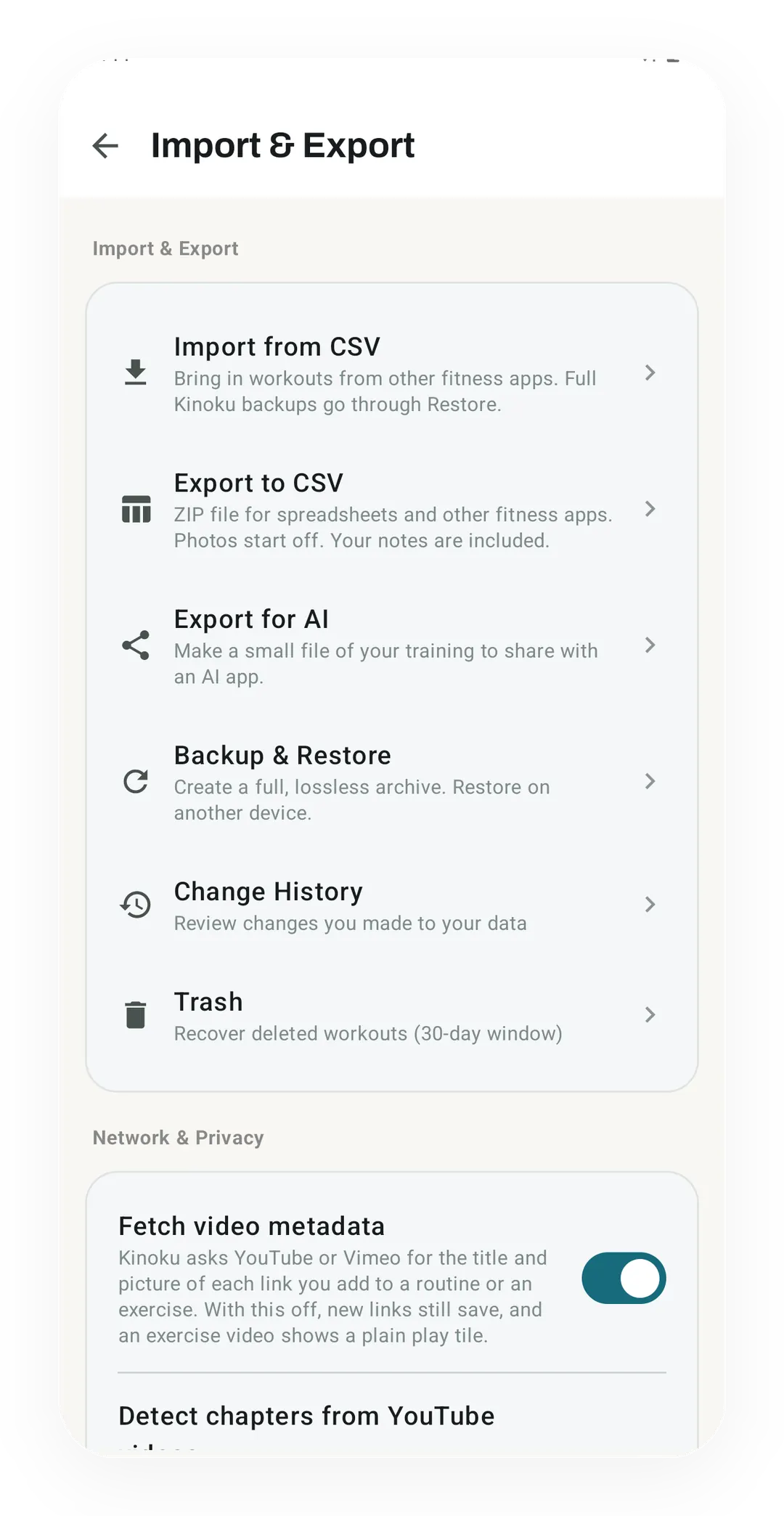
The Import & Export screen holds CSV import and export, a full Backup & Restore archive, Change History and a 30-day Trash. Each of those runs only when you tap it, and a Network & Privacy switch below decides whether Kinoku asks YouTube or Vimeo for video titles.
One of the apps on this page
Kinoku is free to install
Core tracking works offline, with no account. An export from the app you use today can come along.
Android only for now, with an iPhone version in the works. Some depth is paid, and the pricing page says which parts.
Related features
Lossless backup, open CSV and JSON import, Strava import, and a scoped Export for AI handoff.
Every set, one tap. Track how hard each set felt, your rest timers, set types, and notes.
Live pace, splits, a route map, and audio cues. Your run record is not uploaded to Kinoku; map tiles load when you view maps, and weather is a clear opt-in.