

FitNotes vs Hevy: Offline Log or Social Tracker? (2026)
FitNotes is a free, no-account Android log with plate math. Hevy adds iPhone, watch apps, and a social feed with a 4-routine free cap. Tested side by side.
FitNotes is a free, no-account log kept on one Android phone; Hevy adds iPhone, watch and web apps, exercise videos and a feed behind a sign-up; Kinoku keeps FitNotes' rule and adds Wear OS and runs.
At a glance
| App | Best for | Better at | Main trade-off |
|---|---|---|---|
| FitNotes | Android lifters who want a free log with no account and no ads, kept on the phone | No account and no paid plan, plus plate, set and one-rep max calculators in the free app | Android only, and its pages describe no watch app, feed or exercise videos |
| Hevy | Lifters on iPhone or Android who want exercise videos, a watch app and friends to follow | iPhone, Apple Watch, Wear OS and web apps, exercise videos, and a feed with likes and comments | A sign-up before the first set, and four free routines and seven free custom exercises in our test |
| Kinoku | Android lifters who want FitNotes' no-account log plus a Wear OS app, runs and programs | No account, a free Wear OS app, GPS runs, free programs, and importers for both apps' CSV files | Android only for now, with no web view, no feed and no built-in exercise videos |
Publisher disclosure
Kinoku, made by Dreamsoft Works, writes and publishes this page, and Kinoku is one of the apps on it. Every fact about FitNotes and Hevy is quoted from a page that app publishes, opened on September 26, 2026, or observed in our emulator tests of FitNotes 25.1 on September 2, 2026 and Hevy 3.1.12 on September 6, 2026. We give no score. The apps are grouped by what their own pages say, and every label points at a quoted sentence.
Quickstart
FitNotes suits an Android lifter who wants a free log that stays on the phone with no account, while Hevy suits a lifter who wants iPhone and watch apps, exercise videos and friends, and signs up for them. Kinoku is a third option that keeps the FitNotes rule on Android. We give no score, so each label rests on a quoted sentence or a dated test.
What FitNotes and Hevy each do well
FitNotes and Hevy both log sets and reps well, and their own pages describe two different ideas of what a gym log is for.
- FitNotes is a notebook that asks for nothing. Its privacy page says no account is needed to use it, and all the workout data you record “is stored locally on your mobile device”. The homepage adds that it is free to use with no ads, ever.
- FitNotes carries the tools you use at the bar. Its help pages describe a rest timer, a one-rep max calculator, a set calculator for percentage programs, and a plate calculator you set up with the plates you own.
- Hevy reaches more screens. Its homepage calls it “a free workout tracker for iOS and Android”, names Apple Watch and Wear OS watches, and links to a web version at hevy.com.
- Hevy is built for company. The same page lists “Follow Other Athletes” and “Like and Comment on Workouts”, and it lists “High Quality Exercise Videos” for learning a move.
Where does your log live?
The biggest difference between FitNotes and Hevy is where a workout goes after you save it.
- FitNotes keeps it on the phone. Logging needs no account, and the copies its pages describe are all backups: a file you make, an opt-in Google Drive copy about an hour after each workout, and, since version 25, Android’s own automatic backup when your phone has it on.
- Hevy sends it to your Hevy account. In our test of Hevy 3.1.12 on September 6, 2026, the first screen offered only sign-up or log-in. With flight mode on, Hevy kept the set, and a banner on its Home tab said “1 workout failed to upload” until we turned the network back on.
- Hevy leans toward sharing on a new account. The Save Workout sheet preselected Everyone, above the line “This workout is publicly available to all users on Hevy.” Private was one tap away on the same sheet.
What does each free plan hold?
FitNotes has no paid plan that could hold anything back, and Hevy’s free account stopped at two numbers we saw on screen.
- FitNotes. The homepage says it is free to use with no ads, ever, and its pages name no cap on routines or exercises. The one paid part is a separate FitNotes Supporter app on Google Play, which the FAQ says adds some additional exercise types, and the settings page adds units set per exercise. The site prints no price for it.
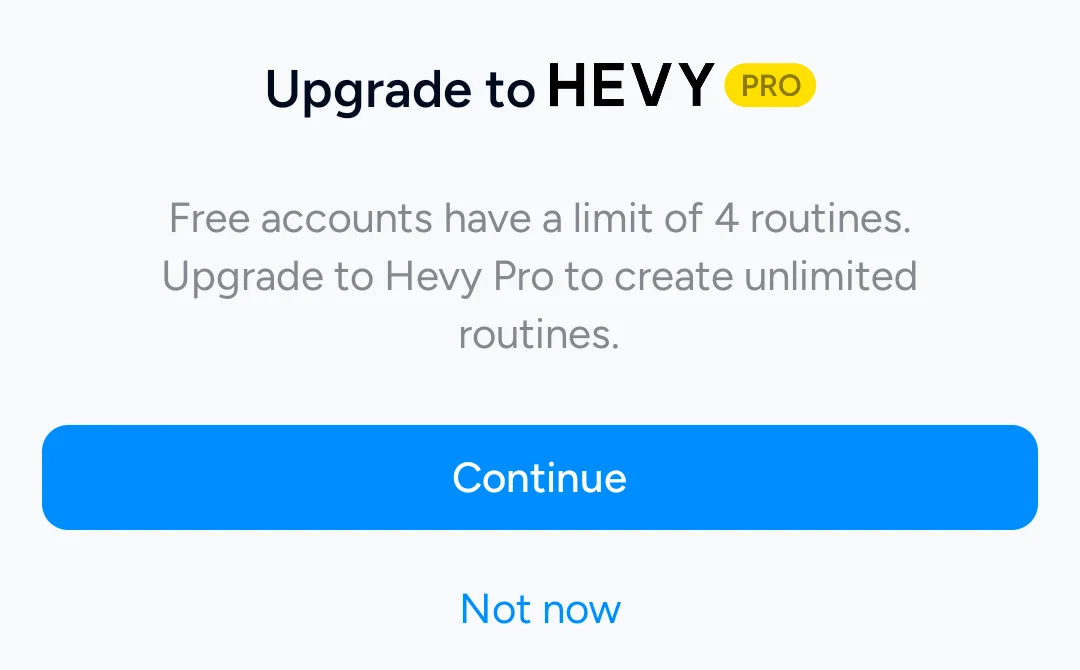
- Hevy. Our free account hit a sheet on the fifth routine that read “Free accounts have a limit of 4 routines.” A matching sheet came up on the eighth custom exercise, with a limit of 7. Hevy Pro lifts both caps.
- Kinoku. Routines, custom exercises, workouts and history have no cap on the free plan, and no plan shows ads.
Charts, tools and videos
Both apps chart your lifts, and they part ways on video and on the calculators around the bar.
The FitNotes progress page lists graphs for estimated one-rep max (1RM), max weight, workout volume, reps and rep maxes, and says “These graphs help give a visual representation of your progress across a variety of different metrics.” Hevy’s homepage lists “Advanced Exercise Charts”, “Personal Records” and “Calculate One Rep Max” without saying which of them need Pro, so this page does not either.
For form, Hevy lists “High Quality Exercise Videos”, and the FitNotes pages we opened do not mention video. Kinoku ships no demonstration videos of its own. It lets you save a YouTube link to any exercise for free and play it from a thumbnail between sets.
At the bar, FitNotes’ plate calculator shows “the plates that are required on each side of barbell” for your next set, and you can tell it which plates your gym has. Hevy’s homepage lists “Mark Warmup, Drop, and Failure Sets” and “Automatic Rest Timers”, and it names no plate calculator. Kinoku’s plate calculator is free with standard plates, while a custom plate set is part of Pro.
Moving between FitNotes and Hevy
Both apps export a CSV file, and both say the file is for other apps rather than a way back in.
- FitNotes. The settings page says “It is not possible to restore data from the CSV file - please use the Backup option for this.” In our September 2 test, FitNotes 25.1 wrote a header of Date, Exercise, Category, Weight, Weight Unit, Reps, Distance, Distance Unit and Time.
- Hevy. Its Export Data screen says the file “can not be imported back into Hevy”, and it saves your whole history as one file named workout_data.csv.
Neither app’s pages that we opened describe reading the other’s file, so this page does not claim a FitNotes import in Hevy or a Hevy import in FitNotes. Kinoku reads both. Its importer knows the FitNotes header and takes the units from their own columns, and from version 1.3.0 on it reads Hevy’s file in pounds or kilograms. Hevy writes exercise names in the app’s language [27], so an English export matches Kinoku’s English catalog best. Before it saves, a review screen lists how each exercise name was matched, and one tap in Import History takes the whole import back out.
Side by side
Each cell quotes the app’s own pages or our emulator tests, and “Not stated” marks a row that no page we opened covers.
| FitNotes | Hevy | Kinoku | |
|---|---|---|---|
| Account | None (“not required to register”) | Needed before the first set, in our test | None |
| Where the log lives | On the phone (“stored locally”) | Uploaded to your Hevy account | On the phone |
| Platforms | Android only | iOS, Android, Apple Watch, Wear OS and web | Android and Wear OS |
| Free routines | No cap stated, and no paid plan | 4, in our test | No cap |
| Free custom exercises | No cap stated | 7, in our test | No cap |
| Feed and follows | Not stated | Follow, like and comment | None |
| Exercise videos | Not stated | “High Quality Exercise Videos” | None built in; saved YouTube links |
| Plate calculator | Yes, set to your own plates | Not stated | Free with standard plates; custom plates in Pro |
| Export | CSV, not restorable, plus a backup file | CSV, not importable back into Hevy | CSV, a ZIP backup and an Export for AI file |
| Paid part | A Supporter app; no price on the site | Hevy Pro, 3.49 euros a month in our September 6 test | Pro, US $5.99 a month or US $39.99 a year |
Each app, in its own words
FitNotes
Best for: Android lifters who want a free log with no account and no ads, kept on the phone.
FitNotes is a long-running Android gym log, and its version 25 notes place the dark theme “Just 11 short years after the initial release of FitNotes”.
- What it does well. It asks for no account, keeps the log on the device, and shows no ads. Its routines can span several days, and its tools cover rest, one-rep max, percentage sets and plate loading.
- What its pages say about limits. It is Android only, and the FAQ says there aren’t any plans for an iPhone version at the moment. Its CSV cannot be restored into FitNotes, and per-exercise units come with the Supporter app.
- Where it is the better pick. A lifter who wants the smallest app with no paid plan in the picture, or who sets up plate math for a home gym’s odd plates, gets that free in FitNotes and not in Kinoku.
- Where FitNotes differs. Its pages describe no watch app, no feed and no exercise videos.
Hevy
Best for: Lifters on iPhone or Android who want exercise videos, a watch app and friends to follow.
Hevy is a social workout tracker for phones, watches and the web, and its Home tab is built as a feed.
- What it does well. Its homepage says “Build routines and track progress with friends.” It lists exercise videos, charts and records, warmup and drop set marks, and rest timers, and it names Apple Watch and Wear OS.
- What its pages say about limits. Our free account stopped at four routines and seven custom exercises, and its Export Data screen warns that the file cannot be imported back into Hevy.
- Where it is the better pick. A lifter moving to an iPhone or an Apple Watch, a lifter who learns moves from video, and a lifter who trains with friends all get more from Hevy than from FitNotes or Kinoku.
- Where Hevy differs. An account comes before the first set, and a new account shared workouts with Everyone unless you changed it.
Kinoku
Best for: Android lifters who want FitNotes’ no-account log plus a Wear OS app, runs and programs.
Kinoku is a free Android app for lifting and running that keeps the training record on the phone, as FitNotes does.
- What it does well. There is no account, and the free plan puts no cap on routines, custom exercises or history. It adds a free Wear OS app, GPS runs, a muscle map, a row, pill, or grid set table with pinned exercise notes above your sets, and a program builder with 25 templates and named plans such as 5/3/1 by Jim Wendler. Its importer reads the FitNotes CSV and the Hevy CSV, and remembers your custom exercise picks on future imports.
- What its pages say about limits. No plan shows ads. Pro is one paid plan, at US $5.99 a month or US $39.99 a year, for run analytics, readiness and the Pro Analytics hub.
- Where it is the better pick. A FitNotes user who wants a watch, runs or programs without an account, or a Hevy user who wants the log back on the phone.
- What Kinoku does not do: It runs only on Android phones and Wear OS watches, with no web version and no iPhone or Apple Watch version yet, so a lifter who needs Hevy’s reach across screens will not find it here today.
How this comparison was checked
Every claim about FitNotes and Hevy rests on a sentence from their own sites or on a dated run on our emulator.
- Their own pages. We read the FitNotes site and the Hevy homepage on September 26, 2026, and each quote sits in the source list with its page.
- Our emulator runs. FitNotes 25.1 was tested on September 2, 2026 and Hevy 3.1.12 on September 6, 2026, both from Google Play on an Android 16 emulator.
- No sponsor. We did not contact either company about this page, and neither paid for a place on it.
Frequently asked questions
Which is better, FitNotes or Hevy?
It turns on where you want the log to live. FitNotes keeps it on one Android phone with no account and no paid plan. Hevy keeps it in an account you can open on iPhone, Android, both watch platforms and the web, and adds exercise videos and a feed. Neither app leads on every row of the table, so this page gives no score.
Does FitNotes or Hevy need an account?
Hevy does and FitNotes does not. The FitNotes privacy page says you are not required to register an account to use the app. Hevy 3.1.12 opened on a screen offering Sign up with Google, Sign up with Email and Log in, and we found no way past it without one. Kinoku asks for no account either, so it sits on the FitNotes side of this line.
How many routines can I make for free in FitNotes and Hevy?
FitNotes’ pages name no routine cap, and the app has no paid plan that could lift one. A FitNotes routine can hold several days, each with its own exercises. Hevy 3.1.12 stopped our free account at four routines and at seven custom exercises, each time with a sheet offering Hevy Pro. Kinoku’s free plan has no cap on routines or custom exercises.
Can I import my FitNotes history into Hevy?
The Hevy pages we opened do not describe a FitNotes import, so this page does not claim one. FitNotes exports a CSV that its own settings page says cannot be restored into FitNotes, and Hevy’s export screen says its file cannot go back into Hevy. Kinoku reads both files, so a FitNotes history and a Hevy history can end up in one log.
Is FitNotes available on iPhone?
No. The FitNotes FAQ says it is only available for Android devices, with no plans for an iPhone version at the moment. Hevy runs on both phone platforms and on Apple Watch, so a lifter moving to an iPhone has Hevy and not FitNotes. Kinoku is Android only for now, and an iPhone version is coming.
Which one has exercise videos?
Hevy’s homepage lists High Quality Exercise Videos among its features, without saying whether they need Pro. The FitNotes pages we opened do not mention videos. Kinoku ships no demonstration videos of its own, but it lets you save a YouTube link to any exercise for free and play it from a thumbnail on the workout screen.
Which one works with no signal?
Both logged a set offline in our tests. FitNotes 25.1 saved an 80 kg by 5 bench press set with the emulator offline on September 2, 2026, and showed it in the history. Hevy 3.1.12 kept a set on September 6 and showed a notice that 1 workout failed to upload while the network was off. Kinoku has no upload step at all.
Are my workouts public in Hevy?
On the new account in our test, Hevy’s Save Workout sheet preselected Everyone, with a line saying the workout is publicly available to all users on Hevy. Private was one tap away on the same sheet. FitNotes’ pages describe no feed and keep the log on the phone. Kinoku has no feed either, so a workout there has nowhere to be posted.
What happens to my log if I lose my phone?
In FitNotes it depends on the backup you set up: a backup file, an opt-in Google Drive copy about an hour after each workout, or, since version 25, Android’s own automatic backup. Hevy uploads each workout to your Hevy account, the same account its web version opens. Kinoku makes a ZIP backup you keep, and Android’s system backup may copy eligible data.
What progress charts do FitNotes and Hevy show?
The FitNotes progress page describes graphs for estimated one-rep max, max weight, workout volume, reps and rep maxes, next to a history of every set. Hevy’s homepage lists Advanced Exercise Charts, Personal Records and a one-rep max calculator without naming which need Pro. Kinoku’s per-exercise charts, records and volume trends are free, and its deeper analysis tab is part of Pro.
Related pages
- Hevy vs JEFIT (a lifting planner on iOS, Android and the web): free caps, plans and prices side by side.
- Hevy vs Strong: Hevy beside the other set-table logger.
- FitNotes vs Strong: FitNotes beside Strong, the other plain set-table logger.
- Kinoku vs FitNotes: The two no-account Android logs in detail.
- Kinoku vs Hevy: Kinoku and Hevy, row by row.
- Best FitNotes alternatives: Five apps for FitNotes users who want runs, a watch or an iPhone.
- Best Hevy alternatives: Six apps sorted by free routine cap.
- Hevy vs Caliber: Hevy against a log whose paid plan adds coach-written programs.
Which one fits you
- Choose FitNotes if you train on Android, want a free log with no account and no ads kept on your phone, and a plate calculator set to your own plates matters more to you than a watch.
- Choose Hevy if you use an iPhone or a watch, learn moves from video, want friends to follow, and four free routines and seven custom exercises cover your training, or Hevy Pro does.
- Choose Kinoku if you train on Android, want FitNotes' no-account rule with a free Wear OS app, GPS runs and programs, and want to bring a FitNotes or Hevy CSV along.
Test record
Tested September 2, 2026
- Environment
- Android Studio Pixel phone emulator, API 36, Android 16
- FitNotes
- Version 25.1 (version code 64), installed from Google Play, tested September 2, 2026. Official listing
- Hevy
- Version 3.1.12 (version code 3289233), installed from Google Play, tested September 6, 2026. Official listing
- Kinoku
- Version 1.2.0 (version code 30), a test build installed outside Google Play, checked with flight mode on September 6, 2026. Official listing
How this page is checked. Every fact about another app on this page comes from a page that app publishes, which we could open and quote on September 26, 2026, or from a dated emulator test named in that source's note. The sources, with the exact sentence each fact rests on, are listed just above. Every Kinoku fact is tied to the shipping app's code. The page carries no score; the apps are grouped by what their own pages say. If a fact here has gone stale, the support page is the fastest way to tell us.
Test evidence
What the tested builds showed
 Open full-size image ↗
Hevy's free routine limit
Cropped emulator capture from September 6, 2026. On the fifth New Routine tap, Hevy 3.1.12 showed this sheet. FitNotes names no routine cap and has no paid plan to lift one.
One of the apps on this page
Kinoku is free to install
Core tracking works offline, with no account. An export from the app you use today can come along.
Android only for now, with an iPhone version in the works. Some depth is paid, and the pricing page says which parts.
Related features
Every set, one tap. Track how hard each set felt, your rest timers, set types, and notes.
Lossless backup, open CSV and JSON import, Strava import, and a scoped Export for AI handoff.
A real watch app for workouts, runs, steps, tiles, and watch face data.