

FitNotes vs Strong: Free Local Log or Cloud Sync? (2026)
FitNotes is a free, no-account Android log with plate math and charts. Strong adds iPhone, Apple Watch, and cloud sync with a 3-template free cap. Tested.
FitNotes is a free, no-account Android log with charts and a plate calculator; Strong adds iPhone, Apple Watch and cloud sync behind a sign-up and a 3-template cap; Kinoku keeps FitNotes' local rule and adds Wear OS and runs.
At a glance
| App | Best for | Better at | Main trade-off |
|---|---|---|---|
| FitNotes | Android lifters who want a free, no-account set log with free charts and a plate calculator | No account, no routine cap, and free progress graphs plus a configurable plate calculator | Android only, with no iPhone app, no watch app stated, and no automatic cloud sync between devices |
| Kinoku | Android lifters who want FitNotes' no-account local log plus a free Wear OS app, GPS runs and programs | No account, no routine cap, a free Wear OS app, GPS runs, free programs, and importers for FitNotes and Strong CSV files | Android only for now, with no iPhone or Apple Watch version yet and no cloud sync between phones |
| Strong | Lifters on iPhone, Apple Watch or Android who want a quiet set table with cloud sync and no social feed | Apps for iPhone, Apple Watch and Android, Strong Cloud sync, and animated exercise videos | Requires an account before your first set, caps free templates at three, and puts charts and calculators in Strong PRO |
Publisher disclosure
Kinoku, made by Dreamsoft Works, writes and publishes this page, and Kinoku is one of the apps on it. Every fact about FitNotes and Strong is quoted from a page that app's maker publishes or observed in our emulator tests of FitNotes 25.1 on September 2, 2026 and Strong 6.2.4 on September 11 and 14, 2026. We give no score. Each section names its measure, and every claim points to a quoted source.
Quickstart
FitNotes and Strong are two of the quietest set-table logs in the gym, and neither one puts a social feed in your way. Their main difference is where your log lives and what the free app includes. FitNotes stays on one Android phone with no account, no routine cap, and free charts and calculators. Strong syncs across iPhone, Apple Watch, and Android through an account, caps the free version at three templates, and puts its charts and plate calculator in Strong PRO. Kinoku sits beside them for Android lifters who want FitNotes’ local rule plus a free Wear OS app, Global Positioning System (GPS) runs, and an importer that reads both apps’ comma-separated values (CSV) files.
Why lifters compare FitNotes and Strong
Many gym apps try to be a social network, a video studio, or an AI coach. FitNotes and Strong take the opposite path, letting you open the workout, type your weight and reps, and start the rest timer.
In our test of Strong 6.2.4, the bottom bar held five tabs: Profile, History, Workout, Exercises, and Measure. None of those tabs is a feed. FitNotes has no feed either, because its privacy page states that “all workout data you record within the application is stored locally on your mobile device.”
Because their logging screens feel so close, lifters usually compare them when one of three things happens:
- Moving between Android and iPhone. FitNotes’ FAQ notes that it runs on Android devices only with “no plans to develop an iOS/iPhone version” right now. Strong’s help docs list “apps for iPhone (including Apple Watch) and Android.”
- Hitting Strong’s three-template cap on Android. Strong’s free tier lets you save “up to 3 Workout Templates” before asking for Strong PRO. Android lifters running a four-day split often look at FitNotes or Kinoku for unlimited free routines.
- Wanting free charts and a plate calculator. FitNotes includes progress graphs, a one-rep max (1RM) calculator, and a plate calculator in the free app. Strong puts its “Warm Up Calculator”, “Plate Calculator”, and “Access to all Charts” behind Strong PRO.
Side by side
Every cell for FitNotes and Strong traces to a sentence on that app’s website or to our dated Android 16 emulator runs. Where an app’s pages do not mention a feature, such as rate of perceived exertion (RPE) or reps in reserve (RIR), the table says so.
| Feature | FitNotes | Strong | Kinoku |
|---|---|---|---|
| Account required | No (“not required to register an account”) | Yes (“prompted to sign up for an account”) | No account |
| Where the log lives | On your phone | Strong Cloud syncs between devices | On your phone |
| Platforms | Android only | iPhone, Apple Watch, and Android | Android and Wear OS |
| Social feed | None stated | None (five tabs, no feed in our test) | None |
| Free routine limit | None stated; multi-day routines | 3 Workout Templates | Unlimited routines and 25 templates |
| Progress charts | Free (1RM, max weight, volume, reps) | Strong PRO (“Access to all Charts”) | Free per-lift charts; deeper hub in Pro |
| Plate calculator | Free and configurable | Strong PRO (“Plate Calculator”) | Free plate calculator and warm-up tool |
| Set tags and effort | Weight, reps, distance, time | Warm Up, Failure, Drop Sets, and 6-10 RPE | Warmup, Working, Failure, Drop, Rest-Pause, RPE, and RIR |
| Exercise videos | Not stated | Animated videos and instructions | Custom YouTube link per exercise |
| GPS run tracking | Not stated | Not stated | Free GPS runs with pace, splits, and map |
| CSV export | Free (FitNotes_Export.csv, one-way) |
Free (one-way CSV export) | Free CSV export, ZIP backup, and AI export |
| CSV import | Restores only .fitnotes backups |
Cannot import exported CSV files back | Imports FitNotes, Strong, Hevy, and Fitbod CSVs |
| Paid tier | Supporter app for extra lift types and per-lift units | Strong PRO (monthly, yearly, or Forever) | Optional Pro at US $5.99/month or US $39.99/year |
Where FitNotes and Strong agree
Both apps stay out of a lifter’s way during a workout.
- No social feed. Neither app asks you to pick a workout privacy setting or scroll past strangers’ workouts before logging your own sets.
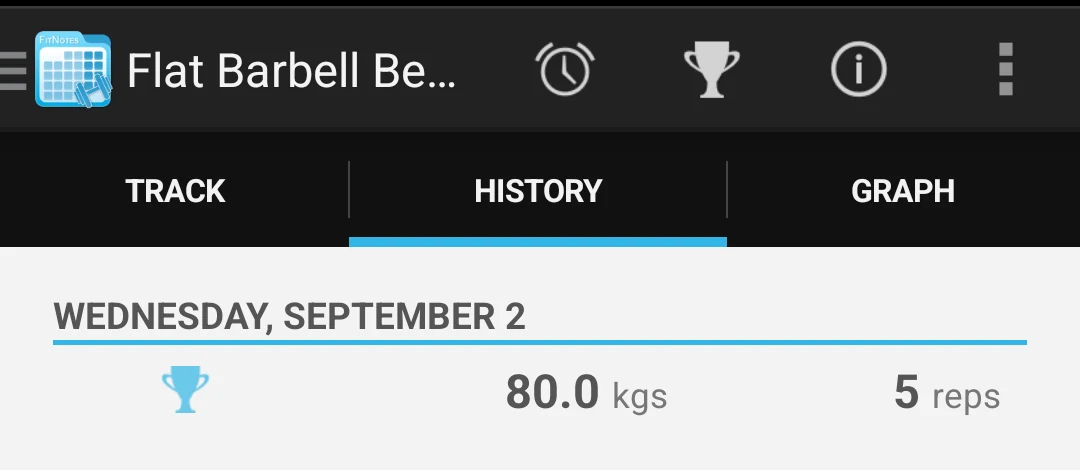
- Offline set logging. In our September 2, 2026 test with flight mode on, FitNotes 25.1 logged an 80 kg by 5 bench press set and showed it in history. In our September 11, 2026 test with flight mode on, Strong 6.2.4 logged a bench press workout, showed “That’s workout 1!” on finish, and kept the workout in History after a forced stop.
- Dark theme and rest timers. FitNotes added a dark theme in Version 25 (“Just 11 short years after the initial release of FitNotes, a dark theme has finally arrived”) and includes a rest timer. Strong also includes a rest timer inside the workout log.
- One-way CSV exports. FitNotes’ settings page warns that you cannot “restore data from the CSV file” and points you to the Backup option instead. Strong’s help centre gives the same warning: “exported files cannot be imported back into Strong.”
Where FitNotes and Strong differ
1. Accounts and where your data lives
FitNotes’ privacy page is plain: no login is needed (“not required to register an account”), and your workout log stays “stored locally on your mobile device.” For an off-phone copy, FitNotes offers a backup file and Android’s default backup, which arrived in Version 25. You can also turn on a setting where “a backup of your data will automatically be saved to your Google Drive account a short time (approximately 1 hour) after each workout.”
Strong builds around an account from the start. Its account help page notes that you are “prompted to sign up for an account” on first launch. Our test of Strong 6.2.4 opened on a sign-in screen offering Google, Facebook, Apple, or email sign-up, with no guest option. That account powers Strong Cloud, which keeps your history “automatically synced between devices”, while its homepage notes that “Strong Accounts are Free Forever.”
2. Free limits: routines, charts, and barbell tools
FitNotes’ homepage says it is “Free to use and no ads - ever.” Its help pages explain that “A Routine can comprise multiple Days (or Sections) and each Day can contain a selection of exercises”, with no cap on how many routines you keep. Its progress page includes graphs for 1RM, max weight, workout volume, reps, max reps, and rep maxes. Its workout tools page includes a 1RM calculator and a set calculator. The same page describes a plate calculator that “allows you to enter the weight of your next set and will display the plates that are required on each side of barbell to make up that weight.”
The only paid item FitNotes mentions is the FitNotes Supporter app on Google Play. Its FAQ says buying the Supporter app adds “some additional exercise types”, and its settings page says it lets you set the weight unit on individual exercises.
Strong’s free version lets you log unlimited workouts and promises that “your workout data will always be available whether you are a Strong PRO user or not.” At the same time, Strong puts three common gym tools inside Strong PRO:
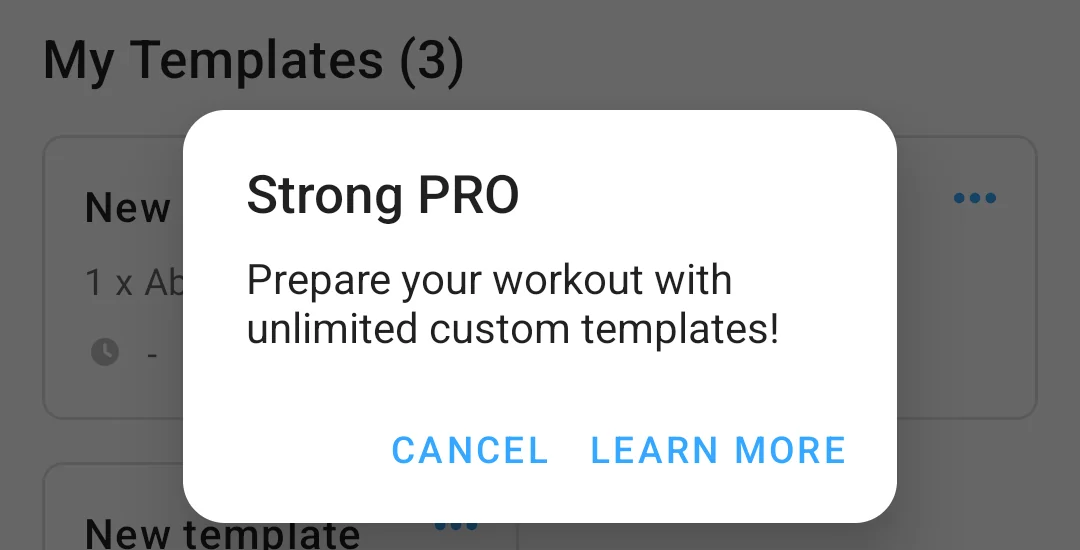
- Workout templates: Free users can save up to 3 Workout Templates, and the fourth tap in Strong 6.2.4 opened a dialog reading “Current free limit: 3 templates.”
- Charts and measurements: Strong’s PRO help page lists “Record Body Part Measurements” and “Access to all Charts” under Strong PRO. In Strong 6.2.4, the Profile tab showed a locked “Charts, Analytics and Insights” card with a crown icon.
- Barbell calculators: Both the “Plate Calculator” and the “Warm Up Calculator” sit on the Strong PRO list.
On September 14, 2026, Strong 6.2.4’s price sheet in our test store listed Strong PRO at 5.62 euros monthly, 32.72 euros yearly, or 97.14 euros for Strong PRO Forever. Strong’s help centre notes that “Prices may vary between regions.”
3. Set tags, RPE, and exercise videos
Strong’s Google Play listing says the app fits “a progressive barbell routine” like Starting Strength or StrongLifts 5x5, and it includes in-set tags that FitNotes’ pages do not describe. In Strong, you can “Tag sets as Warm Up, Failure or Drop Sets”, group lifts into “Supersets/Grouped Exercises”, and log RPE on a 6 to 10 scale (“we use a 6-10 scale to record RPE in Strong”). Strong also ships “Detailed exercise instructions with a growing library of animated videos.”
Each app in detail
FitNotes
Best for: Android lifters who want a free, no-account set log with free charts and a plate calculator.
FitNotes is a local Android workout notebook built for lifters who want sets, reps, graphs, and barbell math without a sign-up screen.
- What it does well: It opens straight into the workout log with no account, keeps every set on your phone, and includes multi-day routines, progress charts, a rest timer, a 1RM calculator, and a plate calculator for free.
- What its pages say about limits: It runs only on Android, and its CSV export cannot be restored back into FitNotes (use its
.fitnotesBackup file instead). - Where it is the better pick: An Android lifter who wants unlimited routines, charts, and plate math without paying a subscription or creating an account.
- Where FitNotes differs: Its pages do not mention a watch app, exercise videos, RPE tags, or GPS run tracking. Versus page: Kinoku vs FitNotes.
Strong
Best for: Lifters on iPhone, Apple Watch or Android who want a quiet set table with cloud sync and no social feed.
Strong is a cross-platform gym log that keeps a clean set table and syncs your history through Strong Cloud.
- What it does well: It offers apps for iPhone, Apple Watch, and Android, syncs workouts across devices, supports warmup, drop, and failure set tags plus 6-10 RPE and supersets, and includes animated exercise videos.
- What its pages say about limits: Strong asks every lifter to create an account on first launch. The free tier caps saved templates at three and keeps full charts, body measurements, and both barbell calculators in Strong PRO.
- Where it is the better pick: A lifter moving from Android to iPhone or Apple Watch who wants a quiet, feed-free set table with cloud sync.
- Where Strong differs: Its help centre does not mention a Wear OS watch app or a FitNotes CSV importer. Versus page: Kinoku vs Strong.
Kinoku
Best for: Android lifters who want FitNotes’ no-account local log plus a free Wear OS app, GPS runs and programs.
Kinoku is a free Android workout and run tracker that keeps FitNotes’ local, account-free rule while adding the tools lifters often leave FitNotes or Strong to find.
- What it does well: It asks for no account and puts no cap on workouts, routines, or custom exercises. The free app includes per-lift charts, a plate calculator, a warm-up generator, warmup/drop/failure/rest-pause set types, and RPE and RIR fields. It also ships GPS run tracking, a free Wear OS watch app, and named programs such as 5/3/1 and GZCLP (a beginner barbell program). After importing a CSV, you can pick compact rows, pills, or a grid for your set table, pin exercise and routine notes above your sets on phone and watch, and turn on per-hand weight for dumbbells.
- What its pages say about limits: Kinoku is Android and Wear OS only for now, with an iPhone version in the works. It has no cloud sync between phones, so backups are ZIP and CSV files you own. Optional Pro (US $5.99 monthly or US $39.99 yearly) adds the deeper analytics hub, readiness, and run analytics.
- Where it is the better pick: An Android lifter leaving Strong’s three-template cap or wanting FitNotes’ local privacy alongside Wear OS, GPS runs, and barbell programs.
Moving your workout history
Both FitNotes and Strong let you export your workout log as a CSV file from Settings. Neither app can import its own CSV file back in, and neither app’s help pages state an importer for the other’s CSV.
If you are moving from FitNotes or Strong into Kinoku, open Settings, then Import & Export, then Import from CSV, and pick your file. Kinoku reads FitNotes_Export.csv (with its weight and distance unit columns) and Strong’s CSV export (including Strong’s newer Weight (kg) column from Kinoku 1.6 on). The Review Matches screen lets you check every exercise match before saving, remembers your custom picks if you import again later, and saves the batch so Import History can undo it in one tap. For step-by-step instructions across seven apps, see how to move your workout history to another app.
Frequently asked questions
Which is better, FitNotes or Strong?
Neither app wins every row. FitNotes gives Android lifters an account-free local log with no routine limit, progress graphs, and a plate calculator on the free app. Strong gives lifters on iPhone, Apple Watch, and Android a quiet log that syncs across devices through Strong Cloud, with exercise videos and a three-template free limit.
Does FitNotes or Strong require an account?
Strong requires an account and FitNotes does not. FitNotes’ privacy notice says no account is needed to log workouts. Strong’s help docs state that new users must sign up before logging, and our test of Strong 6.2.4 showed no guest path. Kinoku also works without an account.
How many free routines do FitNotes and Strong allow?
FitNotes states no routine limit, and its help page shows that a single routine can hold several training days. Strong’s help centre says you can create up to 3 Workout Templates on the free version, and our test of Strong 6.2.4 showed a dialog reading Current free limit: 3 templates on the fourth tap. Kinoku has no cap on free routines.
Are progress charts and the plate calculator free in FitNotes and Strong?
In FitNotes, both are part of the free app. FitNotes’ help pages describe graphs for one-rep max, max weight, and volume, plus a plate calculator and a warm-up set calculator. Strong’s help docs put its Warm Up Calculator, Plate Calculator, and full chart set inside Strong PRO. Kinoku includes per-exercise charts, a plate calculator, and a warm-up generator on the free plan.
Is FitNotes available on iPhone or Apple Watch?
No. The FitNotes FAQ says the app is only available for Android devices and that there are no plans for an iPhone version right now. Strong’s help centre states that it offers apps for iPhone, including Apple Watch, and Android. Kinoku runs on Android and Wear OS today, with an iPhone version planned.
Can I move my history between FitNotes, Strong, and Kinoku?
FitNotes and Strong both export a CSV file, and both apps’ help pages say their exported CSV files cannot be imported back into the app that made them. Neither FitNotes nor Strong states an importer for the other app’s file on the pages we opened. Kinoku imports both the FitNotes CSV and the Strong CSV on the free plan, including Strong’s Weight (kg) column.
Do both FitNotes and Strong work offline?
Yes. In our emulator tests with flight mode on, FitNotes 25.1 logged an 80 kg bench press set and showed it in history, and Strong 6.2.4 logged a bench press workout and kept it in history after a forced stop. Kinoku also logs workouts offline in a local database on your phone.
Related pages
- Kinoku vs FitNotes: A direct comparison of the two account-free Android workout logs.
- Kinoku vs Strong: Kinoku beside Strong on Android, templates, and pricing.
- Best FitNotes alternatives: Five apps compared for FitNotes users who want runs, a watch, programs, or an iPhone.
- Best Strong alternatives: Six apps compared for lifters who hit Strong’s three-template cap.
- FitNotes vs Hevy: FitNotes compared with Hevy’s social workout log.
- Hevy vs Strong: Strong set against Hevy on free limits, watches, and feeds.
Which one fits you
- Choose FitNotes if you train on Android, want a free log with no account and no ads kept on your phone, and want unlimited routines, progress graphs, and a plate calculator without a subscription.
- Choose Strong if you use an iPhone or an Apple Watch, want a quiet set table with no social feed that syncs across devices through an account, and three free templates or Strong PRO fit your plan.
- Choose Kinoku if you train on Android, want FitNotes' no-account rule with a row, pill, or grid set table, a free Wear OS app, GPS runs, and an importer that reads both FitNotes and Strong CSV files.
Test record
Tested September 11, 2026
- Environment
- Android Studio Pixel phone emulator Kinoku_Phone_Play, API 36, Android 16
- FitNotes
- Version 25.1 (version code 64), installed from Google Play, tested September 2, 2026. Official listing
- Strong
- Version 6.2.4 (version code 602006), installed from Google Play, tested September 11 and 14, 2026. Official listing
- Kinoku
- Version 1.2.0 (version code 30), a test build installed outside Google Play, checked with flight mode on September 6, 2026. Official listing
How this page is checked. Every fact about another app on this page comes from a page that app publishes, which we could open and quote on October 29, 2026, or from a dated emulator test named in that source's note. The sources, with the exact sentence each fact rests on, are listed just above. Every Kinoku fact is tied to the shipping app's code. The page carries no score; the apps are grouped by what their own pages say. If a fact here has gone stale, the support page is the fastest way to tell us.
Test evidence
What the tested builds showed
 Open full-size image ↗
Strong's free template limit
Cropped emulator capture from September 11, 2026. On the fourth workout template tap, Strong 6.2.4 showed this dialog reading Current free limit: 3 templates. FitNotes states no routine limit.
 Open full-size image ↗
FitNotes saves sets offline with no account
Cropped emulator capture from September 2, 2026. With flight mode on, FitNotes 25.1 logged an 80 kg by 5 bench press set and displayed it in the exercise history.
One of the apps on this page
Kinoku is free to install
Core tracking works offline, with no account. An export from the app you use today can come along.
Android only for now, with an iPhone version in the works. Some depth is paid, and the pricing page says which parts.
Related features
Every set, one tap. Track how hard each set felt, your rest timers, set types, and notes.
Lossless backup, open CSV and JSON import, Strava import, and a scoped Export for AI handoff.
Load the bar fast with a visual plate layout. The calculator and bar-weight setting are free; Pro adds custom plate inventory settings.