

Best FitNotes alternatives (2026)
Five FitNotes alternatives for Android and iPhone compared by account rules, CSV import, Wear OS and Apple Watch support, GPS runs, and free-plan caps.
Kinoku is the one app here that keeps FitNotes' no-account rule and adds runs, a Wear OS app and programs; the other four ask for an account.
At a glance
| App | Best for | Better than FitNotes at | Main trade-off |
|---|---|---|---|
| Kinoku | FitNotes users who want runs, a Wear OS watch and programs with no account | GPS runs, a Wear OS app, free programs, and a FitNotes CSV importer | Android only for now, with an iPhone version in the works |
| Boostcamp | Lifters who want a coach-written program from a free library, on iOS or Android | A free library of 11,000+ programs, and an iPhone app | An account to start; the volume heatmap and Strength Score sit in Pro |
| Hevy | Lifters moving to iPhone who want a watch app and a friends feed | iPhone, Apple Watch and Wear OS apps, plus a desktop view | An account before use, four free routines and seven free custom exercises |
| JEFIT | Lifters who want exercise videos and stored programs on phone and browser | Apps for iOS, Android and the web on one subscription | Three free custom exercises in our test; an ad-free experience only with Elite |
| Strong | Lifters moving to iPhone who want a quiet log with an Apple Watch app | An iPhone app, an Apple Watch app and cloud sync between devices | An account before use, three free templates, and charts under PRO |
Publisher disclosure
Kinoku, made by Dreamsoft Works, writes and publishes this page, and Kinoku is one of the apps on it. Every fact about another app is quoted from a page that app publishes, opened on September 20, 2026, or observed in our own emulator tests. We give no score. Where the list is ordered, the caption names the measure, and every label points at a quoted sentence.
Quickstart
Kinoku is the one app on this page that keeps FitNotes’ no-account rule and adds GPS runs, a Wear OS app and training programs. The other four apps ask for an account, and each of them brings something FitNotes’ pages do not describe: an iPhone app, a watch app or a program library. We give no score. The list is ordered by account policy, apps with no account first, and each label traces to a sentence from the app’s own pages or to a dated test on our emulator.
Why FitNotes users look for an alternative
FitNotes is a fine gym notebook, and its own pages explain why people use it for years. Those pages say “You are not required to register an account in order to use FitNotes”, every workout is stored on your device, and it is “Free to use and no ads - ever”. The same pages name the four reasons a FitNotes user goes looking.
- No iPhone version: The FAQ says FitNotes “is only available for Android devices” and that there are no plans for an iPhone version at the moment. A lifter who switches phones has to switch apps.
- No run tracking: Nothing on the FitNotes site describes GPS runs, so a runner who lifts keeps two apps.
- No watch app: The pages do not mention a watch, on either platform.
- A one-way CSV: The settings page says “It is not possible to restore data from the CSV file”, so the file is for other apps, and the Backup option is for FitNotes itself.
The Supporter app is the only paid part, and the FAQ says it adds “some additional exercise types”. It does not add any of the four things above.
Which FitNotes alternatives skip the account?
FitNotes users tend to care about this more than most, so it is the measure this list is ordered by.
- No account: Kinoku asks for none. The log is a local database on the phone, and a ZIP backup or Android backup is the copy.
- An account before the first set: Strong’s account article has all users prompted to sign up before using the app. Boostcamp’s homepage says to “create an account” and then choose a program. Hevy 3.1.12 opened on Sign up with Google, Sign up with Email and Log in, and JEFIT (a lifting app on iOS, Android and the web) reached a sign-up screen in version 17.4.4 after a questionnaire and an Elite offer. We found no skip path in either.
Side by side
A cell holds a quote from the app or a finding from our emulator, and “Not stated” marks a feature none of its pages mention.
| App | Account required | Runs logged in the app | Watch app | Programs | iPhone app | FitNotes CSV import |
|---|---|---|---|---|---|---|
| Kinoku | No account | Yes, GPS runs, free | Yes, Wear OS | Free templates and named programs | No | Yes, built in |
| Boostcamp | Yes (“create an account”) | Not stated | Not stated | 11,000+ programs, “The library is free” | Yes (“iOS & Android”) | Not stated |
| Hevy | Yes, in our test | Not stated | Apple Watch and Wear OS | Not stated | Yes (iOS and Android) | Not stated |
| JEFIT | Yes, in our test | Not stated | “Watch app support” under Elite | Program storage, unlimited under Elite | Yes (iOS, Android, web) | Not stated |
| Strong | Yes (“prompted to sign up”) | Not stated | Apple Watch; Wear OS not mentioned | Not stated | Yes (iPhone and Android) | Not stated |
Each app, in its own words
Kinoku
Best for: FitNotes users who want runs, a Wear OS watch and programs with no account.
Kinoku is a free Android app that logs lifts and runs and keeps the whole record on the phone, the way FitNotes does.
- What it does well: Like FitNotes, it asks for no account and keeps the log in a local database. On top of that it records GPS runs, ships a free Wear OS app, and includes free program templates with named programs such as 5/3/1 and GZCLP (a beginner barbell program) whose progression runs on the phone. Right after a FitNotes CSV import, it asks whether you want a compact row, pill, or grid set table, keeps exercise and routine notes pinned above your sets on phone and watch, and offers a per-hand weight switch for dumbbells.
- What its pages say about limits: Free features stay free, with no cap on workouts, routines, custom exercises or history. Pro adds the deeper run dashboard, readiness and zone training, and never limits basic logging.
- Where it is the better pick: A FitNotes user who wants the same privacy rule plus runs, a watch and programs in one app.
- What Kinoku does not do: Kinoku is Android only for now, so it is no help for a move to iPhone until its iPhone version ships. It has no desktop site, no cloud sync between two phones and no social feed.
Boostcamp
Best for: Lifters who want a coach-written program from a free library, on iOS or Android.
Boostcamp turns programs from named coaches into phone routines you follow set by set.
- What it does well: Its homepage calls it a free workout tracker and program app with 11,000+ programs, with coach-designed programs from Geoffrey Schofield, Eric Helms and Cody Lefever among them. The Play listing adds “The library is free. No ads.” The homepage names iOS and Android.
- What its pages say about limits: Paying users get “Strength Score, per-muscle volume heatmap” and “20+ exclusive coach programs”, per the Pro page. The homepage says to “create an account” before choosing a program.
- Where it is the better pick: A FitNotes user who has been typing a coach’s spreadsheet into the log by hand and would rather follow it from a library.
- Where Boostcamp differs: An account comes first, and its pages do not mention run tracking or a watch app. Official listing: Google Play.
Hevy
Best for: Lifters moving to iPhone who want a watch app and a friends feed.
Hevy is a social workout tracker with a set table in the FitNotes spirit and apps on more screens.
- What it does well: In its own words, “Hevy is a free workout tracker for iOS and Android.” The homepage names Apple Watch and Wear OS for logging away from the phone, and a desktop view of routines and friends’ workouts. Its homepage sums the app up as building routines and tracking progress with friends.
- What its pages say about limits: In our test of Hevy 3.1.12, a fifth routine brought up a sheet with a limit of four, an eighth custom exercise brought up one with a limit of seven, and the first screen offered sign-up or log-in with no skip path.
- Where it is the better pick: A FitNotes user switching to an iPhone, or one who wants a watch on either platform and a feed to share workouts on.
- Where Hevy differs: FitNotes names no cap and no account; Hevy has both, and the app is built around a feed. Official listing: Google Play. Versus page: Kinoku vs Hevy.
JEFIT
Best for: Lifters who want exercise videos and stored programs on phone and browser.
JEFIT pairs routines with exercise video and a community, and it runs in a browser as well as on a phone.
- What it does well: The support page manages subscriptions for iOS, Android and the web, so a single login serves the phone and the browser. The Elite page lists “Video exercise demonstrations”, and the JEFIT blog says Elite adds space to store an unlimited amount of exercise programs.
- What its pages say about limits: The Elite page lists an “Ad-free experience” and “Watch app support” as paid. Our test found the custom-exercise form capped at “0/3” beside an Upgrade button, and the sign-up screen offered no guest path.
- Where it is the better pick: A FitNotes user who wants form video next to each exercise and a browser view of the log.
- Where JEFIT differs: Ads go away with Elite, the watch app sits under Elite, and free custom exercises stop at three. Official listing: Google Play. Versus page: Kinoku vs JEFIT.
Strong
Best for: Lifters moving to iPhone who want a quiet log with an Apple Watch app.
Strong is an early phone gym log, and of the five apps here its set table is the closest to FitNotes.
- What it does well: The help centre lists apps for iPhone, Apple Watch and Android, with no mention of Wear OS. Strong Cloud keeps workouts synced between devices, so a phone and a watch stay in step, and the help centre says you can export your workout data as a CSV.
- What its pages say about limits: The free version allows up to three workout templates, and unlimited templates need Strong PRO. On Strong 6.2.4 the fourth New template tap opened the PRO dialog, and its Learn More screen read “Current free limit: 3 templates”. The PRO page lists “Access to all Charts” as paid, and the account page says all users are prompted to sign up before use.
- Where it is the better pick: A FitNotes user moving to an iPhone or an Apple Watch who wants the same kind of quiet log.
- Where Strong differs: FitNotes has no account and no cap; Strong asks for an account, caps free templates at three and keeps charts for PRO. Official listing: Google Play. Versus page: Kinoku vs Strong.
Moving your FitNotes history
FitNotes exports a CSV from its settings, and the settings page is clear that the file is not for restoring into FitNotes: the Backup option does that job. The CSV is for other apps.
- In FitNotes, open Settings, then the export option, and save the CSV to your phone or Google Drive.
- In Kinoku, open Settings, then Backup & Import, then Import from other apps, and pick the file.
- Check the exercise-name matches the importer shows before it saves.
The importer knows the FitNotes header, skips the format-detection step when you choose FitNotes, and reads the weight and distance units from their own columns. It also flags similar exercise names so an incline variation does not merge into a flat lift, remembers your custom exercise picks on future imports, and saves the batch so Import History can undo it. Hevy, Strong, JEFIT and Boostcamp say nothing about a FitNotes import on their pages, so this page claims none for them.
When is FitNotes still the better pick?
Staying makes sense in two cases, both from FitNotes’ own pages.
- Sets and reps are all you log: FitNotes is free with no ads, keeps the data on the phone and asks for no account. If that is the whole job, nothing here does it with fewer screens.
- You want the smallest app: FitNotes is a single-purpose log, and the Supporter app is the only add-on. A wider app is more to learn.
If you want runs, a watch, programs or an iPhone, the apps above cover those, and Kinoku covers three of the four without an account.
How this list was checked
Every claim here rests on a page the app publishes or on a dated emulator run, and nothing else.
- Public citations: Each claim about another app links to the help page, pricing page, store listing or homepage it came from, opened on September 20, 2026.
- Phone observations: The Hevy routine and custom exercise caps, the Strong template cap, the JEFIT custom exercise cap and the FitNotes offline set were seen on an Android 16 emulator, with the date in each source note or caption. No emulator test was run for Boostcamp.
- Nothing bought: Nobody paid for a place on this page, and account policy is the only thing that sets the order, with ties alphabetical.
Frequently asked questions
The questions FitNotes users ask most, answered from the apps’ own pages.
Which FitNotes alternatives work without an account?
Only Kinoku, among the five. FitNotes’ privacy page puts it as not required to register an account, and Kinoku keeps to that rule with the log in a local database on the phone. Strong’s account help page prompts everyone to sign up first, Boostcamp’s homepage tells you to create an account, and in our tests Hevy and JEFIT each put a sign-up screen before the first set with no way past it.
Is there a FitNotes app for iPhone?
No. FitNotes’ FAQ says the app is only available for Android and that there are no plans for an iPhone version at the moment. Kinoku is Android only for now, with an iPhone version in the works. Of the apps here, Hevy’s homepage names iOS and Android, Strong’s help centre names iPhone with Apple Watch and Android, JEFIT’s support page covers iOS, Android and the web, while Boostcamp’s homepage lists iOS and Android.
Which FitNotes alternative also tracks runs?
Kinoku. It records GPS runs with live pace, splits and a route map on the free plan, in the same history as the lifts, and Running Progress adds best-effort records and trends. The deeper Run Analytics dashboard is part of Pro. Hevy’s, Strong’s, JEFIT’s and Boostcamp’s pages describe gym logging and do not state GPS run recording, so the table says not stated for them.
Can I move my FitNotes history to another app?
Yes, through the FitNotes CSV export. FitNotes’ own settings page says the CSV cannot be restored into FitNotes, which is why it also has a Backup option, but the file is readable by other apps. Kinoku has a built-in importer that knows the FitNotes header, reads the weight and distance units from their own columns, and remembers your custom exercise picks for future imports. The other four apps state no FitNotes import on the pages we opened.
Which of these apps have a watch app?
Hevy’s homepage says you can track workouts from your Apple Watch or a Wear OS device. Strong’s help centre pairs an Apple Watch app with the iPhone one and says nothing about Wear OS. Kinoku has a free Wear OS app for sets, runs and steps. JEFIT lists watch app support under Elite without naming a watch platform on that page. Boostcamp’s and FitNotes’ pages do not mention a watch.
Which FitNotes alternatives have training programs?
Boostcamp’s homepage opens with a free library of 11,000+ programs from named coaches. Kinoku ships free program templates and named programs, including 5/3/1, GZCLP (a beginner barbell program) and nSuns, with the progression computed on the phone. JEFIT’s blog says Elite adds space to store an unlimited amount of exercise programs. Hevy’s and Strong’s pages describe routines you build yourself, and FitNotes’ pages describe no program library.
Do any of these apps have a free plan like FitNotes?
FitNotes’ homepage says it is free to use with no ads, ever, and the only paid part is a Supporter app that adds some extra exercise types. Kinoku’s free plan has no cap on workouts, routines, custom exercises or history, and no ads on any plan. Hevy caps free routines at four, Strong caps free templates at three, JEFIT keeps an ad-free experience for Elite, and Boostcamp’s listing says its library is free with no ads.
Which app is closest to FitNotes in feel?
Strong. Both are quiet set tables with weight, reps and a completion tick, and neither builds a social feed into the log. The two differences Strong’s own pages state are the account, which every user is prompted to create before use, and the free cap of three workout templates. FitNotes asks for no account and names no cap.
Where does my data live in each app?
FitNotes’ privacy policy says all workout data you record is stored locally on your device. Kinoku keeps the record in a local database on the phone, with Android backup and a ZIP backup as the copies. Strong’s help centre says Strong Cloud syncs your workouts between devices, which means a server holds them. Hevy’s, JEFIT’s and Boostcamp’s pages we could open do not state where the log is kept, so this page does not say.
Is the FitNotes Supporter app worth buying instead of switching?
If sets and reps are all you log, it can be. FitNotes’ FAQ says the Supporter app on Google Play adds some additional exercise types, and the site prints no price, so this page prints none. The Supporter app does not add runs, a watch app, programs or an iPhone version, which are the four reasons people land on this page. For those, one of the apps above fits better.
What does Kinoku not do that FitNotes does?
Nothing FitNotes’ pages describe is missing from Kinoku on the free plan, and Kinoku lets you choose a compact row layout, hide effort fields, and keep exercise notes pinned above your sets. Even so, the two apps differ in size: FitNotes is a single-purpose log with fewer screens, while Kinoku is a wider app, so a lifter who wants the smallest possible app may still prefer FitNotes.
Which FitNotes alternatives work offline?
In our emulator tests, FitNotes 25.1, Strong 6.2.4 and JEFIT 17.4.4 each saved a set with the network off and kept it after a forced stop, and Kinoku’s core tracking works offline by design. Boostcamp’s listing carries a single word, Offline, under its workout tracker bullet. Hevy 3.1.12 saved a workout offline and showed an upload notice until the network returned.
Related pages
- Kinoku vs FitNotes: The two private, account-free Android loggers in detail.
- Best Hevy alternatives: For lifters who hit Hevy’s four-routine cap.
- Best Strong alternatives: For lifters who hit Strong’s three-template cap.
- Best workout apps without an account: Trackers that never ask you to sign up.
- Best offline workout tracker apps for Android: Loggers that work with the network off.
- FitNotes vs Hevy: FitNotes set against Hevy, one of the apps on this list, in depth.
- FitNotes vs Strong: FitNotes set against Strong, with Kinoku as the account-free third option.
Which one fits you
- Choose Kinoku if you like FitNotes' rule of no account and data on the phone, and you also want GPS runs, a Wear OS app, training programs and a FitNotes CSV importer.
- Choose Boostcamp if you would rather follow a coach's program than write your own, you are fine with an account, and the free library of 11,000+ programs is the draw.
- Choose Hevy if you are moving to an iPhone or a watch, you want a friends feed and a desktop view, and four free routines cover your split.
- Choose JEFIT if you want exercise videos, stored programs and a browser view, and three free custom exercises will do until you decide on Elite.
- Choose Strong if you are moving to an iPhone or an Apple Watch, you want the plainest set table after FitNotes, and three free templates are enough.
Test record
Tested September 11, 2026
- Environment
- Android Studio Pixel phone emulator Kinoku_Phone_Play, API 36, Android 16
- FitNotes
- Version 25.1, installed from Google Play. Official listing
- Hevy
- Version 3.1.12 (version code 3289233), installed from Google Play. Official listing
- Strong
- Version 6.2.4 (version code 602006), installed from Google Play. Official listing
- JEFIT
- Version 17.4.4 (version code 2093), installed from Google Play. Official listing
- Kinoku
- Version 1.2.0 (version code 30), a test build installed outside Google Play. Official listing
How this page is checked. Every fact about another app on this page comes from a page that app publishes, which we could open and quote on September 20, 2026, or from a dated emulator test named in that source's note. The sources, with the exact sentence each fact rests on, are listed just above. Every Kinoku fact is tied to the shipping app's code. The page carries no score; the caption above names the measure the list is ordered by. If a fact here has gone stale, the support page is the fastest way to tell us.
Test evidence
What the tested builds showed
 Open full-size image ↗
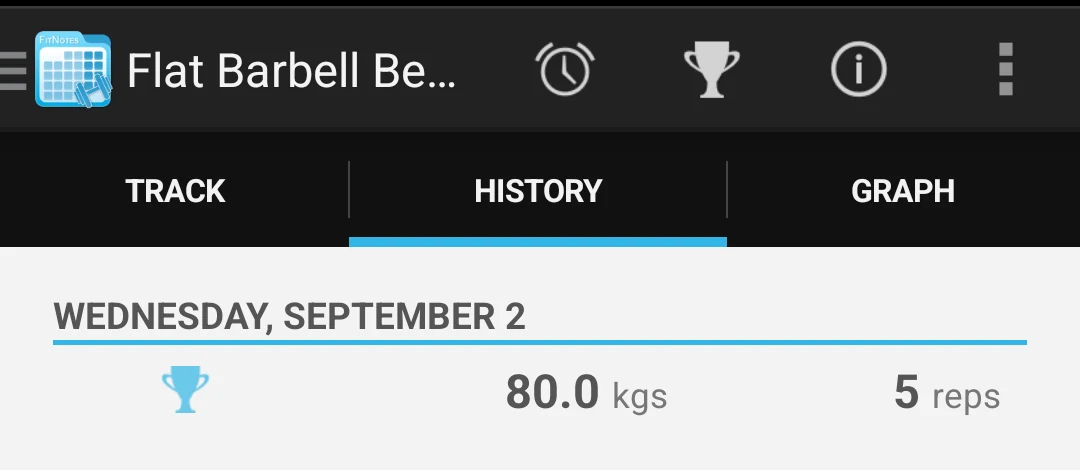
FitNotes keeps a set with no network
Cropped emulator capture from September 2, 2026. With the emulator offline, FitNotes 25.1 saved a bench press set and showed it in the exercise history. Every app on this page is measured against that bar: a log that needs nothing from a server.
One of the apps on this page
Kinoku is free to install
Core tracking works offline, with no account. An export from the app you use today can come along.
Android only for now, with an iPhone version in the works. Some depth is paid, and the pricing page says which parts.
Related features
Every set, one tap. Track how hard each set felt, your rest timers, set types, and notes.
Live pace, splits, a route map, and audio cues. Your run record is not uploaded to Kinoku; map tiles load when you view maps, and weather is a clear opt-in.
A real watch app for workouts, runs, steps, tiles, and watch face data.