

Best StrongLifts alternatives (2026)
Five apps for lifters leaving StrongLifts 5x5 over its subscription, plus StrongLifts itself: which set your next weight free, and what each does after a miss.
StrongLifts' own listing says the app needs a subscription; Boostcamp and Kinoku still set your next 5x5 weight on a free plan, Liftosaur lets you write the rule yourself, and Kinoku needs no account.
At a glance
| App | Best for | Better than StrongLifts at | Main trade-off |
|---|---|---|---|
| Boostcamp | Lifters who want a free 5x5 now and a big program library for later | A free community 5x5 next to 11,000+ programs, with auto-progression | You create an account to start, and some coach programs are Pro |
| FitNotes | Lifters who add the weight by hand and want a free log with no account | Free, no ads, no account, and data kept on the phone | You work out each next weight yourself, and it is Android only |
| Hevy | Lifters who add their own weight and want friends and a watch app | A friends feed, a desktop view, and apps for Apple Watch and Wear OS | Automatic weight changes come with Hevy Trainer, a Pro feature |
| Kinoku | Lifters on Android who want Classic 5x5 run for them, free, with no account | Classic 5x5, a Greyskull-style plan and 5/3/1 with weights set for you, free and on the phone | Android only for now, and you cannot type in your own weight jumps or deload rule |
| Liftosaur | Lifters who want to write their own progression and deload rules | Any rule you can write in its text language, and open-source code | Rules are written as text, and graphs and the watch app are Premium |
| StrongLifts | Lifters happy to pay to keep the original 5x5 app and its watch app | Weight jumps and deload rules you can change, plus Madcow 5x5 | Its listing says the app requires a subscription to use |
Publisher disclosure
Kinoku, made by Dreamsoft Works, writes and publishes this page, and Kinoku is one of the apps on it. Every fact about another app is quoted from a page that app's maker publishes, opened on October 12, 2026. We give no score. The apps are grouped by what their own pages say, and every label points at a quoted sentence.
Quickstart
StrongLifts now needs a subscription, by its own listing. Boostcamp and Kinoku still set your next 5x5 weight on a free plan, and Liftosaur lets you write that rule as text. Hevy changes weights for you only in Pro, and with FitNotes you add the weight yourself. The grouping comes from each app’s own pages, sorted alphabetically within each group.
Which StrongLifts alternatives set the next weight for you?
What made StrongLifts easy was one rule run for you: finish all five sets and the bar goes up next time, miss and it stays put. The StrongLifts listing calls it “Fully automated progression for consistent strength gains.” So the six apps here split by who works out the next weight, going by what each app’s own pages say.
- The app sets it on the free plan: Boostcamp, Kinoku and Liftosaur. Boostcamp’s listing says “Auto-progression sets your next weights.” Kinoku’s Classic 5x5 and its other named programs are free. Liftosaur changes the weights by rules you write, and its Premium list names graphs, plates per side and the watch app, but not progressions.
- The app sets it only with a subscription: Hevy and StrongLifts. Hevy Trainer “automatically adjusts your working weights”, and Hevy says Trainer is a Pro feature. StrongLifts “requires a subscription to use” at all.
- You set it yourself: FitNotes. Its routines fill in last session’s numbers so you can update the sets “according to the progression that your training program calls for”.
Side by side
The rival cells quote each app’s listing, help pages or code, and Kinoku’s cells come from its own code. “Not stated” marks a question no page we could open answers.
| App | Sets the next weight | 5x5 on the free plan | Account | After a miss | Watch app | Platforms |
|---|---|---|---|---|---|---|
| Boostcamp | Yes, auto-progression | Free community 5x5 | Created to start | Not stated | Not stated | iOS, Android |
| Kinoku | Yes, free | Classic 5x5, free | None | Same weight; 10% off after 3 misses | Wear OS, free | Android |
| Liftosaur | By rules you write | You write it or edit a built-in plan | Sign-in to sync | The rule you write | Apple Watch, Premium | iOS, Android, web |
| Hevy | With Hevy Trainer, Pro | You log it and add weight | Not stated | Not stated | Apple Watch, Wear OS | iOS, Android |
| StrongLifts | Yes, in the paid app | No free plan | Log in to save to its server | Same weight; deload you can set | Apple Watch | iOS, Android |
| FitNotes | No, you add it | You log it and add weight | None | You decide | Not stated | Android |
Each app, in its own words
Each block below starts with the need the app fits for a 5x5 lifter, then quotes what its maker says about weights, limits and price model.
Boostcamp
Best for: Lifters who want a free 5x5 now and a big program library for later.
Boostcamp is a workout tracker built around a library of programs, and its own comparison page speaks to StrongLifts users directly.
- What it does well: Boostcamp says it “includes the same 5x5 progression as a free community program, plus 11,000+ other programs and a custom builder for when you outgrow it.” Its listing says “Auto-progression sets your next weights”, and “The library is free. No ads.” It also names offline use.
- What its pages say about limits: Its homepage says you “create an account” before you pick a program. The Pro page lists a strength score, a per-muscle volume heatmap, personalized programs and more than 20 coach programs kept for Pro.
- Where it is the better pick: A lifter on iOS or Android who wants a free 5x5 today and expects to pick from many named programs once it stalls.
- Where Boostcamp differs: Its pages we read do not say what happens after a missed session or name a watch app. Our versus page is Kinoku vs Boostcamp, and its official listing is on Google Play.
Kinoku
Best for: Lifters on Android who want Classic 5x5 run for them, free, with no account.
Kinoku is a private training app for Android whose named programs work out each next weight on the phone itself, and it never asks you to sign up.
- What it does well: Classic 5x5 Full Body is three days a week, two workouts that swap, five sets of five on every lift except one set of five deadlifts. When you get every rep, Kinoku adds 2.5 kg to the squat, bench, row or overhead press and 5 kg to the deadlift. It asks for a one-rep max per lift at the start, fills in an estimate from your history when it has one, and starts a blank lift on the empty bar. The program lands on your training calendar with weights on the very first session.
- What its pages say about limits: A session where any set falls short keeps the same weight next time, and the third miss in a row takes 10% off that lift. The weight jumps and the deload rule come with each program, and the only change is micro loading, which halves the jumps on the Greyskull-style plan and the Basic Beginner Routine. Pro adds three layers that tune a program for you: weekly set targets per muscle, set changes based on how hard a set felt, and a readiness check.
- Where it is the better pick: A lifter with an Android phone who wants the 5x5 rule run for free, then 5/3/1 or GZCLP (Cody Lefever’s tiered linear plan) later, with no account and no Kinoku server holding the record.
- What Kinoku does not do: There is no iPhone or Apple Watch version yet, since Kinoku is built for Android first, and it has no sync between two phones. It has no StrongLifts importer, no Madcow 5x5 and no way to type in your own weight jumps, beyond the micro loading switch that halves them on some plans.
Liftosaur
Best for: Lifters who want to write their own progression and deload rules.
Liftosaur is a workout planner where each program is written as plain text in its own small language, called Liftoscript.
- What it does well: In its code repository’s words, “Any program should be possible to implement - Stronglifts 5x5, GZCLP, any 5/3/1s, any PPL, you name it.” (A PPL is a push, pull, legs split.) It “automatically handles progressive overloads and deloads based on the logic you define.” Built-in plans include Starting Strength, Texas Method and GZCLP.
- What its pages say about limits: Its Premium plan covers “plates per side, graphs, muscle views, Week Insights, the Apple Watch app and the API.” You can “Train offline and sync when you are back online”, and you sign in to sync across devices.
- Where it is the better pick: A lifter who wants StrongLifts’ rule but with a different jump, a different deload, or a rule no other app offers.
- Where Liftosaur differs: Its code page calls it an “Open-source powerful weight lifting tracker PWA for coders”, and a rule you write takes more set-up than picking a ready plan. Official listing: Google Play.
Hevy
Best for: Lifters who add their own weight and want friends and a watch app.
Hevy is a workout log with a social feed, and it says “Hevy is a free workout tracker for iOS and Android.”
- What it does well: You can “Build routines and track progress with friends”, and its homepage names apps for “Apple Watch & WearOS” plus a desktop view.
- What its pages say about limits: Hevy Trainer “creates personalized programs with built-in progressive overload, tracks your performance, automatically adjusts your working weights, and offers helpful tips.” Hevy’s own answer to whether Trainer is free reads “No, Trainer is a Pro feature.”
- Where it is the better pick: A lifter who is happy to add 2.5 kg by hand after a good session and wants friends and a watch app more than a program engine.
- Where Hevy differs: On the free plan you build the 5x5 as routines and raise the weights yourself, and Hevy describes Trainer as building a personalized program, not a named 5x5. Official listing: Google Play. Versus page: Kinoku vs Hevy.
StrongLifts
Best for: Lifters happy to pay to keep the original 5x5 app and its watch app.
StrongLifts is the app built around the program of the same name, and it is on this list because staying is a real option.
- What it does well: “If you complete all sets successfully, it adds weight. If you fail, it will repeat the weight.” You “can control how much weight it adds, and how often it does so”, and you can set how many fails come before a deload and how big it is. You can “Log your entire workout from your Apple Watch with Stronglifts”, and it sends workouts to Health Connect on Android.
- What its pages say about limits: The listing says “StrongLifts is free to download, but requires a subscription to use.” Its support site adds “Everyone needs a subscription.” The seven-day free trial comes with the yearly plan only.
- Where it is the better pick: A lifter who wants the same app, Apple Watch logging or custom deload rules, and for whom the subscription is fine.
- Where StrongLifts differs: Its next steps are in-house programs, such as “Stronglifts 5×5 Intermediate to break through plateaus” and Madcow 5×5. Logging in saves “all your workouts to our server”. Official listing: Google Play.
FitNotes
Best for: Lifters who add the weight by hand and want a free log with no account.
FitNotes is a plain Android workout log, and its homepage says it is free to use with no ads.
- What it does well: Its privacy policy says you need no registered account to use FitNotes, and your workout data “is stored locally on your mobile device”. A routine fills in last time’s numbers, so you can “quickly update the sets according to the progression that your training program calls for”.
- What its pages say about limits: Its FAQ says it is “only available for Android devices”. Its settings page says a CSV export cannot be restored into the app, so moving phones needs its separate backup file.
- Where it is the better pick: A lifter who knows the 5x5 rules by heart and only wants a fast, free place to tick off sets.
- Where FitNotes differs: Its pages describe no automatic weight increase and no built-in programs, so each jump and each deload is your call. Official listing: Google Play. Versus page: Kinoku vs FitNotes.
What happens when you miss reps
The jump after a good day is the easy part, so the real test of a 5x5 app is what it does after a bad one. StrongLifts says “If you fail, it will repeat the weight”, and it lowers the weight once you have failed a set number of times, which you choose.
- Kinoku, Classic 5x5: A session where any set falls short of five reps keeps the same weight next time. The third miss in a row on a lift takes 10% off it, rounded to your plates, and the count starts again.
- Kinoku, Greyskull-style LP (linear progression): Each lift is three sets of five with the last set taken as far as you can. Ten or more reps on that set doubles the next jump, and a single miss takes 10% off.
- Kinoku, Basic Beginner Routine: The same three sets of five, with weight taken off only after three misses in a row.
- Liftosaur: Its code page says it “automatically handles progressive overloads and deloads based on the logic you define”, so the count and the size of the cut are yours to write.
- StrongLifts: You pick how many fails come before a deload and how big it is, and it suggests a deload when you come back from a break.
Boostcamp’s and Hevy’s pages that we read do not say what happens after a missed session, and FitNotes leaves it to you.
After linear progression stalls
Many lifters leave a 5x5 when the jumps each session stop working, not only over the price. So the second question is what each app offers next.
- StrongLifts points to its own StrongLifts 5×5 Intermediate and Madcow 5×5.
- Kinoku runs 5/3/1 Boring But Big, GZCLP and nSuns 5/3/1 LP in 4, 5 and 6-day versions, all free, with weights set from your one-rep maxes. Its GZCLP tracks the Tier 1 lifts, and you move the Tier 2 and Tier 3 lifts yourself. A free program finder asks about your week and suggests one.
- Boostcamp lists nSuns, GZCLP, 5/3/1 and Reddit PPL in its free library, next to more than 130 coach programs.
- Liftosaur ships Texas Method and GZCLP among its free built-in plans, each one written as text you can edit.
FitNotes and Hevy’s free plan leave the next program to you, and Hevy Trainer builds one in Pro.
Moving your StrongLifts history
StrongLifts’ support site says an export arrives as a CSV file, and the delete-account page says that file “cannot be imported back into the app.” So the export is a copy for you to keep, and where it can go depends on the next app.
- Liftosaur says it can “Import workout history from Hevy or a CSV file, with a preview and undo.”
- Kinoku has no StrongLifts importer, and we have not tried a StrongLifts file in it. Kinoku’s own CSV layout is public on its import format page, so the file can be rewritten into that layout by hand or with an AI tool.
- Boostcamp, Hevy and FitNotes do not name a StrongLifts import on the pages we read.
How this list was checked
We opened each maker’s own pages on October 12, 2026, and every line here about another app quotes one of them.
- StrongLifts: Each statement about its price model, progression, deloads and export is quoted from its Google Play listing, its own site or its support site, and each one is numbered in the sources.
- Boostcamp, Liftosaur, Hevy and FitNotes: Their rows rest on their Play listings, homepages, help pages and, for Liftosaur, its public code. A rival’s claim about StrongLifts is never used as a StrongLifts fact. We ran no emulator test for this page, so every cell is a quote or “Not stated”.
- Kinoku: We read the program definitions in Kinoku’s source for the sets, the weight jumps and the rule after a miss in each 5x5 and 3x5 plan.
- Order: The apps are grouped by who sets the next weight, as each app’s pages describe it, and sorted A to Z inside each group. We print no prices, and nobody paid to be here.
Frequently asked questions
Is StrongLifts still free?
No. StrongLifts’ Google Play listing says the app is free to download but requires a subscription to use, and its support site says everyone needs a subscription. New users get a seven-day free trial on the yearly plan, and the monthly and quarterly plans come with no trial. The program itself is still free on its website as spreadsheets, so the app is what costs money.
Is there a free app that runs StrongLifts 5x5 for me?
Yes, Boostcamp and Kinoku run it for you on a free plan, and Liftosaur runs the rule once you write it. Kinoku has a free Classic 5x5 program that adds weight after each session where you get every rep. Boostcamp says it runs the same 5x5 progression as a free community program, with an account. Liftosaur lets you write the 5x5 rules yourself, and its Premium list does not include progressions.
Which app repeats the weight after a failed 5x5 session?
StrongLifts says that if you fail, it repeats the weight, and it deloads when you get stuck. Kinoku’s Classic 5x5 does the same: a short session keeps the weight, and the third miss in a row takes 10% off that lift. Liftosaur runs whatever rule you write. Boostcamp’s and Hevy’s pages we read do not say what happens after a miss.
Can I run StrongLifts 5x5 without the app?
Yes. StrongLifts’ own program page offers a spreadsheet of every StrongLifts program for free, so you can follow the plan on paper or in a sheet. Any logger then works, FitNotes included, as long as you add the weight yourself. The apps in the first group on this page do that sum for you after each session.
Can I move my StrongLifts history to another app?
You can take a copy. StrongLifts’ support site says an export arrives as a CSV file, and that the file cannot be imported back into StrongLifts. Liftosaur says it imports history from Hevy or a CSV file. Kinoku has no StrongLifts importer, and we have not tried a StrongLifts file in it, but Kinoku’s own CSV layout is public, so the file can be rewritten into it.
What should I run after StrongLifts 5x5 stops working?
Inside StrongLifts, its own page points to StrongLifts 5×5 Intermediate and Madcow 5×5. Kinoku runs 5/3/1 Boring But Big, GZCLP and nSuns 5/3/1 linear progression for free, with the weights set from your one-rep maxes. Boostcamp lists nSuns, GZCLP and 5/3/1 in its free library, and Liftosaur ships Texas Method and other plans you can edit.
Is there a 5x5 app that needs no account?
Kinoku runs its 5x5 programs with no account and no Kinoku server, though Android can still put eligible app data in your system backup. FitNotes also needs no account, but you add the weight yourself. Boostcamp’s homepage says you create an account to start, and StrongLifts saves workouts to its server when you log in. Liftosaur uses sign-in for sync, and Hevy’s homepage does not say.
Which StrongLifts alternative has a watch app?
StrongLifts logs a whole workout from an Apple Watch. Hevy names apps for Apple Watch and Wear OS, and Kinoku has a free Wear OS app that logs sets and syncs to the phone. Liftosaur’s Apple Watch app is part of Premium. Boostcamp’s and FitNotes’ pages we opened do not name a watch app.
Does Kinoku run Greyskull LP or a 3x5 plan?
Yes. Kinoku has a Greyskull-style plan, three sets of five with the last set taken as far as you can, which doubles the jump when that set reaches ten and takes 10% off a lift after one miss. It also has the r/Fitness Basic Beginner Routine, also 3x5 with a last set for as many reps as you can, which takes weight off only after three misses in a row.
Can I change how much weight Kinoku adds each session?
Only in one way. Classic 5x5 has fixed jumps: 2.5 kg on the squat, bench, row and overhead press and 5 kg on the deadlift after each full session. On the Greyskull-style plan and the Basic Beginner Routine, micro loading in Program settings halves the jumps. You can reset a lift’s starting point in Program settings. StrongLifts lets you set the jump, how often it happens and the deload, and Liftosaur lets you write any rule.
Which of these apps work offline?
Boostcamp’s listing names offline use, and Liftosaur says you can train offline and sync when you are back online. FitNotes stores everything on the phone. Kinoku needs no connection to log a set or to set the next weight, since the app does both on the phone. Hevy’s homepage names offline workouts for its watch app, and StrongLifts’ pages we opened do not say.
What does Kinoku not do that StrongLifts does?
Kinoku has no iPhone or Apple Watch app yet, and no sync between two phones. You cannot type in your own weight jumps or deload rule, which StrongLifts lets you set, though micro loading halves the jumps on some plans. It has no Madcow 5×5 program and no StrongLifts importer. Its GZCLP tracks the Tier 1 lifts only, so you move the Tier 2 and Tier 3 lifts by hand.
Related pages
- Best workout apps for beginners on Android: StrongLifts again, now beside Fitbod, Hevy and others a new lifter might try first.
- Best workout program apps for periodization: Apps that run 5/3/1, GZCLP and nSuns, for the step after a 5x5.
- Free gym apps with progressive overload tracking: Which free apps show records, one-rep max charts and stalled lifts.
- Best Boostcamp alternatives: Program apps for people weighing Boostcamp’s account or Pro programs.
- Kinoku vs FitNotes: Two free Android logs with no account, side by side.
- Classic 5x5 in Kinoku: The two workouts, the weight jumps and what happens after three missed sessions.
- Greyskull-style LP in Kinoku: Phrak’s variant, the doubled jump at 10 reps and where the app’s version differs.
- Basic Beginner Routine in Kinoku: The r/Fitness starter routine and the changes Kinoku makes to it.
- GZCLP in Kinoku: The three tiers, their rep schemes and what Kinoku does after a missed set.
- Periodization: Kinoku’s free program builder, the named programs and the Pro layers.
- Import format: Kinoku’s public CSV and JSON layouts, for moving a log from another app.
Which one fits you
- Choose Boostcamp if you want a free 5x5 with the weights set for you, plus a large program library to grow into, and an account is fine.
- Choose Kinoku if you want Classic 5x5, then 5/3/1 or GZCLP, run for you on an Android phone for free, with no account.
- Choose Liftosaur if you want to write your own weight jumps and deload rules as text, and you like open-source software.
- Choose Hevy if you are fine adding weight yourself, or paying for Hevy Trainer, and want a friends feed and a Wear OS or Apple Watch app.
- Choose StrongLifts if you want the original 5x5 app with its Apple Watch logging and custom deload rules, and a subscription is fine.
- Choose FitNotes if you know the 5x5 rules well, want a free Android log with no account, and are happy to add the weight by hand.
How this page is checked. Every fact about another app on this page comes from a page that app publishes, which we could open and quote on October 12, 2026. The sources, with the exact sentence each fact rests on, are listed just above. Every Kinoku fact is tied to the shipping app's code. The page carries no score; the apps are grouped by what their own pages say. If a fact here has gone stale, the support page is the fastest way to tell us.
Kinoku in practice
Where this shows up in the app
 Open full-size image ↗
A program, week by week
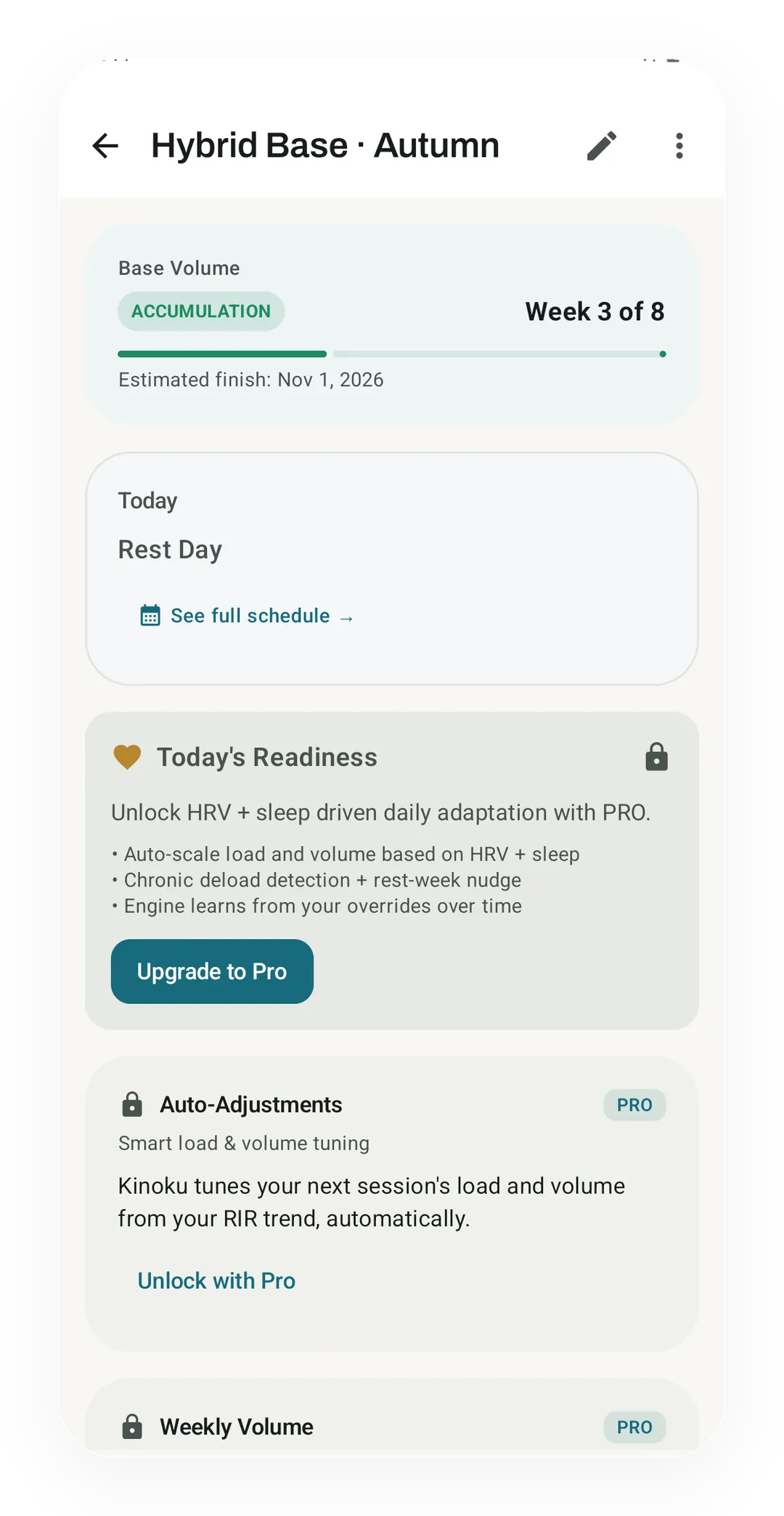
Real app capture. A Kinoku program in week 3 of 8 of its first block, on the training calendar. The Pro layers that tune a program are shown locked; the program itself is free.
One of the apps on this page
Kinoku is free to install
Core tracking works offline, with no account. An export from the app you use today can come along.
Android only for now, with an iPhone version in the works. Some depth is paid, and the pricing page says which parts.
Related features
A 4-phase planning stack. The builder, all 25 templates, named programs with auto-progression, the custom model, and unlimited active programs are free. Pro adds volume targets, readiness tuning, and auto set changes.
Unlimited routines, Smart Sync, Starter Packs, and follow-along links are free, and so are Rotation Groups that cycle through several routines for you.
Load the bar fast with a visual plate layout. The calculator and bar-weight setting are free; Pro adds custom plate inventory settings.
Warmup sets built from your working weight, bar weight, and unit system.
A real watch app for workouts, runs, steps, tiles, and watch face data.