

Best Workout Apps for Beginners on Android (2026)
Five Android workout apps for people new to the gym: which hand you a plan to follow, which set your next weight, what that costs, and how each shows the moves.
Kinoku runs a beginner program and sets your next weight on a free plan, StrongLifts does the same with a subscription, Fitbod builds each workout for you after a free trial, and Boostcamp and Hevy offer free programs with automatic weight changes kept for Pro.
At a glance
| App | Best for | Better at | Main trade-off |
|---|---|---|---|
| Fitbod | Beginners who want every workout built for them and are fine paying after a trial | Builds each session around your level and gear, with videos and written how-tos for each move | A subscription follows the free trial, by its own App Store listing |
| Kinoku | Android beginners who want a free starter program run for them, with no account | Free starter programs that set the next weight on the phone, plus a free program finder | Android only, no exercise videos of its own, and weight tips outside a program are Pro |
| StrongLifts | New lifters who want one barbell 5x5 plan made simple and are fine with a subscription | Plans every exercise, set and weight of a single 5x5 program, built for new and returning lifters | Its listing says the app requires a subscription to use |
| Boostcamp | Beginners who want to pick a free program from a big library, on Android or iOS | A free program library you can filter by level, with form videos, on Android and iOS | An account to start, and Auto Progression is listed as a Pro feature |
| Hevy | Beginners who copy a routine, add the weight themselves and want exercise videos | A free program library, exercise videos and your last numbers shown while you lift | Hevy Trainer, the part that adjusts your weights, is a Pro feature |
Publisher disclosure
Kinoku, made by Dreamsoft Works, writes and publishes this page, and Kinoku is one of the apps on it. Every fact about another app is quoted from a page that app's maker publishes, opened on October 18, 2026. We give no score. The apps are grouped by what their own pages say, and every label points at a quoted sentence.
Quickstart
Kinoku runs a beginner program and sets your next weight on a free plan, and StrongLifts does the same with a subscription. Fitbod builds each workout for you once you pay after a trial. Boostcamp and Hevy have free programs, and their own pages keep automatic weight changes for Pro. We grouped the apps by what their pages say and sorted each group from A to Z.
Which apps give a beginner a plan and the next weight?
Someone new to the gym needs two answers on day one: which exercises to do, and how heavy to go. A rep is one lift of the weight, and a set is a group of reps done without a break, so “three sets of five” means five lifts, a rest, and the same twice more. Progressive overload means asking a little more of your body over time, most often by adding a small amount of weight. Linear progression (LP) is the simplest way to do that, because the weight goes up one small step after every session that goes to plan.
The five apps on this page answer those two questions in three ways, going by their own pages.
- The app builds each workout for you: Fitbod. Its listing says each session is “custom-built for your fitness level”, your goals and the gear you have at home or in the gym.
- The app runs a starter program and sets the next weight: Kinoku and StrongLifts. Kinoku’s starter programs, from the r/Fitness Basic Beginner Routine to Classic 5x5, are free and work out each weight on the phone. StrongLifts says the app “plans every exercise, set, and weight so you always know exactly what to do.”
- Free programs, with the automatic weight changes in Pro: Boostcamp and Hevy. Boostcamp’s Pro page says “Beginners can run free programs end-to-end without needing Pro.” and lists Auto Progression among the features Pro adds. Hevy’s listing says you can “Easily see your previous lift values, this helps you with progressive overload training.” Hevy Trainer, the part that adjusts weights for you, is a Pro feature.
Cost splits the first two groups. Fitbod’s App Store listing says that after the free trial, “this app includes an auto-renewing subscription”, and StrongLifts “requires a subscription to use” at all, while Kinoku’s starter programs are free.
Side by side
Each cell about another app comes from that app’s listing, homepage or help pages, and Kinoku’s cells come from its own code. A cell that reads “Not stated on a page we could open” marks a question that none of that app’s pages we opened answers.
| App | The plan for a beginner | Sets the next weight | How each move is shown | Account | Free plan | Platforms |
|---|---|---|---|---|---|---|
| Fitbod | Builds every session for your level and gear | Each session is built for you | Videos and written instructions | Not stated on a page we could open | A free trial, then a subscription | Android, Wear OS, iOS, Apple Watch |
| Kinoku | Free starter programs and a free program finder | Yes, inside a program | Written form notes and a YouTube search | None | Starter programs free; weight tips outside a program in Pro | Android, Wear OS |
| StrongLifts | One 5x5 barbell program, planned for you | Yes, and it repeats the weight after a miss | Not checked for this page | Log in to save to its server | None; a 7-day trial on the yearly plan | Android, iOS |
| Boostcamp | A large free program library, filtered by level | Auto Progression, listed under Pro | Form videos | Created to start | Programs and tracker free; Auto Progression and Personalized Programs in Pro | Android, iOS |
| Hevy | A free program library and routines you build | Only with Hevy Trainer, a Pro feature | Exercise videos | Not stated on a page we could open | Free log and program library; Trainer in Pro | Android, Wear OS, iOS |
Each app, in its own words
Each block below starts with the beginner it suits best, then says what the app does well, quotes what its maker says about limits, and names where it is the better pick.
Fitbod
Best for: Beginners who want every workout built for them and are fine paying after a trial.
Fitbod is a workout planner that uses artificial intelligence (AI) to write each session for you, and its listing calls it “a personalized workout planner” built on AI.
- What it does well: Each session fits your level, goals and gear, and the listing names “Advanced, intermediate, and beginner fitness levels”. It lists “Hi-res, multi-angle videos of each fitness exercise” and “Easy-to-understand, detailed exercise instructions”, which matters most when every move is new. Its “Adaptive AI learns from your edits to its workout recommendations”, and you can still “Save, build or use your favorite strength training workouts”.
- What its pages say about limits: The App Store listing says that once the free trial ends, “this app includes an auto-renewing subscription” covering its workouts and features. It does not say how long the trial lasts, and we print no price.
- Where it is the better pick: A beginner who would rather not choose a program at all, and who wants to see each move on video before trying it. That is the need Fitbod’s own pages speak to most directly.
- Where Fitbod differs: It plans session by session, so there is no named program like a 5x5 to follow week after week. Its listing names a Wear OS tile, and the App Store adds iPhone and Apple Watch. Official listing: Google Play.
Kinoku
Best for: Android beginners who want a free starter program run for them, with no account.
Kinoku is a training app for Android that runs named starter programs on the phone, sets each next weight inside them, and never asks you to sign up.
- What it does well: The starter programs are free, and each has its own page. They are the Basic Beginner Routine, a Greyskull-style plan, Classic 5x5, GZCLP (Cody Lefever’s program built on three tiers of lifts), the Dumbbell Stopgap and the Bodyweight Recommended Routine. A barbell or dumbbell program lands on your training calendar with a weight on every session. If the list feels long, a free program finder asks about your level, your days, your goal and your gear, then shows its pick with its reasons and two others you can swap in. A plan from a coach or a friend can also be pasted as text on the Import screen, and Kinoku turns it into routines.
- How it shows each move: Every built-in exercise has written form notes, with what to watch and the common mistakes, plus a typical rep range and rest time on most. An exercise’s info sheet opens a YouTube search for that move, and those videos come from YouTube under its own terms.
- What sits in Pro: Weight tips on a routine you built yourself, read from your history, are part of Pro. So are weekly set targets per muscle, set changes based on how hard a set felt, and a readiness check. The starter programs, the program finder and the calendar stay free.
- Where it is the better pick: A beginner with an Android phone who wants a well-known starter plan run for free, with the record kept on the phone and no Kinoku server holding it.
- What Kinoku does not do: There is no iPhone version yet, and no sync between two phones. Kinoku makes no exercise videos of its own and does not use artificial intelligence to write your workouts. It has no trainer to ask and no friends feed. On the Bodyweight Recommended Routine, the step to a harder version of a move is yours to make.
StrongLifts
Best for: New lifters who want one barbell 5x5 plan made simple and are fine with a subscription.
StrongLifts is the app built around the 5x5 barbell program of the same name, and its listing says “StrongLifts is made for lifters starting or returning to barbell strength training.”
- What it does well: “It plans every exercise, set, and weight so you always know exactly what to do.” Its app page explains the rule in two lines: “If you complete all sets successfully, it adds weight. If you fail, it will repeat the weight.” The listing ends that pitch with “No experience needed.”
- What its pages say about limits: “StrongLifts is free to download, but requires a subscription to use.” The listing adds “All new users get a 7-day free trial for the yearly plan.” Its support site says that logging in creates an account and saves “all your workouts to our server”.
- Where it is the better pick: A new lifter who wants a single plan with no other choices to make, on Android or an iPhone, and for whom paying is fine.
- Where StrongLifts differs: The program itself is free on its website, since “Download the spreadsheet of every Stronglifts program on this website, for free.” So the subscription pays for the app, not the plan. Official listing: Google Play.
Boostcamp
Best for: Beginners who want to pick a free program from a big library, on Android or iOS.
Boostcamp is a workout tracker built around a library of programs, and its listing opens its list of who the app is for with “Beginners who want a plan and a gym logger.”
- What it does well: Its listing describes a free tracker and gym log with a program library in the thousands, plus an AI coach that builds a custom plan around your goal, schedule and gear. You can “Filter by goal, level, and days per week.”, and the tracker lists “warmup templates, form videos, and mid-set exercise swaps that keep your numbers”, plus offline use. Its Pro page says “Beginners can run free programs end-to-end without needing Pro.”
- What its pages say about limits: The listing says “Auto-progression sets your next weights.” without naming a tier, while the Pro page lists “Auto Progression (linear progression, double progression, and missed-rep adjustments)” among the features Pro adds. Its homepage says to “create an account” before choosing a program, and “Free accounts can build custom programs manually; Personalized Programs are Pro-only.”
- Where it is the better pick: A beginner who wants to browse many plans, compare a few by days per week, and keep the same app on an iPhone. Its library is far larger than Kinoku’s set of templates.
- Where Boostcamp differs: The choice of program is yours, from a very long list, which suits some beginners more than others. Versus page: Kinoku vs Boostcamp. Official listing: Google Play.
Hevy
Best for: Beginners who copy a routine, add the weight themselves and want exercise videos.
Hevy is a workout log with a social side, which its homepage describes as “a free workout tracker for iOS and Android.”
- What it does well: It lists “Hundreds of exercises with free high-quality videos for you to focus on your form”, and you can “Easily see your previous lift values, this helps you with progressive overload training.” You can “Create gym routines or home workouts” and plan sessions ahead, and “Build routines and track progress with friends.” Hevy says “Our existing program library will remain available and free.”
- What its pages say about limits: Hevy Trainer “creates personalized programs with built-in progressive overload, tracks your performance, automatically adjusts your working weights, and offers helpful tips.” Asked whether Trainer is free, Hevy answers “No, Trainer is a Pro feature.”
- Where it is the better pick: A beginner who is happy to add a little weight by hand after a good session, wants videos for every lift, and likes training next to friends.
- Where Hevy differs: On the free plan the next weight is your call, with last session’s numbers on screen to guide it. Trainer builds its program “based on your fitness goals, experience, available equipment, workout frequency, and time constraints.” Versus page: Kinoku vs Hevy. Official listing: Google Play.
What the first weeks look like on a starter program
A starter program runs on rules simple enough to fit on one card, which is why an app can work out each weight for you. Here is how Kinoku runs the r/Fitness Basic Beginner Routine, as one example of the shape these plans share.
- The week: Workout A (rows, bench press and squats) and Workout B (chin-ups, overhead press and deadlifts) take turns on three days, often Monday, Wednesday and Friday.
- The sets: Every lift is three sets of five reps, except the deadlift, which Kinoku plans as one set. The last set is taken further, stopping with one or two reps left.
- The first weight: Kinoku starts each barbell lift at 80 percent of the one-rep max you enter, which is the most you could lift once. A lift left blank starts on the empty 20 kg bar.
- The next weight: When every set of a lift reaches five reps, the squat and deadlift go up 5 kg and the other lifts go up 2.5 kg next time.
- A bad day: A short session keeps the same weight, and the third short session in a row takes 10 percent off that lift.
Here is how that plays out on a squat that starts at 50 kg. Three good sessions make it 55, 60 and 65 kg. If the lifter then falls short three times in a row at 65 kg, the next squat is planned at 57.5 kg, which is 10 percent off, rounded to the nearest 2.5 kg. StrongLifts describes the same idea in its own words: it adds weight after a full session and repeats the weight after a miss.
The Fitness Wiki suggests running this routine for three months at most and then moving to a fuller program. Kinoku’s Basic Beginner Routine page lists where the app’s version differs from the wiki’s, such as the larger weight jumps and the later cut after a bad session.
How this list was checked
We opened each maker’s own pages on October 18, 2026, and every line here about another app quotes one of them.
- Fitbod, StrongLifts, Boostcamp and Hevy: Their rows rest on their Google Play listings, homepages, help pages and, for Fitbod, its App Store listing. Each quote is numbered in the sources. We ran no emulator test for this page, so every cell rests on a quote or reads “Not stated on a page we could open”. The one exception is StrongLifts’ exercise how-to, which we did not check for this page.
- Kinoku: We read the program definitions in Kinoku’s source for the sets, the weight jumps and the rule after a miss. We checked which features are free and which are Pro against the app’s own tier checks.
- Order: The apps are grouped by how each app’s pages describe the plan and the next weight, then sorted from A to Z inside each group. We print no prices, and no app paid to be on this page.
Frequently asked questions
What is the best free workout app for a beginner on Android?
It depends on how much you want decided for you. Kinoku runs beginner programs and sets your next weight on a free plan, with no account. Boostcamp says beginners can run its free programs end to end, and Hevy is a free log with exercise videos, but both keep automatic weight changes for Pro. Fitbod and StrongLifts plan for you with a subscription.
Which app tells a beginner what weight to lift next?
Kinoku sets the next weight inside its free starter programs, such as Classic 5x5 and the Basic Beginner Routine. StrongLifts adds weight after a session where you finish every set, inside its paid app. Fitbod builds each session for you after its trial. Boostcamp lists Auto Progression among the features Pro adds, and Hevy adjusts weights through Hevy Trainer, which it calls a Pro feature.
Is there a workout app that builds the whole workout for me?
Fitbod says it builds each session around your fitness level, goals and gear, and its listing names a beginner level. Boostcamp’s listing describes an AI coach that builds a custom plan, while its Pro page keeps Personalized Programs, built from a short questionnaire, for Pro. Hevy Trainer builds a program in Hevy Pro. Kinoku does not write workouts for you, but it runs ready-made programs.
What is a good first program for someone new to the gym?
Many people start with a short barbell plan done three days a week, like the r/Fitness Basic Beginner Routine or a 5x5. The Fitness Wiki suggests running its Basic Beginner Routine for three months at most. A plan with only dumbbells, or a bodyweight routine, works the same way when a barbell is out of reach. Kinoku has a free page for each of these programs.
Which beginner workout app shows how to do each exercise?
Fitbod lists videos of each exercise from several angles plus detailed written instructions. Hevy names hundreds of exercises with free videos, and Boostcamp lists form videos in its tracker. Kinoku has written form notes on every built-in move, covering what to watch and common mistakes, and its info sheet opens a YouTube search for the move.
Can a beginner follow a plan at home with dumbbells or no equipment?
Yes. Kinoku’s free Dumbbell Stopgap is a full-body dumbbell plan on three days, and its Bodyweight Recommended Routine needs no weights. Its Starter Packs include Bodyweight Basics and Home Dumbbell. Fitbod plans home or gym workouts around your gear, and Hevy’s listing mentions home workouts. Boostcamp’s listing names dumbbells at home as one of the setups it serves.
What does progressive overload mean in a workout app?
Progressive overload means asking a little more of your muscles over time, most often with a bit more weight or one more rep. A workout app helps by showing what you lifted last time, or by working out the next step for you. Hevy shows your previous numbers, Kinoku and StrongLifts plan the next weight inside a program, and Boostcamp and Hevy do that in Pro.
Do I need to know my one-rep max to start a program?
No. Your one-rep max is the most you can lift once, and few beginners know theirs. In Kinoku’s Basic Beginner Routine and Classic 5x5, a barbell lift left blank starts on the empty bar, and a lift you have logged before gets an estimate from your history. The next weights then come from the sessions you log.
Which beginner workout apps work without an account?
Kinoku runs every program with no account, and no Kinoku server holds your training history. Boostcamp’s homepage says you create an account to start, and StrongLifts saves your workouts to its server once you log in. Fitbod’s and Hevy’s pages that we opened do not say, and our Kinoku vs Hevy page records the sign-up screen we saw in a 2026 test.
Do these workout apps work offline in the gym?
Kinoku logs sets and sets the next weight on the phone, so a basement gym with no signal is no problem. Boostcamp’s listing lists offline use for its tracker. Hevy’s homepage mentions offline workouts on its watch app. Fitbod’s and StrongLifts’ pages that we opened do not say what happens without a connection.
What happens after the beginner program stops working?
A beginner plan adds weight every session, and sooner or later those jumps stall. The Fitness Wiki points people who finish its Basic Beginner Routine to GZCLP or 5/3/1 for Beginners. Kinoku runs GZCLP and 5/3/1 Boring But Big for free, and Boostcamp’s library lists both as well. StrongLifts offers its own next programs inside the app.
What does Kinoku not do for a beginner?
Kinoku has no iPhone app yet and no exercise videos of its own, only written form notes and a YouTube search. It does not use artificial intelligence to write workouts, and it has no trainer to ask and no friends feed. Weight tips on a routine you built yourself are part of Pro, while the starter programs stay free.
Related pages
- Basic Beginner Routine in Kinoku: The r/Fitness starter routine, its two workouts and the changes the app makes.
- Greyskull-style LP in Kinoku: Phrak’s variant, with a last set taken past five and a bigger jump at 10 reps.
- Classic 5x5 in Kinoku: Two barbell workouts that take turns, and more weight after every full session.
- GZCLP in Kinoku: The three tiers, their rep schemes and what happens after a missed set.
- Dumbbell Stopgap in Kinoku: A full-body plan for a home with only dumbbells.
- Bodyweight Recommended Routine in Kinoku: The r/bodyweightfitness routine, with no weights needed.
- Beginner workout routine at home: One table that matches the gear you own to a free home plan.
- Best free workout tracker apps for Android: Free logs compared by what their free plans cover.
- Best StrongLifts alternatives: Apps that set your next 5x5 weight, and which of them charge for it.
- Best free apps to build your own workout routines: For when you would rather write the plan yourself.
- Best workout apps without an account: Which apps let you train without signing up.
Which one fits you
- Choose Fitbod if you would rather have each workout written for you, with videos of every move, and a subscription after the trial is fine.
- Choose Kinoku if you have an Android phone and want a free starter program that sets each weight, with no account.
- Choose StrongLifts if you want one 5x5 barbell plan with nothing else to choose, and paying for the app is fine.
- Choose Boostcamp if you want to browse a large free library for a beginner program on Android or iOS, and an account is fine.
- Choose Hevy if you are happy to add the weight yourself and want a free log with exercise videos and friends.
How this page is checked. Every fact about another app on this page comes from a page that app publishes, which we could open and quote on October 18, 2026. The sources, with the exact sentence each fact rests on, are listed just above. Every Kinoku fact is tied to the shipping app's code. The page carries no score; the caption above names the measure the list is ordered by. If a fact here has gone stale, the support page is the fastest way to tell us.
Kinoku in practice
Where this shows up in the app
 Open full-size image ↗
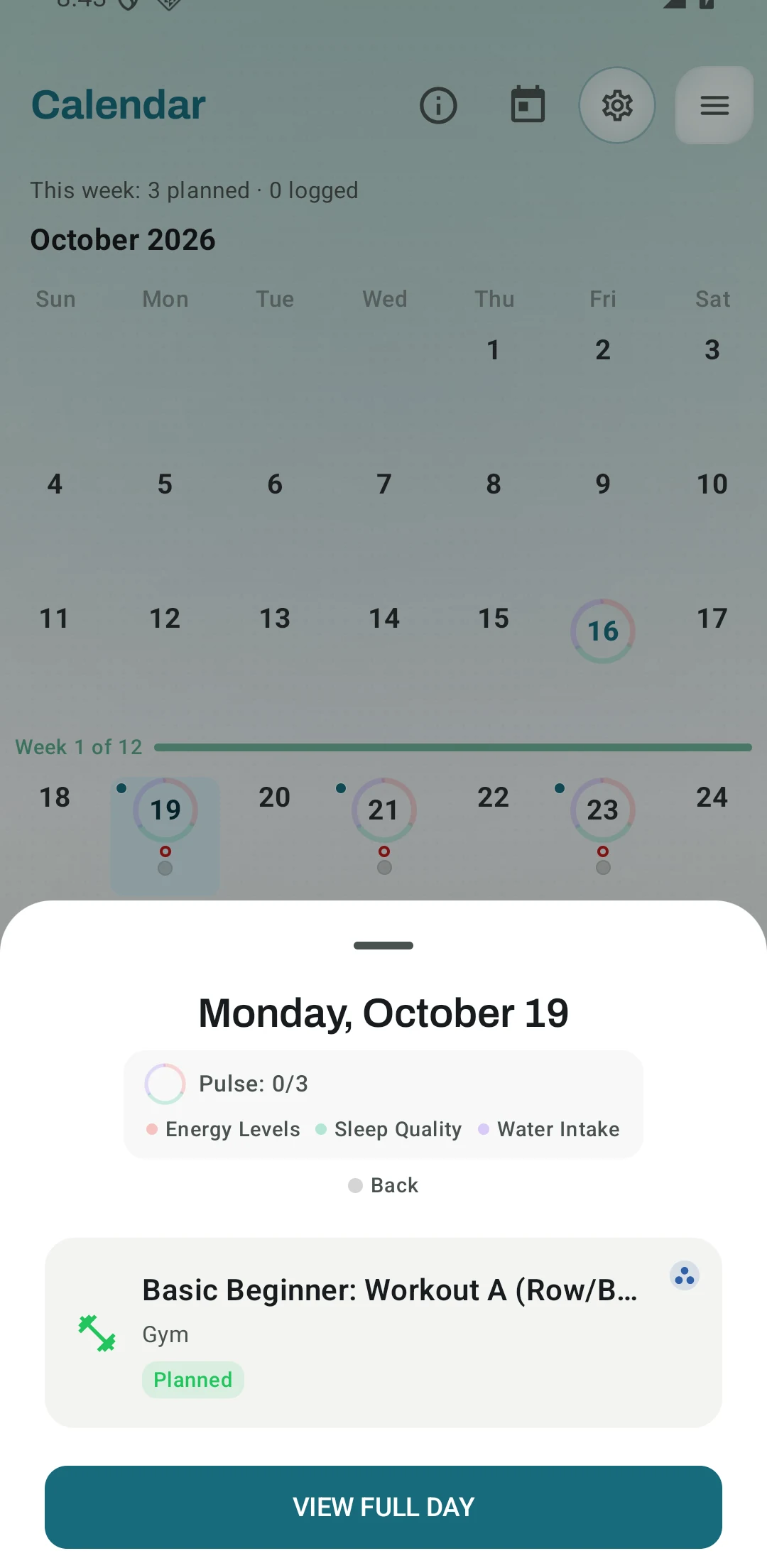
A starter program on the calendar
Real Android app capture of the Basic Beginner Routine set to start on a Monday. Workout A comes first on Monday, and the two workouts take turns on Monday, Wednesday and Friday.
One of the apps on this page
Kinoku is free to install
Core tracking works offline, with no account. An export from the app you use today can come along.
Android only for now, with an iPhone version in the works. Some depth is paid, and the pricing page says which parts.
Related features
A 4-phase planning stack. The builder, all 25 templates, named programs with auto-progression, the custom model, and unlimited active programs are free. Pro adds volume targets, readiness tuning, and auto set changes.
Unlimited routines, Smart Sync, Starter Packs, and follow-along links are free, and so are Rotation Groups that cycle through several routines for you.
1,300+ built-in exercises with muscle data and unlimited custom moves are free. Pro adds custom form photos and assisted sorting.
Every set, one tap. Track how hard each set felt, your rest timers, set types, and notes.
Load the bar fast with a visual plate layout. The calculator and bar-weight setting are free; Pro adds custom plate inventory settings.
Warmup sets built from your working weight, bar weight, and unit system.