

Best free apps to build your own workout routines (2026)
Eight gym apps for making your own routines and exercises, grouped by what each free plan limits, quoted from the apps' own pages and our tests.
FitNotes, Kinoku and Liftosaur state no limit on routines or custom exercises in their free plans; Boostcamp, Caliber and JEFIT keep routines open but cap or charge for custom exercises, and Hevy and Strong cap how many routines a free account saves.
At a glance
| App | Best for | Better at | Main trade-off |
|---|---|---|---|
| FitNotes | Android users after a plain routine log with nothing to buy | Multi-day routines with no account, no ads and nothing to buy | Android only, and no programs that change week to week |
| Kinoku | Android lifters who want routines, custom moves and multi-week programs free with no account | Unlimited routines and custom exercises, plus a free program builder and photo import | Android only for now, no desktop editor, and the circuit timer is Pro |
| Liftosaur | Lifters who like to write a program as text and edit it on a computer | A program editor with a grid, a per-day view, text and a browser editor | Graphs and muscle views are Premium |
| Boostcamp | Lifters who build multi-week programs and want a desktop builder too | A free program builder in the app and a grid editor on the web | 3 custom exercises free, and it asks for an account |
| Caliber | Lifters who build workouts from a stock library and may pay for coaching later | Unlimited workouts free, with a paid coach on the same app | Custom exercises and supersets sit in Caliber Plus |
| JEFIT | Lifters who build routines from a large exercise list with how-to guides | Over 1,400 exercises with guides, and supersets inside a routine | 3 custom exercises free in our test, plus an account wall |
| Hevy | Lifters who build routines to share and copy with friends | Copy a friend's routine and plan sessions ahead in a routine planner | Our test hit a free cap of 4 routines and 7 custom exercises |
| Strong | Lifters who keep a few templates and want a fast, plain log | A plain template list with supersets and set tags | 3 workout templates on the free version |
Publisher disclosure
Kinoku, made by Dreamsoft Works, writes and publishes this page, and Kinoku is one of the apps on it. Every fact about another app is quoted from a page that app's maker publishes, opened on October 17, 2026, or observed in our own dated emulator test. We give no score. The caption names how the list is grouped, and every label points at a quoted sentence.
Quickstart
FitNotes, Kinoku and Liftosaur state no limit on routines or custom exercises in their free plans. Boostcamp, Caliber and JEFIT (a long-running lifting app) keep routines open but cap or charge for custom exercises, while Hevy and Strong cap how many routines a free account can save. The apps are grouped by what the free plan limits, A to Z inside each group.
What does each free plan limit when you build?
Building your own training means three things in practice: saving workouts as routines, adding moves the library lacks, and grouping sets into supersets. The eight apps here split by which of those their free plan holds back, in their own words or in our dated tests.
- Nothing stated: FitNotes, Kinoku and Liftosaur. FitNotes’ listing says you can “Create as many routines as you want”, Liftosaur says “programs and the editor” are free, and Kinoku keeps unlimited routines and custom exercises in its free tier.
- Routines open, custom exercises or supersets limited: Boostcamp, Caliber and JEFIT. Boostcamp’s features page says “Create up to 3 custom exercises free (unlimited with Pro)”, Caliber’s listing puts custom exercises and supersets in Caliber Plus, and JEFIT showed “Custom exercises: 0/3” in our test.
- Saved routines capped: Hevy and Strong. Strong’s help centre caps its free version at “3 Workout Templates”, while Hevy’s listing says “Create an unlimited amount of routines”, yet its app stopped a free account at four in our September 2026 test.
A cap matters most if you keep a split with many days. A four-day upper and lower split fits inside Hevy’s four routines, while a six-day push, pull and legs plan does not. A cap on custom exercises bites when your gym has machines no catalog describes.
Side by side
The table sets out what each app’s own pages, or our dated emulator tests, say about building. A cell reads “Not stated” where none of the pages we opened says. Kinoku’s row comes from its code.
| App | Routines in the free plan | Custom exercises in the free plan | Supersets | Account to start |
|---|---|---|---|---|
| FitNotes | As many as you want, split into days | Not stated; no paid plan | Yes, as a group in a routine | No |
| Kinoku | No cap | No cap | Yes, plus drop sets and rest-pause | No |
| Liftosaur | Programs and the editor are free | Yes; not in the Premium list | Yes | No |
| Boostcamp | Custom programs with no cap; single-session templates limited | 3 free | Yes | Yes |
| Caliber | Unlimited workouts | In Caliber Plus | In Caliber Plus | Not stated |
| JEFIT | Free and custom routines; a 5-day plan limit seen in our test | 3 in our test | Yes | Yes, in our test |
| Hevy | 4 in our test; listing says unlimited | 7 in our test | Yes, as a set type | Yes, in our test |
| Strong | 3 templates | Yes; cap not stated | Yes | Yes |
Each app, in its own words
FitNotes
Best for: Android users after a plain routine log with nothing to buy.
FitNotes is a workout log for Android with a long help section on routines. “A Routine can comprise multiple Days (or Sections) and each Day can contain a selection of exercises.”
- What it does well: Its listing says you can “Create as many routines as you want and switch between them using dropdown list” and “Assign exercises to a particular day within the routine”. A routine can hold predefined sets, which “will be added to your current workout automatically each time you use this Routine”.
- What its pages say about building: Exercises you put in a group run as a superset, and the routine marks them with “A coloured bar”. Its homepage says it is “Free to use and no ads - ever”.
- What its pages say about limits: FitNotes runs on Android only, and a routine holds the same workout each time. Nothing in its pages describes a program that changes its sets or weights from week to week.
- Where it is the better pick: An Android lifter who wants routines split into days, with no account and no store page to upgrade from.
Its privacy policy says no account is needed to use FitNotes. FitNotes’ official listing is on Google Play, and our versus page, Kinoku vs FitNotes, sets the two side by side.
Kinoku
Best for: Android lifters who want routines, custom moves and multi-week programs free with no account.
Kinoku is an Android training app that never asks you to sign up. Your workout record lives on no Kinoku server, though the phone’s own Android backup can include eligible app data. Every part of building your own training described here sits in the free tier.
- What it does well: Routines have no cap, and each one can hold straight sets, supersets, giant sets, drop sets, rest-pause sets and cardio blocks. Starting a routine fills each set with the numbers from your last session of it. A Rotation Group cycles through several of your routines, so a push, pull and legs split picks the next day for you.
- Custom exercises: You can add as many of your own moves as you need, with their main muscles and gear. A custom move then turns up in search, feeds the muscle map and counts toward your volume charts, the same as one of the 1,300+ built-in moves.
- Getting a plan in: Photo Import reads a printed page or a screenshot into a routine on your phone and marks any number it was unsure of. You can also paste a plan as text, or start from a free Starter Pack. A free program builder lays out plans that change week to week.
- What Kinoku does not do: Kinoku is an Android app with no iPhone version yet, and it has no desktop editor. A routine kept on one phone does not sync to a second phone. The circuit and interval timer is Pro, and so are the three layers that tune a program for you.
You can install Kinoku from its official Google Play listing and build your first routine before any sign-up, because there is none.
Liftosaur
Best for: Lifters who like to write a program as text and edit it on a computer.
Liftosaur is a workout planner built around its own program language, Liftoscript. Its features page says you can “Build a program on a calendar grid, in a per-day UI, or as Liftoscript text.” Each set can carry a target rate of perceived exertion (RPE), and the editor keeps every earlier version of the plan.
- What it does well: You can “Write your program in a browser with a full keyboard, autocomplete and weekly volume stats, then send it to the phone with one link.” Supersets let you “Group two or more exercises, and the workout screen moves to the next one after every set.”
- What its pages say about building: You can “Add exercises missing from the built-in list, with muscles, types, notes and an image.” Its Premium page says “Everything else is free: programs and the editor, Liftoscript, logging workouts, history, measurements entry, equipment, sharing, import and export.”
- What its pages say about limits: One subscription adds “plates per side, graphs, muscle views, Week Insights, the Apple Watch app and the API.” So you build for free and pay to chart the results.
- Where it is the better pick: A lifter who thinks in spreadsheets or code and wants the plan written out in full, with a version history to go back to.
For a lifter wary of sign-ups, its sync page says the app works “without an account and without a connection.” The official Liftosaur listing sits on Google Play.
Boostcamp
Best for: Lifters who build multi-week programs and want a desktop builder too.
Boostcamp is a program app with a workout log, and it publishes its own list of routine builders. Its features page says you can “Build your own multi-week mesocycle in the custom program builder, duplicate your own programs or copy shared community programs, and share programs publicly, all free with no cap.”
- What it does well: Its own roundup describes “a separate desktop Web Program Creator, a spreadsheet-style tool with keyboard shortcuts for adding sets, editing sets, and rearranging exercises and days”. The tracker lists “Supersets, drop sets, customizable warmup templates, and Swap Exercise, which keeps the prescription when you substitute a movement.”
- What its pages say about limits: “Create up to 3 custom exercises free (unlimited with Pro).” Its roundup adds that the free limits fall on saved single-session templates and on “custom exercises (3 free), not on building or running custom programs.”
- Where it is the better pick: A lifter who builds full blocks that run for weeks, likes to edit them on a big screen, and rarely needs a move outside the library.
Its homepage says to “create an account, and choose a program”. Boostcamp’s official listing is on Google Play, and our versus page, Kinoku vs Boostcamp, sets the two side by side.
Caliber
Best for: Lifters who build workouts from a stock library and may pay for coaching later.
Caliber is a strength training app that sells coaching on top of a free tracker. Its listing opens the free half with “Free Version. Create and track unlimited workouts, access 800+ exercises, and train solo or with friends.”
- What it does well: Building workouts has no stated cap, and the library holds more than 800 exercises. The same app offers paid one-to-one coaching, so a lifter can start free and move to a coach without switching apps.
- What its pages say about limits: Its paid list says you can “create custom exercises and supersets, swap exercises, upload progress photos, and more” with Caliber Plus. That puts both custom exercises and supersets in Caliber Plus, next to “coach-designed training plans”.
- Where it is the better pick: A lifter whose training fits the stock exercise list, who builds straight sets, and who might hire a coach later.
Caliber’s official listing is on Google Play, where the free and Caliber Plus lists sit one after the other.
JEFIT
Best for: Lifters who build routines from a large exercise list with how-to guides.
JEFIT is a long-running workout planner with a large exercise database. Its listing says you can “Build your own custom workouts, exercises, and personalized gym routines”.
- What it does well: You can “Group exercises into supersets, and set a custom rest timer, stopwatch, or countdown for any exercise”. Its Elite page lists “Free and custom workout routines” under Basic, the free plan, next to over 1,400 exercises with guided instructions.
- What we saw about limits: In our test of JEFIT 17.4.4 on September 11, 2026, the Create Custom Exercise form read “Custom exercises: 0/3” next to a button that opens the paid plan. The plan editor showed “Day Limit - 5 days”, though we did not add days to see which plan that belongs to. The app asked us to sign up before the first workout.
- Where it is the better pick: A lifter who wants a guide for every move in the library and builds routines mostly from stock exercises.
JEFIT’s official listing is on Google Play, and our versus page, Kinoku vs JEFIT, sets the two side by side.
Hevy
Best for: Lifters who build routines to share and copy with friends.
Hevy is a social workout log, and its listing names routines in almost every line. You can “Create gym routines or home workouts and use the routine planner to prepare your sessions ahead of time”.
- What it does well: You can “Create your own custom exercises for your workouts” and “Mark sets as Warmup, Normal, Drop sets, Failure and Supersets”. The social side lets you follow a friend’s lifts and copy the routines they build.
- What its pages and its app say about limits: The listing says “Create an unlimited amount of routines”. In our test of Hevy 3.1.12 on September 6, 2026, the fifth New Routine tap brought up an upgrade sheet: “Free accounts have a limit of 4 routines.” The eighth custom exercise met “Free accounts have a limit of 7 custom exercises.” The first screen asked for an account with no guest path.
- Where it is the better pick: A lifter on a split of four days or fewer, or one who plans to pay for Pro, who likes to borrow routines from friends.
The official Hevy listing is on Google Play, and Kinoku vs Hevy compares the two apps routine by routine.
Strong
Best for: Lifters who keep a few templates and want a fast, plain log.
Strong is a gym log for phones that calls a saved workout a template. Its listing says you can “Add your own exercises, routines and easily choose between them”.
- What it does well: The listing names “Supersets/Grouped Exercises” and lets you “Tag sets as Warm Up, Failure or Drop Sets”. A template fills the session for you, and the log stays out of the way while you train.
- What its pages say about limits: Its help centre sets the free version at “up to 3 Workout Templates”. Our test of Strong 6.2.4 on September 11, 2026 matched it: the fourth template opened a Strong PRO dialog, and the screen behind it read “Current free limit: 3 templates”. Its help centre adds that every user is asked to make an account first.
- Where it is the better pick: A lifter who runs the same three sessions most weeks, such as a full-body A, B and C, and wants the simplest screen.
The official Strong listing is on Google Play, and Kinoku vs Strong puts its template cap next to Kinoku’s routines.
Routines, programs and the plan you already have
A routine saves one workout, while a program says how the workouts change over the weeks. Most of the apps here build routines, and three of them also build programs for free.
- One workout, saved: FitNotes, Caliber, Hevy, JEFIT and Strong save a workout to run again, and you change the numbers yourself as you get stronger. FitNotes fills in predefined sets, and Kinoku fills each set from your last session of that routine.
- A plan over weeks: Boostcamp’s builder makes multi-week blocks, and Liftosaur splits a program into weeks and days in text. Kinoku’s free program builder starts from 25 templates, such as 5/3/1 and GZCLP, or from a blank page. Its Pro layers can adjust a program from your effort and recovery.
- A plan on paper or in another app: Kinoku’s Photo Import reads a printed page or a screenshot into a routine, and its importer reads a plan pasted as text. Boostcamp and Liftosaur let you build on a computer instead of typing on a phone.
How much you build is up to you. Some lifters keep one routine for years, and others rewrite their plan every block, so the right cap is the one your own split never runs into.
How this list was checked
The checks for this page ran on October 17, 2026, against pages that each app’s maker runs: a Play listing, a help article or the maker’s own site.
- Building in other apps: Every routine, exercise or superset claim about a rival is copied word for word from its own page, with a numbered source. Three caps rest on our own emulator tests from September 2026, and each one names the app version and the date.
- Where pages and tests disagree: Hevy’s listing says unlimited routines and its app showed a cap of four. We print both, with the test date, and leave the reader to weigh them.
- Kinoku: We read Kinoku’s facts in its source code and in its feature pages: no cap on routines or custom exercises, and the Pro check on the circuit timer and the program tuning layers.
- Order: The apps are grouped by what the free plan limits when you build, and inside a group they run in alphabetical order. No app paid for a place here.
Frequently asked questions
Which free app lets me build my own workout routines with no limit?
FitNotes, Kinoku and Liftosaur state no cap on routines or custom exercises in their free plans. FitNotes has no paid plan at all, Liftosaur says its programs and editor are free, and Kinoku keeps unlimited routines and custom exercises free. Boostcamp, Caliber and JEFIT keep routines open but cap or charge for custom exercises, while Hevy and Strong cap saved routines.
Is there a free workout app where I can create my own exercises?
Yes. Kinoku keeps custom exercises free with no cap, and Liftosaur’s custom exercises are not in its Premium list. Hevy capped a free account at 7 in our September 2026 test, JEFIT showed 3, and Boostcamp’s features page says 3 are free. Caliber’s listing puts custom exercises in Caliber Plus, its paid plan.
Does Hevy limit how many routines I can make for free?
Its pages and its app disagreed when we checked. Hevy’s Google Play listing says you can create an unlimited amount of routines. In our emulator test of Hevy 3.1.12 on September 6, 2026, the fifth New Routine tap opened a sheet that read “Free accounts have a limit of 4 routines.” We print both and date the test.
How many templates can I keep on Strong’s free version?
Three. Strong’s help article on templates puts the free version at three Workout Templates, and unlimited templates come with Strong PRO. Our emulator test of Strong 6.2.4 on September 11, 2026 matched it: the fourth New template tap opened a Strong PRO dialog, and the screen behind it read “Current free limit: 3 templates”.
Which is better for custom workouts, Caliber or Hevy?
They limit different things. Caliber’s listing says the free version lets you create and track unlimited workouts, and it puts custom exercises and supersets in Caliber Plus. Hevy lets you make custom exercises and mark supersets, and its free account stopped at 4 routines and 7 custom exercises in our test. If you need moves the library lacks, Caliber costs money sooner.
Can I build supersets in a free workout app?
Yes, in several. Boostcamp lists supersets and drop sets among its tracker features, FitNotes groups exercises into a superset with a colored bar, and Liftosaur’s supersets move you to the next exercise after each set. Kinoku builds supersets, giant sets, drop sets and rest-pause sets for free. Caliber is the one app here that puts creating supersets in its paid plan.
Can I build a program that changes week to week, not just one workout?
Yes. Boostcamp’s builder makes multi-week programs for free, Liftosaur’s editor splits a program into weeks and days, and Kinoku’s program builder is free and lays out weeks from 25 templates or from scratch. A routine in FitNotes, Hevy, Strong or Caliber holds a workout, so a plan that shifts each week means editing it by hand.
Do I need an account to build my own routines?
Not in FitNotes, Kinoku or Liftosaur. FitNotes says you are not required to register an account, Liftosaur says you can use the app without one, and Kinoku has no account to create. Strong asks each new user to make an account, Boostcamp’s homepage asks you to create one, and our tests found no guest path in Hevy or JEFIT.
Can I build my routines on a computer?
In Boostcamp and Liftosaur, yes. Boostcamp’s own page describes a desktop Web Program Creator, a spreadsheet-style editor with keyboard shortcuts, and Liftosaur lets you write a program in a browser and send it to the phone with one link. Kinoku has no desktop editor. You build on the phone, or paste a plan as text into its importer.
Can I turn a written or printed plan into a routine?
Kinoku’s Photo Import reads a printed page or a screenshot into a routine on your phone, with no upload and no account. It marks numbers it was unsure of so you can fix them before saving, and handwriting is best effort. You can also paste a plan as text. The other pages we read describe no photo import.
What does Kinoku charge for when I build my own training?
Building routines, custom exercises, supersets, drop sets, Rotation Groups and the program builder are free. Pro adds the circuit and interval timer and your own form photos on a custom exercise. It also adds three layers that tune a program for you, which read your effort ratings, your weekly sets per muscle, and your sleep and heart data.
Can I move routines I already built in another app into Kinoku?
Partly. Kinoku’s CSV import reads workout history from apps like Hevy and Strong, but a CSV carries no routines. Kinoku can suggest routines from sessions you repeat in that history, read a pasted plan as text, or read a photo of the plan. The Kinoku JSON format carries routines in full, which suits a plan an AI assistant writes for you.
Related pages
- Routines and programs: Every set type a Kinoku routine holds, Smart Sync and Rotation Groups.
- Photo Import: How a printed plan or a screenshot becomes a routine on your phone.
- Exercise Library: The 1,300+ built-in moves and how a custom move joins them.
- Best workout program apps: Apps that run named programs such as 5/3/1 and GZCLP for you.
- Best free workout tracker apps for Android: What each free plan covers beyond building.
- Kinoku vs Hevy: Two loggers side by side, from routines to export.
Which one fits you
- Choose FitNotes if you are on Android, want routines split into days, and want an app with nothing to buy.
- Choose Kinoku if you want no cap on routines or custom exercises, a free program builder, and no account.
- Choose Liftosaur if you would rather write your program as text, or edit it in a browser on a computer.
- Choose Boostcamp if you build programs that run for weeks and want a spreadsheet-style editor on the web.
- Choose Caliber if the stock exercise list covers your training and you might want a paid coach later.
- Choose JEFIT if a big exercise list with guides matters more to you than custom moves.
- Choose Hevy if four routines are enough, or you plan to pay, and you like copying routines from friends.
- Choose Strong if three templates cover your week and you want the plainest log on this list.
How this page is checked. Every fact about another app on this page comes from a page that app publishes, which we could open and quote on October 17, 2026. The sources, with the exact sentence each fact rests on, are listed just above. Every Kinoku fact is tied to the shipping app's code. The page carries no score; the caption above names the measure the list is ordered by. If a fact here has gone stale, the support page is the fastest way to tell us.
Kinoku in practice
Where this shows up in the app
 Open full-size image ↗
Routines you build yourself
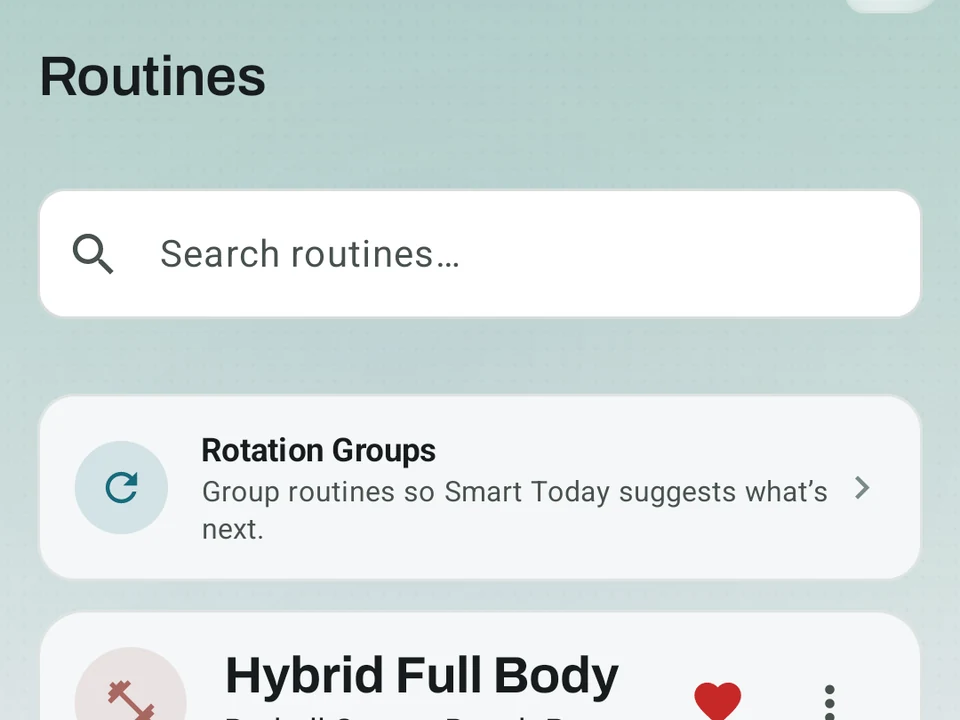
Real app capture, free tier. The Routines screen holds your own routines, a Rotation Group that picks which one comes next, and a search box. Kinoku puts no cap on how many routines you keep.
One of the apps on this page
Kinoku is free to install
Core tracking works offline, with no account. An export from the app you use today can come along.
Android only for now, with an iPhone version in the works. Some depth is paid, and the pricing page says which parts.
Related features
Unlimited routines, Smart Sync, Starter Packs, and follow-along links are free, and so are Rotation Groups that cycle through several routines for you.
1,300+ built-in exercises with muscle data and unlimited custom moves are free. Pro adds custom form photos and assisted sorting.
Scan a routine from a photo. Point at a coach's program, a screenshot, or a handwritten card, and Kinoku reads it into a routine on your phone. Check what it was not sure about, then import. Nothing is uploaded.
A 4-phase planning stack. The builder, all 25 templates, named programs with auto-progression, the custom model, and unlimited active programs are free. Pro adds volume targets, readiness tuning, and auto set changes.