

Boostcamp vs Hevy (2026): Programs, Free Limits and Feed
Boostcamp vs Hevy from their own pages: free programs, who sets the next weight, custom exercise limits, the feed, watches, offline use and moving over.
Boostcamp suits lifters who want a coach-written program from a free library; Hevy suits lifters who want friends, a web view and a watch app; Kinoku suits Android lifters who want no account.
At a glance
| App | Best for | Better at | Main trade-off |
|---|---|---|---|
| Boostcamp | A lifter who wants a coach-written program picked from a large free library | Free programs from named coaches, a desktop program builder, and offline logging once a program loads | Auto Progression is in Pro, 3 custom exercises are free, and you make an account to start |
| Hevy | Lifters who share workouts with friends and log from a watch on either platform | A friends feed, Apple Watch and Wear OS apps, a web view, and 7 free custom exercises | Trainer, its plan that changes your weights, is in Pro, and its pages disagree on free routines |
| Kinoku | Android lifters who want named programs to set the next weight for free, with no account | No account, free weight steps in named programs, and no cap on routines or custom exercises | Android only, 25 templates in place of a big library, and no feed or web view |
Publisher disclosure
Kinoku, made by Dreamsoft Works, writes and publishes this page, and Kinoku is one of the apps on it. Every fact about Boostcamp or Hevy is quoted from a page that app's maker publishes, opened on October 27, 2026. We give no score. The apps are listed A to Z, and every label points at a quoted sentence.
Quickstart
Boostcamp and Hevy both log sets on iPhone and Android, and they start from different places. Boostcamp is built around a free library of programs from named coaches and the community, while Hevy is a log with watch apps and a web view, plus an automatic plan in Pro. Both apps have a friends feed, and Kinoku is a third option on Android with no account.
This page ranks neither app and gives no score. The apps sit in A to Z order, and every cell quotes a page its maker publishes, opened on October 27, 2026.
What Boostcamp and Hevy each do well
The two apps answer different questions, and each one answers its own question well.
- Boostcamp hands you a plan. Boostcamp describes itself as “A free workout tracker and program app”. The programs come from coaches it names, among them Geoffrey Schofield, Dr. Eric Helms and Cody Lefever, and its listing adds nSuns, from the r/nSuns community, and 5/3/1, by Jim Wendler.
- Boostcamp lets you build on a big screen. Its routine builder page describes “a separate desktop Web Program Creator”, and its features page says free accounts can build and share programs with no cap.
- Hevy keeps your training social. Its help centre lists following other users, commenting on their workouts and a personalized workout feed.
- Hevy reaches your wrist. The same page names apps for Apple Watch and Wear OS next to the phone apps and a web browser view.
Side by side
The cells quote each app’s own pages, and “Not stated” marks a row that no page we opened answers.
| Boostcamp | Hevy | Kinoku | |
|---|---|---|---|
| Platforms | iPhone and Android, plus a desktop program builder | iPhone, Android, web, Apple Watch and Wear OS | Android and Wear OS |
| Account | “create an account” to start | A Hevy account holds your log | None |
| Program library | Most of its coach programs free, plus a community library | 26 programs and seven routine categories | 25 templates, all free |
| Who sets the next weight | Auto Progression, in Pro | Hevy Trainer, in Pro | Named programs, free |
| Free custom exercises | 3 | 7 | No cap |
| Building your own | Custom programs with “no cap”, in its words | Routines; its pages disagree on the free count | Routines and programs, no cap |
| Friends | A feed with follows and comments, plus shared programs | Follows, comments and a feed | None |
| Watch app | Not stated | Apple Watch and Wear OS | Wear OS, free |
| Effort rating per set | 6 to 10, in half steps | Listed among its tools | Free |
| Exercise videos | Form videos | “free high-quality videos” | None built in; saved YouTube links |
| Health Connect | Saves workouts to it | Not stated | Reads and writes, free |
| With no signal | Works offline once a program loads, then syncs | “Workout Offline” listed for its watch apps | Works offline, with no upload step |
| Export | Not stated | A file that spreadsheets open | CSV, a ZIP backup and Export for AI |
Where does the plan come from?
The size of the program library is the widest gap between the two apps, and it favours Boostcamp.
- Boostcamp’s library is mostly free. Its Pro page puts “Most of the 130+ coach-designed programs” in the free column and adds “20+ exclusive coach programs” in Pro, and its features page adds community programs to copy. Personalized Programs, a starter plan built from a short questionnaire, are Pro-only.
- Hevy’s library is smaller. Its help centre describes “a pre-built library of 26 training programs and seven routine categories”. Saving a program adds each of its routines to your library in a folder, which matters because Hevy’s own pages disagree on how many routines a free account keeps.
- Kinoku ships 25 templates. The program builder and every template are free, and a program can run for many weeks with its own blocks and deloads.
Who sets the next weight?
The step from one session to the next is where Kinoku differs most from both apps.
- Boostcamp, in Pro. Its homepage marks “Auto Progression (Pro)”, and its Pro page says linear progression, double progression and missed-rep adjustments “update your working weights from what you actually logged”.
- Hevy, in Pro. Hevy Trainer “automatically adjusts your working weights”, and Hevy’s help centre adds suggested weights and reps for your workouts. Its Trainer page says “No, Trainer is a Pro feature.”
- Kinoku, free inside a named program. Its named programs set the next weight on the free plan. They include 5/3/1 by Jim Wendler, GZCLP (a barbell program built on tiered lifts) by Cody Lefever, and nSuns from the r/nSuns community. Kinoku’s weight suggestions for a routine outside a program are part of Pro.
Building your own and custom exercises
All three apps let you build your own training, and they limit different parts of it.
- Boostcamp. Its features page lets free accounts build multi-week programs and share them “all free with no cap”, and its desktop builder works like a spreadsheet. Custom exercises are the limit: “Create up to 3 custom exercises free (unlimited with Pro).”
- Hevy. A free account can make up to 7 custom exercises, and Hevy marks sets as warmup, normal, drop, failure and supersets. The free routine count is unclear, because the Play listing reads “Create an unlimited amount of routines” and the help centre gives free accounts a smaller number. This page leaves the figure out.
- Kinoku. Routines, programs and custom exercises have no cap on the free plan, and supersets are free too.
Friends, watches and screens
Hevy covers more screens, and both apps have a feed of friends’ workouts.
- Hevy. You follow other users, comment on their workouts and read a feed. Its homepage offers “a big screen view of your routines, exercise progress” on the desktop, and its watch apps run on Apple Watch and Wear OS.
- Boostcamp. Its features page lists a feed of friends’ workouts with follows, reactions and comments, and it lets you copy community programs and share your own. On iPhone its listing adds Live Activities, which “put your set and rest timer on the Lock Screen and Dynamic Island”. The Boostcamp pages we opened name no watch app.
- Kinoku. A free Wear OS app, no Apple Watch app, no web view and no feed.
Logging with no signal, and where the log lives
Both rival apps keep your log in an account, and each one says something about working offline.
- Boostcamp says “The app works offline once a program is loaded, and your sessions sync to the cloud the next time you have internet.” Its features page adds that iCloud and Google account sign-in back up your training across devices.
- Hevy says your workouts, routines and profile come with you when you sign in on another device, and its homepage lists Workout Offline for its watch apps.
- Kinoku keeps the training record on the phone with no account, so a set logged with no signal needs no sync to any Kinoku server.
Moving between them
Hevy is the one of the two rivals whose pages describe an export file.
- Out of Hevy. Its help centre says Hevy exports data “in a format that can be opened in spreadsheet programs such as Google Sheets, Microsoft Excel, or similar applications.”
- Into Boostcamp. The Boostcamp pages we opened describe no export and no import from another app, so this page claims neither.
- Into Hevy. Hevy’s import page reads a Strong CSV file, and we found no Hevy page about a Boostcamp file.
- Into Kinoku. Kinoku’s importer reads the Hevy CSV export into the log on your phone. Kinoku has no importer written for Boostcamp.
Each app, in its own words
Boostcamp
Best for: A lifter who wants a coach-written program picked from a large free library.
Boostcamp is a program app first. Its homepage leads with the library and the coaches behind it, and the tracker runs whichever program you pick.
- What it does well. Coach-written programs on the free plan, a free builder for multi-week programs on the phone or a computer, form videos, an effort rating on every set, Health Connect, and offline logging once a program loads.
- What its pages say about limits. Auto Progression, Personalized Programs, per-exercise records and charts, and 20+ exclusive coach programs are in Pro, and a free account can make 3 custom exercises.
- Where it is the better pick. A lifter who wants a proven program from a named coach and a large choice of them gets far more of that in Boostcamp than in Hevy or Kinoku.
- Where Boostcamp differs. It asks you to create an account, and its pages name no watch app.
Hevy
Best for: Lifters who share workouts with friends and log from a watch on either platform.
Hevy’s homepage calls it “a free workout tracker for iOS and Android”, and the app adds a feed, a web view and both watch platforms around the log.
- What it does well. Follows, comments and a feed, apps for Apple Watch and Wear OS, a web view of your routines, exercise videos, and 7 free custom exercises.
- What its pages say about limits. Hevy Trainer, the plan that adjusts your weights, is in Pro, and its listing and help centre state the free routine limit differently.
- Where it is the better pick. A lifter who logs from an Apple Watch finds a watch app in Hevy, and none in Kinoku or the Boostcamp pages we opened.
- Where Hevy differs. Your log lives in a Hevy account, and its program library is much smaller than Boostcamp’s.
Kinoku
Best for: Android lifters who want named programs to set the next weight for free, with no account.
This page comes from Kinoku’s maker, so weigh this block with that in mind. Kinoku is an Android tracker for weights and runs that needs no account and keeps your record on the phone, which puts it beside Boostcamp and Hevy as a third choice.
- What it does well. Its named programs, such as 5/3/1, GZCLP and nSuns, set the next weight on the free plan. Routines and custom exercises have no cap, and it adds a free Wear OS app and an import for Hevy CSV files.
- What costs money. Pro, which runs US $5.99 for a month or US $39.99 for a year, holds readiness, run analytics, the Pro Analytics Hub and weight suggestions for routines outside a program. Free features stay free, and Kinoku shows no ads on any plan.
- Where it is the better pick. An Android lifter running 5/3/1, GZCLP or nSuns who wants the next weight set for free, with no sign-up.
- What Kinoku does not do: it offers 25 templates against Boostcamp’s far larger library, with no community programs to copy. It also has no feed, no web view, no Apple Watch app and no iPhone version yet.
How this comparison was checked
Each claim about Boostcamp and Hevy rests on a sentence from a page its maker publishes.
- Their own pages. We read Boostcamp’s homepage, Pro page, features page, routine builder page and Google Play listing, and Hevy’s homepage, Play listing, help centre, Trainer page and Strong import page, on October 27, 2026.
- Kinoku’s side. Kinoku facts come from the app’s own feature list, and each free or Pro line matches the tier check in the app’s code.
- What we left out. Prices, because store prices change from country to country. Also Hevy’s free routine figure, because its listing and help centre disagree, and a total for Boostcamp’s library, because its pages give different totals.
- No sponsor. Neither company had a say in this page or paid to be on it.
Frequently asked questions
Is Boostcamp or Hevy better?
Each one is better at a different job. Boostcamp hands you a program from a free library with coach-written plans, and it sets your weights if you pay for Pro. Hevy is a log with friends, a web view and apps for both watch platforms, and its Trainer plan is in Pro too. This page gives no score, because neither leads on every row.
Which app has more free programs?
Boostcamp, by a wide margin. Its Pro page says most of its 130+ coach-designed programs are free and Pro adds 20+ exclusive ones, and its features page adds community programs to copy. Hevy’s help centre describes 26 pre-built programs and seven routine categories. Kinoku ships 25 program templates, all free, including 5/3/1, GZCLP and nSuns.
Which app sets my next weight for free?
Among these three, only Kinoku does it on the free plan, inside its named programs. Boostcamp’s homepage marks Auto Progression as Pro, and Hevy’s Trainer page says Trainer is a Pro feature. Kinoku’s weight suggestions outside a program are part of Pro, so a routine you built yourself gets no automatic step on the free plan.
How many custom exercises can I make for free?
Boostcamp’s features page allows 3 custom exercises on a free account, with unlimited ones in Pro. Hevy’s help centre allows 7 on the free version. Kinoku puts no cap on custom exercises, routines or programs on its free plan, so a gym full of odd machines costs nothing to set up there.
Does Boostcamp have a social feed like Hevy?
Yes. Boostcamp’s features page lists a feed of friends’ workouts and published programs, with follows, reactions and comments. Hevy’s help centre lists following other users, commenting on their workouts and a personalized workout feed. Kinoku has no feed at all.
Do Boostcamp and Hevy work offline?
Boostcamp says the app works offline once a program is loaded, and your sessions sync to the cloud the next time you have internet. Hevy’s homepage lists Workout Offline among the features of its watch apps. Kinoku keeps the log on the phone, so logging with no signal needs no sync step afterwards.
Can I move my history from Hevy to Boostcamp or Kinoku?
Hevy exports your workouts as a file that spreadsheet programs open. The Boostcamp pages we opened describe no import from Hevy, so this page claims none. Kinoku’s importer reads the Hevy CSV export. The Hevy pages we opened describe an import for Strong files, and none for a Boostcamp file.
Is there a free option with no account?
Kinoku is one, on Android only. Boostcamp’s homepage tells you to create an account when you start, and Hevy’s help centre says your workouts and routines come with you when you sign in on another device. Kinoku has no account, keeps routines, custom exercises and programs free with no cap, and has no iPhone app yet.
Related pages
- Hevy vs Caliber: Hevy next to an app that sells coach plans and a personal trainer.
- Hevy vs Strong: Hevy beside the other set-table logger.
- Kinoku vs Boostcamp: Kinoku and Boostcamp in detail.
- Kinoku vs Hevy: Kinoku and Hevy, row by row.
- Best Boostcamp alternatives: apps ordered by whether they compute program weights.
- Best workout program apps: apps for running a structured program.
- Free GZCLP and nSuns apps: the two linear programs in more depth.
Which one fits you
- Choose Boostcamp if you want a coach-written program from a big free library, like to build long plans on a computer, and making an account is fine with you.
- Choose Hevy if you train with friends, log from an Apple Watch or a Wear OS watch, and your own routines or a paid guided plan cover your training.
- Choose Kinoku if you train on Android with no account and want 5/3/1, GZCLP or nSuns to set the next weight on the free plan.
How this page is checked. Every fact about another app on this page comes from a page that app publishes, which we could open and quote on October 27, 2026. The sources, with the exact sentence each fact rests on, are listed just above. Every Kinoku fact is tied to the shipping app's code. The page carries no score; the apps are grouped by what their own pages say. If a fact here has gone stale, the support page is the fastest way to tell us.
Kinoku in practice
Where this shows up in the app
 Open full-size image ↗
A program on the free plan
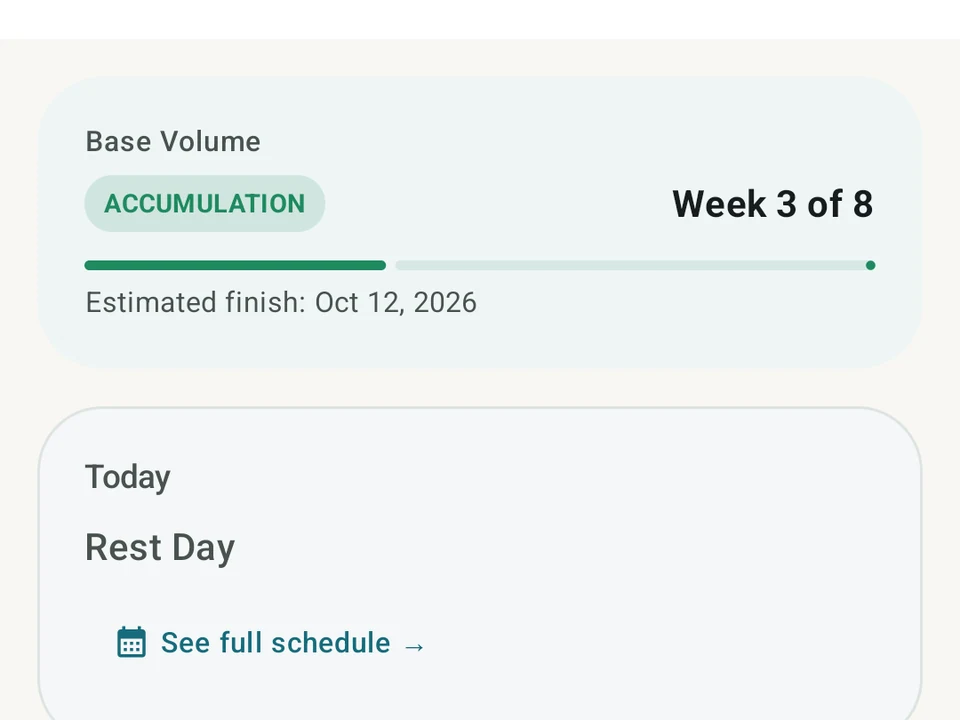
Real app capture. A Kinoku program at week 3 of 8 in its accumulation block, with a finish date and today's session, here a rest day. Building and running a program is free, and so are all 25 templates.
One of the apps on this page
Kinoku is free to install
Core tracking works offline, with no account. An export from the app you use today can come along.
Android only for now, with an iPhone version in the works. Some depth is paid, and the pricing page says which parts.
Related features
A 4-phase planning stack. The builder, all 25 templates, named programs with auto-progression, the custom model, and unlimited active programs are free. Pro adds volume targets, readiness tuning, and auto set changes.
Unlimited routines, Smart Sync, Starter Packs, and follow-along links are free, and so are Rotation Groups that cycle through several routines for you.
A real watch app for workouts, runs, steps, tiles, and watch face data.