

Which free app runs GZCLP or nSuns on Android? (2026)
Five Android apps that run GZCLP or nSuns, compared on which layouts they ship, what moves the weights after a stall, and what each one keeps for its paid plan.
Boostcamp, Intensity, KeyLifts, Kinoku and Liftosaur all list nSuns on Android, and four of them name GZCLP; Kinoku and Liftosaur move the weights for free with no account, KeyLifts puts that step in Pro, and Boostcamp's pages disagree.
At a glance
| App | Best for | Better at | Main trade-off |
|---|---|---|---|
| Boostcamp | nSuns lifters who want all four layouts, and GZCLP lifters who want the tiers set out, with an account | The 4, 5 and both 6 day nSuns layouts, and GZCLP with Tier 2 and Tier 3 work in order | An account to start, and two of its pages differ on whether progression is free |
| Intensity | Lifters who want nSuns in a free, powerlifting-focused log that also runs on the web | Over 250 programs with nSuns among them, free, on Android, iPhone and the web | Its pages do not say which nSuns layout it runs or how it handles a stall |
| KeyLifts | Lifters who want GZCLP and four nSuns layouts in one percentage template library | GZCLP and four nSuns layouts next to 5/3/1 and other percentage programs | Its homepage puts automatic training max progression in Pro |
| Kinoku | Android lifters who want GZCLP's Tier 1 stages and nSuns run free, offline and with no account | Stage changes, resets and training max steps run on the phone, free | Android only, Tier 1 only on GZCLP, and one nine-set ladder for every nSuns day |
| Liftosaur | Lifters who want the Tier 2 stages written out and every rule open to edit in a script | GZCLP with all three tiers, and nSuns raised from the 95 percent set | Its nSuns is the 5-day layout, and its GZCLP adds weight in pounds |
Publisher disclosure
Kinoku, made by Dreamsoft Works, writes and publishes this page, and Kinoku is one of the apps on it. Every fact about another app comes from a page that company publishes, opened on October 21, 2026. We give no score. The apps are listed in alphabetical order, and every label points at a quoted sentence.
Quickstart
Boostcamp, Intensity, KeyLifts, Kinoku and Liftosaur all run nSuns on Android, and all but Intensity name GZCLP (coach Cody Lefever’s starter barbell program) on their pages. Kinoku and Liftosaur move the weights on their free plans with no account, KeyLifts keeps that step for Pro, and two of Boostcamp’s pages disagree about it. We give no score, and the apps are listed in alphabetical order.
Which free apps run GZCLP and nSuns on Android?
GZCLP is coach Cody Lefever’s linear progression (LP), a starter program where the weight goes up each time a lift goes well. Each day has three tiers: a heavy Tier 1 (T1) lift, a lighter Tier 2 (T2) lift for more reps, and Tier 3 (T3) extra work for the back and arms.
nSuns is a 5/3/1 offshoot from the r/nSuns forum. Each day pairs a nine-set main lift with an eight-set second lift, and every weight comes from a training max (TM), a number set a little below your one-rep max (1RM). Both programs end the main lift with an AMRAP set (as many reps as possible), and that set decides what happens next.
Four of the apps here name both programs on their own pages, and Intensity names nSuns next to GZCL (the wider family of Cody Lefever’s programs). They split into three groups by what those pages say about the step a spreadsheet makes you do by hand, which is moving the weights.
- The weights move on the free plan: Intensity, Kinoku and Liftosaur. Intensity’s homepage calls the app free and offers programs “with built-in progression and automated percentage calculations.” Liftosaur’s premium page puts programs, its program editor and workout logging under the line “Everything else is free”. Kinoku’s templates and their weight changes cost nothing.
- The weights move in Pro: KeyLifts. Its homepage says “Pro adds automatic training max progression, cloud backup and sync, a plate calculator, and progress graphs.”
- The pages disagree: Boostcamp. Its nSuns roundup says the program runs “on the free tier, with the same automatic Training Max progression.” Its nSuns program page says “With Auto Progression in Boostcamp Pro, working weights and targets update between sessions”.
Side by side
Every cell below comes from the app’s own listing or site, or from Kinoku’s code for Kinoku. “Not stated” marks a cell that none of the app’s pages cover.
| App | GZCLP | nSuns layouts | What moves the weights | After a stall | Account |
|---|---|---|---|---|---|
| Boostcamp | All three tiers set out in order | 4-day, 5-day, 6-day Squat, 6-day Deadlift | Two of its pages differ on free or Pro | Not stated | Yes (“create a free account”) |
| Intensity | GZCL listed; GZCLP not named | Not stated | “built-in progression” | Not stated | Two lines on its homepage differ |
| KeyLifts | A GZCLP template, weight added each week | 4-day, 5-day, two 6-day | Automatic training max step in Pro | Not stated | Not stated |
| Kinoku | Tier 1 stages run for you; Tier 2 and 3 by hand | 4-day, 5-day, 6-day with a second squat day | A fixed step: +5 kg lower body, +2.5 kg upper | GZCLP: 90% after 10x1; nSuns: 90% after two misses | None |
| Liftosaur | All three tiers in an editable script | 5-day | Your script; nSuns reads the 95% set | GZCLP: 90% or a new 5-rep max; nSuns: minus 10% | Optional, for sync |
Each app, in its own words
Boostcamp
Best for: nSuns lifters who want all four layouts, and GZCLP lifters who want the tiers set out, with an account.
Boostcamp is a program library and gym logger, and its Play listing names nSuns and GZCLP among the programs you can run, next to “130+ coach programs.”
- What it does well: Its nSuns roundup says Boostcamp “ships nSuns 5/3/1 as a free program with all four standard layouts built in: 4-day, 5-day, 6-day Squat, and 6-day Deadlift.” You enter your training maxes, and “the percentage table is filled in for you”. For GZCLP, its GZCL roundup says “Boostcamp lays the T1, T2, and T3 work out in order, records the AMRAP, and advances the loads”.
- What its pages say about limits: The tracker page says to “create a free account” after you install the app. Its nSuns program page puts Auto Progression in Boostcamp Pro, while its nSuns roundup describes automatic training max progression on the free tier, so its own pages give two answers.
- Where it is the better pick: A lifter who wants the 6-day Deadlift layout of nSuns, or GZCLP with the Tier 2 and Tier 3 work set out, and who does not mind an account.
- Where Boostcamp differs: Its pages do not say how far a lift drops after a stall on either program. Its tracker page says logging, programs and rest timers “are all included with no paywall.” Official listing: Google Play. Versus page: Kinoku vs Boostcamp.
Intensity
Best for: Lifters who want nSuns in a free, powerlifting-focused log that also runs on the web.
Intensity describes itself as “A powerlifting-focused workout tracking app designed to get you stronger. Available on Android, iOS, and web.”
- What it does well: Its homepage offers “Access to over 250 popular and proven strength and powerlifting programs such as 5/3/1, GZCL, Candito Programs, nSuns, Juggernaut Method, Sheiko, Smolov”, with “built-in progression and automated percentage calculations.” It also says “Intensity is free to use with all core features including workout tracking, pre-built programs, statistics, and more.”
- What its pages say about limits: The homepage says “Completely ad-free and no account required.” The same page says “All your workout data is associated to your account and stored securely in the cloud,” so its two lines read differently.
- Where it is the better pick: A lifter who wants nSuns inside a free log built around powerlifting, with the same record on a phone and in a web browser.
- Where Intensity differs: Its program pages load in a way we could not read, so we could not see which nSuns layout it runs, which GZCL programs it holds, or what it does after a stall. It says “Intensity works both online and offline.” Official listing: Google Play.
KeyLifts
Best for: Lifters who want GZCLP and four nSuns layouts in one percentage template library.
KeyLifts is an app for percentage programs, and its homepage says “The library includes more than 170 verified templates across 5/3/1, GZCL, nSuns, Tactical Barbell, Starting Strength, and other progression systems.”
- What it does well: Its GZCL page says “Compare GZCL and GZCLP templates that organize exercises into primary, secondary, and assistance tiers.” Its nSuns page lists four layouts, with “nSuns LP 6 Day Deadlift” among them. The GZCLP template offers “the prebuilt schedule with percentage calculations and training-max progression prepared for each session.”
- What its pages say about limits: The homepage says “Pro adds automatic training max progression, cloud backup and sync, a plate calculator, and progress graphs.” It also says KeyLifts “is available for iPhone, iPad, Apple Watch, and Android.”
- Where it is the better pick: A lifter who runs several percentage programs in a row and wants GZCLP, nSuns and 5/3/1 in one app, and who will pay for the automatic step.
- Where KeyLifts differs: Its GZCLP page says “Every week you add weight to the main lifts,” but its pages do not say how far a lift moves after a missed stage. It also says “KeyLifts is an independent workout tracker and is not the original publisher of this program.” Official listing: Google Play.
Kinoku
Best for: Android lifters who want GZCLP’s Tier 1 stages and nSuns run free, offline and with no account.
Kinoku is a free Android training app, and your record sits on no Kinoku server, though Android’s system backup can still copy eligible app data. It ships GZCLP as a four-day template and nSuns in four, five and six day versions, all in its free template gallery.
- What it does well: You type a one-rep max for the squat, bench press, deadlift and overhead press, and Kinoku sets each training max at 90 percent of it. On GZCLP it moves each Tier 1 lift through its three stages and resets it after the last one. On nSuns it sets the nine-set ladder for each day’s main lift and raises the training max by a fixed step.
- What its pages say about limits: The templates, the weight changes, the program builder and the plate calculator are all free, with no account. Pro adds readiness tuning, which can change a planned session based on your sleep and heart rate readings from Health Connect.
- Where it is the better pick: A lifter on Android who wants the GZCLP stages or the nSuns training max kept for them, with no sign-up and nothing to pay.
- What Kinoku does not do: It has no iPhone version so far, and your record stays on one Android phone with no sync to a second. On GZCLP it tracks Tier 1 only, so you move the Tier 2 and Tier 3 stages by hand, and it plans four days a week with no three-day rotation. On nSuns it uses one ladder for every main lift, with no heavy single at 95 percent, and it has no 6-day Deadlift layout.
Liftosaur
Best for: Lifters who want the Tier 2 stages written out and every rule open to edit in a script.
Liftosaur is a workout planner where each program is a short text script you can change. Its Play listing promises “All GZCL programs”, with GZCLP first in that list.
- What it does well: Its GZCLP page writes out all three tiers. Tier 2 uses the main lifts too (“You flip flop the T1 and T2.”), and for Tier 3 “There are no stages, just do 3 sets of 15 reps, with AMRAP as a last set.” Its nSuns page says “After each session, the app checks your AMRAP performance on the T1 top set (set 3 at 95% TM).” Its Play listing adds that weights and reps go up or down by the rules you write.
- What its pages say about limits: Its nSuns program describes a “Fixed 5-day weekly rotation”, and “GZCLP is a 3-day program.” Its paid plan adds plates per side, graphs, muscle views and the Apple Watch app, while programs and the editor stay free.
- Where it is the better pick: A lifter who wants Tier 2 stages tracked, or the original nSuns jumps from the heavy single, and who is happy to edit a short script.
- Where Liftosaur differs: Its sync page says the app works with no account and no signal, and “An account adds a copy in the cloud.” Its GZCLP script adds 5 or 10 pounds after a good session, and you can rewrite those steps. Official listing: Google Play.
How each app moves the weights after a stall
A stall is where a spreadsheet gets hard to keep, and the apps handle it in three ways.
- The app runs a fixed rule. Kinoku moves a failed GZCLP lift to the next stage and lowers the training max to 90 percent after a failed 10 sets of 1. On nSuns it lowers the training max to 90 percent after two short sessions in a row.
- The rule is in a script you can edit. Liftosaur’s GZCLP page says “If you fail Stage 3, you reset to 90% of your current weight and restart at Stage 1, or test a new 5RM,” where 5RM means your five-rep max. Its nSuns page says to “reduce your 1RM by 10% and rebuild” when the top set keeps getting one rep or none.
- The pages do not say. Boostcamp, Intensity and KeyLifts describe weights that move between sessions, but none of them names what happens after a stall.
One detail sets Kinoku’s GZCLP apart. Liftosaur’s page says that after a failed stage “you keep the weight the same, but move on to” the next stage. Kinoku keeps the training max the same instead, and each stage works from a higher share of it, so the bar gets a little heavier at 6 sets of 2 and again at 10 sets of 1.
How Kinoku runs GZCLP
Kinoku’s GZCLP is a four-day template, planned for 12 weeks by default, that works each Tier 1 weight out from the training max on the phone.
- The week: four workouts on Monday, Wednesday, Friday and Saturday. Each one has a Tier 1 lift for 5 sets of 3, a Tier 2 lift for 3 sets of 10, and lat pulldowns or barbell rows for 3 sets of 15.
- The stages: 5 sets of 3 at 85 percent of the training max, then 6 sets of 2 at 90 percent, then 10 sets of 1 at 95 percent. The last set of each is marked as an AMRAP set.
- A good session: when every set before the last reaches its reps and the last set gets at least one, the training max goes up 5 kg on the squat and deadlift and 2.5 kg on the bench and press. The lift stays in the same stage.
- A miss: the lift moves to the next stage at the same training max. After a failed 10 sets of 1, the training max drops to 90 percent and the lift goes back to 5 sets of 3.
- A short session: if you log fewer than half of a lift’s sets, Kinoku leaves that lift alone instead of counting a miss.
- Smaller jumps: with micro loading on in Program settings, the upper body step is 1.25 kg, the lower body step is 2.5 kg, and sets round to 1.25 kg.
Tier 2 and Tier 3 stay in your hands. The full tier layout and the setup steps are on the GZCLP program page.
How Kinoku runs nSuns
Kinoku’s nSuns runs in three versions and uses one ladder for the main lift of each day.
- The layouts: the 4-day week trains Monday, Tuesday, Thursday and Friday. The 5-day week runs Monday to Friday, and the 6-day week adds a second squat day on Saturday.
- The ladder: nine sets at 65, 75, 85, 85, 85, 80, 75, 70 and 65 percent of the training max, for 8, 6, 4, 4, 4, 5, 6, 7 and 8 or more reps. The last set is the AMRAP set.
- The step up: eight or more reps on that last set raise the training max by 5 kg on the squat and deadlift and by 2.5 kg on the bench and press, ready for the next session.
- A stall: fewer than eight reps hold the training max. Two short sessions in a row drop it to 90 percent.
- Second lifts: on the 5-day and 6-day plans, you choose the weights for the second lifts, such as the sumo deadlift and the close-grip bench.
This is simpler than the spreadsheet in two ways. The original climbs to a heavy single at 95 percent on most days, and a bigger set there earns a bigger jump, while Kinoku adds the same step each time. The nSuns 5/3/1 LP program page sets the two side by side. Program weights are worked out in kilograms, and the program has no setting for a five-pound rounding step.
How this list was checked
We quoted every fact about another app from a page that app’s maker runs, and we opened each of those pages on October 21, 2026.
- Other apps: each cell and label rests on a sentence from the app’s Google Play listing, its homepage, its program pages or its help pages. We ran no device test of these apps, so the table holds quotes and gaps only.
- The app list: we kept an app only when its own site or Play listing names GZCLP or nSuns and the app is on Android. We left out apps we could find only on the App Store, and one app whose Play listing we could not read. Intensity’s program list loads in a way we could not read, so its row holds the homepage lines only.
- Kinoku: Kinoku’s facts come from the app’s GZCLP and nSuns code and the templates it ships, including the stage rules, the step sizes and the stall rules.
- Order: no single measure ranks these apps, so they are listed from A to Z. No app paid for its place, and the page prints no price because no single page gives one figure for every plan.
Frequently asked questions
What is a good free app to run GZCLP on Android?
Four apps here run it. Kinoku moves the Tier 1 lift through its three stages for free, with no account, and you move Tier 2 and Tier 3 by hand. Liftosaur writes all three tiers into an editable script and keeps programs free. Boostcamp sets out the three tiers after you make an account, and KeyLifts puts its automatic training max step in Pro.
What is a good free app to run nSuns on Android?
Five apps here list it. Boostcamp and KeyLifts ship four layouts, with a 6-day Deadlift version among them. Kinoku runs the 4, 5 and 6 day versions free with no account, and Liftosaur runs the 5-day version, raising the max from the set at 95 percent. Intensity lists nSuns in a free app but does not say which layout it runs.
Which app is best for GZCLP or nSuns if I train for powerlifting?
Both programs build the squat, bench press and deadlift, so any of the five apps here can carry a strength block before a meet. Intensity calls itself a powerlifting-focused log, and the other four are general program apps. Apps that plan your attempts or a peak, and the strength scores that rank a total, are on our powerlifting app roundup for Android.
Does Kinoku track the GZCLP Tier 2 and Tier 3 stages?
No. Kinoku runs the Tier 1 stages, so it moves the main lift from 5 sets of 3 to 6 sets of 2 and then 10 sets of 1. The Tier 2 and Tier 3 exercises are in each routine, but you choose their weights and move their stages yourself. Liftosaur’s GZCLP page writes out the Tier 2 stages, and Boostcamp’s page says it lays out all three tiers.
What happens in Kinoku when I fail a GZCLP stage?
A miss on 5 sets of 3 moves that lift to 6 sets of 2, and a miss there moves it to 10 sets of 1. The training max stays put, so the bar goes from 85 to 90 to 95 percent of it. A miss on 10 sets of 1 drops the training max to 90 percent and starts the lift at 5 sets of 3 again.
How does Kinoku move the nSuns training max?
After each session, Kinoku reads the last set of the main lift. Eight or more reps raise the training max by 5 kg on the squat and deadlift and by 2.5 kg on the bench press and overhead press. Fewer than eight holds it, and two short sessions in a row lower it to 90 percent. The spreadsheet’s bigger jumps for a big set are not in the app.
Which nSuns layouts does each app run?
Boostcamp lists four: 4-day, 5-day, 6-day Squat and 6-day Deadlift. KeyLifts lists the same four layouts as templates. Kinoku runs 4, 5 and 6 day versions, where the 6-day week adds a second squat day, so it has no 6-day Deadlift version. Liftosaur’s nSuns LP page describes a fixed 5-day week.
Can I run GZCLP three days a week in an app?
Liftosaur’s page calls GZCLP a 3-day program that rotates four workouts, so its version fits a three-day week. KeyLifts lists its GZCLP template at four days a week. Kinoku plans its GZCLP on Monday, Wednesday, Friday and Saturday, and it has no three-day rotation for this program.
Do I need an account to run GZCLP or nSuns?
Not in Kinoku, which has no account at all, and not in Liftosaur, whose page says you can use the app without one. Boostcamp’s tracker page tells you to create a free account after you install the app. Intensity’s homepage says no account is required, and it also says your workout data is tied to your account in its cloud. KeyLifts’ pages do not say.
Is automatic progression free in these apps?
In Kinoku, yes: the programs and every weight change cost nothing. Liftosaur says programs, the editor and its script language are free, and Intensity calls itself free to use with its pre-built programs included. KeyLifts’ homepage puts automatic training max progression in Pro. Boostcamp’s nSuns roundup says the free tier has automatic training max progression, while its nSuns program page puts Auto Progression in Boostcamp Pro.
Does Kinoku round GZCLP and nSuns weights in pounds?
No. Kinoku works out program weights in kilograms and rounds them to 2.5 kg, or to 1.25 kg with micro loading on in Program settings. If you log in pounds, the numbers are converted for display, so they may not land on round pound plates. Liftosaur’s GZCLP script adds weight in 5 and 10 pound steps instead.
What does Kinoku not do for GZCLP and nSuns?
Kinoku has no iPhone app yet and no sync between two phones. On GZCLP it tracks Tier 1 only and plans four days a week. On nSuns it uses one nine-set ladder for every main lift, with no heavy single at 95 percent and no 6-day Deadlift layout, and you load the second lifts yourself on the 5-day and 6-day plans.
Related pages
- Best 5/3/1 apps for Android: How seven apps set and raise the 5/3/1 training max, cycle by cycle.
- Best workout program apps for periodization: Program runners and plain loggers side by side, beyond GZCLP and nSuns.
- Best powerlifting apps for Android: Meet planners and strength scores next to the program runners on this page.
- GZCLP program page: The three tiers, the stages and the setup steps in Kinoku.
- nSuns 5/3/1 LP program page: The ladder, the original jump table and where Kinoku’s version differs.
- Kinoku vs Boostcamp: The program library, the account and the free tier, side by side.
- One-rep max calculator: Estimate a one-rep max from a recent set before you start a program.
- Periodization: Every program template in Kinoku and what Pro adds on top.
Which one fits you
- Choose Boostcamp if you want the 6-day Deadlift layout of nSuns or GZCLP with the Tier 2 work set out, and an account is fine.
- Choose Intensity if you want nSuns inside a free powerlifting log, and want the same log on the web.
- Choose KeyLifts if you run several percentage programs, want GZCLP and nSuns in the same library, and will pay for the automatic training max step.
- Choose Kinoku if you are on Android and want GZCLP's Tier 1 stages or nSuns run on the phone, free, with no account.
- Choose Liftosaur if you want the Tier 2 stages tracked or the original nSuns jump table, and you are happy to edit a short script.
How this page is checked. Every fact about another app on this page comes from a page that app publishes, which we could open and quote on October 21, 2026. The sources, with the exact sentence each fact rests on, are listed just above. Every Kinoku fact is tied to the shipping app's code. The page carries no score; the apps are grouped by what their own pages say. If a fact here has gone stale, the support page is the fastest way to tell us.
Kinoku in practice
Where this shows up in the app
 Open full-size image ↗
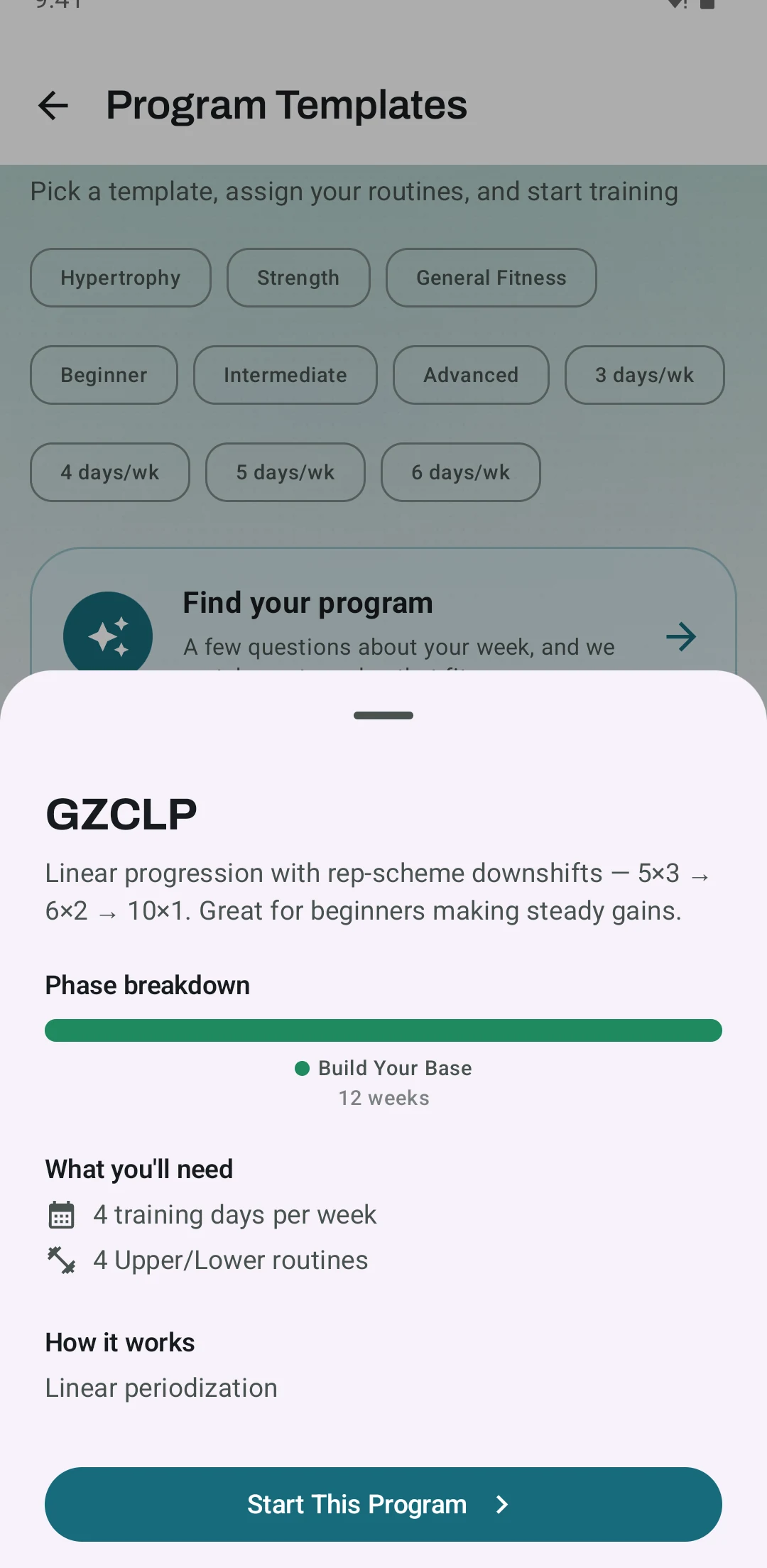
The GZCLP template in Kinoku
Real Android app capture, free tier. The template sheet shows the 5x3, 6x2 and 10x1 stages, the 12-week phase bar and the four routines before you start the program.
One of the apps on this page
Kinoku is free to install
Core tracking works offline, with no account. An export from the app you use today can come along.
Android only for now, with an iPhone version in the works. Some depth is paid, and the pricing page says which parts.
Related features
A 4-phase planning stack. The builder, all 25 templates, named programs with auto-progression, the custom model, and unlimited active programs are free. Pro adds volume targets, readiness tuning, and auto set changes.
Load the bar fast with a visual plate layout. The calculator and bar-weight setting are free; Pro adds custom plate inventory settings.
Unlimited routines, Smart Sync, Starter Packs, and follow-along links are free, and so are Rotation Groups that cycle through several routines for you.