

10 Best Free Wear OS Gym & Workout Apps (2026)
Which Wear OS gym apps log sets on your watch for free without your phone nearby? We compare 10 apps, including Hevy, Kinoku, GainLogger, Strong, and JEFIT.
GainLogger, Hevy and Kinoku say on their own pages that their Wear OS app is free and logs sets with the phone left behind; Gravl and JEFIT put their watch apps in paid plans.
At a glance
| App | Best for | Better at | Main trade-off |
|---|---|---|---|
| GainLogger | Lifters who want phone-free watch logging on a free plan with set limits | Says its watch app runs on free and Pro, with no phone required | The free plan keeps 3 templates and 10 sessions of history |
| Hevy | Lifters who want their routines and set types on the watch, phone in the locker | Routines, set types and a Tile on Wear OS | A watch session reaches the phone only when the two reconnect |
| Kinoku | Lifters and runners who want a free watch app for both, with no account | Logs sets and records runs on the watch, with no history cap | No Apple Watch app, and voice logging on the watch is Pro |
| Massiv | Lifters who keep the phone nearby and want free wrist logging | Its own page says watch logging is free and states its limit plainly | The phone has to come with you |
| StrengthLog | Lifters who want free Wear OS Tiles for goals, streaks and weekly stats | Wear OS support sits in its list of free features | Set logging on the watch is not described on its pages |
| GymRun | Lifters who want a standalone mode and a live-connected mode on the watch | Two watch modes, plus Galaxy and Garmin support | Standalone mode syncs before and after the session, and the watch plan is not stated |
| Lyfta | Lifters who want to log from the watch and start fast from a Tile | Tiles built for quick workout starts | Its pages do not say whether the watch works without the phone |
| Gravl | Lifters who want to run a whole planned session from the watch, with Premium | A full session from the watch, with the phone left behind | The Wear OS app is part of Gravl Premium |
| JEFIT | Lifters who want sets, heart rate and calories on the wrist, live-synced | Live sync between the watch and the phone | Its pricing page lists watch app support under Elite |
| Samsung Health | Galaxy Watch owners who want gym exercises such as bench press on the watch | Exercises chosen in the phone app appear in the watch's workout list | Logging sets and weights on the watch is not described |
Publisher disclosure
Kinoku, made by Dreamsoft Works, writes and publishes this page, and Kinoku is one of the apps on it. Every fact about another app is quoted from a page that app's maker publishes, opened on October 4, 2026. We give no score. Where the list is ordered, the caption names the measure, and every label points at a quoted sentence.
Quickstart
GainLogger, Hevy and Kinoku say on their own pages that their Wear OS app is free and logs sets with the phone left behind. The caption under the table names the order, which runs from those three down to watch apps whose pages do not mention logging sets.
Which gym apps log sets on a Wear OS watch?
A gym app on Wear OS can mean three different things: a watch that runs the whole session alone, a watch that mirrors a session the phone runs, or a shortcut that opens the phone app. The difference matters most when the phone stays in a locker, so this page asks two questions of each maker’s own pages. Does the watch log sets with the phone left behind, and is the watch app free?
- Free, and the phone can stay behind. GainLogger, Hevy and Kinoku say both.
- Free, with the phone nearby or with no set logging described. Massiv says watch logging is free and the phone must come along, and StrengthLog lists free Wear OS Tiles.
- Sets on the watch, with no stated plan. GymRun describes logging with the phone left behind, and Lyfta describes logging from the watch.
- A paid watch app. Gravl puts its Wear OS app in Premium, and the pricing page of JEFIT (a workout tracker and gym log) lists watch app support under Elite.
- Gym exercises on a Galaxy Watch. Samsung Health lets you add exercises such as bench press to the watch.
Google’s own blog says an on-wrist strength workout with set and weight logging is “Coming soon” for the Pixel Watch, so this list leaves Google’s app out until it ships.
Side by side
Every cell below quotes the maker or restates its words, and “Not stated” means none of its pages we opened says.
| App | Logs sets on the watch | Phone left behind | Watch app free, by its own page |
|---|---|---|---|
| GainLogger | Yes | Yes, “no phone required” | Yes, on free and Pro; free keeps 3 templates and 10 sessions |
| Hevy | Yes, with set types | Yes; saves when it reconnects | Yes, in its help centre’s Free column |
| Kinoku | Yes, by tap or the dial | Yes; syncs once the two are near | Yes; voice logging is Pro |
| Massiv | Yes | No, the phone has to come | Yes, “watch logging itself” is free |
| StrengthLog | Not stated | Not stated | Wear OS Tiles are in its free list |
| GymRun | Yes | Yes, in standalone mode | Not stated |
| Lyfta | Yes | Not stated | Not stated |
| Gravl | Yes | Yes | No, part of Gravl Premium |
| JEFIT | Yes, with heart rate | Not stated; live sync | No, listed under Elite |
| Samsung Health | Exercises such as bench press | Not stated | Some content is paid; this part not stated |
Each app, in its own words
GainLogger
Best for: Lifters who want phone-free watch logging on a free plan with set limits.
GainLogger is a gym log with watch apps for Wear OS and Apple Watch.
- What it does well. Its listing promises “same fast logging on Android watches”, with “Heart rate, calories, and rest timer on your wrist”, and calls the watch app independent with “no phone required”.
- What its pages say about the free plan. Its blog says “The Wear OS companion is available on both free and Pro.”
- Where it is the better pick. Lifters who want to leave the phone behind without paying.
- Where it differs. The same blog says “Free users can log workouts from their wrist using up to 3 templates and 10 sessions of history.”
Hevy
Best for: Lifters who want their routines and set types on the watch, phone in the locker.
Hevy is a social gym tracker for iPhone and Android with watch apps on both.
- What it does well. Its homepage says “Leave your phone in the locker room, and track your workouts completely from your Apple Watch or WearOS device.” Its listing adds routines on the watch, set types to “Mark sets as Warmup, Normal, Drop sets, or Failure”, and a Tile.
- What its pages say about syncing. “Watch workouts automatically save when reconnecting to your phone”.
- Where it is the better pick. Lifters who already run Hevy routines and want them on the wrist.
- What its pages say about the free plan. Its help centre’s Free vs Pro table ticks “Apple Watch & Wear OS” for the free version, and says that whether you use the free version or Hevy Pro, you can track your workouts across multiple devices.
- Where it differs. Hevy is social: its homepage says “Build routines and track progress with friends.”
Kinoku
Best for: Lifters and runners who want a free watch app for both, with no account.
Kinoku is a free Android tracker for lifts and runs, and its Wear OS app is a full watch app rather than a remote control.
- What it does well. You can start a workout on the watch with the phone elsewhere, log each set with a tap or the dial, read your pinned exercise and routine notes above your sets, see your heart rate live, and time your rest with a buzz on the wrist. The watch also records a run with pace, distance and splits, plus its average and peak heart rate, phone left at home.
- How it syncs. A workout started on either device turns up on the other once the two are near, with nothing to press. A Tile starts a session from beside the watch face.
- Where it is the better pick. You lift and run, want both on the watch for free, and want no account and no cap on your history.
- What Kinoku does not do: There is no Apple Watch app, because Kinoku is Android only. Voice logging on the watch is Pro, and until the watch and phone meet, the phone’s history runs a step behind.
Massiv
Best for: Lifters who keep the phone nearby and want free wrist logging.
Massiv is a lifting app that runs your program and states its watch limits up front.
- What it does well. Its homepage says you can “Log sets and run the rest timer from Apple Watch or Wear OS with haptic alerts.”
- What its pages say about the free plan. Its blog says “Running your program, logging every set, the rest timer, the plate calculator, and watch logging itself are free.”
- Where it is the better pick. Lifters whose phone sits on the bench anyway.
- Where it differs. The same blog is candid: the watch is “a full-featured client with an offline buffer, not an independent app”, so “you can’t leave the phone at home.”
StrengthLog
Best for: Lifters who want free Wear OS Tiles for goals, streaks and weekly stats.
StrengthLog is a strength log with a free plan that names its watch support.
- What it does well. Its listing puts “Wear OS support with Tiles for your goals, streaks, weekly training stats, and monthly challenges” among its free features.
- What its pages say about the watch. Heart rate shows in the watch app during a workout, but “it won’t be saved in our app; it will only be saved in Health Connect.”
- Where it is the better pick. Lifters who want their stats one swipe from the watch face.
- Where it differs. Its pages do not describe logging sets on the watch.
GymRun
Best for: Lifters who want a standalone mode and a live-connected mode on the watch.
GymRun is an Android gym log with watch apps for several platforms.
- What it does well. Its listing says “GymRun offers top-tier support for Samsung Galaxy, Google Wear OS, and Garmin,” and “Log directly on your wrist: Use the standalone watch app.”
- What its pages say about the two modes. Standalone mode needs no phone and syncs “data/routines before and after your session”, while Companion Mode “Keeps a live connection to your smartphone during the workout.”
- Where it is the better pick. Lifters who want the choice, or who wear a Garmin.
- Where it differs. No page we could open says whether the watch app is free.
Lyfta
Best for: Lifters who want to log from the watch and start fast from a Tile.
Lyfta is a gym app with a free plan and a Premium layer.
- What it does well. Its listing says you can “Log workouts from your Wear OS watch and get quick access through Wear OS Tiles for faster workout starts.”
- What its pages say about plans. It says “Lyfta is free to use”, with Premium adding advanced analytics, unlimited routines and more programs.
- Where it is the better pick. Lifters who like a Tile that drops them straight into a workout.
- Where it differs. Its pages do not say whether the watch works without the phone, or which plan holds the watch app.
Gravl
Best for: Lifters who want to run a whole planned session from the watch, with Premium.
Gravl is a planned-training app with a standalone watch app.
- What it does well. Its listing says “A standalone Wear OS app. Log sets and reps, run rest timers, and finish a whole session from the watch.”
- What its pages say about plans. “Free to start. Full training plans, the Wear OS app and analytics on Gravl Premium.”
- Where it is the better pick. Lifters who want a guided plan on the wrist and are happy to pay for it.
- Where it differs. The watch app is a paid feature.
JEFIT
Best for: Lifters who want sets, heart rate and calories on the wrist, live-synced.
JEFIT keeps the watch and phone in step during a session.
- What it does well. Its listing says “Live-sync your gym workout between JEFIT and your Wear OS smartwatch” and “Track your heart rate, sets, and calories burned as you train directly from your wrist”.
- What its pages say about plans. Its pricing page lists “Watch app support” among what Elite adds to Basic, the free plan.
- Where it is the better pick. Lifters who want a live link between the two screens and pay for Elite.
- Where it differs. The watch app sits in the paid plan.
Samsung Health
Best for: Galaxy Watch owners who want gym exercises such as bench press on the watch.
Samsung Health is Samsung’s own health app, and it runs the workout list on Galaxy watches.
- What it does well. Samsung’s support page says you can “Add different exercises, such as bench press, to your watch favorites”, and the exercises you add in the phone app “will also show on your watch”.
- What its pages say about limits. You need a Samsung account from version 6.15 on, and “Some contents are only available through an optional paid subscription.”
- Where it is the better pick. Galaxy Watch owners who want gym exercises in the watch’s own workout list.
- Where it differs. The pages we read do not describe logging sets, reps or weights on the watch.
How this list was checked
We read every source on this page ourselves, from the app makers’ own sites and listings.
- Quoted, then checked. The listings, help pages and blogs above were opened on October 4, 2026, and a script confirmed each quote is still on its page.
- Kept off the list. GymPsycho’s listing and its own Wear OS page disagree about logging sets and needing the phone, so we left it out until a test settles it. SetSage’s Google Play listing did not open, and Strong’s pages name an Apple Watch app but no Wear OS app.
- Nothing paid for. No app paid for a spot. The table caption names the order, and apps in the same group appear in alphabetical order.
Frequently asked questions
What is the best free gym app for Wear OS?
It depends on whether you want the phone to stay home. GainLogger, Hevy and Kinoku say on their own pages that the watch app is free and logs sets with no phone, and Massiv’s free watch logging needs the phone nearby. Gravl and JEFIT put their watch apps in paid plans, and GymRun does not say.
Can I log sets on a Wear OS watch without my phone?
Several apps say so. GainLogger’s listing says no phone is required, GymRun has a standalone mode, Gravl runs a whole session from the watch with Premium, and Hevy’s homepage invites you to leave the phone in the locker room. Kinoku starts and logs a workout on the watch alone, while Massiv’s blog says you cannot leave the phone at home.
Does Hevy have a Wear OS app?
Yes. Hevy’s listing says you can use your routines on a Wear OS watch, mark set types such as warmup, drop set or failure, and open the app from a Tile. Watch workouts save to the phone when the two reconnect, and Hevy’s help centre marks the Apple Watch and Wear OS apps as part of the free version.
Does Strong work on Wear OS?
Strong’s help centre says it offers apps for iPhone, including Apple Watch, and for Android. No page we could open mentions a Wear OS app, so this page does not list Strong as one.
Is JEFIT’s watch app free?
JEFIT’s listing describes live sync between the phone and a Wear OS watch, with heart rate, sets and calories on the wrist. Its pricing page lists watch app support among what Elite adds to the free Basic plan.
Does Samsung Health track weight training on a Galaxy Watch?
Samsung’s support page says you can add gym exercises such as bench press to your watch favorites, and the exercises you add in the phone app show up in the watch’s workout list. The pages we read do not describe logging sets or weights on the watch.
What is a Wear OS Tile?
A Tile is a small screen you reach by swiping from the watch face, so an app is one swipe away. Hevy, Lyfta and Kinoku offer a Tile to start or open a workout, and StrengthLog’s free Tiles show your goals, streaks and weekly stats.
Do Wear OS gym apps track heart rate?
Most of the watch apps here mention it. JEFIT tracks heart rate, sets and calories from the wrist, and GainLogger lists heart rate and a rest timer. Kinoku’s watch app shows your heart rate live during a workout and keeps the average and peak from each run, but not from gym sets. StrengthLog shows heart rate during a workout and saves it to Health Connect, not to its own app.
Can one Wear OS app record both lifts and runs?
Kinoku does: the watch logs sets and also records a run with pace, distance and splits, phone left at home. Strava’s Wear OS app records time, distance and heart rate, and lists Weight Training as an activity, but its page does not describe sets or reps.
What happens if the watch loses its phone during a workout?
The apps here handle it in different ways. Hevy’s watch workouts save when the watch reconnects, Massiv keeps an offline buffer through a dropped connection, and Kinoku holds the whole session on the watch until the two meet again.
What does Kinoku’s watch app not do?
It has no Apple Watch version, because Kinoku is Android only. Voice logging on the watch is part of Pro, and until the watch and phone meet, a session lives on the watch alone, so the phone’s history runs a step behind.
Related pages
- Wear OS in Kinoku: What the watch app handles, and how it syncs.
- Free workout trackers with Health Connect: Which apps share watch data through Android’s health store.
- Best apps for lifting and running in one app: Apps that keep gym sets and runs in one history.
- Best Hevy alternatives: Gym logs compared for people leaving Hevy.
- Kinoku vs Hevy: A no-account log next to a social one.
- Kinoku vs JEFIT: A free tracker next to an Elite plan.
Which one fits you
- Choose GainLogger if you want to leave the phone behind on a free plan, and 3 templates and 10 sessions of history are enough.
- Choose Hevy if you already use Hevy routines and want them on the watch with the phone in the locker.
- Choose Kinoku if you lift and run, want both on the watch for free, and want no account and no history cap.
- Choose Massiv if the phone stays in your pocket anyway and you want free logging from the wrist.
- Choose StrengthLog if you mostly want your goals and weekly stats one swipe from the watch face.
- Choose GymRun if you want to choose between a phone-free session and a live link to the phone, and on Galaxy or Garmin too.
- Choose Lyfta if you want a Tile that starts a workout fast and logging from the watch.
- Choose Gravl if you want the watch to run a full planned session and Premium is fine.
- Choose JEFIT if you want sets and heart rate synced live between the watch and the phone, and Elite is fine.
- Choose Samsung Health if you own a Galaxy Watch and want gym exercises in its own workout list.
How this page is checked. Every fact about another app on this page comes from a page that app publishes, which we could open and quote on October 4, 2026. The sources, with the exact sentence each fact rests on, are listed just above. Every Kinoku fact is tied to the shipping app's code. The page carries no score; the caption above names the measure the list is ordered by. If a fact here has gone stale, the support page is the fastest way to tell us.
Kinoku in practice
Where this shows up in the app
 Open full-size image ↗
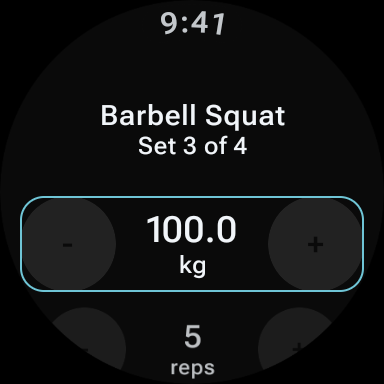
Set logging on Kinoku's watch app
The watch shows set 3 of 4 at 100.0 kg and 5 reps, and each value has its own plus and minus buttons. The watch app is free.
One of the apps on this page
Kinoku is free to install
Core tracking works offline, with no account. An export from the app you use today can come along.
Android only for now, with an iPhone version in the works. Some depth is paid, and the pricing page says which parts.
Related features
A real watch app for workouts, runs, steps, tiles, and watch face data.
Every set, one tap. Track how hard each set felt, your rest timers, set types, and notes.
Live pace, splits, a route map, and audio cues. Your run record is not uploaded to Kinoku; map tiles load when you view maps, and weather is a clear opt-in.