

Workout Apps With CSV Export for Android (2026)
Which workout apps export your history to CSV, restore a full backup and read other apps' files? Eight Android apps compared from their own pages.
Kinoku, LiftJot and Liftosaur state all four parts of a round trip on their own pages: a CSV export, a full backup they restore, another app's file read in, and an export that is free.
At a glance
| App | Best for | Better at | Main trade-off |
|---|---|---|---|
| Kinoku | Lifters and runners who want CSV tables, a full backup and imports, all free | One table per kind of record, plus a checksummed ZIP backup | Photos and cycle records travel in the backup file, not the CSV |
| LiftJot | Lifters who want a no-account log that reads Hevy, Strong and FitNotes files | Reads a FitNotes Android backup as well as CSV files | Routines, templates and measurements do not come across |
| Liftosaur | Lifters who want CSV, JSON and text exports and a Hevy import with undo | Its CSV can be imported back into the same app | Graphs and muscle views are part of its paid subscription |
| Alpha Progression | Lifters who want CSV export to stay in the free version | CSV export stays free even after Pro ends | Its own page says it has no workout history import |
| FitNotes | Lifters who want a spreadsheet CSV and a separate backup file for a new phone | A step-by-step export path on its own settings page | The CSV cannot be restored; the backup file does that job |
| Hevy | Strong users moving to Hevy, who can bring a Strong CSV along | A free Strong CSV import, merged by date with your Hevy history | Its export cannot be imported back into Hevy, by our test |
| Legend | Lifters moving in from Strong or Hevy who want a CSV export later | Reads Strong and Hevy exports and keeps unread rows for review | Some rows may need a check by hand |
| Strong | Strong users who want their history in a spreadsheet | A spreadsheet-friendly CSV from Settings | Exported files cannot be imported back into Strong |
Publisher disclosure
Kinoku, made by Dreamsoft Works, writes and publishes this page, and Kinoku is one of the apps on it. Every fact about another app is quoted from a page that app's maker publishes, opened on October 4, 2026, or observed in our own emulator test. We give no score. Where the list is ordered, the caption names the measure, and every label points at a quoted sentence.
Quickstart
Kinoku, LiftJot and Liftosaur state all four parts of a round trip on their own pages: a CSV export, a full backup they restore, another app’s file read in, and an export named as free. Apps here are ordered by how many of those four points their pages, or our test, confirm.
Which workout apps export your history to CSV?
A CSV (comma-separated values) file is a plain table that any spreadsheet opens, which makes it the common language for moving workout history between apps. Exporting one is only half of a move, though, so this page counts four points for each app:
- A CSV export. Your sets come out as a table.
- A full backup the app restores. One file rebuilds your history on a new phone.
- Import of another app’s file. History from a rival app comes in.
- Export named as free. A sentence on the app’s own page says you pay nothing to take your data out.
Kinoku, LiftJot and Liftosaur state all four, and the others state one or two. A missing point is often a missing sentence rather than a missing feature, and the table marks those cells “Not stated”.
Side by side
Each cell rests on a sentence the app’s maker publishes, or on our dated test where the cell says so.
| App | CSV export | Full backup it restores | Reads another app’s file | Export named free |
|---|---|---|---|---|
| Kinoku | Yes, one table per kind of record | Yes, a checksummed ZIP | Hevy and FitNotes in full; Strong with weights from 1.6 | Yes |
| LiftJot | Yes | Yes, a .workoutlog file | Hevy and Strong CSV, FitNotes backup | Yes, the app has no paid tier |
| Liftosaur | Yes, one row per set | Yes, a JSON file | Hevy or another CSV file, with undo | Yes |
| Alpha Progression | Yes | Not stated | No, by its own page | Yes |
| FitNotes | Yes, workouts and body data | Yes, a .fitnotes file | Not stated | Not stated; the app is free |
| Hevy | Yes, in our test | No, by its export screen | Strong CSV | The Strong import is free |
| Legend | Yes | Not stated | Strong and Hevy exports | Not stated |
| Strong | Yes, from Settings | No, “cannot be imported back” | Not stated | Not stated |
Each app, in its own words
Kinoku
Best for: Lifters and runners who want CSV tables, a full backup and imports, all free.
Kinoku is a free Android tracker for lifts and runs with no account, so every way out of the app is a file you hold.
- What it does well. Export to CSV writes a ZIP with one table per kind of record, covering workouts, sets, routines, metrics, challenges and settings. Backup and Restore writes a full archive with the databases and photos, plus a checksum so a damaged file is refused before it replaces anything.
- What it reads in. Hevy and FitNotes exports import in full, and Kinoku’s own CSV and JSON layouts are published so you can write a file yourself. A review screen shows how exercise names matched before anything saves, and Import History can undo the whole batch.
- Where it is the better pick. You want a spreadsheet copy, a phone-to-phone backup and a way in from another app, all on the free plan.
- What Kinoku does not do: A Kinoku release older than 1.6 skips the weight column in Strong’s newest CSV, so those sets arrive with reps but no weight until the app is updated. The CSV export leaves out progress photos and cycle records, which only the full backup carries.
LiftJot
Best for: Lifters who want a no-account log that reads Hevy, Strong and FitNotes files.
LiftJot is an Android gym log built around files you keep.
- What it does well. Its listing says you can “Create an unencrypted CSV export or full .workoutlog backup when you choose,” and “Bring over compatible Hevy and Strong CSV exports or a compatible FitNotes Android backup.”
- What its pages say about limits. “CSV is a readable export of performed sets, not a LiftJot restore file.” On import, “Routines, templates, profiles, measurements, and social data are not imported.”
- Where it is the better pick. People leaving FitNotes, whose backup file it reads directly.
- Where it differs. Its listing sums itself up as “No account, social feed, ads, analytics, or cloud sync.” Its terms add that there is “no subscription, in-app purchase, advertising, or paid tier”.
Liftosaur
Best for: Lifters who want CSV, JSON and text exports and a Hevy import with undo.
Liftosaur is a workout planner whose export page is unusually precise.
- What it does well. Its features page says “Export everything as JSON, your history as CSV, or your programs as text.” The CSV holds “one row per set”, and “The same file can be imported back.”
- What its pages say about restore and import. The JSON export “is the only export that you can load back into the app in full.” To bring Hevy history in, you go to the import screen “and tap Upload CSV file from Hevy”, and “Undo removes the workouts from that import.”
- Where it is the better pick. Lifters who want a CSV that also round-trips into the same app.
- Where it differs. Its premium page lists “import and export” among what stays free, and “You can use the app without an account and without a connection.” Its paid subscription adds graphs and muscle views, while import and export stay free.
Alpha Progression
Best for: Lifters who want CSV export to stay in the free version.
Alpha Progression is a lifting app that builds plans, with a free version and a Pro plan.
- What it does well. Its homepage says “The permanent free version includes unlimited workout logging, manually created plans, exercise videos, a rest timer, body measurements and CSV export.” Its blog adds that CSV export stays after Pro expires.
- What its pages say about import. “There is currently no web-based workout logger or workout-history import feature.”
- Where it is the better pick. Lifters who start fresh and want the way out to stay free.
- Where it differs. History from another app cannot come in, by its own page.
FitNotes
Best for: Lifters who want a spreadsheet CSV and a separate backup file for a new phone.
FitNotes is a plain Android gym log with two different export files.
- What it does well. Its settings page offers to “Generate a CSV file of your Workout or Body Tracker data”, and then “Select Save Export to save the CSV file to your device.” A backup saves “all of your FitNotes data so that it can be restored onto a new device.”
- What its pages say about limits. “It is not possible to restore data from the CSV file - please use the Backup option for this.” Restoring a backup overwrites the FitNotes data already on the phone.
- Where it is the better pick. Lifters who want clear steps on the maker’s own page.
- Where it differs. Its pages do not describe reading other apps’ files. Its listing says “Free to use, and no ads - ever.”
Hevy
Best for: Strong users moving to Hevy, who can bring a Strong CSV along.
Hevy is a gym tracker with a social feed, on iPhone and Android.
- What it does well. Its import page says “Hevy supports importing your Strong data through a CSV file”, and its title marks the import “(Free)”. Its FAQ says your existing workouts “stay untouched and just mix with the imported ones by date.”
- What our test found. In Hevy 3.1.12 the Export Data screen read “Export your entire workout/measurement history to a CSV file. Exported data can not be imported back into Hevy.”
- Where it is the better pick. Strong users who want their old sessions inside Hevy.
- Where it differs. Its import page says supersets do not carry over, though the exercises arrive in the right order.
Legend
Best for: Lifters moving in from Strong or Hevy who want a CSV export later.
Legend is a workout tracker that calls itself “the most intuitive workout tracker for iOS and Android.”
- What it does well. Its feature page says it can “Export completed workout records to CSV for analysis or coaching”, and “Import workouts from Strong and Hevy exports”.
- What its pages say about limits. It promises to “Keep unimported rows visible when source data needs manual review”.
- Where it is the better pick. Lifters who want to see exactly which rows did not make it across.
- Where it differs. Its pages do not describe a full backup file.
Strong
Best for: Strong users who want their history in a spreadsheet.
Strong is a set-and-rep logger with apps for iPhone and Android.
- What it does well. Its help centre says “You can export your workout data to a spreadsheet friendly CSV format,” and gives the Android path: “Go to in-app Settings”, then “Select Export Data”.
- What its pages say about limits. “Please note that exported files cannot be imported back into Strong.”
- Where it is the better pick. People who stay in Strong and want a copy to read.
- Where it differs. Its pages do not describe a backup that restores, or an import from other apps. They do say your workout data stays available whether or not you pay for Strong PRO.
How this list was checked
The facts above come from the eight makers’ own help pages, feature pages and listings, plus one test we ran.
- Read and matched. We opened each page on October 4, 2026, and a script confirmed every quote still appears on it. Hevy’s export screen comes from our own emulator test, as its source note says.
- Left out. JEFIT (a workout tracker and gym log), Fitbod, Garmin Connect and StrengthLog either refused our automated reads or say nothing about CSV export on a page we could open. Strava’s export page names activity files such as GPX rather than CSV.
- Counted, not scored. No app paid to appear. The order counts the four points in the caption, and a tie stays alphabetical.
Frequently asked questions
Which workout apps export to CSV?
All eight apps here say so, in their own words or in our test of the app. Kinoku, LiftJot and Liftosaur also restore a full backup, read another app’s file and say the export is free. Alpha Progression keeps its CSV export in the free version, and Strong and FitNotes describe the menu path step by step.
Can I import a CSV back into the same app?
Only some apps allow it. Liftosaur says its CSV can be imported back, while Strong’s help centre and Hevy’s own export screen say the file cannot go back in. FitNotes points you to its backup file for a restore, and LiftJot calls its CSV a readable export rather than a restore file.
What is the difference between a CSV export and a backup?
A CSV export is a plain table that a spreadsheet or another app can read, usually one row per set. A backup is the app’s own complete file, meant to rebuild your history in the same app on a new phone. FitNotes, Liftosaur, LiftJot and Kinoku each make both.
How do I export my workouts from Strong?
Strong’s help centre gives the Android path: open Settings in the app, then select Export Data, and you get a spreadsheet-friendly CSV file. The same page says the exported file cannot be imported back into Strong.
How do I export my workouts from Hevy?
In our test of Hevy 3.1.12, the path was Settings, then Export and Import Data, then Export Data. The screen said it exports your entire workout and measurement history to a CSV file that cannot be imported back into Hevy. Hevy’s help articles on export refused our automated reads.
Which apps import a Hevy or Strong CSV?
Hevy imports a Strong CSV and calls the import free. Liftosaur reads a Hevy CSV, and LiftJot and Legend read both. Kinoku imports Hevy and FitNotes exports in full, and from version 1.6 on it reads Strong’s newest CSV with its weights too.
Is exporting my data free?
Liftosaur, Alpha Progression and Kinoku say so in plain words, and LiftJot’s terms say it has no paid tier at all. Strong’s help centre says your workout data stays available whether or not you pay for PRO, and the other pages here do not name a price for export either way.
What is inside a workout CSV?
Usually your sets. Liftosaur writes one row per set into a dated file, LiftJot calls its CSV a readable export of performed sets, and FitNotes covers both workouts and body tracker data. Kinoku’s export is a ZIP with one table per kind of record, such as workouts, sets, routines and metrics.
What does not move with a CSV?
Often the plans around your sets. LiftJot says routines, templates, profiles, measurements and social data are not imported, and Hevy’s import page says supersets do not carry over. Kinoku’s CSV leaves out progress photos and cycle records, which only the full backup carries.
Do any of these apps work without an account?
Liftosaur says you can use it without an account, LiftJot lists no account among its traits, and Kinoku has no sign-up at all. Hevy and Strong ask you to sign up first. The other pages here do not say either way.
What does Kinoku not do with exports?
Releases before 1.6 drop the weights from Strong’s newest CSV layout, so that import is best done after the update. Its CSV export is not the lossless copy, because photos and cycle records travel only in the full backup. Kinoku has no cloud account, so moving to a new phone means carrying the backup file yourself.
Related pages
- How to move your workout history to another app: Step-by-step exports for Strong, Hevy, FitNotes, Strava, Google Fit and Samsung Health.
- Backup and import in Kinoku: The full backup, the CSV export and the AI handoff file.
- Kinoku import format: The published CSV and JSON layouts Kinoku reads.
- Best workout apps without an account: Which gym apps log a set before any sign-up.
- Best Strong alternatives: Apps for people leaving Strong.
- Kinoku vs FitNotes: Two account-free Android logs, with the FitNotes CSV we tested.
Which one fits you
- Choose Kinoku if you want CSV tables for a spreadsheet, a full backup for a new phone, and imports from Hevy or FitNotes, all free and with no account.
- Choose LiftJot if you are leaving FitNotes, Hevy or Strong and want a no-account log that reads their files.
- Choose Liftosaur if you want a CSV you can load back into the same app, a JSON backup, and a Hevy import you can undo.
- Choose Alpha Progression if you want a CSV export that stays free, and you will start your history fresh.
- Choose FitNotes if you want a plain Android log whose settings page walks you through both the CSV and the backup.
- Choose Hevy if you are moving from Strong and want your old workouts to sit beside new ones by date.
- Choose Legend if you are moving in from Strong or Hevy and want to see which rows did not import.
- Choose Strong if you stay in Strong and want a CSV copy to read in a spreadsheet.
Test record
Tested September 11, 2026
- Environment
- Android Studio Pixel phone emulator Kinoku_Phone_Play, API 36, Android 16
- Hevy
- Version 3.1.12 (version code 3289233), installed from Google Play. Official listing
- Strong
- Version 6.2.4 (version code 602006), installed from Google Play. Official listing
How this page is checked. Every fact about another app on this page comes from a page that app publishes, which we could open and quote on October 4, 2026, or from a dated emulator test named in that source's note. The sources, with the exact sentence each fact rests on, are listed just above. Every Kinoku fact is tied to the shipping app's code. The page carries no score; the caption above names the measure the list is ordered by. If a fact here has gone stale, the support page is the fastest way to tell us.
Test evidence
What the tested builds showed
 Open full-size image ↗
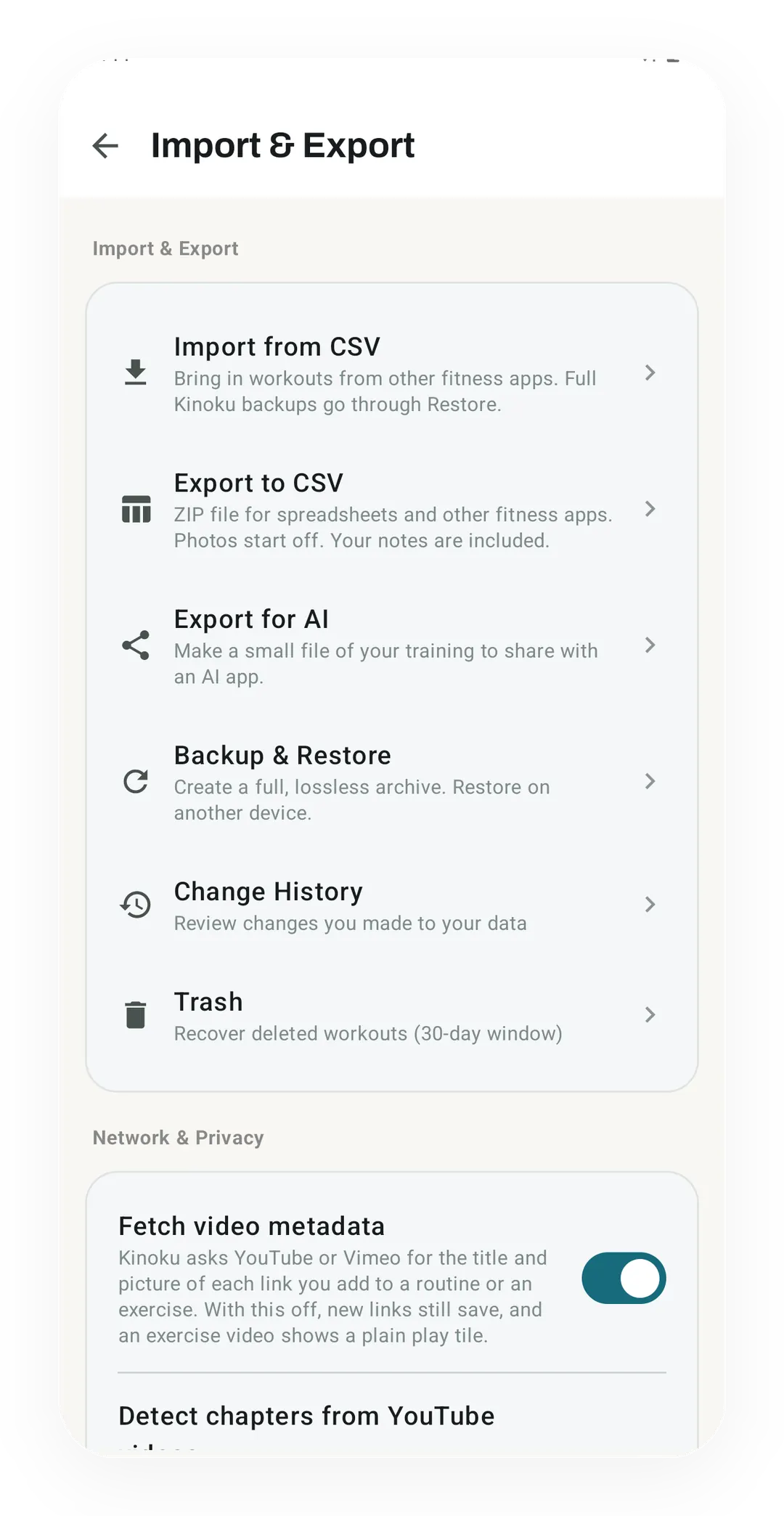
Kinoku's Import & Export screen
Import & Export puts CSV files, Export for AI and the full Backup & Restore archive in one list, next to Change History and a 30-day Trash.
One of the apps on this page
Kinoku is free to install
Core tracking works offline, with no account. An export from the app you use today can come along.
Android only for now, with an iPhone version in the works. Some depth is paid, and the pricing page says which parts.
Related features
Lossless backup, open CSV and JSON import, Strava import, and a scoped Export for AI handoff.
Bring your Strava history with no login token. Choose the Strava archive ZIP once; Kinoku reads activities.csv and supported route files from it on your phone. Kinoku never touches Strava's servers.
See saved edits as plain before-and-after changes, including imports and deleted targets. The history stays local, and private cycle changes stay in their own database.